Search the Community
Showing results for tags 'scrolltriger'.


-
 Hey guys, I need a little help with this one. I want scroll to specific slide by clicking on button but unable to find any way to perform same function. Pls advice. Many thanks
 -
Hello Everyone! I have a bit of a generic problem/misunderstanding - basically, i have some animations in GSAP and have a couple of questions to understand it more deeply: When is the best time to load the GSAP animation (when the document is loaded or when everything is loaded (DOM, images, etc))? The first question leads to this one - if I do a hard refresh in the browser my animations are flashing or for example, the element that should be x: -100% is visible (for literally like 0.00s but still and then animation kicks in so there is a little flash) because the js file is not probably loaded yet - how do you guys tackle this, especially vital animations like for hero section or the other places when we need everything to be loaded and animated ASAP? Please have a look at the code below all bundled by webpack: $(function () { // Hero section animation const heroBanners = document.querySelectorAll(".section__hero-banner"); heroBanners.forEach((section) => { let imgCover = section.querySelector(".img-cover"); let imgTl = gsap.timeline({ scrollTrigger: { trigger: section, // markers: {startColor: "green", endColor: "red", fontSize: "18px", fontWeight: "bold", indent: 20}, start: "top center", }, }); // Inital state for headings imgTl.set(".hero-text__right", {x: "120%"}); imgTl.set(".hero-text__left", {x: "-120%"}); imgTl.to(imgCover, { opacity: 1, ease: "power4.inOut", duration: 0.4, }); gsap.utils.toArray(section.getElementsByClassName("hero-text")).forEach((heroText, herIdx) => { var container = section.getElementsByClassName("text-wrapper"); let textTl = gsap.timeline({ scrollTrigger: { trigger: section, scrub: 1, // markers: {startColor: "green", endColor: "red", fontSize: "18px", fontWeight: "bold", indent: 20}, start: "top top-=50px", end: "bottom center", // toggleActions: "restart none none reset" }, }); if (herIdx % 2 == 0) { let distance = $(container).width() - $(heroText).width(); //left imgTl.to(heroText, { x: "0%", duration: 0.85, ease: "power4.inOut", }); textTl.to(heroText, { x: `${distance}px`, }); } else { let distance = $(container).width() - $(heroText).width(); //right imgTl.to( heroText, { x: "0%", duration: 0.85, ease: "power4.inOut", delay: -0.85, } ); textTl.to(heroText, { x: `-${distance}px`, }); } }); }); }); The animation is: hero image fade in then slide two lines of text from left and right. Would be amazing he somebody could point out some bad practises or mistakes or if this could be done in better way. thanks you so much guyz!
-
 Hey GSAP Team, I have a concern regarding my implementation of "scrollTrigger". The Start/End marker of the triggers isn't aligning correctly with the top and bottom of the triggers. Please focus on the ".services-content-heading-inner" element, as this is what I'm currently experimenting with. My ultimate goal here is to animate this element once it enters the viewport. However, it immediately animates because of how the elements' start/end is positioned. I tried changing the position to start: "center top", end: "center bottom". However, the position is still off and not really at the center of the trigger element. I attempted to change the trigger to the parent element, but the story remains the same. I really want to use scrollTrigger because it seems to be simpler compared to https://gsap.com/docs/v3/Plugins/Observer/. I also tried using https://gsap.com/docs/v3/Plugins/ScrollTrigger/static.isInViewport()/ by wrapping the animation in an if-else condition "ScrollTrigger.isInViewport(element)". However, it doesn't fire the logic inside the condition even if the condition was met. I would appreciate your thoughts and expert advice on where I went wrong or missed. Thank you very much for any assistance.
 -
Hello community. I'm trying to implement an animation that has been talked about here more than once from the site https://lenis.darkroom.engineering where Enter Lenis is approaching us in the screen. I implemented the same "backing" and it worked fine until I started testing it in Safari browser and on mobile devices The issue is that as I get closer, the edges of my shape (SVG) start to blur and I can see the outlines are not clear. I tried to implement my shape as a normal text, but I faced the same problem, my outlines during the animation process become not clearly visible. I also tried to add will-change property, but with this property my edges become blurred even in Google Chrome browser where everything was fine before. What could be the problem? Thanks! Demo: https://codesandbox.io/p/sandbox/scale-problem-tx8s3m?file=%2Fsrc%2FApp.tsx%3A32,11 Lenis Website: https://lenis.darkroom.engineering
-
Hello everyone ! I am having his issue of needing to animate elements that are within an overflow container. As you can see here by default, it seems GSAP doesn't pick up the positions of the container being scrolled thus the scrolltrigger never gets activated. The behaviour I'm looking after is that when the first blue square hits the top, the animation gets triggered. Right now, I need to scroll all the way down and then somehow scrolling some more gets the markers moving and triggers the animation (I'm thinking this is due to the pinspacer). If you'd have any thought on how to get around this/ info on the inner workings, it would be highly appreciated. Thanks a lot for any help you can provide
-
Hi Dear, I have created a component with split text and scroll trigger in a Next.js project. It works fine on Android but is not functioning properly on iPhone. Specifically, I'm experiencing jerking while scrolling. Can anyone suggest a solution to fix this issue?
-
Hi everyone, I'm writing here for the first time as I see that your community is quite developed, it's cool, thank you. I don't have more experience with GSAP, but I'm trying to realize this effect I have a page where the first block always takes 100vh, and as soon as I initiate a scroll event (any, strong or weak) my block automatically scrolls (I can't interrupt this event) and when it reaches the start of the second block, the effect turns and I can safely scroll the page. I'm trying to implement this, but I keep running into various bugs, I used to write it via Framer Motion, but now I'm trying to rewrite it on GSAP as I think this solution is more suitable for this effect. Does anyone have similar cases or maybe a demo to share some advice? Thank you very much I mean, in a nutshell. The point is that you can't scroll partially through the first block, only always the whole block. And then the page starts to work like normal scrolling in the browser on the next blocks https://codesandbox.io/p/devbox/scroll-sections-txdh67?file=%2Fsrc%2FApp.tsx cut5.mov
-
Hi all 🫡 https://codepen.io/mikhail21990/pen/QWPEeRP I use two pin animations In the first, the block stands still and the photo is scrolled from bottom to top from the top of the text. in the reviews block, the block also stands still while the animation is running, containers with reviews should move from right to left. Separately, the animations work as they should, but together for some reason an incomprehensible flickering effect occurs. Tell me what could be the problem ?
-
i have problem in scroll trigger project page with outlet react-router-dom when first reload pinned not working in the other outlet . https://portfolio2024-two-black.vercel.app/project/live
-
 My pin is not starting at the correct point. Please help
 -
 Hey guys, I am happy to be here and use your amazing tools for my upcoming personal website. That being said, I need your advice. What would you say would be best practices when dealing with multiple reveal animations on scrolling? I've found that mobile performance (on Chrome, since Firefox seems to perform beautifully) is pretty bad when it comes to the way my reveal animations trigger. They feel stuttery and somewhat low-fps. I've tried slowly scrolling to avoid overriding them by dragging the screen (to see if multiple animations firing at once could be the cause), but the choppy animation effect is pretty much the same even if only one animation triggers. For reference, I've set up my reveal animations using attributes. I place certain attributes on certain elements, and a switch statement detects the type of animation that needs to be fired for each element. Here's more or less how this code is setup. Maybe you have some pointers on how would be best to setup something like this? function loadGSAPAnimations() { let selector = "[data-reveal]"; // Base selector for elements to animate // Query the DOM once for each modified selector let itemsToAnimate = document.querySelectorAll(selector); itemsToAnimate.forEach((itemFound) => { const elementTimeline = gsap.timeline({ delay: itemFound.dataset.delay || 0, // If "data-delay" attribute is present, adjust value defaults: { duration: 1, ease: "power4.out" }, }), animationType = itemFound.dataset.reveal; switch (animationType) { case "multi-element-reveal": const childElements = itemFound.querySelectorAll(childSelector); gsap.set(childElements, { opacity: 0, y: 115, willChange: "transform, translateY", }); elementTimeline.to( childElements, { opacity: 1, y: 0, stagger: 0.2, ease: "power4.out", onComplete: () => { gsap.set(childElements, { willChange: "auto" }); }, }, "+=0.3" ); break; case "element-reveal": gsap.set(itemFound, { opacity: 0, y: 115, willChange: "transform, translateY", }); elementTimeline.to( itemFound, { opacity: 1, y: 0, duration: 1, ease: "power4.out", stagger: 0.15, onComplete: () => { gsap.set(itemFound, { willChange: "auto" }); }, }, "+=0.3" ); break; case "title-reveal": let elementText = new SplitType(itemFound, { types: "lines", lineClass: "title-line", tagName: "span", }); gsap.set(elementText.lines, { opacity: 0, y: 115, willChange: "transform, translateY", }); elementTimeline.to( elementText.lines, { opacity: 1, y: 0, duration: 1, stagger: 0.15, ease: "power4.out", onComplete: () => { gsap.set(elementText.lines, { willChange: "auto" }); elementText.revert(); }, }, "+=0.3" ); break; case "image-reveal": const image = itemFound.querySelector("img"); const innerWrapper = image.closest(".image-animation-wrapper"); gsap.set(innerWrapper, { scale: 1.15, "--reveal-scale": 1, force3D: true, willChange: "scale, transform, translateY", }); elementTimeline.to( innerWrapper, { "--reveal-scale": 0, scale: 1, duration: 1.5, ease: "power4.out", onComplete: () => { gsap.set(innerWrapper, { willChange: "auto" }); }, }, "+=0.3" ); break; } //Controls the distance from the screen when the item gets revealed on scroll const revealOffset = itemFound.dataset.offset || 84; // Create the ScrollTrigger instance ScrollTrigger.create({ trigger: itemFound, animation: elementTimeline, start: `top ${revealOffset}%`, end: "bottom 35%", refreshPriority: -1, }); }); }
 -
 I want vertical progress bar in content section that will be completely filled when user reaches at the end of the content section.
 -
Greetings everyone, I have recently started to work as a Shopify Developer and I have a task to tackle. The developer before me used ScrollTrigger to animate the Home page. It would display one div (slide) that would cover the full size, and when scrolling, the next div coming from the bottom would overlap the existing one, continuing the scroll this animation would repeat until there were no more slides left. Now the client requested that I have this same animation but in reverse, when scrolling, slides would appear from the top and overlap the existing one. Is this possible with this current JS code, or do I need to make this from scratch? I've managed to find a Post here that has CodePen that shows what is my current animation.
-
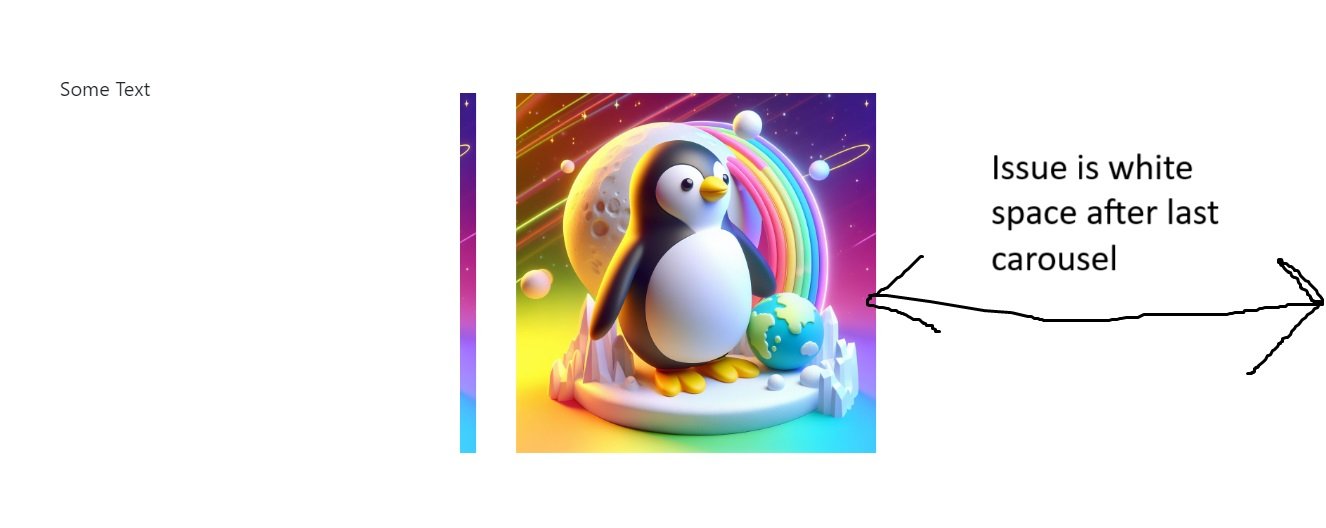
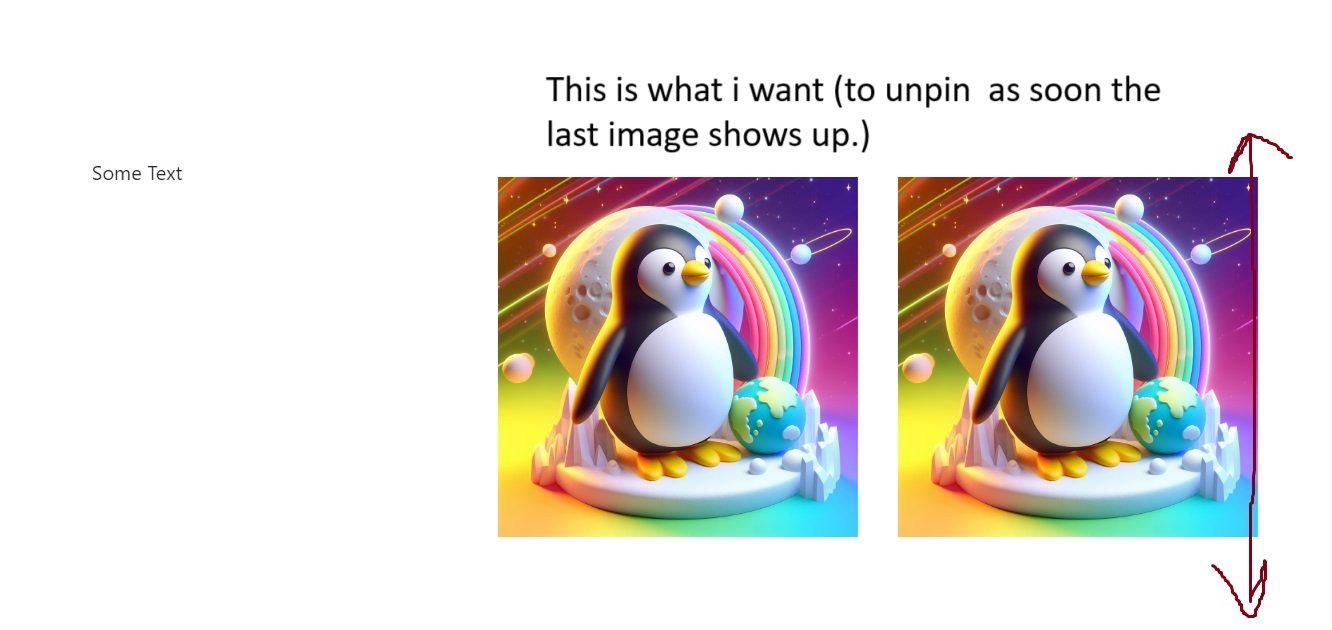
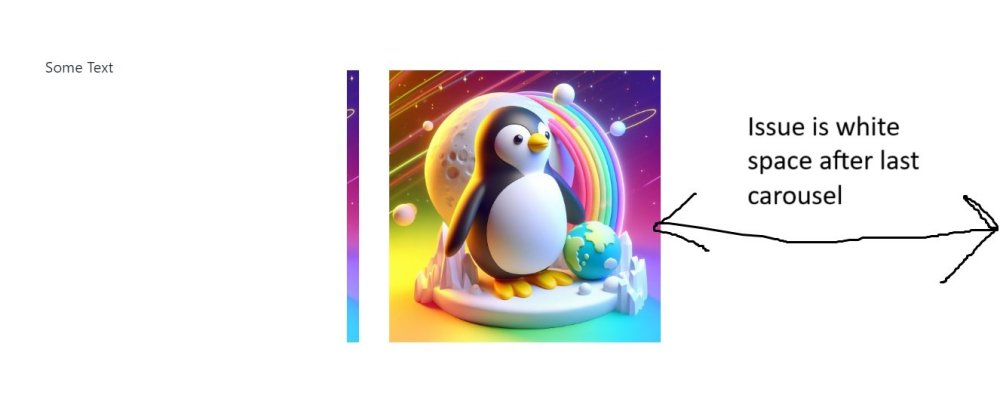
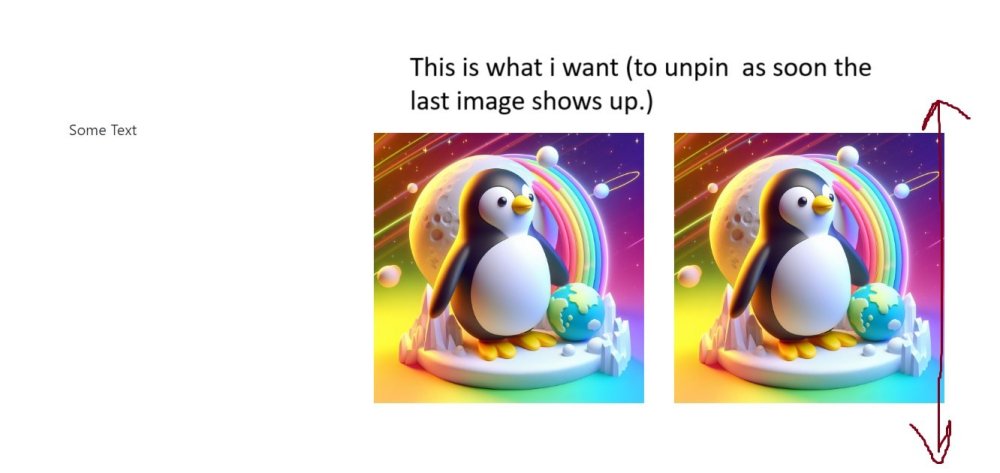
Hi Everyone, Hope everyone is doing good. I am facing a small problem that I cant seem to solve. issue is that while i scroll vertically there a section that scroll horizontally (like a image carousel) then unpin and continou scrolling vertically. ISSUE: the issue is where the trigger should unpin. now it unpin when the left side of last image has touched the left side of parent div leaving a big white space. Example From Images. What I want: when the last image is shown, just stop the horizontal scrolling and unpin the section don't drag the last image to the right side https://codepen.io/Fawad4real/pen/abMRqLZ
-
Hi, Im new to gsap . here i was trying to replicate this smooth bouncy effect on scroll from this pen https://codepen.io/ReGGae/full/QZxdVX/ , but in my case its like repeating after the ends.i dont know its the correct way to animate that bouncy effect
-
 Hello! I'm trying to create an animated content using ScrollTrigger. I have 4 sections that fade in/out on scroll and I have a progress bar that animates when each section fades in. The issue that I'm having is trying to animate a curved SVG line and trying to match the start and end animation with the fading in of the first section. Any help would be much appreciated!
 -
 import React, { useEffect, useRef } from 'react'; import './services.css'; import { gsap } from 'gsap/all'; import { ScrollTrigger } from 'gsap/all'; gsap.registerPlugin(ScrollTrigger); const Services2 = () => { const staticRef = useRef(null); const scrollRef = useRef(null); const componentRef = useRef(null); let componentHeight; useEffect(() => { // Access the height of the component using ref componentHeight = componentRef.current.clientHeight; console.log('Component Height:', componentHeight); // You can perform further actions with the height, such as updating state or triggering animations }, []); useEffect(() => { const staticPart = staticRef.current; const scrollPart = scrollRef.current; gsap.timeline({ scrollTrigger: { trigger: scrollPart, start: 'top 75px', end: `bottom ${componentHeight}`, pin: staticPart, scrub: true, onEnter: () => console.log('Pin starts'), onLeave: () => console.log('Pin ends'), }, }); }, []); return ( <div> <div style={{ display: 'flex', justifyContent: 'space-evenly', margin: '10px', }} > <div ref={componentRef} style={{ width: '40%' }}> <div style={{ width: '100%', height: '400px' }} ref={staticRef}> hi, my name is yosh </div> </div> <div style={{ width: '40%' }} ref={scrollRef}> <div style={{ height: '400px' }}>yes</div> <div style={{ height: '400px' }}>yes</div> <div style={{ height: '400px' }}>yes</div> <div style={{ height: '400px' }}>yes</div> </div> </div> </div> ); }; export default Services2;
 -
Hello, I'm having some trouble navigating the pinned cards block. In the menu on the left there are anchor links that, when clicked, should scroll to their block. Also, during normal scrolling, links should be marked with an active class when the block becomes visible. Now, when clicked, the link scrolls to the top of the parent block, as far as I understand, because the cards are on top of each other. What is the problem? How can I pin the scroll to the desired block? I used these URLs to implement cards on top of each other and for navigation: https://greensock.com/forums/topic/33597-stacking-cards-overlap/ And https://gsap.com/community/forums/topic/35776-click-to-navigate-to-a-section-using-gsap/ https://codepen.io/Vlanesvit/pen/gOExGzZ
-
 I was building a website while integrating scrollTrigger with lenis, the animation was not coming in right, when I added marker and set it to true to see the the start and end positions, I saw they where not aligned properly. But If I let's say change one of the animating properties in the code it aligns itself correctly to the actual start and end position. And also no this is not the same issue with ScrollTrigger and Lenis Issue, because some section seem not to have this issue and this particular one does. here is the code on codesanbox. Check the contact component. THANK YOU
 -
When I'm scrolling my animation, one part of it is randomly jumping from one tween to another I have this issue just in one part of an animation. Here is my timeline configuration .timeline({ paused: false, scrollTrigger: { trigger: generationRef.current, //markers: true, scrub: 0.5, start: 'top top', end: () => '+=' + window.innerHeight * animationHeight, pin: true, pinSpacing: false, invalidateOnRefresh: true, refreshPriority: 1, }, }) It's jumping somewhere at this point: .to( getGsapSelector('GSAP_GENERATION_BAR_ASTRONAUT_FINAL'), { visibility: 'visible', translateX: '-63%', translateY: '-36%', duration: 2.5, scale: 1, opacity: 1, }, `${scroll5}+=2.1`, ) And it happens only on mobile device I'm completely new to gsap and such animations so I'm just stuck
-
I have tried several methods mentioned in the forum yet i could not find a proper smooth play by scroll for videos. I created one in the code pen , yet the issue is it only animates smoothly if it is safari desktop, safari mobile or even firefox mobile (checkd in macos and ios). If it is chrome or firefox desktop which uses webp version of the movie, no chance it just skips animations in the middle. Any thoughts ?
-
I'm new to GreenSock and I encountered a rather confusing error when using scroll triggers with reactjs. Same JSX code but I get two different results on Codeandbox and on vscode, I'm not sure if this is a bug on my dev environment so here is the video I recorded the error: https://streamable.com/m0kvca here is my code on Codeandbox, everything is very similar and there is no difference but the result is different: :Codeandbox link here is my code in app.js file import React, { useEffect, useState, useRef } from "react"; import { gsap } from "gsap"; import { ScrollTrigger } from "gsap/ScrollTrigger"; gsap.registerPlugin(ScrollTrigger); function App() { const menuRef = useRef(null); const leftRef = useRef(null); useEffect(() => { (async () => { const LocomotiveScroll = (await import("locomotive-scroll")).default; const locomotiveScroll = new LocomotiveScroll(); })(); }, []); useEffect(() => { const menuElement = menuRef.current; const leftElement = leftRef.current; if (menuElement && leftElement) { ScrollTrigger.create({ trigger: menuElement, start: "top top", end: "bottom bottom", pin: leftElement, markers: true, }); ScrollTrigger.refresh(); } }, []); return ( <div> <div style={{ height: "50vh" }}></div> <div> <div ref={menuRef} style={{ display: "flex", border: "2px", borderStyle: "solid", gap: "20px", }} > <div ref={leftRef} style={{ width: "30%", height: "50vh", backgroundColor: "#ff0" }} > <div style={{ padding: "20px" }}>1</div> <div style={{ padding: "20px" }}>2</div> <div style={{ padding: "20px" }}>3</div> <div style={{ padding: "20px" }}>4</div> <div style={{ padding: "20px" }}>5</div> </div> <div style={{ width: "70%" }}> <div style={{ height: "50vh", background: "#ddd" }}></div> <div style={{ height: "50vh", background: "#ff0" }}></div> <div style={{ height: "50vh", background: "#0ff" }}></div> <div style={{ height: "50vh", background: "#0f0" }}></div> <div style={{ height: "50vh", background: "#333" }}></div> </div> </div> </div> <div style={{ height: "50vh", background: "#333" }}>1</div> <div style={{ height: "50vh", background: "#555" }}>2</div> <div style={{ height: "50vh", background: "#777" }}>3</div> <div style={{ height: "50vh", background: "#999" }}>4</div> </div> ); } export default App; làm ơn giúp tôi
-
 <!DOCTYPE html> <html lang="en"> <head> <meta charset="UTF-8"> <meta name="viewport" content="width=device-width, initial-scale=1.0"> <link rel="stylesheet" href="https://cdn.jsdelivr.net/npm/destyle.css@1.0.15/destyle.css"> <style> * { box-sizing: border-box; } header div.mainv { height: 80vh; display: flex; justify-content: center; align-items: center; background-color: yellow; } header div.mainv h1 { font-size: 3em; } main section { display: flex; justify-content: center; } main section div.container { width: 1100px; height: 400px; text-align: center; display: flex; flex-direction: column; align-items: center; justify-content: center; background-color: aqua; } fotter div.container { height: 300px; background-color: chocolate; display: flex; justify-content: center; align-items: center; } </style> <script src="https://cdnjs.cloudflare.com/ajax/libs/gsap/3.12.3/gsap.min.js"></script> <script src="https://cdnjs.cloudflare.com/ajax/libs/gsap/3.12.3/ScrollTrigger.min.js"></script> <title>Document</title> </head> <body> <header> <div class="mainv"> <h1>Title</h1> </div> </header> <main> <section> <div class="container"> <h2>text</h2> <p>texttext</p> </div> </section> <section> <div class="container"> <h2>text</h2> <p>texttext</p> </div> </section> <section> <div class="container"> <h2>text</h2> <p>texttext</p> </div> </section> </main> <fotter> <div class="container"> <p>text</p> </div> </fotter> <script> let tl = gsap.timeline({}) tl.fromTo( "h1", { y: 0, autoAlpha: 0 }, { y: -30, autoAlpha: 1, duration: 0.5 } ) ScrollTrigger.create({ animation: tl, trigger: ".mainv", start: "top top", end: "+=3000", scrub: 1, pin: true, anticipatePin: 1, }) </script> </body> </html> I am attempting to create an animation using GSAP's ScrollTrigger. The behavior I aim for, especially for the title animation, includes the following points: - The animation should complete when scrolled through 3000px. - The animation should synchronize with the mouse scroll. - I don't want the animation to reverse when scrolling upwards. - Once 3000px scrolling is completed and the animation ends, I do not want the animation to replay. I am using the scrub feature to sync with mouse scrolling, but I haven't found a parameter that disables reverse playback on upward scrolling. Is there any effective solution for this? I plan to post this on a community forum, so please ensure the translation is suitable for that context. Thank you.
 -
I am not a native English speaker and my writing may be poor, but thank you in advance. What I want to do Final Goal. * As a Wordpress block, I want to create a component that switches images as it scrolls, like a GIF. Specifications 1. the image changes by scrolling 2. the block is like a sticky Ideally, the block should behave like a sticky. 2. When the scrolling brings the block to a given location, in this case the middle, the animation of the image switching will start, and when it switches to the last image, the sticky-like behavior will resume. 3. 3. The number of images and the amount of scrolling per image should be adjustable. 4. Use Next/image for performance. However, we are currently unable to meet most of the specifications. Please advise. https://codesandbox.io/p/devbox/mutable-sunset-phspgm?layout=%7B%22sidebarPanel%22%3A%22EXPLORER%22%2C%22rootPanelGroup%22%3A%7B%22direction%22%3A%22horizontal%22%2C%22contentType%22%3A%22UNKNOWN%22%2C%22type%22%3A%22PANEL_GROUP%22%2C%22id%22%3A%22ROOT_LAYOUT%22%2C%22panels%22%3A%5B%7B%22type%22%3A%22PANEL_GROUP%22%2C%22contentType%22%3A%22UNKNOWN%22%2C%22direction%22%3A%22vertical%22%2C%22id%22%3A%22clpgsu9rd000c3b6hk9fvt80r%22%2C%22sizes%22%3A%5B70%2C30%5D%2C%22panels%22%3A%5B%7B%22type%22%3A%22PANEL_GROUP%22%2C%22contentType%22%3A%22EDITOR%22%2C%22direction%22%3A%22horizontal%22%2C%22id%22%3A%22EDITOR%22%2C%22panels%22%3A%5B%7B%22type%22%3A%22PANEL%22%2C%22contentType%22%3A%22EDITOR%22%2C%22id%22%3A%22clpgsu9rd00033b6hgs78ghyh%22%7D%5D%7D%2C%7B%22type%22%3A%22PANEL_GROUP%22%2C%22contentType%22%3A%22SHELLS%22%2C%22direction%22%3A%22horizontal%22%2C%22id%22%3A%22SHELLS%22%2C%22panels%22%3A%5B%7B%22type%22%3A%22PANEL%22%2C%22contentType%22%3A%22SHELLS%22%2C%22id%22%3A%22clpgsu9rd00093b6h4tuvn8da%22%7D%2C%7B%22type%22%3A%22PANEL%22%2C%22contentType%22%3A%22SHELLS%22%2C%22id%22%3A%22clpgsv2wp00as3b6h9q1zxkca%22%7D%5D%2C%22sizes%22%3A%5B50%2C50%5D%7D%5D%7D%2C%7B%22type%22%3A%22PANEL_GROUP%22%2C%22contentType%22%3A%22DEVTOOLS%22%2C%22direction%22%3A%22vertical%22%2C%22id%22%3A%22DEVTOOLS%22%2C%22panels%22%3A%5B%7B%22type%22%3A%22PANEL%22%2C%22contentType%22%3A%22DEVTOOLS%22%2C%22id%22%3A%22clpgsu9rd000b3b6hz66bjsev%22%7D%5D%2C%22sizes%22%3A%5B100%5D%7D%5D%2C%22sizes%22%3A%5B50%2C50%5D%7D%2C%22tabbedPanels%22%3A%7B%22clpgsu9rd00033b6hgs78ghyh%22%3A%7B%22id%22%3A%22clpgsu9rd00033b6hgs78ghyh%22%2C%22tabs%22%3A%5B%5D%7D%2C%22clpgsu9rd000b3b6hz66bjsev%22%3A%7B%22tabs%22%3A%5B%7B%22id%22%3A%22clpgsu9rd000a3b6hs7vcy8u6%22%2C%22mode%22%3A%22permanent%22%2C%22type%22%3A%22TASK_PORT%22%2C%22taskId%22%3A%22dev%22%2C%22port%22%3A3000%2C%22path%22%3A%22%2F%22%7D%5D%2C%22id%22%3A%22clpgsu9rd000b3b6hz66bjsev%22%2C%22activeTabId%22%3A%22clpgsu9rd000a3b6hs7vcy8u6%22%7D%2C%22clpgsu9rd00093b6h4tuvn8da%22%3A%7B%22tabs%22%3A%5B%7B%22id%22%3A%22clpgsu9rd00043b6ht4kjqek2%22%2C%22mode%22%3A%22permanent%22%2C%22type%22%3A%22TASK_LOG%22%2C%22taskId%22%3A%22dev%22%7D%2C%7B%22id%22%3A%22clpgsu9rd00053b6hea0ksahd%22%2C%22mode%22%3A%22permanent%22%2C%22type%22%3A%22TASK_LOG%22%2C%22taskId%22%3A%22build%22%7D%2C%7B%22id%22%3A%22clpgsu9rd00063b6hps2cukre%22%2C%22mode%22%3A%22permanent%22%2C%22type%22%3A%22TASK_LOG%22%2C%22taskId%22%3A%22start%22%7D%2C%7B%22id%22%3A%22clpgsu9rd00073b6hr3bn3ejy%22%2C%22mode%22%3A%22permanent%22%2C%22type%22%3A%22TASK_LOG%22%2C%22taskId%22%3A%22lint%22%7D%2C%7B%22id%22%3A%22clpgsu9rd00083b6hay6mh0wm%22%2C%22mode%22%3A%22permanent%22%2C%22type%22%3A%22TASK_LOG%22%2C%22taskId%22%3A%22install%22%7D%5D%2C%22id%22%3A%22clpgsu9rd00093b6h4tuvn8da%22%2C%22activeTabId%22%3A%22clpgsu9rd00083b6hay6mh0wm%22%7D%2C%22clpgsv2wp00as3b6h9q1zxkca%22%3A%7B%22tabs%22%3A%5B%7B%22id%22%3A%22clpgsutp300ao3b6hzundduq5%22%2C%22mode%22%3A%22permanent%22%2C%22type%22%3A%22TERMINAL%22%2C%22shellId%22%3A%22clpgsv34k00hwefge61fm17o6%22%7D%5D%2C%22id%22%3A%22clpgsv2wp00as3b6h9q1zxkca%22%2C%22activeTabId%22%3A%22clpgsutp300ao3b6hzundduq5%22%7D%7D%2C%22showDevtools%22%3Atrue%2C%22showShells%22%3Atrue%2C%22showSidebar%22%3Atrue%2C%22sidebarPanelSize%22%3A15%7D
-
Hello , Im trying to do a animtion on scroll . What I want to do is a dot that starts at the bottom of the pink path and as you scroll the dot it goes up and when it is at the intersection it changes path to purple. I can't share my exact code but this is what I did overall.But the point doesn't go the other path and when i try whitout the tl.to(target) but gsap.to(target) that works witout the scrolltrigger. I don't know if I was clear but i hope someone can help me let tl = gsap.timeline({ scrollTrigger: { trigger: ".test", pin: ".test", start: "top center", end: "+3000 center", scrub: true, }, }) tl.to('.test-dot-1', { ...this.makeMotionPath(.43, .57,tl), duration: 1000, }); makeMotionPath(start, end,tl) { return { motionPath: { path: '#path-3', align: '#path-3', start: start, end: end, alignOrigin: [0.5, .5], }, onUpdate: function () { let progress = start + this.ratio * (end - start) let target = this.targets()[0]; if (progress >= 0.47) { console.log('tl',tl) console.log(target) tl.to(target, { motionPath: { path: '#path-2', align: '#path-2', start: .47, end: 1, alignOrigin: [0.5, .5], }, duration: 100, onUpdate: function (){ console.log('test') }, }); } }, } },