Search the Community
Showing results for tags 'parallax'.
Found 62 results


-
I am struggling to get this effect to work. There is a hero image with parallax that is working. But the logo, which starts full size and fixed to the bottom of the hero container (with a slight overlap of about 75px at the bottom), needs to resize smaller to fit in the sticky header at the top. This should scrub with the scrollbar and be sticky at the top shortly before the hero is fully scrolled past. I've spent days trying to get this to work, and I can't find any examples anywhere that have helped me get to the bottom of the issue. Any help would be greatly appreciated!
-
Greetings everyone, I have recently started to work as a Shopify Developer and I have a task to tackle. The developer before me used ScrollTrigger to animate the Home page. It would display one div (slide) that would cover the full size, and when scrolling, the next div coming from the bottom would overlap the existing one, continuing the scroll this animation would repeat until there were no more slides left. Now the client requested that I have this same animation but in reverse, when scrolling, slides would appear from the top and overlap the existing one. Is this possible with this current JS code, or do I need to make this from scratch? I've managed to find a Post here that has CodePen that shows what is my current animation.
-
 I am not able to get this simple thing working. Basically I want to have sections with parallax effect without leaving the space at the bottom of the page. I have the sections overlapped initially. But either they all move by equal amount or leave white-space in-between which is not desirable. Going forward I also want the Orange section to get pinned. Please guide me on how all of this can be implemented.
 -
Hi Everyone, I recently recieved a project for a tour and travels website. I was scrolling through many design and thought of creating a parallax website with 3D models, but I haven't created any up until now. So I needed some suggestions on how to start and where to get the resources. Also, will there be any performance issues when hosting the website. (Website is not Dynamic, More like a Gallery type for an agency). How do I optimize the performance of the website while building it? What thinks should I be aware of? Any suggestions will be helpful. Thank You.
-
Greetings from Ukraine! I am trying to recreate the parallax section effect (https://ochi.design - from here. right after the preloader when u start to scroll the page), when the bottom of the section reach the bottom of the screen the next section should scroll up a bit faster than previous and to overlap thereby the previous one. I achieved what I wanted (on my website it works smoother then in codepen tho) but I'm not sure it's the best way to implement this. I'm curious how can I improve my code and optimize it. Thanks! WATCH IN FULLSCREEN MODE
-
Hello, I'm exploring the examples but I can't find what I'm looking for, and I want to see if it's possible to do it. I'm looking to have some cards move horizontally with a parallax effect when scrolling, but I want them to stay centered, and the next card should appear on top of the previous one. I don't want them to push each other like a slider. When reaching the last card, there should be 5 cards stacked on top of each other in the middle, and then the vertical scrolling of the site should continue to work. This website has it, but cards with vertical scroll https://quipo-app.com/
-
Hi, i'm trying to replicate this animation , but i don't really understand what's wrong with the animation. https://codepen.io/pixit_design/pen/ExKWVdq -> found on another topic. My structure is different. When i don't set horizontal: true, the image property change, but when i want to do it with horizontal trigger, the property doesn't change anymore. I'm sorry if this question has already been asked. i hope you will be able to help me
-
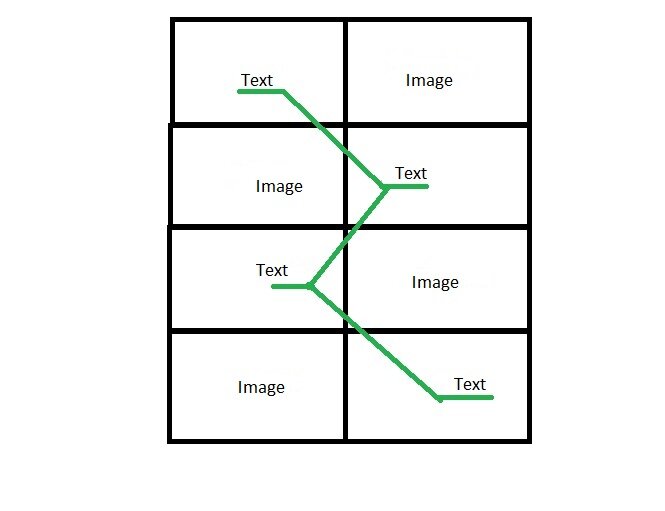
You need to make an animation on the site so that when you scroll the page, the picture moves around the site, moving from side to side. Site structure: on the right the picture on the left is tex, the next block on the right is the text on the left picture, so the blocks alternate. You need to make an animation on the site so that when you scroll the page, the picture moves around the site, moving from side to side. Site structure: on the right the picture on the left is tex, the next block on the right is the text on the left picture, so the blocks alternate. enter the description of the image here so that when the user scrolls through the site, the image follows him and smoothly shifts under the text block, as if highlighting the text.
-
Hi GSAP Community, i have a horizontal parallax ScrollTrigger and every slide or panel within the ScrollTrigger is 1/2 viewport width (CSS => 50vw) . Each panel is clickable and the click toggles the panel between 50vw and 100vw and pushes the other panels aside. Everything is working well but i want in addition, to center or pin the expanded panel to the viewport and disable the scroll. After the next toggle, the panel shrinks to 50vw and the scroll behaves like before. Is it possible to mix it with ScrollToPlugin? If so, can someone give me a hint or a starting point? Or is it doable with just ScrollTrigger? Thanks in advance
-
Hello, I made a copy for the gsap animation in the sample codepen link. But it doesn't work like the effect example, it takes the styles but there seems to be a shifting problem. Can you help me? Example; https://codepen.io/GreenSock/pen/JjYPgdp My Pen;
-
Hello, I want the footer part to come from the bottom like a parallax. I did it partially, but there is a space at the bottom. Can you help with this?
-
Hello, I want to make a stream like on this site. I partially succeeded, but I can't control the parallax. The parallax in the blue background that comes after CHAPTER 01 comes into play long ago and the right part looks bad. Actually, I have to give a container a 100% width and the main container a 300% width right now, I couldn't get it to get the width automatically. Can you help me? My sample site https://transmissions.cristobalbalenciagamuseoa.com/2019-21/moe-matsuoka.html
-
Hello, I actually want to stop the scroll and parallax effects that are not normal effects on mobile devices. I used a code for this, but smoothscroll still works. can you help me? You can view the project here, thank you very much. http://clients.super-agency.com/test/dy/ I'm using the code below, it turns off the parallax, but the smooth scroll effect still works. I want browser default scrolll on mobile devices. console.clear(); gsap.registerPlugin(ScrollTrigger, ScrollSmoother, SplitText); let smoother = ScrollSmoother.create({ wrapper: "#smoother-wrapper", content: "#smoother-content", smooth: 1, smoothTouch: 0.1, normalizeScroll: true, ignoreMobileResize: true, effects: ScrollTrigger.isTouch === 1 ? false : true, });
-
Hi, I want to do something similar to history. There will be years and articles and photographs of that year. And I want to make them parallax when scrolling horizontally. I created a demo codepen. I thought I did that because each panel class needs to have auto-width in itself, but everything overlaps. I am sharing a site as an example. https://transmissions.cristobalbalenciagamuseoa.com/2019-21/moe-matsuoka.html Thank you so much...
-
Hi there, I'm trying to do the same animation as this website: https://www.jomor.design/ in the work section half window scroll I'm having trouble getting it. I couldn't figure out how he did it. I kinda mimicked it using position sticky but I had to remove overflow-x: hidden from html & body, and it made huge horizontal scroll since i had many section overflowing. I tried to do it with gsap but the best I can manage is what you can see on codepen. I'm running out of ideas to try, and I'd love some tips please Thanks in advance
-
Hello, first of all, the problem is; I am making a project with gsap. I want parallax to work on desktop version and I have succeeded. When the menu opens, I wanted to pause the body scroll, which works successfully. But there was a problem. I can't pause sroll in mobile version because the project is not loaded in GSAP (768px) resolution. I want to pause body scroll in both mobile and desktop versions. I am sharing the code and codepen link with you. Can you help me? console.clear(); gsap.registerPlugin(ScrollTrigger, ScrollSmoother); let smoother; const mm = gsap.matchMedia(); mm.add("(min-width: 768px)", () => { smoother = ScrollSmoother.create({ wrapper: "#smooth-wrapper", content: "#smooth-content", smooth: 1, normalizeScroll: true, ignoreMobileResize: true, effects: true, }); return () => smoother.kill(); });
-
Hello, in the example i shared in codepen, I only want to disable the parallax effect on the mobile device, can you help with this?
-
Hi community, once again I wanted to use your universal and broad wisdom. I have multiple sections following each other with different heights and each of them can have a background image. This implemented as a direct child, is positioned absolute, has the size of the section and, of course, has a background-image set. This image's position can vary, depending on what the user selected in the backend. What is now relatively tricky for me is to use each section as the actual container where the bg image parallaxes in. So not the whole window but only the current section's height should be used. I found this demo this demo to start off with: https://codepen.io/GreenSock/pen/QWjjYEw and I adjusted it to the version you see now at the end of the post. My questions now are: 1. How can this work with multiple sections as the reference container? 2. How can this work with different bg positions? 3. Why do I need the ratio calc in there' Wouldn't the acutal height of the section suffice? Hope it's clear what my problem is and looking forward to your ideas! Have a nice one!
-
Hello everyone, I'm trying to make a timeline here, but I don't know how to use the horizontal scrolltrigger. I also want the images to parallax horizontally, and I want them to go left and right as the scroll moves. Finally, I want to give the opacity active value of 1 for the circles with low opacity in each pass. Thank you very much Example; https://transmissions.cristobalbalenciagamuseoa.com/2019-21/maissane-zinai.html
-
 Hi all! I'm wondering if you can show me a clue on how to perform the next operation I haven't been able to do. I have a mega svg on which I want to scroll down and show elements of the svg along with other html elements by pinning multiple sections of the large svg. At certain position I want to display an image in background while the svg elements appear in front while scrolling, let's say that the svg will be divided in four sections that will show a few animations using the ScrollTrigger. After some adjustments I've made to the css properties of the svg I've managed to approach a little to what I need but I'm still not sure if I'm going in a correct direction. What I want to achieve is to display text (video, or any other html element) in front and an image in background while scrolling through the large svg by pinnning a section of the svg to display the content, then scroll and pin again to the next section and so on. In my test, basically I have merged an image parallax with an svg pinning animation. Is there any suggestion or better approach you could advise me to do this. Thanks a lot in advance for your appreciated help!
 -
(1).thumb.png.a1b7993dc8325922340f4e1caed26a22.png) I tried to pin the current page (div1) and when the next page(div2) will slide up, the current page (div1) will keep going 30 percent to the top, creating a parallax effect. But the problem is, when The 2nd page(div2) pins and 3rd page(div3) slides up, the 2nd(div2) page's parallax effect breaks the whole design. I need help.
I tried to pin the current page (div1) and when the next page(div2) will slide up, the current page (div1) will keep going 30 percent to the top, creating a parallax effect. But the problem is, when The 2nd page(div2) pins and 3rd page(div3) slides up, the 2nd(div2) page's parallax effect breaks the whole design. I need help. -
 I have an image that is the background in a div, I want to have a parallax effect when the scroll is activated. I'm already managing to do the effect, but it's influencing the div I use as a "mask" of the image. I have this logic: As you can see , the div with the section-parallax class is smaller when I move the scroll and I want only the image to move.. I want to fix the div I use as a mask to a size, just move the image inside it. I'm new to GSAP and have been doing a lot of research to create the effects I need and to learn more, sorry if it's a silly question. Thanks
 -
Dear GreenSock community! I am currently working on a project with a horizontal parallax. Each "scene" needs to be in full width and height of the viewpoint with a static background and up to 3 "objects" within this "scene" that just slightly move horizontal with different speed on scrolling, so that it creates kind of a depth effect. I already built this by using rellax library and it worked pretty well, at least while using a modern mouse (Magic Mouse etc) without a physical wheel. My client is using a mouse with a wheel and this is causing the scrolling to be very faltering. I tried to combine my first attempt with several scroll smoothing libraries, nothing worked. So now I completely rebuilt this by using GSAP and ScrollTrigger. In general, the scroll smoothing works now with all kinds of mouses, which is great! BUT: I can only get the objects in the very first scene to move. In all other scenes, the objects do not move. I spent hours on this but can't get it run properly. I really hope to get some feedback on this issue from the community. Thank you in advance!
-
Hope you have had a great weekend guys I´ve already done some coding on codepen > using the amazing scroll trigger but I need help to finalize the code and make the scroll trigger & parallax nice and smooth if possible. Kind regards from Denmark. Question > is it possible for gsap to bend / warp the images as you scroll like on this awesome website? > https://kacper.ch/ Inspirational codepen > https://codepen.io/GreenSock/pen/wvMeNee
-
Hi everyone, I would like to achieve the following image parallax effect (vertical translation) with Scrolltrigger and without Smooth Scroll. https://tympanus.net/Tutorials/SmoothScrollAnimations/ I tried the parallax demos in the docs, but they work differently then this example. Which way is the best to get this effect? Thanks Martin
- 12 replies
-
- 1
-

-
- parallax
- translation
- (and 2 more)