Search the Community
Showing results for tags 'reactjs'.


-
Hello I want to know if I can divide the screen size on 100 circle with different size please like this website bubbles also I try to use @nivo/circle-packing to get the radius after packing them but I cannot so how to get it please
-
Hello, I have a couple of questions and one dead end that I can't seem to solve. I am attempting to create an ellipse carousel, essentially similar to this one made in a circle: https://codepen.io/GreenSock/pen/GRMqWvW My main issue lies in the fact that I'm attempting to move objects along the path using the progress parameter, and I don't know how to achieve this functionality. I have tried to add animation to the timeline, but currently, it isn't moving even with the basic rotation for the div, which acts as a wrapper. I've added numerous console.log statements to track progress changes, and they seem to be updating correctly. The relevant code for inspection is from line 65 to 177, with some comments interspersed. From the side problems I'm also struggling to track the active element using animation added to the timeline, similar to the example provided by GSAP example pin (lines 83-97, currently commented out). Currently, I am changing this value within the 'moveWheel' function at line 162. Here's StackBlitz link for the above questions: https://stackblitz.com/edit/stackblitz-starters-4p7twq?file=src%2Fcomponents%2FroundComponent.js Another issue I need assistance with is the 'convertToPath' function. I am attempting to obtain a path from an ellipse, but when I position the SVG beforehand (for example, by centering it using cx and cy values), obtaining the path doesn't reflect this position. Additionally, if I try to directly add a translate into the generated path, it doesn't work. How can I accomplish this correctly? I have provided separate code to visualize this problem: https://stackblitz.com/edit/stackblitz-starters-6mzrk4?file=src%2FApp.js P.S. Regarding the issue with converting the ellipse to a path, I've noticed that if I comment out line 57 within my code, it looks as it should, but now the entire path isn't visible 😕. I've saved the StackBlitz project with a comment on that line. Perhaps you could provide me as I think with some simple solution to get a whole path of svg visible? Thanks in advance.
-
Hello, I hope everyone is well! I'm trying to make an animation where the element goes to position y=95 then waits 3 seconds and returns to position 0 and repeats the animation several times, but I'm not succeeding. I would like guidance to understand what I am doing wrong. Thank you very much in advance. https://codepen.io/daniel-silva-dxp/pen/VwNaZWg
-
I'm facing a problem with animate html inside foreignObject. when I click the button it animates. it works normally on desktop and Android devices and is debug responsive with iPhone on the Chrome dev tool. but when I'm testing in a real iPhone. it causing problems. the text and jumping big above the SVG and this is not i want. how can i fix it ? Please help me. this is the demo in codesandbox: animate html ìn foreignObject - CodeSandbox
-
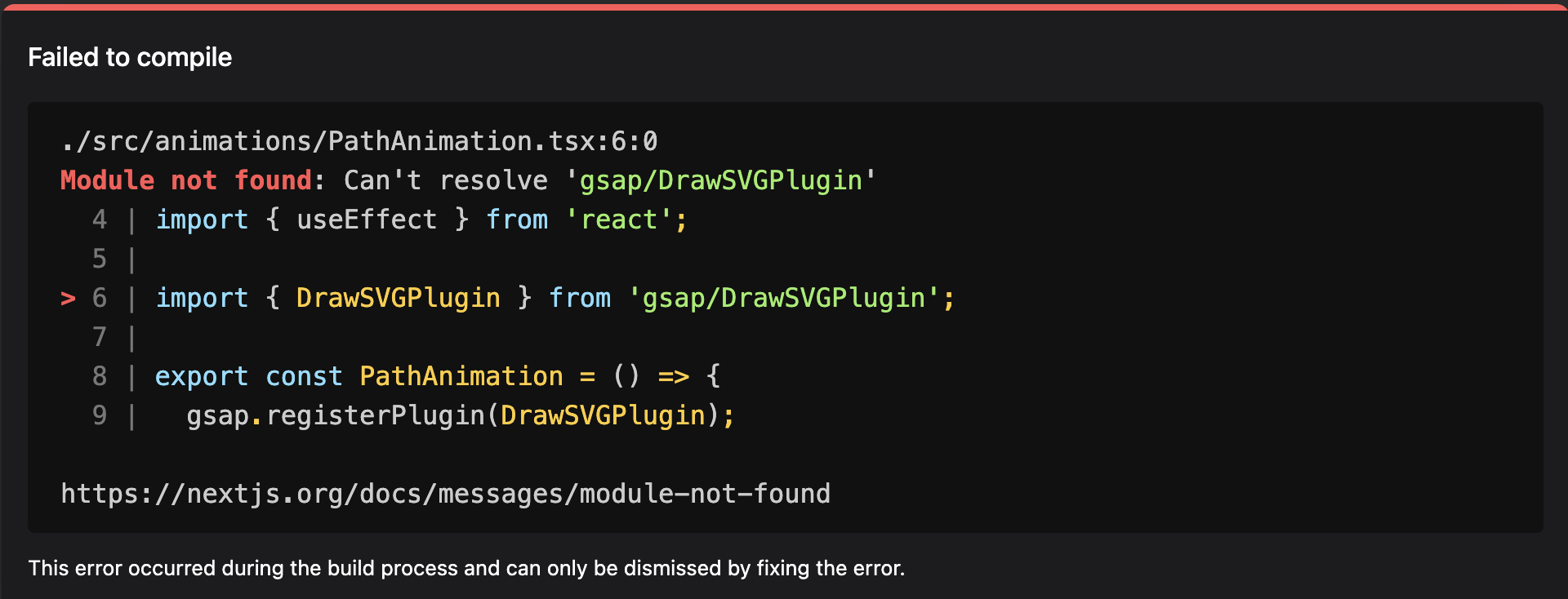
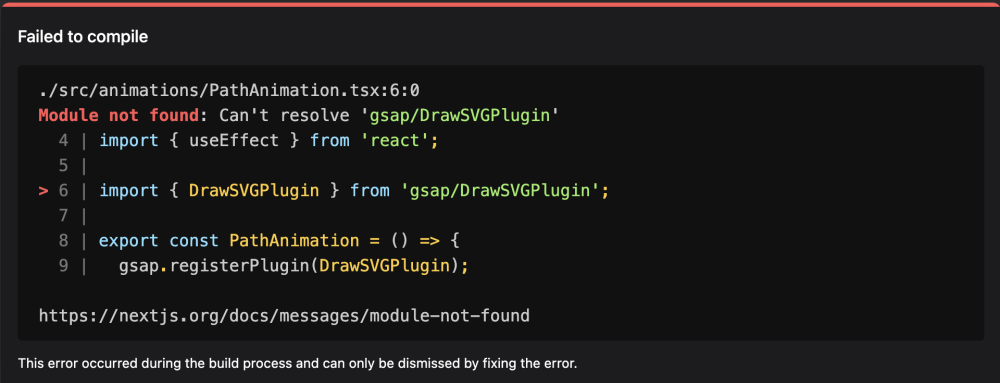
Hi, Receiving this "Module not found" error while importing DrawSVGPlugin module. the base gsap is working fine, just the drawSVGPlugin is throwing this error. import { DrawSVGPlugin } from 'gsap/DrawSVGPlugin'; export const PathAnimation = () => { gsap.registerPlugin(DrawSVGPlugin); } I am using NextJS 14.1.0. I tried importing the plugin from "/dist" "/all", but the issue persists. Thanks in advance for help.
-
 Hi, and Thanks in Advance; I need to create two sections. The parent div will be pinned, and you can scroll a Lottie animation on the left and text on the right together and snap the Lottie animation to specific keyframes. For example, I have a Lottie animation where it shows a bulb, then transforms into a notebook and then into a tablet. Simultaneously, on the right side section, I have a div with text in it. so when the animation is at bulb I want to show text bulb {initaily},then I scroll and if the animation is at the notebook I want to show notebook in the div text area. And if the animation is in between, snap to the nearest keyframe of a bulb or notebook and so on. and when the Lottie animation ends then unpin parent section. You can see the example if the website: https://www.brandnewschool.com/ if you scroll down. I am really stuck here.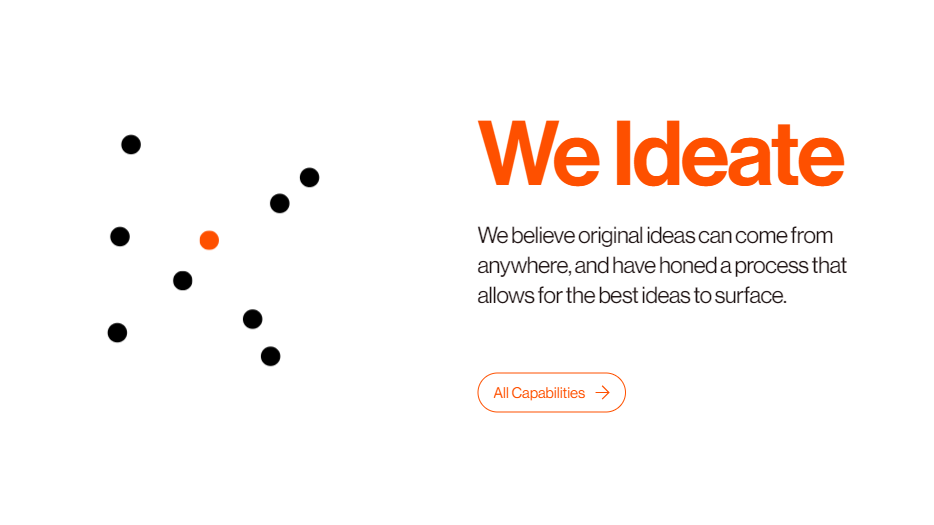
-
 I was building a website while integrating scrollTrigger with lenis, the animation was not coming in right, when I added marker and set it to true to see the the start and end positions, I saw they where not aligned properly. But If I let's say change one of the animating properties in the code it aligns itself correctly to the actual start and end position. And also no this is not the same issue with ScrollTrigger and Lenis Issue, because some section seem not to have this issue and this particular one does. here is the code on codesanbox. Check the contact component. THANK YOU
 -
ScrollTrigger not animating the element ".profile__container", unless I add scrub. I want the scrollTrigger to element without the scrub. Is there something I'm doing wrong. useEffect(()=>{ const profileAboutTexts = document.querySelectorAll(".profile__about p"); // const profileContainer = document.querySelector(".profile__container") // const about = aboutRef.current profileAboutTexts.forEach(text=>{ new SplitType(text, { types: 'lines, char' }) }) const anim = { y: 130, transform: "rotateZ(25deg)", opacity: 0, stagger: { amount: .8 }, } const ctx = gsap.context(()=>{ tl.current = gsap.timeline(); tl.current.from(".profile__about p:first-child .char", {delay: 2, duration: 1.3, ...anim}) tl.current.from(".profile__about p:last-child .char", {...anim, scrollTrigger: { trigger: ".profile__container", start: "top 40%", end: "top 20%", markers: true, } } ) }, aboutRef) return ()=> { ctx.revert() } }, [])
-
Hey Greensock! I was just wondering if I could get some assistance on my project. I want to create animation letter that appear one by one when scrolling, right now this is my progress https://stackblitz.com/edit/react-xogadh?file=src%2FApp.js I kinda hope when user scroll to the second section they have to scroll one by one/slowly to make the all letters appears. I've tried using pin and adding values "end" more but it makes section after them got pushed down and it some breakpoints it make the animation section got scrolled too. is this the right way to achieve it? Thank you for any help. Sorry for my english

-
I have been stuck here for a week. I'm trying to make a scroll snap from section 1 to section 2 with a delay time for exit animation and reverse. From section 2 to section 4 it can be a normal scroll. I'm using overflow: hidden that I can't let it go. This is the reason that I think it prevents me from scrolling snap and normal scroll. The scroll way I try to achieve is exactly the same as this website: David | Creative Developer (david-hckh.com) Here is the codesandbox : https://codesandbox.io/s/scroll-rfjx9k How can I achieve this ? Please help me with this....
-
Hi there! We just completed a major site redesign featuring ScrollTrigger in several modules. It's been awesome, thanks to all involved in making this happen! One issue that came up is illustrated in the Codepen. We have a few modules that "expand" with interaction, like the green Module 2. The horizontal scroll module works great, but if the module above is expanded, it throws off the start/end positions of the trigger. My initial solution was to add a resizeObserver on the height of the body, that would trigger a window.resize event. This was effective in conjunction with MatchMedia, but it's global and is interrupting other animations that are happening on-screen while the body size is changing. What's the best (and more "componentized" ) way to recalculate the trigger when its position changes like that? Note: I don't think it's necessarily relevant, but we are using React in a sort of unique set up... we are working within a modular CMS, so each module is its own React app, similar to how the Codepen is set up. Much thanks!
-
I'm new to GreenSock and I encountered a rather confusing error when using scroll triggers with reactjs. Same JSX code but I get two different results on Codeandbox and on vscode, I'm not sure if this is a bug on my dev environment so here is the video I recorded the error: https://streamable.com/m0kvca here is my code on Codeandbox, everything is very similar and there is no difference but the result is different: :Codeandbox link here is my code in app.js file import React, { useEffect, useState, useRef } from "react"; import { gsap } from "gsap"; import { ScrollTrigger } from "gsap/ScrollTrigger"; gsap.registerPlugin(ScrollTrigger); function App() { const menuRef = useRef(null); const leftRef = useRef(null); useEffect(() => { (async () => { const LocomotiveScroll = (await import("locomotive-scroll")).default; const locomotiveScroll = new LocomotiveScroll(); })(); }, []); useEffect(() => { const menuElement = menuRef.current; const leftElement = leftRef.current; if (menuElement && leftElement) { ScrollTrigger.create({ trigger: menuElement, start: "top top", end: "bottom bottom", pin: leftElement, markers: true, }); ScrollTrigger.refresh(); } }, []); return ( <div> <div style={{ height: "50vh" }}></div> <div> <div ref={menuRef} style={{ display: "flex", border: "2px", borderStyle: "solid", gap: "20px", }} > <div ref={leftRef} style={{ width: "30%", height: "50vh", backgroundColor: "#ff0" }} > <div style={{ padding: "20px" }}>1</div> <div style={{ padding: "20px" }}>2</div> <div style={{ padding: "20px" }}>3</div> <div style={{ padding: "20px" }}>4</div> <div style={{ padding: "20px" }}>5</div> </div> <div style={{ width: "70%" }}> <div style={{ height: "50vh", background: "#ddd" }}></div> <div style={{ height: "50vh", background: "#ff0" }}></div> <div style={{ height: "50vh", background: "#0ff" }}></div> <div style={{ height: "50vh", background: "#0f0" }}></div> <div style={{ height: "50vh", background: "#333" }}></div> </div> </div> </div> <div style={{ height: "50vh", background: "#333" }}>1</div> <div style={{ height: "50vh", background: "#555" }}>2</div> <div style={{ height: "50vh", background: "#777" }}>3</div> <div style={{ height: "50vh", background: "#999" }}>4</div> </div> ); } export default App; làm ơn giúp tôi
-
Hi team In the attached code-pen link, div with class 'container' has a div with class 'wrapper' (bad name for a slider) with 6 sections (section tags). I've defined a GSAP timeline and stored it in a variable. I am referencing this timeline using useRef to use it. This timeline has a tween on sections and it animates them on the Xpercent All of this is scroll based using a Scroll-trigger with a scrub. The timeline is set to paused The things that I don't understand are 1. why is the progress of timeline always equal to 0? Is it because scrub is true? 2. How do I control timeline, like start, pause, reset, reverse, if the tweens are scroll based? 3. How do I control timeline in react? 4. What is the optimal way of updating react components that are based on a timeline's/tween's progress (eg. the progress bar) Currently, i am updating the progress bar based on the progress of scroll trigger, when I add a state variable and use it as a dependency in the useEffect and try to update it to comply with react, it doesn't work. What is the underlying issue? NOTE: I am animating the xPercent because I was further animating the scale of sections based on their position with respect to the viewport using container animations but that is too far fetched. Please help me understand
-
Hi, I have some trouble with my Observer. I used it to snap between 2 sections. I have a state for the open menu is isOpenedMenu and pass it to the navbar as props. But when I click many times it causes an error with the Observer. I'm going crazy over this because when stated in the navbar component it works normally. What's wrong with the Observer? Here is my codesanbox: Maximum call stack size exceeded by observer - CodeSandbox Please support me, Thank you so much
-
Hi everyone, I have some trouble with my project. I'm trying to mix Observer and Scrolltrigger. I have a body with overflow: hidden to disable the native scroll of HTML. I am using a manual scroll with a Scrolltrigger. But I'm facing a problem when it becomes the manual scroll. It doesn't run onEnter and onEnterBack then using Observer to snap back. How can I make onEnter and onEnterBack run while keeping overflow: hidden in the body and the manual scroll?
-
 Hello, I have a question about how to replicate the hover effect in boxes like this site (https://www.vovi.studio/). My question is how to have the box background changed to black but in a smooth way like the example website and split the text. I managed to do something with the code below, but it wasn't as smooth as on the example site. // react box component import { useRef } from 'react'; import gsap from 'gsap'; import { ArrowCircleRight } from 'phosphor-react'; import { Flex, SplitElement } from '@/components'; import * as S from './styles'; import { DefaultTheme } from '@/styles'; interface IGridBoxProps { alignWrapper?: 'center' | 'flex-end'; justifyChildren?: 'center' | 'space-between'; } const GridBox = ({ alignWrapper = 'center', justifyChildren = 'space-between' }: IGridBoxProps) => { const splitElementRef = useRef<HTMLDivElement>(null); const gridBoxRef = useRef<HTMLDivElement>(null); const tl = gsap.timeline({ defaults: { duration: 0.2, ease: 'power1.inOut' } }); const onEnter = () => { if (splitElementRef.current && gridBoxRef.current) { const splitChildren = gsap.utils.toArray( splitElementRef.current.children ); tl.to(gridBoxRef.current, { background: DefaultTheme.colors.text.heading, duration: 0.3, stagger: -0.05 }); tl.to(splitChildren, { yPercent: -100, stagger: -0.05 }); } }; const onLeave = () => { if (splitElementRef.current && gridBoxRef.current) { const splitChildren = gsap.utils.toArray( splitElementRef.current.children ); tl.to(splitChildren, { yPercent: 0 }); tl.to(gridBoxRef.current, { background: DefaultTheme.colors.white, duration: 0.15 }); } }; return ( <S.GridBoxWrapper align={alignWrapper} ref={gridBoxRef} onMouseEnter={onEnter} onMouseLeave={onLeave} > <Flex align="flex-end" justify={justifyChildren} style={{ width: '100%' }} > <SplitElement firstChild="firstChild" lastChild="lastChild" ref={splitElementRef} /> <ArrowCircleRight size={20} weight="bold" /> </Flex> </S.GridBoxWrapper> ); }; export default GridBox; //styles box component import styled, { css } from 'styled-components'; import { Flex } from '..'; export const GridBoxWrapper = styled(Flex)` ${({ theme }) => css` width: 100%; height: 200px; border: 1px solid ${theme.colors.gray[50]}; padding: 3.2rem; svg { color: ${theme.colors.gray[200]}; } `} `; //react split component import { ForwardRefRenderFunction, HTMLAttributes, ReactNode, forwardRef } from 'react'; import * as S from './styles'; type SlitWrapperDivType = HTMLAttributes<HTMLDivElement>; interface ISplitElementProps extends SlitWrapperDivType { firstChild: ReactNode; lastChild: ReactNode; } const SplitElement: ForwardRefRenderFunction< HTMLDivElement, ISplitElementProps > = ({ firstChild, lastChild, ...props }, ref) => { return ( <S.SplitWrapper {...props} ref={ref}> <S.SplitChildren>{firstChild}</S.SplitChildren> <S.SplitChildren>{lastChild}</S.SplitChildren> </S.SplitWrapper> ); }; export default forwardRef(SplitElement); //styles split component import styled, { css } from 'styled-components'; export const SplitWrapper = styled.div` width: fit-content; height: 2em; overflow: hidden; display: flex; flex-direction: column; justify-content: flex-start; align-items: flex-start; `; export const SplitChildren = styled.span` ${({ theme }) => css` color: ${theme.colors.gray[200]}; font-size: 2em; line-height: 1; cursor: pointer; display: flex; align-items: center; justify-content: center; `} `; Can anyone help me improve this gsap code and make the animation as smooth as possible? Thank you all very much in advance. Gravação de Tela 2023-10-17 às 18.51.17.mov
 -
I want to create a parent div with 80% of screen width, and inside of that there should be mini square colorful divs, now the functionality i want it to drag though them inside of that parent div, and see all the divs because there'll be so much divs so it will be hard to see them in 1 place, and also It should show the divs in a grid style. another website (midjourney) using same features uses this draggable.min.js() gsap.(). how to achieve it? you can go to (https://www.midjourney.com/) and test it, just click on the eye icon and it will appear on the hero section
-
reactjs On React the Anchor tag jump scroll dont run the animation.
fawad4Real posted a topic in GSAP
Hello everyone, I have a React app with a number animation that activates when we scroll down. The animation works fine with regular scrolling. However, when I click an Anchor tag <a href="#section"> to jump-scroll to a section below, the animation doesn't play. Even after scrolling up and down again, the animation still doesn't work. I need some guidance on how to fix this issue. Link to sandbox: https://codesandbox.io/s/gsap-animation-issue-k3g7yl?file=/src/App.js Note: also, can someone tell me how to embed codesandbox in my form? -
Hi everyone, I am new in here. My employer wants me to create a page which has an animated background exactly like the grid in this web, whose grid is moving like waves. They want to use different grid image but with the same effect. When I check the website, they use GSAP, hence why I am here. I have been reading the documentations, and so far haven't found any method to create such animation. If anyone can help me, that would be highly appreciated.
-
Hello fellow GSAP enthusiasts, I hope this post finds you all in good health and high spirits. I'm currently working on a project where I need to create a section animation using GSAP and Next.js. Despite my efforts, I haven't been able to find a suitable solution. I'm reaching out to this community in the hopes that someone can provide some guidance or point me in the right direction. To give you a clear idea of what I'm aiming to achieve, I would like to replicate the section animation showcased in this example: link to example. You can find the animation below the "About me" section on that webpage. Essentially, as the user scrolls, the image and content within the section slide vertically in a visually pleasing manner. While I initially attempted to create this animation using GSAP and Next.js, I have struggled to find the perfect implementation. I'm open to using alternative frameworks or libraries if they better suit this animation requirement. If anyone has successfully implemented a section animation like the one mentioned above, I would greatly appreciate any tips, code examples, or even a walkthrough of the steps involved. Thank you in advance for your time and assistance. I'm looking forward to your valuable input!
-
I am trying to create two subsequent animations on the cube in react-three-fiber. But I want to run the second animation(animateY) after I finish the first animation(animate) and that's why I am using onComplete function for the same. But I am getting the desired results as both animations run simultaneously. I have shared the relevant code and output for the issue. _med.mp4
-
 On clicking the link scrollTrigger in the below error demo and scrolling the section is not being pinned but on manually refreshing the page the it is getting pinned and works fine, on removing any transition animations the pin works as well still works. Here's a link to the same error that I replicated. https://stackblitz.com/edit/nextjs-rdx4ro?file=pages%2Fscroll.js P.S I am a gsap noob and im still learning
 -
 Hello Team, Following code pen has click event anywhere on page, 1. Could you please assist me in transforming jquery to equivalent result using gsap. 2. Also please suggest how to achieve same result if by clicking any 5 menu items that animates radial clip path entire page by originating from any one menu item. ( Example: Clicking any navigation item from website: https://www.choreograph.com/ ) Regards Prad.
 -
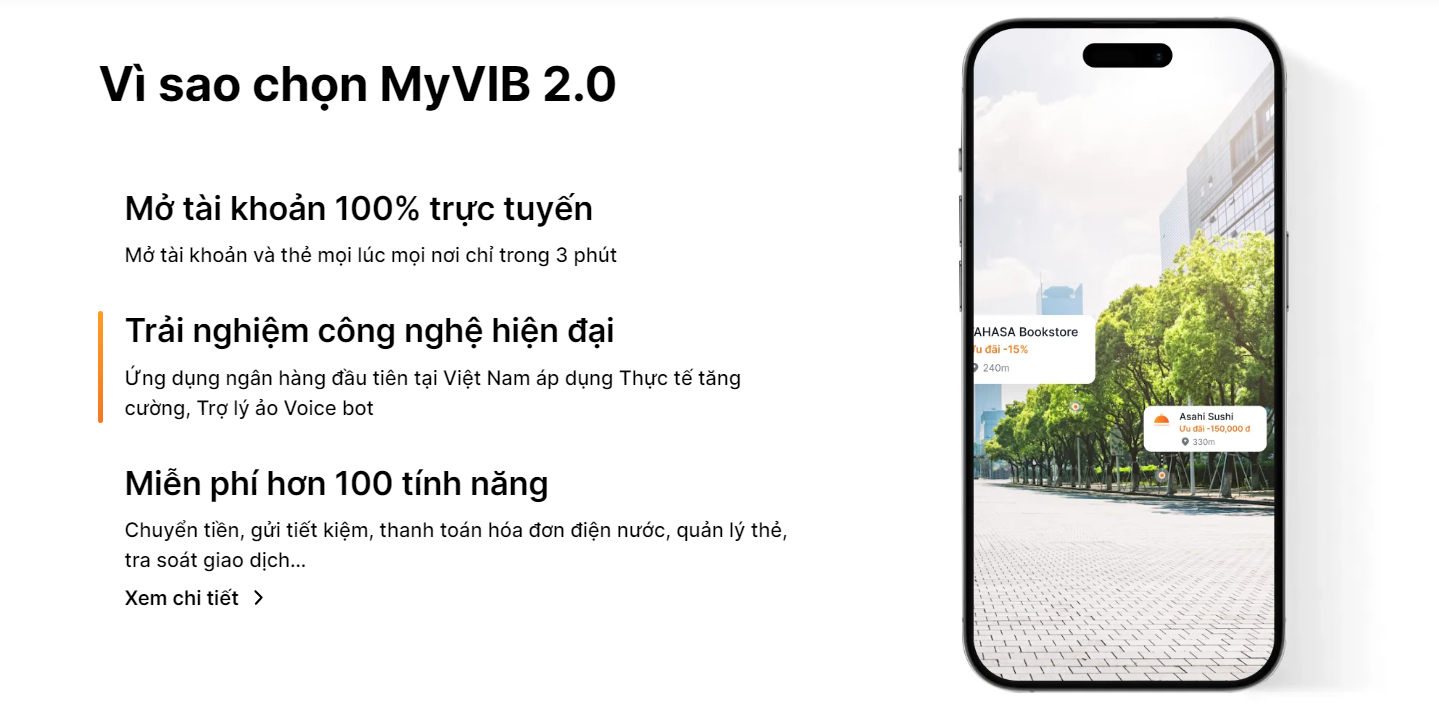
 Hello everyone, I need your help to code this scroll logic : change one pinning element allowed active state by scroll. When I scroll, state changes and updates image in both sides allowed. By details, when I scroll down, the element below will be active and drag to change the corresponding image to the right, otherwise when scrolling up, the upper element will be active and drag to change the image, when clicked on any element on the left, the image will also be changed according to the active element (similar to scroll), and if the first element is active, we will be able to scroll to the top of this section. This is sample link : Ngân hàng di động MyVIB 2.0| VIB I want to use scrollmagic or maybe gsap or intersection observer, thank you.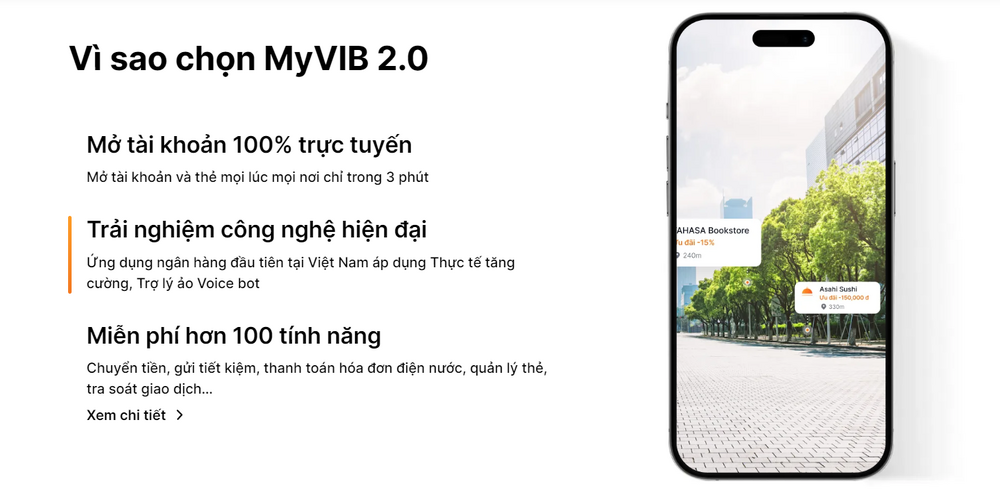
-
Hello, I just can’t figure out how to set up a smooth sliding of the title (targetTitle) and colored blocks (targetImg, targetImg2). When scrolling through the page, they move very quickly. I've experimented with the duration parameter, but it doesn't give any results. I tried to add ScrollSmoother, the page began to scroll smoothly, but this did not affect the block (target). I don't understand what I'm doing wrong. And for some reason, the marker end: 'bottom bottom' does not reach the bottom of the block (target). Can someone explain why this is happening and how to add smoothness to the elements?