Search the Community
Showing results for tags 'safari'.
Found 71 results


-
Hello community. I'm trying to implement an animation that has been talked about here more than once from the site https://lenis.darkroom.engineering where Enter Lenis is approaching us in the screen. I implemented the same "backing" and it worked fine until I started testing it in Safari browser and on mobile devices The issue is that as I get closer, the edges of my shape (SVG) start to blur and I can see the outlines are not clear. I tried to implement my shape as a normal text, but I faced the same problem, my outlines during the animation process become not clearly visible. I also tried to add will-change property, but with this property my edges become blurred even in Google Chrome browser where everything was fine before. What could be the problem? Thanks! Demo: https://codesandbox.io/p/sandbox/scale-problem-tx8s3m?file=%2Fsrc%2FApp.tsx%3A32,11 Lenis Website: https://lenis.darkroom.engineering
-
Hi. I'm animating a div container clip-path using gsap. The idea here is to turn the container from a rectangle shape into a pill shape. This is how I'm doing it inside a timeline: const videoPinTl = $gsap.timeline({ scrollTrigger: { trigger: '.video-wrapper-pin', start: `center center`, end: "+=1000", pin: true, scrub: true, } }) .fromTo('.video', { clipPath: 'inset(0% 0% round 50px)', }, { duration: 1, clipPath: `inset(46% 34% round 140px)`, }) Code above works fine in all browsers except Safari in which the shape radius bugs out while scrolling. I think the reason for this is because of the decimal values when animating from 50px to 140px. If I inspect the devtools and do a "manual" animation from 50px to 140px (without decimals) it doesn't bug. Is there a way to make it so that the clipPath border-radius does not use decimal values while animating? Thanks.
-
Here's an example: https://codepen.io/helleholmsen/pen/abXvvQq Is there any known fix for this?
-
 Hi, I have an issue with text flickering on Safari. It happens only when I scroll. On Chrome and other browsers it works smoothly. I am using ScrollTrigger to move the text to the right side. Any ideas how to solve this issue? Everything is kindly welcomed.
 -
 Hello Guys, it's my first Forum Article. I'm using GSAP for nearly a year now. I'm using GSAP + GsapSmoothScroll + ScrollTrigger and Barba.js I have some slightly complex Animations on my Site and its extremely laggy on iPhone Safari I tried a lot of Solutions that I found hear, but nothing really works. Does someone have some Ideas how to fix. Here is a Link to the Website: This is my config for the ScrollSmoother. The Lag is specially on the page uid42 thats the link i put in hear. The other pages are ok not perfekt but ok: I hope its enough information. scroll = ScrollSmoother.create({ smooth: 0.2, // how long (in seconds) it takes to "catch up" to the native scroll position effects: true, // looks for data-speed and data-lag attributes on elements ignoreMobileResize: isMobile() && !document.querySelector("#uid1") ? true : false, normalizeScroll: isMobile() && !document.querySelector("body:not(#uid42)") ? true : false, }) On a Mission (hantha.net) Hope someone could help me.
 -
Hello all, Was wondering if anyone could shine some light on this issue i am having. Simply put, I am getting chopping animations when scrolling with a mousewheel on safari only. Every other browser the animations are smooth with a trackpad or mousewheel or even keyboard arows. On safari it works fine with a trackpad but not with a mousehweel. Any suggestions? Thanks in advance! Tas
-
 I am trying to use the scrollTrigger plugin while implementing the fix for the safari scroll issue you flag in this article here. When I apply the CSS from this it breaks the pages native scroll and therefore the scrolltrigger doesn't fire. What can I do to resolve this In the section: Stop iOS Safari from resizing the window on scroll body, html { height: 100vh; width: 100vw; overscroll-behavior: none; overflow: hidden !important; } #viewport { position: fixed; overflow-x: hidden; overflow-y: scroll; height: 100vh; width: 100vw; -webkit-overscroll-behavior: none; overscroll-behavior: none; -webkit-overflow-scrolling: touch; } https://greensock.com/docs/v3/HelperFunctions#scrollResize My simple scrollTrigger on the element is just this but it breaks cause the above CSS ScrollTrigger.create({ trigger: '#test', start: 'top top', // endTrigger: '#otherID', end: 'bottom 50%+=100px', onToggle: (self) => console.log('toggled, isActive:', self.isActive), onUpdate: (self) => { console.log( 'progress:', self.progress.toFixed(3), 'direction:', self.direction, 'velocity', self.getVelocity() ); } });
 -
 Hello, I'm trying to make an animation that switches the viewport's background color depending on your scrolling position. The animation works great on Chrome and on FireFox, but Safari just looks bad, very laggy and the colors don't transition into the page, but rather just pop up with a delay. Here is my animation code (I am using Vue.js) backgroundAnimation() { let $projects = gsap.utils.toArray(this.htmlID + " .project-wrapper"); let projectListTl = gsap.timeline({ scrollTrigger: { trigger: this.htmlID, start: "top center", end: "bottom center", ease: "none", scrub: true, markers: false, onLeave: ({ progress, direction, isActive }) => document.documentElement.style.setProperty("--background", "white"), }, }); $projects.forEach(($project, i) => { projectListTl.to("html", { duration: 0.1, "--background": $project.dataset.projectColor, }); projectListTl.to("html", { delay: 0.3, duration: 0.2, "--background": "transparent", }); }); }, (The method above runs when there is an update on the component) updated: function () { this.$nextTick(function () { this.backgroundAnimation(); const self = this; ScrollTrigger.matchMedia({ "(min-width: 1024px)": function () { self.scrollAnimation(); }, }); }); }, Any ideas? Not sure where to start looking even. Thanks!
 -
Hey, All. First off smooth scroller is amazing! An awesome addition to the gsap plugins. Second while testing it out I ran into some performance issues on Mac Safari. It appears jittery and shakey on scroll. Is this due to something I'm doing wrong? Or a compatibility issue with Safari? Here are the codepens I and a A screen recording (chrome on the left and safari on the right). Smooth Scroller On/Off https://codepen.io/bws_dan/full/MWrPEEN
-
hi, i got a few animations linked to a scrolltrigger, which work absolutely fine with every browser. but in safari if the screen is over a certain width the animations sometimes start to flick or just lag. i already tried to just animate them automatically (without scrolltrigger), but it seems like not the scrolltrigger is the problem. i think that svg's require more performance in safari or something like that? so the question is how can i fix my animations, for safari? it also seems like the animation works fine unless u got a 4k or higher screen. thanks in advance!
- 9 replies
-
- 1
-

-
- scrolltrigger
- performance
- (and 2 more)
-
hi guys! my problem is, that my lottie animations, which are combined with a scrolltrigger sometimes start to flick in safari. the flickering only appears above a certain viewport. as i said sometimes the flicking happens sometimes not. i already tried to just make the animation not fullscreen, but unfortunately it doesn't help at all. i also noticed, that the flickering is much worse if i visit the site on a ultrawide display. i also thought about just implementing the animations as videos, but there are like 6 animations on one page, so i didn't want to let the loading time explode. in the demo i haven't noticed any flickering so, if u want to see the full page: www.sterngasse.at
-
Hi there! On mobile safari autoscrolling to the sections is lagging. Can you help me to fix it?
-
Hello all, I just had a problem with iOS 10 Safari and the ScrollToPlugin, there are some changed that now will trigger the autoKill function. It has taken me more than a hour to realize that it was the autoKill function who stopped the animation. (iOS9 Safari didnt had this problem) Just for people with the same problem (I think almost everybody who is using ScrollToPlugin) for now just add "autoKill:false": TweenLite.to(window, 1, {scrollTo: {y:2000, autoKill:false}, ease:Power2.easeInOut}); Sorry for no Codepen but you can easily try it out with the Safari Developers Debug, just open a page that is using GSAP on your iPhone en run code without autoKill:false. (Sometimes it will not autoKill it, but almost always). Hope that I have made someone happy with the same problem Greets! Vincent
- 12 replies
-
- 11
-
-
Hi everyone, The issue here seems to be with the shifting of the background images on slide in / out. In the functions slideIn and slideOut I've commented out the lines of code that shift the background images. With this code removed everything works fine on all browsers. Un-commenting the code adds the image shifting and on Chrome and Firefox, everything works fine with the shifting added. On Safari however, it appears to kill the other tweens that scale the SVG clipping path and do the SplitText animation. Have a look and see what you think. I'm assuming I've made a mistake but then I'd also assume I'd have an issue in other browsers. (Feel free to critique my code as well )
-
Hey, This is my first post on the forum, loving gsap! I've ran into a little bit of an error. I have an SVG clip-path that I wan't to perform a simple scale animation on when in the viewport but for some reason it does not want to run in safari, I'm fairly new to gsap so don't have much experience troubleshooting SVG animations, so any help would be appreciated, cheers! NOTE: I've not included the scrollTrigger library on the codepen just so you don't have to scroll to play the animation, the bug still stands.
-
Anyone have a fix for blurry text in Safari when it scales up? Safari does the same thing to SVGs but I found if I slightly change the rotation with an onUpdate that fixes the issue. SOLVED - see my post below.

-
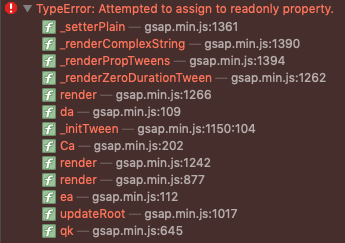
Hey guys, I´m having an issue on Safari when I try to transition some properties into a <linear Gradient>. I'm using Next.js, but I leave here a minimal codepen to replicate the issue. Also, I leave some videos to show the error. In Chrome and Firefox works fine, just fail in Safari (Version 13.1.1). I'm getting this error (TypeError: Attempted to assign to readonly property.) Maybe anyone who had this error can help me! thanks in advance. chrome.mov safari.mov
-
Hi guys, I've an issue with Safari rendering when I use MorphSvg Plugin to change SVG path of a mask. With other browser I've no problem, but with Safari Desktop (monitor over 1920x1080), and Safari Mobile, the SVG morphing animation is not fluid. I'm using the scrollPlugin, but also without that integration the result is the same. Any ideas? Thanks to everyone. safari-rendering-issue.mp4
-
Hey guys. I just launched my new website. All my vanilla JS animations are super smooth. And my GSAP animation is smooth in every other browser like Firefox, and Chrome. But in Safari it is super laggy, like instead of being smooth is clips 4 times, so it increases 25% each time. None of my other elements does this, so I do not think that this is a general problem on the site. And the animation is like super subtle so I can't see why it would cause such a lag. I am new to GSAP. I put a codepen URL, I haven't pasted the whole styling in, but I pasted all the GSAP js in so you can get a sense of what I have done. UPDATE: I found a solution, it was a Lottie animation who were interfering with the animation, thanks for the help!
-
Hi ladies and gents. Hoping someone can help me out with the performance of this animation in Safari. I built a site for a friend and it works fine on Chrome, Firefox and Edge but on Safari it flashes towards the end of one of the animations in the timeline. I have no idea why. If anyone could give me some advice on how to fix this and any other tips to improve the performance, i'd really appreciate it ? https://theswirlytrain.com Here is a video example of what is happening. // start animation at top of page function scrollTop() { if ('scrollRestoration' in history) { history.scrollRestoration = 'manual'; } window.scrollTo(0,0); } const tl = gsap.timeline({ defaults: { ease: 'power3.out' }, onStart: scrollTop }); tl.set('article', {autoAlpha: 1}); tl.from('.home .artwork .elementor-widget-container', 3, { scale: 8, autoAlpha: 0, delay: 0.3}); tl.from('.home .elementor-button, .signup-form, .release-details', 1, {autoAlpha: 0, y: 40, stagger: 0.4, delay: -1}); tl.from('header', 1, {autoAlpha: 0, delay:-0.5}); tl.from('.moving-text', 3, {autoAlpha: 0, scale:1.2, x: 100, delay:-0.5});
-
Hey, First time posting so hope i'm making myself clear and not breaking any rules :). But i have no idea what i could be doing wrong (yet). Been working on a banner ad in which masked svg elements are animated: No trouble with Chrome or Firefox. But when i rotate a div element with an masked svg inside it, the mask takes a bigger size in Safari. I've added an event listener to not have to refresh every time to see my precious yoghurt rotate ;) Can anyone point me in the right direction what could be a solution? Not sure if this is Greensock related, if not, i'll show myself out :). Thanks anyway!
-
Good day, Can someone help me solving the issue? Have been looking for multiple solution and i don't want to end up using javascript safari hacks. My sample pen works in other browsers but safari. Many thanks in advance.
-
Hey, When I display an animtion in an iframe, the whole content jumps up 1 px while animating, and then jumps down again when done. I've only observed this behavior in Safari on desktop. (I've tried other people's animations as well with the same result.) Does anybody have any idea why it does this, and how to make it not to? http://skalpell.se/clients/ellermore/test/ Plz halp
-
Hi Folks, When GreenSock write matrix3d on CSS Transform based on force3D / Perspective / TransformOrigin the clip-path css attribute animation just break in the Latest Safari (12.1 (14607.1.40.1.4)). See our Example above in SAFARI Latest Version, or on any iOS latest version !! . Click on Working and Not Working version to see the Effect. The only Different between those functions are the "force3d:true" setting ! Hope you have a good idea for this ? Thank you, Krisztian from ThemePunch
-
Hi, So this is a simple rotation animation that works well on all browsers but Safari. Can't figure out why this is happening. Any ideas? (Chrome for desired results, Safari for wrong ones) Thanks!