Search the Community
Showing results for tags 'draggable'.


-
 Hi all! When I drag and drop some boxes on to the main element, i'd like to be able to swap 2 elements with each other by dragging. However when I swap 2 elements with each other, the dragged element is no longer correctly synced with my mouse. I tried this.update()but that didn't seem to do much. How can i fix this? Or should I try a different approach? TIA, Jens
-
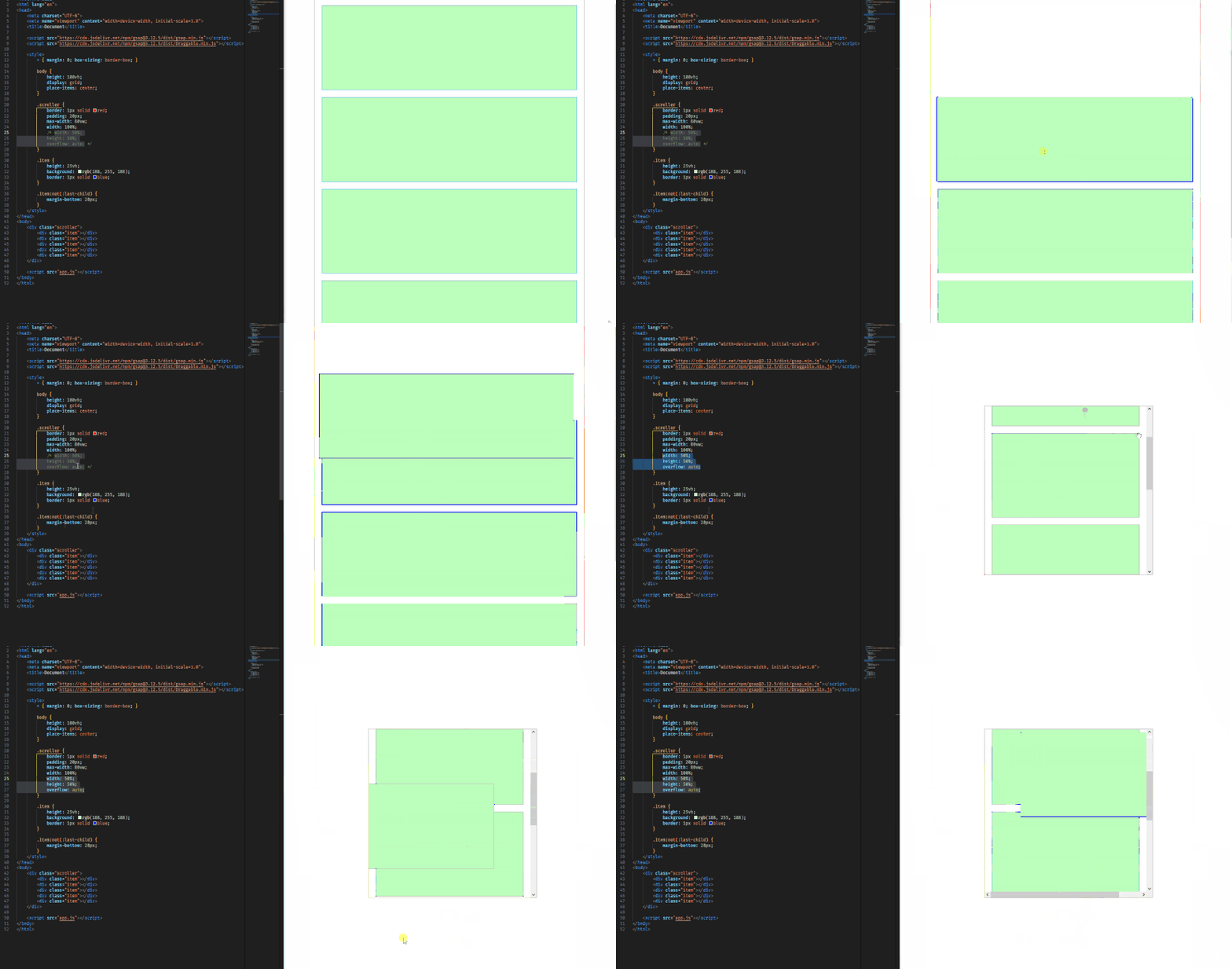
First of all, i forked the codepen demo template, but i couldn't get it to work, even though it's exactly the same code as on my local machine. I attached a gif to this post which showcases the following problem: I'm using the Draggable plugin, but noticed an issue when scrolling. The item i was dragging wouldn't scroll down with me. This only seems to happen when the item i'm dragging is in a different scrollable container. Is there a way to set a different scrolling parent on the Draggable instance? I couldn't seem to find anything in the Draggable docs either. TIA, Jens
-
Hello everyone, I need to create a timeline that must adhere to the following behaviors: - Both the timeline and the slider must scroll automatically - The user should be able to take control of the scrolling with the slider - When the user finishes dragging the slider, the timeline AND the slider should resume their automatic scrolling Today, I have an issue. Everything works well in auto-scroll, but as soon as I drag the slider, it stays frozen and doesn't start moving again. I don't understand why, onDragEnd, my autoScroll method restarts fine but the .to related to the slider doesn't 🤔 If anyone has a solution, I'm all ears, Thanks in advance. === FRENCH VERSION === Bonjour à tous, Je dois réaliser une frise chronologique qui doit respecter les comportements suivants : - La frise et le curseur doivent défiler automatiquement - L'utilisateur a la possibilité de prendre la main sur le scroll avec le curseur - Quand l'utilisateur a terminé de drag le curseur, la frise ET le curseur reprennent leur défilement automatique Aujourd'hui j'ai un soucis. Tout se passe bien en scroll auto, mais dès que je drag le curseur ce dernier reste figé en ne repars pas Je ne comprends pas pourquoi onDragEnd ma méthode autoScroll se relance bien mais pas le .to lié au curseur 🤔 Si quelqu'un a une solution, je suis preneur, Merci par avance
-
I am trying to develop an infinite canvas animation which show cases a number of clickable images on it. On moving the cursor the images will move in the opposite direction, I tried this with div now, is it possible to use Canvas for an infinite scroll effect. Plugins used: TweenMax, TweenLinte, ScrollToPlugin, Draggable
-
Hello, I am pretty new to GSAP. I been working on a slider like provided in the demo. The slider works fine on computer or laptop, however, when I tried on phone the slider is all weird. It is showing the wrong text by a selected box. I am sadly not sure why this is the case. I have read something about using Draggable3, but I don't know how to use this by CDN. Can someone help me out? Thanks in advance
-
Hello! I am quite new to GSAP and I am trying to make a slider using Draggable. I am trying to display a caption when an item is above the arrow (the '\/'). I got working for the right side. However, I can't get the draggable to be able to drag all the way to the left without messing up getting the 'content-box' index in the OnDragEnd function. Please, let me know how to solve this. Thanks in advance
-
Hi, I have a circular slider on my website, copied from this example https://codepen.io/Mrchoy/pen/eYbezYG It works fine but I noticed a big performance issue on iOS devices, the slider is almost impossible to use because of the lag. Is there something I can do to improve this? The js is copied from the example, I just changed the css and of course the content of the cards. Thank you
-
Hi, i am starting a new project where a slider has already been set up with swiper js. Now i was wondering if its possible to add a cool animation when i drag or scroll through the slider like on this website: http://manifesto.clapat.com/index-showcase-carousel.html the images seem to be cut on the sides and seem to have more depth also they skew in the direction they are dragged. I was just wondering if someone could give me some direction on how to approach this kind of effect with GSAP or if there is a tutorial that someone could point me to. So no debugging for now^^. Also i wanted to know, if this effect is possible with a slider made with swiper JS or if there are any complications. Additionally i would like to implement the transition effect when clicking on the slider images. I saw that it can be made with the FLIP plugin, i just hope it works within Swiper JS. Thanks
-
Hey guys, hope you all are having a great week! Is there any way I can achieve the 'radius' functionality using the 'rotation' type Draggable? I tried hacking my way into it but no good My problem is that when defining the liveSnap property on a 'rotation' Draggable, the grabbed element just instantly jumps from snap to snap instead of smoothly rotating around and then locking position once it is close enough to a given snap point (like what happens when using a 'x,y' type Draggable: https://codepen.io/GreenSock/pen/wgapaY) This codepen is the closest I've found to the result that I want, it works fine the way it is, but as soon as you add liveSnap: true, the dragging just becomes truncated ⬇️ Thanks in advance!
-
Is it possible to define points in css strings? My usecase is a mobile menu that slides out after a drag. The value that the draggable item ends at is a pixel value which is fine until you resize the browser. I know you can't resize a phone but a rotate will have the same issue and you can of course also have menus like that on desktops. A points definition of… ["0%", "100%"] …would fix that.
-
 Ok so this is a continuation of my previous post (that was resolved) The problem now is that when the item that exists below the fold (you have to scroll to reach it), when dragged the draggable on the `move` function will correctly resolve hitTest versus other containers, but on dragEnd it will not resolve hitTest correctly. Other list elements that are above the scrollbar correctly resolve hitTest on both `move` and `dragEnd` Here is a sample: https://stackblitz.com/edit/gsap-react-basic-f48716-tc3dev?file=src%2FBoxItem.js (simply drag box 3, 4 over the drop area and release, the hit test resolves correctly, then drag box 7 on move it will fire the hitTest correctly, but when released over the drop-area the hitTest will return false) 2024-01-18 16-51-16 (1).mp4
 -
Hello! I am using this useful resource https://codepen.io/GreenSock/pen/JjZdPWj to create my custom circle cards slider. I'm triying to spread all the cards around the main circle with a small rotation to get an effect like the image provided, because my cards are overlaping in both sides of the window, but I don't know how to approach this, it would be necessary to animate the rotation of the cards when the animation of the carrousel is executed to keep cards circle. Anyone could help me? Thanks!

-
I'm using this slider from an other gsap question, however I would like to add buttons to go to next and prev slide. However I'm not totally aware in how can add this functionality. I've been looking on "startDrag()" method but didn't get it. Can someone help me with that?
-
Hello! So I have a scenario where I have a draggable of size 250x250 and when I drag it, I pass a class that converts it to 150x150 pixels (width, height), however when I do `draggable.hitTest("#someelement", "50%")` first of all it doesn't match although visually the elements overlap, and when I print the boundingClientRect of the draggable instance it prints `250` for width and height. I'm doing this.update onPressInit but it doesn't change anything. Is there a way to update the bounds of the draggable instance after the drag initiates or onDragEnd? onPressInit: function (ev) { console.log(draggable, this); this.target?.classList.add('intransit'); this.update(true); },
-
Hello, I made draggable content, but there is a problem in my code to move it by dragging left and right, but I could not solve it. Can you help with the Codepen link? //Draggable Start let tickerElement = document.querySelector(".ticker"); Draggable.create(tickerElement, { type: "x", edgeResistance: 1, bounds: ".ticker-slider", onDrag: updateTickerPosition }); function updateTickerPosition() { let newPosition = tickerElement.getBoundingClientRect().left; gsap.set(".ticker-content", { x: newPosition }); } //Draggable End
-
Hey there, I'd like to move an element horizontally using wheel and/or drag on desktop and touch and/scroll on mobile. I've set up Draggable for easiest possible scrolling with inertia, and Observer for wheel events. I can sort of update a target value for the element to tween to, but the back-and-forth of the respective x values won't quite work. Any tips? Best regards Constantin
-
First of all, congrats for all stuff GSAP! This is a wonderful piece of work! Secondly, I've encountered issues with Draggable, while using React 16.5: Using Draggable.create(target) doesn't allow the user to drag the element at all. A 3d transform is set on the element, having all 0px values, but the element itself doesn't move. The onDrag / onDragEnd / onDragStart handlers aren't called. On the other hand, the onPress handler is called, but two times every click, once with a PointerEvent type event payload, and with a MouseEvent, the second time. Also, it's important to point out that using GSAP 1.19.1 / 2.0.0 / 2.0.2 with React 16.4 and lower doesn't reproduce the issue, nor does it cause the onPress handler to be called twice. It only gets called once, with a PointerEvent. However, I was able to reproduce this issue using GSAP 1.19.1 / 2.0.0 / 2.0.2, with React 16.5. If there's anything more needed, I'll happily provide more details. componentDidMount() { const lis = document.getElementsByTagName('li'); Draggable.create(lis, { cursor: 'grab', onPress(event) { console.log(event); }, onDragEnd() { TweenMax.to(this.target, 0.5, { x: 0, y: 0 }); } }); } Thanks in advance!
-
I want to create a parent div with 80% of screen width, and inside of that there should be mini square colorful divs, now the functionality i want it to drag though them inside of that parent div, and see all the divs because there'll be so much divs so it will be hard to see them in 1 place, and also It should show the divs in a grid style. another website (midjourney) using same features uses this draggable.min.js() gsap.(). how to achieve it? you can go to (https://www.midjourney.com/) and test it, just click on the eye icon and it will appear on the hero section
-
Hi there. I am trying to create a bottomsheet. As you guys can see, there is a scrollable div element inside draggable element. If scrollTop is 0 then the element should be dragged toward bottom side when users drag or touch down. If scrollTop is more than 0 then it should scroll and should not be dragged. But the problem is that I cannot solve this issue. I searched about this issue and i got the hint that I should use allowEvnetDefault option to fix this issue. And I tried to solve this issue but i can't. How can I fix this issue?
-
Hey guys, sorry for no codepen this time...I wanted to check if it's possible first and ask if you know any demos that try this approach. I was trying to find any examples but from what I see no one tried to do it yet. While I wait for the answer I am working on a demo. I have a lottie animation - it's a 3d model being rotated 360 degrees. I want to be able to drag on x axis to "rotate" that 3d model, without using any UI element - just simple drag anywhere on the area to start rotating. So first of all, is it even possible to use draggable this way? Maybe there are some demos that show control of lottie with drag on mouse x? All codepens I saw were using scrolltrigger to control the animation, but I can't do that. Maybe observer is also an option?
-
 Hi there beloved community. I'm in the process of launching a new portfolio but there's a bug with my GSAP-based marquee which showcases my projects in a gallery. From what I can see it looks like my code doesn't calculate the proper width & height of all of the media's inside of the marquee. And sometimes on load it only loads some of the actual content inside. Another thing: the marquee height is clamped, and inside of my runMarquee function it looks like the height doesn't adapt when resizing. I use: SvelteKit (framework) Hygraph (GraphQL) Another issue I'm facing is that most of my content inside of the marquee's has different aspect-ratios, especially the videos doesn't load in the proper format. So please also look for a solution to this. Preview link of website: https://krause-ew9w4q45a-asgerkrause.vercel.app/ sometimes it works and sometimes it doesn't. I need it to be bullet-proof. If you have a stronger code for the same results, please let me know! HTML structure: <div class="marquee"> <div class="track"> <!-- Media will go here --> <video autoplay loop muted src={url} type="video/mp4" /> <img src={url} alt="" /> </div> </div> CSS: .marquee { height: clamp(18.75rem, 12.5rem + 16.6667vw, 25rem); position: relative; overflow: hidden; display: block; margin-left: calc(var(--space) * -1); width: 100vw; } .marquee .track { height: 100%; transform-origin: 0 0; display: block; position: relative; } .marquee .track > * { height: 100%; width: auto; padding-left: 4px; position: absolute; object-fit: cover; } JS: onMount(() => { function runMarquee() { const allMarquees = document.querySelectorAll('.marquee'); allMarquees.forEach((marquee, index) => { marquee.querySelector('.track'); const allItems = marquee.querySelectorAll('.marquee>.track>*'), proxy = document.createElement('div'); allItems.length; let totalX = 0, marqueeH = 0; marquee.offsetWidth; allItems.forEach((item, i) => { const itemW = item.offsetWidth, itemH = item.offsetHeight; (totalX += itemW), gsap.set(item, { x: totalX, width: itemW, height: itemH }), itemH > marqueeH && (marqueeH = itemH); }); const marqueeVal = gsap.utils.wrap(0, totalX), marqueeProgress = gsap.utils.wrap(0, 1); gsap.set([marquee], { height: marqueeH }); const stringX = `-=${totalX}`, animation = gsap.to(allItems, { repeat: -1, duration: 300, x: stringX, ease: 'none', paused: !0, modifiers: { x: function (x, target) { return `${(x = ((parseInt(x) - totalX) % totalX) + (totalX - target.offsetWidth))}px`; } } }); function updateProgress() { const dragValue = marqueeVal((this.deltaX / 2) * -1) / totalX, currentProgressAnim = animation.progress(), endProgress = marqueeProgress(currentProgressAnim + dragValue); animation.progress(endProgress); } Draggable.create(proxy, { type: 'x', trigger: marquee, inertia: !0, onDrag: updateProgress, onThrowUpdate: updateProgress }), window.addEventListener('resize', function resize() { animation.render(animation.time(), !1, !0); }), animation.play(); }); } runMarquee(); }); Thanks
-
Greetings I just converted my web game (link at bottom) over to GSAP using Draggable, TweenMax and TimelineMax! I launched the site over 10 years ago, built on YUI2. About 6 months ago I decided it was time to drag it into the modern age, so I set upon a total front end re-write, this time basing all animations and drag/drop on GSAP! I deployed the update 2 weeks ago. Since then about 1 million unique users have spent over 10.9 million hours playing. Not a single GSAP bug or issue has come up! GSAP has been ROCK SOLID. WOOT! I just wanted to THANK YOU for making an amazing product that's allowed me to do this massive re-write and launch without having to worry about the animation/dragging aspects. Thanks again! PS: The new GSAP based website is https://worldofsolitaire.com The old YUI2 version is here: http://legacy.worldofsolitaire.com
-
The linked pen is a simple use case of draggable that appears to work in all aspects except one. The svg elements that are dragged will not display above any of the other elements making it impossible to determine where the cursor/drag is on the screen. The drop logic appears to work fine and there are no errors reported. Even though it is built into gsap, I tried messing with the z-index of the svg elements to no avail. I have a feeling the answer to this is simple. I just cannot figure it out.
-
Hi Based on the demo codepen provided by you, how can I add the draggable plugin? Note that this must also work on mobile. Thanks
-
Hello, I tried to recreate material ui 3 carousel with GSAP. When we swipe on the carousel, width of next image in the line should increase and width of current image should decrease. I added labels in the timeline where one of the images are in expanded positions. When the timeline is linked to a ScrollTrigger, Snap to labels is working fine. And it is not working if timeline is linked to draggable. I tried snap: { snapTo: "labelsDirectional", duration: 0.01, ease: "none", }, and snap: "labelsDirectional", Is it not supported? Please help me with anything Im doing wrong. Thanks Carousel with ScrollTrigger