Search the Community
Showing results for tags 'splitext'.
Found 20 results
-
Hi Dear, I have created a component with split text and scroll trigger in a Next.js project. It works fine on Android but is not functioning properly on iPhone. Specifically, I'm experiencing jerking while scrolling. Can anyone suggest a solution to fix this issue?
-
Hi, everyone! We've been using SplitText for almost all of the heading animations on our website for a long time and accidentally revealed the following issue. It seems like Google is crawling our H1s instead of Title Tags on multiple pages and as a result— it is not able to read spans SplitText breaks headings into like a sentence. Some of the pages where H1s and other headings are crawled instead of Meta Title and Description display them as separate letters separated by spaces in SERP. Is there any fix possible for that? I don't think I can find similar topics on the forum. Website link I am also attaching multiple screenshots with the issue described. Thanks in advance!
.thumb.png.eb5cad0a1400210d135b3fd711bfd639.png)
.png.812fdb587745acd383ba2eb3c33c8eee.png)
.png.e72e08855d779d394fa5d9e9aace7d8a.png)

-
help me pls figure out how to break words into letters and make an animation of word replacements endlessly in a loop
-
Hello ! I'm new here and I have a problem to start animation on hover. I try to make the same animation like this : https://custom-hover-animations.webflow.io/ (Character Tween V1) Can you help me ? pls This is my animation without the hover trigger : <script> gsap.registerPlugin(SplitText) var split = new SplitText("#title-b", {type: "chars"}); var splitb = new SplitText("#title-bb", {type: "chars"}); gsap.fromTo(split.chars, { y: 0, }, { duration: 1, y: -38, stagger: 0.05 } ); gsap.fromTo(splitb.chars, { y: 38, }, { duration: 1, y: -38, stagger: 0.05 } ); </script>
-
I want to animate the background, but it is not continuous with the spaces between words. Is there a way that I can treat spaces as characters, so that they will be animated the same way. Thank you!!! To be as clear as possible I want the background of the spaces to be treated exactly the same as the rest of the characters
-
Hi All, I am new to GSAP. How do we create a text / heading animation like https://tobiasahlin.com/moving-letters/#2
-
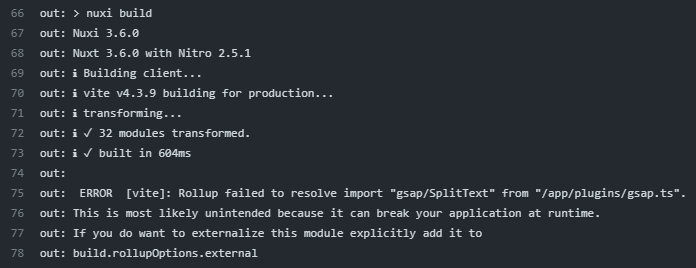
Hello, im trying to use SplitText club plugin, but i can't make it work. I've searched in forum but no similar issue found. 1. Club token added to `.npmrc` //npm.greensock.com/:_authToken=xxxxxxx @gsap:registry=https://npm.greensock.com 2. transpile gsap in `nuxt.config.ts` build: { transpile: ['gsap'] } 3. Register plugins in `/plugins/gsap.ts` (this also doesn't work `/plugins/gsap.client.ts`) such as: import gsap from 'gsap' import { ScrollTrigger } from 'gsap/ScrollTrigger' import { SplitText } from 'gsap/SplitText' export default defineNuxtPlugin(() => { gsap.registerPlugin(ScrollTrigger) if (process.client) { gsap.registerPlugin(SplitText) } }) Everthing works fine in local build, but not in actual build on server, this is my error: * Also I find here https://github.com/hypernym-studio/nuxt-gsap/pull/41 this comment: (actually same error using nuxt-gsap) So maybe somehow `gsap/SplitText` is not visible for build ? I tried to make minimal repo, which is oddly working fine (just add authToken to `.npmrc`): https://stackblitz.com/edit/github-fhtp4t-jgbsnt?file=nuxt.config.ts,pages%2Findex.vue,.npmrc
-
Hello All, I need help on Gsap, if you see the link of codepen theres a hover on text, I want something like on this Site on the last section https://dimitriossykovaris.netlify.app/about Hover on the mail u will see the hover Thanks,
-
Hi GSAP community! Hope you're doing well! I would like have an answer about multiple paragraph animated with the SplitText module in react environment. In fact, i'm tryin to make a dialog box with multiple paragraph that I split to make an effect like in a video game. My problem is I would like to remove the previous paragraph before the new one start his animation so that it'll appear at the top of the dialog box. I made a codesandbox (sorry i didn't find a way to make it works with codepen) here : https://codesandbox.io/s/adoring-currying-12sedl? Is there a way to do that ? Thanks in advance.
-
Hello. I'm importing the Splittext js file, as explain on documentation https://greensock.com/docs/v2/NPMUsage?_fromLogout=1 , on an Angular environment. So i've: Insert the gsap-bonus package inside src folder imported in component using import SplitText from "./gsap-bonus/SplitText"; It generates this error though: Failed to compile. ./src/assets/libs/gsap-bonus/SplitText.js Module not found: Error: Can't resolve 'gsap/TweenLite.js' in '/Users/federica/Desktop/menatcode2020-menatcode-landing/src/assets/libs/gsap-bonus' So i've tried to import the SplitText.js file inside the UMD folder and it doesn't fails to compile but it throws an error on console: ERROR TypeError: _doc.createElement is not a function at _splitRawText (SplitText.js:423) at _split (SplitText.js:503) at _split (SplitText.js:496) Anyone could help me understand what's missing in the process? Thank you in advance
-
click to play button this video is play. But when close this video. click the closed (X) icon then this page jump to top. then scroll down jump to previous section (video section). Please check this youtube video: Previously i am using this code (link below) now its not working.
-
Just trying 2 different easy approaches to get this typewriter works like a charm! My issue is to sync both animations of the #text element and the chars and I do believe it is really simple to do! I am looking for an easy approach to take down this latency this animation is what i need to edit: // need to sync this block with the above animation gsap.from('#text', {width: 2, duration: 2, ease: SteppedEase.config(20) }) my target is to code this without the use of any other JS Libs like jquery
-
Hello! I am very thankful for Greensock forum to be so helpful for me before with my website. I've got +1 little moment of getting stuck in there without knowing what to do. I need to make on scroll text animation as on this reference website - https://www.joinsparq.com/ (as in "Say goodbye to labor fees" and other titles like this). I am using SplitText and trying to get the same effect, but I cannot achieve the same look of text getting from like... behind & bottom of the row and moving to the front & top? I am attaching a codepen of my current progress and that's how it looks when implemented on website (not quite it, right? ) - https://saltbox-new.webflow.io/workspaces I think the reference website itself might be using GSAP as well, but I don't seem to find it in their code, so will be glad to get any help or hint. Thanks in advance! P.S. An off question - is it possible to upload SplitText/SmoothScroll as CDN links? I am using sitebuilder, so cannot store files externally myself or upload them to the builder as well as pasting it as external code due to a limit of symbols.
-
I have this issue with SplitText where the text inside a <span> is breaking into another line and I have no idea how to fix it. According to the docs they spans shouldn't be a problem, but I don't know what is causing this In my example, the "this is the THIRD line" should be on the same line
-
Hey guys, I'm using SplitText plugin to show like a typing animation, the problem is that sometimes I have buttons inside the paragraph and the plugin is also typing those character when I don't need the text inside the buttons to have that animation. It's there a way to get avoid that text to be splited? I try several techniques, one was to remove the paragraph with the buttons outside of the SplitText animation, the problem there is that I need the movement to the next line
-
 Hello, I'm new to GSAP and wanted a little bit of help with one of my projects. I'm trying to recreate the text animations in this codepen https://codepen.io/kh-mamun/pen/NdwZdW. There are seven different text animations in this codepen. If someone can help me by just recreating only one of the animations as I cant quite grasp how to perfectly time keyframes with staggered animations. Here is one of my trials for the animation called "revolveScale" in the codepen or also tagged with class "one": var char='.char'; var duration=5; var tl=gsap.timeline(); tl.fromTo(char,{x:-150,y:-50,rotation:-180,scale:3,opacity:0},{stagger:{amount:duration*0.6},x:20,y:20,rotation:30,scale:0.3,ease:'none'}) .to(char,{stagger:{amount:duration},opacity:1,ease:'none'},"<") .to(char,{x:0,y:0,stagger:{amount:duration*0.4},scale:1,rotation:0,ease:'none',delay:duration/char.length},`<+${(duration*0.6)}`);
 -
Hi! How can i animate text from last character to first? I can't find any demo about it. Thank you!
-
Hi, I'm new here & need some help. I have attached my Codepen here. It's the Part of a bigger Menu. My Text is coming from Left to the Right, So is the is the all of effects & animations. Is there a way to Start the Opacity/Letter-spacing from Right (end of the sentence) to the Left side? So only Text will be Ease-in from Left to Right but all of the animation (Opacity/Letter-spacing) will go from Right to Left ? Sorry, if my question is confusing. Thanks.
-
Hi there, I am having an issue with reduceWhiteSpace:false on splitText. It doesn't seem to be doing anything for spaces and or I have a font where placing a Y character next to another letter, with a space, it looks like there is no space between them. So I need to artificially add some space. I tried adding a span with margin but I was getting issues on some browsers so I need this reduceWhitespace to work. Thanks for your help Will
-
Hi guys, I'm testing the morphsvg and splittext plugins and got something interesting. After read the tutorials and following the videos from the website, my results didn't match the tutorials and I would like to know why. Strangely, when the splittext is running, it grabs all the javascript codes and post it as a text. I'm sure that is not common, but I have no idea atm what's going on. If you could have a look and reply to this treat it will be great. Kind regards, Fernando Fas


.png.24ec6237ef234badbfc27e50a3a2f8f7.png)