Search the Community
Showing results for tags 'issue'.
Found 24 results
-
 I have a gsap.timeline() I'm using for animation in a Phaser game. I have events which I receive from a server and I timeline.to(sprite, { x: ..., y:... }) them to move them around. I also have some fake tweens like timeline.to({ duration: 0.5 }, {onComplete: () => {}}) Everything is working perfectly, until I set the {autoRemoveChildren: true} setting for the timeline. Then the movement animations don't play for the duration of the fake tweens. And afterward, any further timeline.to movements applied happen instantly (sprite just teleports to end location). I've linked a codepen where I try to reproduce the error, but I'm actually unable to. I'm going to keep winding back my program to something closer to the codepen to see what's wrong. But in the meantime, does anyone have any suggestions on beginning to debug this based on clues I've given? I've attached some videos... Screencast from 02-27-2024 11:06:08 PM.webm Screencast from 02-27-2024 11:05:33 PM.webm Screencast from 02-27-2024 11:29:28 PM.webm
 -
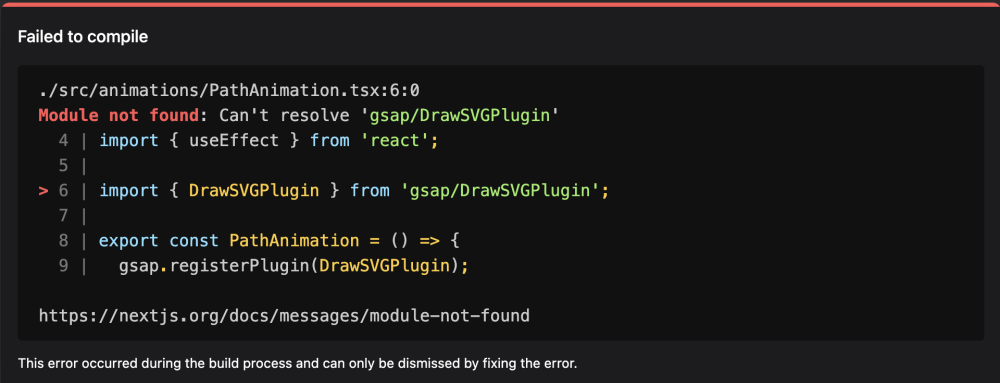
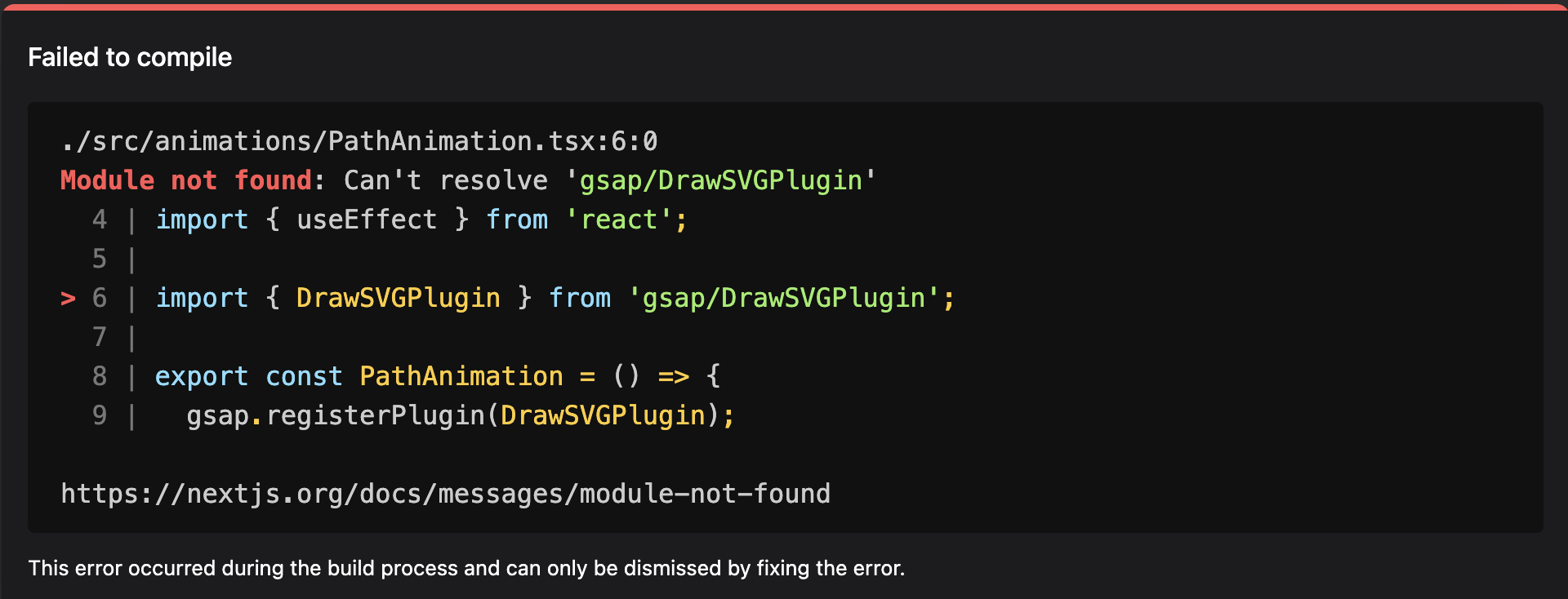
Hi, Receiving this "Module not found" error while importing DrawSVGPlugin module. the base gsap is working fine, just the drawSVGPlugin is throwing this error. import { DrawSVGPlugin } from 'gsap/DrawSVGPlugin'; export const PathAnimation = () => { gsap.registerPlugin(DrawSVGPlugin); } I am using NextJS 14.1.0. I tried importing the plugin from "/dist" "/all", but the issue persists. Thanks in advance for help.
-
First of all, congrats for all stuff GSAP! This is a wonderful piece of work! Secondly, I've encountered issues with Draggable, while using React 16.5: Using Draggable.create(target) doesn't allow the user to drag the element at all. A 3d transform is set on the element, having all 0px values, but the element itself doesn't move. The onDrag / onDragEnd / onDragStart handlers aren't called. On the other hand, the onPress handler is called, but two times every click, once with a PointerEvent type event payload, and with a MouseEvent, the second time. Also, it's important to point out that using GSAP 1.19.1 / 2.0.0 / 2.0.2 with React 16.4 and lower doesn't reproduce the issue, nor does it cause the onPress handler to be called twice. It only gets called once, with a PointerEvent. However, I was able to reproduce this issue using GSAP 1.19.1 / 2.0.0 / 2.0.2, with React 16.5. If there's anything more needed, I'll happily provide more details. componentDidMount() { const lis = document.getElementsByTagName('li'); Draggable.create(lis, { cursor: 'grab', onPress(event) { console.log(event); }, onDragEnd() { TweenMax.to(this.target, 0.5, { x: 0, y: 0 }); } }); } Thanks in advance!
-
I have an infinite marquee, that i thought was working, however it jumps at the very end slightly, im not quite sure why im wondering based on the code provided below if theres anything that looks wrong in what im doing? JSX File: const MobileMarquee = ({ client }) => { // NOTE • Refs const main = React.useRef(); const first = React.useRef(); const last = React.useRef(); React.useLayoutEffect(() => { const ctx = gsap.context(() => { // Split characters const split = new SplitText(first.current, { type: "chars", charsClass: "char", }); // Split characters count + timing calculation const charsTotal = split.chars.length; const timingFactor = charsTotal * 0.25; let timeline1 = gsap.timeline(); let timeline2 = gsap.timeline(); timeline1.fromTo( first.current, { xPercent: 0, }, { xPercent: -100, repeat: -1, duration: timingFactor, ease: "none", } ); timeline2.fromTo( last.current, { xPercent: 0, }, { xPercent: -100, repeat: -1, duration: timingFactor, ease: "none", } ); }, main); return () => ctx.revert(); }, []); return ( <Jacket isPaused={isPaused} ref={main}> <div> <ul ref={first}> {words.map(({ word, uid }) => ( <li key={uid} className="el"> {word} – </li> ))} </ul> {/* Dupl */} <ul aria-hidden="true" ref={last}> {words.map(({ word, uid }) => ( <li className="el" key={uid}> {word} – </li> ))} </ul> </div> </Jacket> ); }; CSS/JS: // Imports // ------------ import styled, { css } from "styled-components"; // Exports // ------------ export const Jacket = styled.h1( (props) => css` position: relative; z-index: 3; overflow: hidden; width: 100vw; div { display: flex; width: fit-content; } ul { display: flex; width: fit-content; position: relative; justify-content: flex-start; transform: translateX(0); li { display: flex; align-items: center; font-weight: ${props.theme.font.weight.reg}; font-family: ${props.theme.font.type.heading}; font-size: 6rem; line-height: 1.2; color: ${props.theme.colors.brand.bc4}; user-select: none; white-space: nowrap; } } ` ); Codesandbox Recreation: https://codesandbox.io/s/react-hooks-example-w-clicker-t6yno?file=/src/pages/index.js Kapture 2023-05-25 at 23.24.09.mp4
-
Hi, i try to make a pinned element on my page. If you go to the section "Découvrez mon histoire" all down (or discover link in the menu) the section on the right should be pinned. but i don't understand why, the fixed position is relative to the page instead of the screen. I tried to do the same on codepen, and everything works well. Do you have any idea ? https://justhugo.fr/
-
I'm building a site using the Astro framework, where there will be video animations on scroll. Unfortunately using this framework it is not possible for me to create a demo on CodePen but I recorded a video to show the problem (here is the link to the site in production). The problem is that sometimes when I refresh the page the second section overlaps the first after a slight scroll (you notice when the error occurs because you see the "start" marker of the second section just below the first section, and therefore before the "end" marker of the first section). In the video, from seconds 01 to 07 the site loaded ScrollTrigger correctly, while from second 08 onwards, after the refresh, as you can see, the second section ends above the first, before it can finish scrolling. Do you have any idea what it could be even without having a demo? is this a known scrollTrigger issue or can it be caused by the framework? This is the index.astro: --- import Layout from '../layouts/Layout.astro'; import VideoScroll from '../components/VideoScroll.astro'; --- <script> gsap.registerPlugin(ScrollTrigger); </script> <Layout title="TUC"> <main> <section class="container relative min-h-screen py-6 mx-auto" id="home"> <VideoScroll client:load section={1} main="Hello TUC" title="LOREM IPSUM" description="Lorem ipsum dolor sit amet, consectetur adipiscing elit, sed do eiusmod tempor incididunt ut labore et dolore magna aliqua. Ut enim ad minim veniam, quis nostrud exercitation ullamco laboris nisi ut aliquip ex ea commodo consequat. Duis aute irure dolor in reprehenderit in voluptate velit esse cillum dolore eu fugiat nulla pariatur." video="/video/esploso_edit.mp4" /> </section> <section class="container relative min-h-screen py-6 mx-auto" id="technology"> <VideoScroll client:load section={2} main="All in one" title="LOREM IPSUM" description="Lorem ipsum dolor sit amet, consectetur adipiscing elit, sed do eiusmod tempor incididunt ut labore et dolore magna aliqua. Ut enim ad minim veniam, quis nostrud exercitation ullamco laboris nisi ut aliquip ex ea commodo consequat. Duis aute irure dolor in reprehenderit in voluptate velit esse cillum dolore eu fugiat nulla pariatur." video="/video/sedile_edit.mp4" /> </section> </main> </Layout> And this is how I created the components (.astro): --- export interface Props { section: number; main: string; video: string; title: string; description: string; } const { section, main, video, title, description } = Astro.props; --- <script> class VideoScroll extends HTMLElement { constructor() { super(); // Read the message from the data attribute. const section = this.dataset.section; const IntroVideoRef = document.getElementById(`section-${section}`); const videoRef = document.getElementById(`video-section-${section}`); videoRef.onloadedmetadata = function() { const pauseVideo = () => { videoRef.removeAttribute("autoplay"); videoRef.currentTime = 0; videoRef.pause(); gsap.delayedCall(4, () => ScrollTrigger.refresh()); } if (videoRef) { pauseVideo() } const videoDuration = this.duration; ScrollTrigger.create({ trigger: IntroVideoRef, scrub: true, pin: IntroVideoRef, start: '-100', end: `+=${videoDuration * 300}`, markers: true, onUpdate: function(self) { if (videoRef) { const scrollPos = self.progress; const videoCurrentTime = videoDuration * scrollPos; if(videoCurrentTime) { videoRef.currentTime = videoCurrentTime; } } }, }); console.log(videoTime) }; } } customElements.define('video-scroll', VideoScroll); </script> <video-scroll data-section={section}> <div class='w-full h-full hyperboards-container min-h-[200px] md:min-h-[300px]' id={`section-${section}`}> <div class='flex justify-end w-full translate-y-[30px] lg:translate-y-[70px]'> <h2 class='text-4xl font-bold md:text-7xl text-grey'> {main} </h2> </div> <div class='grid grid-cols-1 gap-4 md:grid-cols-12'> <div class='w-full col-span-1 col-start-1 overflow-hidden rounded-xl video-col md:col-span-7 md:col-start-2'> <video muted playsinline autoplay disableRemotePlayback id={`video-section-${section}`} class="min-h-[200px]"> <source src={video} type="video/mp4"/> </video> </div> <div class='col-span-1 section-text md:col-span-4'> <h4 class='bold text-[25px] text-white'>{title}</h4> <p class='light text-light-grey'>{description}</p> </div> </div> </div> </video-scroll> <style> .section-text { display: flex; flex-direction: column; justify-content: flex-end; } </style> You will probably have to refresh a few times to get both versions (working and not working).
-
Hello, I'm having a problem with a TweenMax in ie8. i'm not sure if it's a "color" tween error or not though. The error message is: Invalid property value. TweenMax.min.js Line: 16 Char: 838 The website is: http://www.paragoncasinoresort.com/ I'm kind of stumped here as to what that could be. It's working on all other browsers including IE9+. Any help would be greatly appreciated. Thanks, Sam
-
 I apologise about the codepen missing images, But i am trying to make a tree that scrolls horizontally and make about a dozen leaves fall with different paths, all while the background moves to a side at the moment i am struggling to make both work properly, if both do end up working the leaf is slower than the background and stays way too far behind or it simply stops at around the middle of the screen and i am trying to make the leaves fall to the ground is there any advise you could give on the issue? Thank you
 -
Hi! I'm new to javascript and found gsap while trying to animate some objects. I was trying to animate this sequence of squares to create a gallery effect but the result is very unpredictable, sometimes works all fine, but when i hover from one square to another some squares don't reverse the animation and end up in wrong positions. It's like if when i play a timeline right after another, and both timelines have animations to a certain objetc, the first timeline overrides the second and then, the objects end in the wrong position. How can i avoid this? Another issue i'm having is that i wanted both properties "scale" and "transform" to change the object simultaneously (i believe this way the animation would be smoother), but the way it is, the object first scales and then transforms. Does anyone knows what am I missing? Thanks a lot!
-
Hi all, I've got an issue with using a killTweensOf following by a fromTo method. Here is a codepen for explaining the issue https://codepen.io/manuelodelain-the-lessful/pen/eYddYzQ The expected behavior here would be that the blue square fades from 0 to 1 each times I hover it. If I hover the blue square multiple times very quickly the animations plays as expected but at the end of the animation the opacity reverts to 0. If I don't use killTweensOfthe issue doesn't occure. Thanks,
-
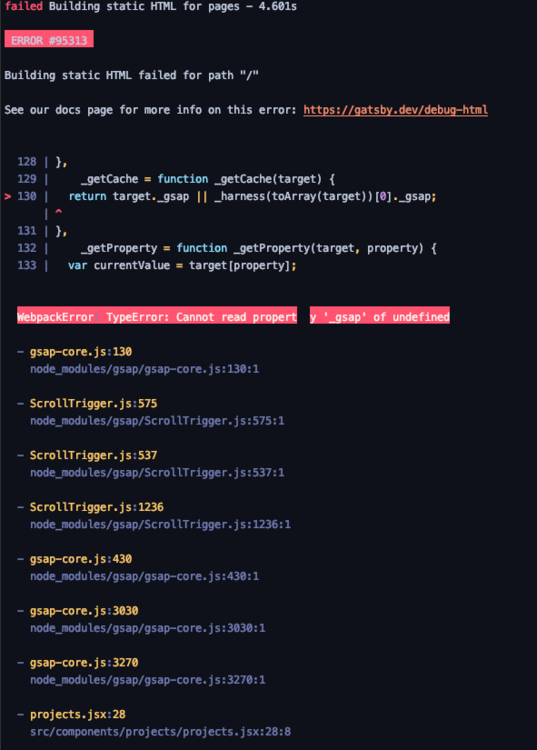
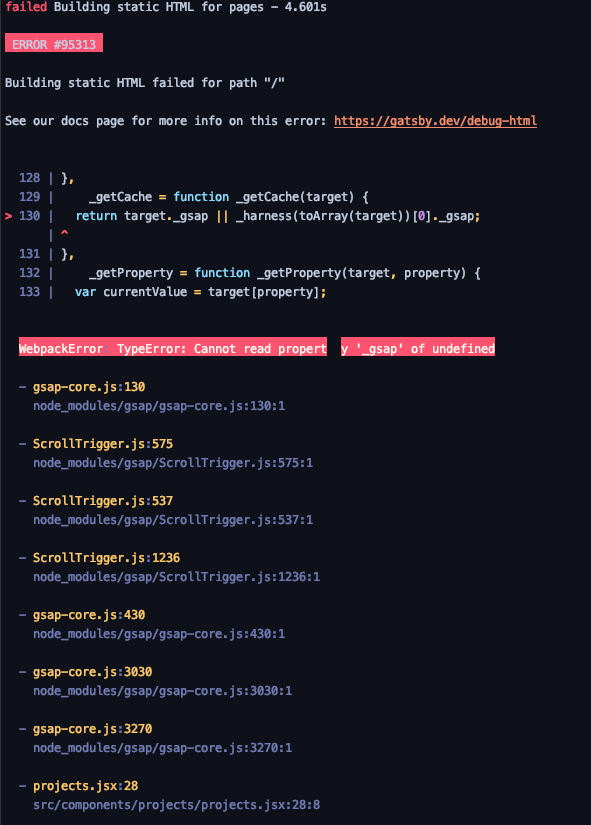
I'm trying to build and deploy my project in Gatsby but can't figure out how to solve this problem. Error seems to be made by ScrollTrigger. I tried to fire animation in if (window) statement as well as if (document) but it also generates error. Does anyone know what should I fix?
-
Hello guys, I was working on some animation for my client and I found the issue with rotateY which I'm unable to implement. Can you guys please check and let me know if there is any solution to this? I've checked few forum topics and did see the solution below shared by you guys. It suggests to use scaleX but element is not a symmetrical element so I need it actually be flipped and I don't think I can use it as a separate SVG as well. By the way storyline is as follow (store guy filling crate to a van): store guy goes near the van crate is left there (hide crate) store guy come back to the crate laying outside the store picks another crate repeat until there is no crate So can you guys please check and let me know if there is any solution to this? Thank you for checking in. Abi Rana
-
Has anyone encountered the issue, today I was work on a new project and I was using new updated GSAP and MorphSVGPlugin for this one. I had to do some motion along a path. So first this I wan creating variables like below: var motionPath_1 = MorphSVGPlugin.pathDataToBezier("#motionPath-1", {align:"#connecting-dot"}); But this is throwing an error as below: Uncaught TypeError: MorphSVGPlugin.pathDataToBezier is not a function This is the same thing I've been using and on the new update this has no change as I can think of. When using old GSAP and MorphSVGPlugin it is work fine. Has anyone encountered this? Does anyone know what is the issue?
-
Dear GSAP comrades, Why do I get for some HOSTED DrawSVG animations from codepen 1 FPS when using CHROME on Mobile? They work fully FINE ON FF but just not on CHROME! How can this be? Only on Codepen it runs also well on mobile. Can someone solve me the riddle? Thanks for any suggestions, Mat
-
Guys, Although I've worked with GS before, GSDevTools is new to me. I'm loving it but finding I get varying results in the playback. I have some code which I'll list below and it includes a draw function then a splitText function then a fade function which are on a masterTL. I hit play and all's well but if I hit play to watch the animation again the fade gets quicker and seems to move up the timescale and if I hit play again it gets quicker still and then disappears. I've tried including TL functions to reset vars but it doesn't make any difference. Obviously the code doesn't change. <CODE> /*Draw Function - makes .svg with class="badge" visible then draws it, then fades the container div #splash and all works fine*/ function drawBadge (){ TweenLite.set("#coreBadge", {visibility:"visible"}); var tl = new TimelineLite(); tl.from(".badge", 0.6, { drawSVG: 0, delay: 0.2 }); tl.to("#splash", 0.6, {autoAlpha: 0, display:"none"}); return tl; } /*Split Text function - variable received to function as console confirms, makes <p> visible then performs splitText on <p> and works fine*/ function runText (textLine) { TweenLite.set(textLine, {visibility:"visible"}); var mySplitText = new SplitText(textLine, { type: "chars" }), tl = new TimelineLite(); console.log("done split ",textLine); tl.staggerFrom(mySplitText.chars, 0.01, { opacity: 0 }, 0.04); return tl; } /* Fade Function - variable received to function as console confirms, then tweens a simple repeating fade on same <p> as Split Text function and works fine first time*/ function hudFadeEffect (hudLine) { TweenMax.to(hudLine, 0.8, {delay: 0.8, alpha: 0, repeatDelay: 0.1, repeat: -1, yoyo: true}); console.log("fade effect",hudLine); return hudLine; } /*Timeline*/ var masterTL = new TimelineMax(); masterTL.add(drawBadge(), 0) .call(runText, ["#hudGenius"], 1) .call(hudFadeEffect, ["#hudGenius"], 2) What am I doing wrong? I know you'd probably appreciate a pen but mine's private - I can send the url to GS superfabheroes if you want via email. Buzz
-
Helo guys, I need some help with a little issue that is driving me crazy. In the codepen I have attached I am trying to animate three balls each one with it's own timeline and I have an animation handler that depending on the stage on which the app is it will move the animation point to one point or another of the timelines using labels. The animation when moving from the loop and seeking the 'animationOut' point should move to the top and out but keeps looping inside the 'loop' label step. The seek function (lines 75, 80, 85, 91, 96) seems to not be working correctly. I am using version 1.19, if using version 1.10 it works for the label called 'animationOut' but not for 'animationReverse'. Can you guys help me out please? Cheers!
-
Ok, so I'm pretty new to GSAP, but loving it already. Only thing is, I'm having difficulties figuring out how throwprops is initialising. Pen in question http://codepen.io/casperovergaard/pen/WxqbbK As per the forked pen, I'm running the robust TweenMax library (https://cdnjs.cloudflare.com/ajax/libs/gsap/1.19.0/TweenMax.min.js), which should suffice in terms of plugins, right? Or so at least I'm interpreting it from https://greensock.com/throwpropsplugin – hit download, include the TweenMax library, and you're set to go with ThrowProps. Then include Draggable as a separate plugin (https://cdnjs.cloudflare.com/ajax/libs/gsap/1.19.0/utils/Draggable.min.js), as stated under the download section of https://greensock.com/draggable Okay, a lot of links, but what I'm trying to conclude is that when I initialise TweenMax and Draggable, ThrowProps is not working. I can see that on every pen out there, ThrowProps is initialised as a standalone plugin (often through http://www.greensock.com/js/src/plugins/ThrowPropsPlugin.min.js), but when trying that script source in my local dev environment, I'm redirected to a 'not allowed' page. If someone could give me a hint in terms of how the various plugins and libraries work together and should be initialised, it would be much appreciated
-
Hello, I may found a bug(?) in CSSPlugin version 1.15.1 (and later) The following two examples are exactly the same, except the included CSSPlugin version (1.15.1 VS 1.15.0) Please check the strange "jump" effect after the scale transition with version 1.15.1 1.15.1: https://jsfiddle.net/w6jcm33u/ 1.15.0: https://jsfiddle.net/w6jcm33u/1/ Is this a bug or should I change something in the transitions?
-
GreenSock does not render animated SVG symbols properly in Chrome (44.0.2403.155.m) and IE 11.0.21 on Windows 7 SP1 x64. Please have a look at the Codepen example. The animations render properly in Firefox 40.0.2. There is no animated scale in IE and nothing is animated in Chrome.
-
Hi, I have some issue since the last update with "-webkit-" Not sure this bug has been fixed FIXED problem caused by some Webkit browser reporting redundant/duplicate transform values (in both "transform" and "WebkitTransform") of the computed style which could cause className tweens to act oddly.I make a simple TweenMax.to('element', 1, {className: "+=active"}); and bam ! http://codepen.io/stephanedemotte/pen/bNRXYO Only on Safari and Chrome. Everything good with gsap : 1.15.0
-
Hi I am theme developer in ThemeForest and I use GSAP for my theme, more exactly I use TweenMax because of advanced functionality it offers, however the problem is that when user purchase my theme, they include some sort of plugins, which in this case one of them uses TweenLite library, so its conflict error and GreenSock gives me this error: http://cl.ly/ZTax So, what is the best solution in this case, I must use TweenMax, while other plugins may include or not TweenLite as well. Thank you very much
-
Hello there, As a new user of your fabulous library, I'm experimenting and I just went into a big issue. On my computer, all is displaying fine but on my iPad and mobile, I've an issue. I'm trying to animate my logo making images coming from the sides to the center of the screen. If on computer the effect is just as I designed it, on the tablet and the mobile phone, the browser resize (scale down) to fit to the new width of the page according to the position of the image on the left (not on the right side). Do i have a way to force browser to keep the page width and not scale down to fit in the logo? Here's a link to the animation: http://francoish.net/test/ Kind regards.
-
Hi, as you can see in the Codepen example, I'm seeing different behaviors when using fromTo() nested in two timelines. First case (work as expected): var t1 = new TimelineMax({paused: true, repeat: 2}); t1 .to("#redBox", 1.5, {x: 300}) .fromTo("#redBox", 1.5, {y: '+=100'}, {x: '+=250', immediateRender: false}, "+=0.5"); Second case (work as expected only once, then from the second iteration it seems to not reset the "from", ignoring "immediateRender = false" config value). var t2 = new TimelineMax({paused: true, repeat: 2}); t2 .to("#blueBox", 1.5, {x: 300}) .add(new TimelineMax().fromTo("#blueBox", 1.5, {y: '+=100'}, {x: '+=250', immediateRender: false}), "+=0.5"); Is there something wrong in my setup or is it a bug? Thanks in advance.
-
Hello, GSAP is a wonderful achievement! In below given code, if you observe the css left property eg in IE11 dev Tools of #text2, you'll notice it jumps to 100% from 600% and only then decreases to 90%. I expected a smooth transition from 600% to 90%. Reversing (using superscrollorama), the 90% increase to 100% and remain there. It appears the initial offsetLeft is not recorded. <!DOCTYPE html> <html> <head> <meta charset="utf-8" /> <title>gsap_left_issue</title> <script src="http://ajax.googleapis.com/ajax/libs/jquery/1.9.1/jquery.min.js"></script> <script src="jquery.superscrollorama.js"></script> <script src="http://cdnjs.cloudflare.com/ajax/libs/gsap/1.11.2/TweenLite.min.js"></script> <script src="http://cdnjs.cloudflare.com/ajax/libs/gsap/1.11.2/plugins/CSSPlugin.min.js"></script> <style type="text/css"> html, body { height: 100%; font-size: 1px; } body { margin: 0; } #timeline { position: absolute; top: 0; right: 0; height: 2500px; width: 100px; } #limiter { position: fixed; height: 100%; width: 100%; overflow: hidden; } #stage { position: relative; max-width: 1920px; height: 100%; margin: auto; } .vwrapper { position: absolute; top: 50%; left: 0; width: 100%; } #stage hr { position: relative; top: 50%; } #timeline hr { margin-top: 100px; } a { display: block; position: absolute; } .vegcontainer /* for everything above screen min-width of 1024px */ { width: 12.64%; float: left; position: relative; } @media screen and (min-width: 1681px) { #vegs { position: absolute; margin-top: -15.65%; left: 22.1%; width: 100%; } } .veg { width: 100%; /* default width of img in container is not 100% ! (default margin is 0) */ /*margin-left: 0;*/ /* > 0 lets (IE11) break line due to margin of img (!) not covered in expanding parent */ } .vegcontainer { opacity: 0; position: relative; } .text { font: 16px "Arial Narrow"; color: grey; position: absolute; } .text h1 { font-size: 32px; } #text2 { font-size: 16rem; width: 20%; top: 15%; left: 600%; } .text h2 { font-size: 28rem; } </style> </head> <body> <div id="timeline"></div> <div id="limiter"> <div id="stage"> <div class="vwrapper"> <div id="vegs"> <div id="veg1" class="vegcontainer"> <img class="veg" width="120" height="400" src="" alt="image" /> <div id="text2" class="text"> <h2>text</h2> <p>text</p> </div> </div> </div> </div> </div> </div> </body> <script type="text/javascript"> var dests = { veg1 : { scenes : [ { css : {opacity: 1}, duration : .3, delay : 350, syncd: 0 }, { css : {left: "19%", ease: "Back.easeOut"}, duration : .3, delay : 750, syncd: 600 } ] }, text2 : { scenes : [ { css : {left: "90%", ease: "Back.easeOut", easeParams: [0.7]}, duration : .3, delay : 750, syncd: 800 } ] } }; var controller = $.superscrollorama({ triggerAtCenter: true, playoutAnimations: true, reverse: true }); function getElem(id) { var elem = document.getElementById(id); return elem; } for(var a in dests) { var b = dests[a].scenes; for(var e=0; e<b.length; e++) { var s = b[e]; var t = TweenLite.to(getElem(a), s.duration, s.css); controller.addTween(s.delay, t, s.syncd); } } </script> </html> Can this be fixed (or is the overflowing offsetLeft somehow not attainable) ? Merry Christmas!





-min.thumb.png.e9b9ff661954360c5f1ce15c7f44e077.png)