Search the Community
Showing results for tags 'greensock'.


-
I've created an animated landing page for my portfolio using GSAP and ScrollMagic.js, but it's pretty resource intensive and I know my code isn't the most efficient. How can I modify the code to create a smoother and more robust animation? And how can my JavaScript be condensed and more efficiently written to avoid repetition? function pageScroll(e) { var clicked = e.currentTarget.id; if (clicked == "navWelcome") { TweenMax.to($('#mainNav'), 0.4, {x:windowWidth}); TweenMax.to(window, 0.8, {scrollTo:{y:"header"}, delay:0.3}); }else if (clicked == "arrow") { TweenMax.to(window, 3.5, {scrollTo:{y:"#aboutMeFull"}}); }else if (clicked == "navAbout") { TweenMax.to($('#mainNav'), 0.4, {x:windowWidth}); TweenMax.to(window, 0.8, {scrollTo:{y:"#aboutMeFull"}, delay:0.3}); }else if (clicked == "navServices") { TweenMax.to($('#mainNav'), 0.4, {x:windowWidth}); TweenMax.to(window, 0.8, {scrollTo:{y:"#servicesConBg"}, delay:0.4}); }else if (clicked == "navPortfolio") { TweenMax.to($('#mainNav'), 0.4, {x:windowWidth}); TweenMax.to(window, 0.8, {scrollTo:{y:"#portfolio"}, delay:0.3}); }else if (clicked == "portfolioBut") { TweenMax.to(window, 0.8, {scrollTo:{y:"#portfolio"}}); }else if (clicked == "navContact") { TweenMax.to($('#mainNav'), 0.4, {x:windowWidth}); TweenMax.to(window, 0.8, {scrollTo:{y:"#contact"}, delay:0.3}); } } for (var i=0; i<navBut.length; i++) { navBut[i].addEventListener('click', pageScroll, false); } for (var i=0; i<navItem.length; i++) { navItem[i].addEventListener('click', pageScroll, false); } document.querySelector('#arrow').addEventListener('click', pageScroll, false); //Landing Page $(function() { var xTo = 1.15*window.innerWidth; var yTo = 0.5*window.innerHeight; var rocketTween = new TimelineMax().add([ TweenMax.from("#parallaxContainer #bg", 1, {backgroundPosition:"0 100%", ease: Linear.easeNone}), TweenMax.from("#parallaxContainer #starsSmall", 1, {backgroundPosition:"0 12%", ease: Linear.easeNone}), TweenMax.from("#parallaxContainer #starsLarge", 1, {backgroundPosition:"0 6%", ease: Linear.easeNone}), TweenMax.to("#parallaxContainer #rocket", 1, {y:0, ease: Linear.easeNone}), TweenMax.to("#parallaxContainer #cloudsFront", 1, {y:0, ease: Linear.easeNone}), TweenMax.to("#parallaxContainer #cloudsBack", 1, {y:0, ease: Linear.easeNone}), TweenMax.to("#parallaxContainer #comet", 0.5, {x:-xTo, y:yTo, delay:0.5, ease: Linear.easeNone}), TweenMax.to("#parallaxContainer #logo", 0.8, {opacity:0, ease: Linear.easeNone}), TweenMax.to("#parallaxContainer #arrow", 0.07, {opacity:0}) ]);
-
I try to copy this website to study and I found that my fonts are not smoothly. I would like to gain your suggestion how to make website like this. Thank you, Kopkap. http://www.carlsberg.com/170/
-
I created this demo which shows a slider with a preloader. The GSAP slider is completely out of sink and doesn't slide on time. How can I load the images and the slider together? It would be nice to have this function working together nicely. Also the fading on the images are a bit glitchy . I might have used to many alphas.
-
Hi I am having a conflict I can't replicate. The solution works fine in the codepen( If you look at the codepen in IE10, the effect works perfectly (place div in center of viewport on click), but in my finished page, the scrollTo just goes all over the place and lands in a different position each time. It works fine in IE11 but not IE10 which is a requirement for my client. I tried matching the codepen function exactly to my production functions but the error still occurs. Here is a copy for your review that is condensed: window.onload = function(){ // Scroll to X and Y position buttons // bullet points var logoBtn = document.getElementById("logo"); var section1Btn = document.getElementById("section1Btn"); var section2Btn = document.getElementById("section2Btn"); var section3Btn = document.getElementById("section3Btn"); var section4Btn = document.getElementById("section4Btn"); var section5Btn = document.getElementById("section5Btn"); var section6Btn = document.getElementById("section6Btn"); var section7Btn = document.getElementById("section7Btn"); // menu buttons var firstnav = document.getElementById("firstnav"); var secondnav = document.getElementById("secondnav"); var thirdnav = document.getElementById("thirdnav"); var fourthnav = document.getElementById("fourthnav"); var fifthnav = document.getElementById("fifthnav"); var sixthnav = document.getElementById("sixthnav"); var seventhnav = document.getElementById("seventhnav"); var firstdot = document.getElementById("firstdot"); var seconddot = document.getElementById("seconddot"); var thirddot = document.getElementById("thirddot"); var fourthdot = document.getElementById("fourthdot"); var fifthdot = document.getElementById("fifthdot"); var sixthdot = document.getElementById("sixthdot"); var seventhdot = document.getElementById("seventhdot"); // buttons on central spinning circle var firstcirclebtn = document.getElementById("invisible-btn1"); var secondcirclebtn = document.getElementById("invisible-btn2"); var thirdcirclebtn = document.getElementById("invisible-btn3"); var fourthcirclebtn = document.getElementById("invisible-btn4"); var fifthcirclebtn = document.getElementById("invisible-btn5"); var sixthcirclebtn = document.getElementById("invisible-btn6"); // Scroll to Bullets logoBtn.onclick = function() { TweenLite.to(window, 1, {scrollTo:{y:"#firstdot", offsetY: $(window).innerHeight() / 2 - $('#firstdot').height() / 2, x:"#firstdot", offsetX: $(window).innerWidth() / 2 - $('#firstdot').width() / 2, autoKill:false, behavior: 'smooth'}},100); }; // Scroll to Start div id on page load TweenLite.to(window, 1, {scrollTo:{y:"#firstdot", offsetY: $(window).innerHeight() / 2 - $('#firstdot').height() / 2, x:"#firstdot", offsetX: $(window).innerWidth() / 2 - $('#firstdot').width() / 2, autoKill:false, behavior: 'smooth'}},100); // Scroll to Bullets section1Btn.onclick = function() { TweenLite.to(window, 1, {scrollTo:{y:"#firstdot", offsetY: $(window).innerHeight() / 2 - $('#firstdot').height() / 2, x:"#firstdot", offsetX: $(window).innerWidth() / 2 - $('#firstdot').width() / 2, autoKill:false, behavior: 'smooth'}},100); }; section2Btn.onclick = function() { TweenLite.to(window, 1, {scrollTo:{y:"#seconddot", offsetY: $(window).innerHeight() / 2 - $('#seconddot').height() / 2, x:"#seconddot", offsetX: $(window).innerWidth() / 2 - $('#seconddot').width() / 2, autoKill:false, behavior: 'smooth'}},100); }; section3Btn.onclick = function() { TweenLite.to(window, 1, {scrollTo:{y:"#thirddot", offsetY: $(window).innerHeight() / 2 - $('#thirddot').height() / 2, x:"#thirddot", offsetX: $(window).innerWidth() / 2 - $('#thirddot').width() / 2, autoKill:false, behavior: 'smooth'}},100); }; section4Btn.onclick = function() { TweenLite.to(window, 1, {scrollTo:{y:"#fourthdot", offsetY: $(window).innerHeight() / 2 - $('#fourthdot').height() / 2, x:"#fourthdot", offsetX: $(window).innerWidth() / 2 - $('#fourthdot').width() / 2, autoKill:false, behavior: 'smooth'}},100); }; section5Btn.onclick = function() { TweenLite.to(window, 1, {scrollTo:{y:"#fifthdot", offsetY: $(window).innerHeight() / 2 - $('#fifthdot').height() / 2, x:"#fifthdot", offsetX: $(window).innerWidth() / 2 - $('#fifthdot').width() / 2, autoKill:false, behavior: 'smooth'}},100); }; section6Btn.onclick = function() { TweenLite.to(window, 1, {scrollTo:{y:"#sixthdot", offsetY: $(window).innerHeight() / 2 - $('#sixthdot').height() / 2, x:"#sixthdot", offsetX: $(window).innerWidth() / 2 - $('#sixthdot').width() / 2, autoKill:false, behavior: 'smooth'}},100); }; section7Btn.onclick = function() { TweenLite.to(window, 1, {scrollTo:{y:"#seventhdot", offsetY: $(window).innerHeight() / 2 - $('#seventhdot').height() / 2, x:"#seventhdot", offsetX: $(window).innerWidth() / 2 - $('#seventhdot').width() / 2, autoKill:false, behavior: 'smooth'}},100); }; // menu nav // Scroll to Bullets firstnav.onclick = function() { TweenLite.to(window, 1, {scrollTo:{y:".first-coordinate-2", offsetY: $(window).innerHeight() / 2 - $('.first-coordinate-2').height() / 2, x:".first-coordinate-2", offsetX: $(window).innerWidth() / 2 - $('.first-coordinate-2').width() / 2, autoKill:false, behavior: 'smooth'}},100); }; secondnav.onclick = function() { TweenLite.to(window, 1, {scrollTo:{y:".second-coordinate-2", offsetY: $(window).innerHeight() / 2 - $('.second-coordinate-2').height() / 2, x:".second-coordinate-2", offsetX: $(window).innerWidth() / 2 - $('.second-coordinate-2').width() / 2, autoKill:false, behavior: 'smooth'}},100); }; thirdnav.onclick = function() { TweenLite.to(window, 1, {scrollTo:{y:".third-coordinate-2", offsetY: $(window).innerHeight() / 2 - $('.third-coordinate-2').height() / 2, x:".third-coordinate-2", offsetX: $(window).innerWidth() / 2 - $('.third-coordinate-2').width() / 2, autoKill:false, behavior: 'smooth'}},100); }; fourthnav.onclick = function() { TweenLite.to(window, 1, {scrollTo:{y:".fourth-coordinate-2", offsetY: $(window).innerHeight() / 2 - $('.fourth-coordinate-2').height() / 2, x:".fourth-coordinate-2", offsetX: $(window).innerWidth() / 2 - $('.fourth-coordinate-2').width() / 2, autoKill:false, behavior: 'smooth'}},100); }; fifthnav.onclick = function() { TweenLite.to(window, 1, {scrollTo:{y:".fifth-coordinate-2", offsetY: $(window).innerHeight() / 2 - $('.fifth-coordinate-2').height() / 2, x:".fifth-coordinate-2", offsetX: $(window).innerWidth() / 2 - $('.fifth-coordinate-2').width() / 2, autoKill:false, behavior: 'smooth'}},100); }; sixthnav.onclick = function() { TweenLite.to(window, 1, {scrollTo:{y:".sixth-coordinate-2", offsetY: $(window).innerHeight() / 2 - $('.sixth-coordinate-2').height() / 2, x:".sixth-coordinate-2", offsetX: $(window).innerWidth() / 2 - $('.sixth-coordinate-2').width() / 2, autoKill:false, behavior: 'smooth'}},100); }; seventhnav.onclick = function() { TweenLite.to(window, 1, {scrollTo:{y:".seventh-coordinate-2", offsetY: $(window).innerHeight() / 2 - $('.seventh-coordinate-2').height() / 2, x:".seventh-coordinate-2", offsetX: $(window).innerWidth() / 2 - $('.seventh-coordinate-2').width() / 2, autoKill:false, behavior: 'smooth'}},100); }; firstcirclebtn.onclick = function() { TweenLite.to(window, 1, {scrollTo:{y:".second-coordinate-3", offsetY: $(window).innerHeight() / 2 - $('.second-coordinate-3').height() / 2, x:".second-coordinate-3", offsetX: $(window).innerWidth() / 2 - $('.second-coordinate-3').width() / 2, autoKill:false, behavior: 'smooth'}},100); }; secondcirclebtn.onclick = function() { TweenLite.to(window, 1, {scrollTo:{y:".third-coordinate-3", offsetY: $(window).innerHeight() / 2 - $('.third-coordinate-3').height() / 2, x:".third-coordinate-3", offsetX: $(window).innerWidth() / 2 - $('.third-coordinate-3').width() / 2, autoKill:false, behavior: 'smooth'}},100); }; thirdcirclebtn.onclick = function() { TweenLite.to(window, 1, {scrollTo:{y:".fourth-coordinate-3", offsetY: $(window).innerHeight() / 2 - $('.fourth-coordinate-3').height() / 2, x:".fourth-coordinate-3", offsetX: $(window).innerWidth() / 2 - $('.fourth-coordinate-3').width() / 2, autoKill:false, behavior: 'smooth'}},100); }; fourthcirclebtn.onclick = function() { TweenLite.to(window, 1, {scrollTo:{y:".fifth-coordinate-3", offsetY: $(window).innerHeight() / 2 - $('.fifth-coordinate-3').height() / 2, x:".fifth-coordinate-3", offsetX: $(window).innerWidth() / 2 - $('.fifth-coordinate-3').width() / 2, autoKill:false, behavior: 'smooth'}},100); }; fifthcirclebtn.onclick = function() { TweenLite.to(window, 1, {scrollTo:{y:".sixth-coordinate-3", offsetY: $(window).innerHeight() / 2 - $('.sixth-coordinate-3').height() / 2, x:".sixth-coordinate-3", offsetX: $(window).innerWidth() / 2 - $('.sixth-coordinate-3').width() / 2, autoKill:false, behavior: 'smooth'}},100); }; sixthcirclebtn.onclick = function() { TweenLite.to(window, 1, {scrollTo:{y:".seventh-coordinate-3", offsetY: $(window).innerHeight() / 2 - $('.seventh-coordinate-3').height() / 2, x:".seventh-coordinate-3", offsetX: $(window).innerWidth() / 2 - $('.seventh-coordinate-3').width() / 2, autoKill:false, behavior: 'smooth'}},100); }; }(jQuery); There are other jquery plugins I have used, so perhaps the conflict is from there? <script src="https://code.jquery.com/jquery-3.2.1.slim.min.js" integrity="sha384-KJ3o2DKtIkvYIK3UENzmM7KCkRr/rE9/Qpg6aAZGJwFDMVNA/GpGFF93hXpG5KkN" crossorigin="anonymous"></script> <script src="https://cdnjs.cloudflare.com/ajax/libs/gsap/1.20.3/TweenMax.min.js"></script> <script src="https://s3-us-west-2.amazonaws.com/s.cdpn.io/16327/ScrollToPlugin-latest-beta.js"></script> <!-- Bootstrap pre built stuff--> <script src="https://maxcdn.bootstrapcdn.com/bootstrap/4.0.0/js/bootstrap.min.js" integrity="sha384-JZR6Spejh4U02d8jOt6vLEHfe/JQGiRRSQQxSfFWpi1MquVdAyjUar5+76PVCmYl" crossorigin="anonymous"></script> <script src="http://cdn.jsdelivr.net/particles.js/2.0.0/particles.min.js"></script> The console shows no errors so its hard to debug. Any help would be greatly appreciated, it's the last obstacle of the project!
-
I have a little trouble. i want Door opens. Follow by, background plays a different dog barking sound. but it's not working in iphone
-
Guys, I've used greenock before on website deployments but I'm no expert, we're going to be using it much more now and the first project we've come up with is (as usual) tricky. Is it possible within GSAP to replicate something like this? Seems ambitious but I'm sure GSAP can handle it Interested in any other threads that discuss these principles. Needless to say I'm trying to avoid defaulting to After Effects.. Buzz
-
 Hi ! It's possible to achieve the scroll effect in this page (this page use scrollmagic and greensock.) http://www.locus-solus.it/en/pouffe_gae_aulenti The elements continue their animation after scroll is stopped. I dont know if I could achieve this with greensock tween settings or the scrollmagic one Thanks!
 -
Hi guys. I'm a newbie to the forums and would like some help with changing (or disabling) animations to static images whilst in responsive mode. I am currently in the process of finding a web host for my work so examples will be quite bleak, but should be up shortly. Any help would be greatly appreciated. M
-
Hi forum! How are you today? I'm working on an animation that I want to trigger and sync to the scrollbar, but start in the middle of the page, and return the scrolling the page when finished. This is what I thought about doing: [content] [ANIMATION PLACEHOLDER which is height: 100vh;] [empty section] [ANIMATION which is floating and set to display: none; and height: 100vh;] I put a scroll scene trigger at the start of the ANIMATION PLACEHOLDER section. the animation duration is set by javascript. the duration will change the ANIMATION PLACEHOLDER height to get the correct duration injected into that scroll section: pre-animation: set height of ANIMATION PLACEHOLDER to animation duration (should be 2 screens or 200vh) animation: make ANIMATION appear (I don't want the animation to scroll off screen) make ANIMATION PLACEHOLDER stick to top of it's section (when animation is set to reverse, this will make the placeholder appear in the correct place) move two boxes in the ANIMATION synced to the scroll (for now) make ANIMATION PLACEHOLDER stick to bottom (so it will appear as if you just continued to scroll) make ANIMATION disappear This seems to work for the end of the animation, but the animation (at least the set) starts as soon as the page loads. maybe it has something to do with immediateRender? I want the floating ANIMATION to appear only when the scroll trigger reaches the top of the screen. The animation itself does trigger at the right moment (only when the trigger reaches the top), but the set part happens immediatley thanks for the help Neil
-
hi! In the code pen you see an animation for the menu. I use the splittext plugin as you can see. First time you open the menu, everything animates as intended. But after closing once, the second time it seems like it's ignoring the timeline. Been fiddling with it for a long time but can't seem to figure it out. Anyone has a hunch of what's going wrong?
-
Hi! Does anyone have any experience in animating paths (drawSvg style) with greensock in Animate CC? Does drawSvg translate in to use in Animate CC? regards,
-
Hi. I've been stuck for a while on this. The goal is to tween a bubble coming from one circle to another circle while having a 'goo' effect at the exit and entry points. For the filter to have effect, I must place the bubble circle within the starting circle's group, then at some point before the bubble finished following it's designated path, remove it from that starting circle's group, apply the filter to the end circle, and append the bubble to the end circle's group. Does anyone have any thoughts on how to do this while maintaining a smooth animation?
-
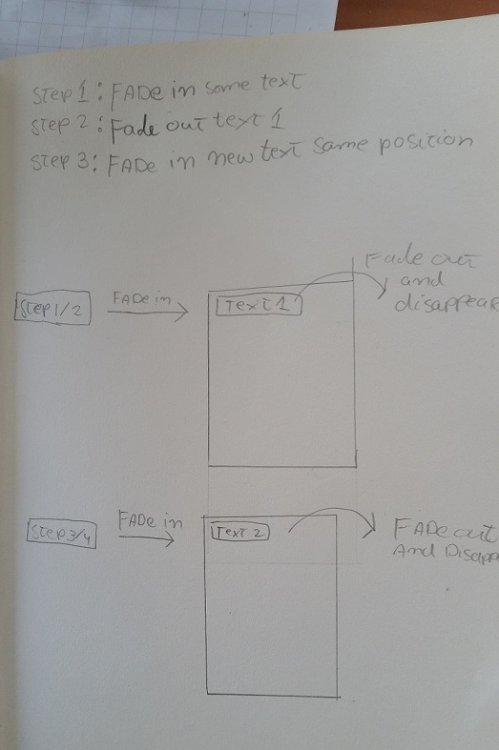
Hey guys, I have been struggling to achieve some ( i guess ) basic gsap stuff. What i want to achieve is a text that comes in from out of the screen to the center of the screen and then stays there for a couple of seconds and then moves out of the screen again. Now it is time for a new text that comes in from the left goes to the same position and moves out of the screen again. I tried to achieve this but the problem that i've encountered what that the 3 text items where overlapping eachother at the start. the other 2 text items need to be invisible when the 1st one moves to the center. step 1 : black screen. step2: fade in text 1 to the center of a div coming from the left side of the screen step 3: after a couples of seconds fade out text 1 and disappear. step 4 : text 2 becomes visable and fades in from the left to the center. step 5 : stays there for a couple of seconds --> moves out of screen again step 6: repeat process. I have also drawn to explain, since english isnt my native language. Thank you guys, greensock is awesome!
-
Hey guys, i am new to greensock. i want to start the 3th .from after a delay of 2 second and continue the animation ( make it wiggle ) and repeat the animation. Basically i want to wiggle the animation after 2 seconds after the previous 2 .from are done. and another question: can you point me to some basic tutorials explaining labels,timelines and nested timelines. thank you guys in advance, best regards, Tim.
-
Hello! It's my first time useing the tick event provided by greensock, and i am having trouble to figure it out what i am missing in my code, because there are signs that something is not right. Well the concept is that there is a horizontal scrolling area (with iscroll.js), and during scrolling the upcomming element should scale up / animate to it's full size. I use the TweenMax.ticker.addEventListener('tick', myfunction) on line 312 to call the function which detects which box should be animated. On every tick event the selected box(es) properties get updated with TweenMax.set. The problem is that the performance is not right, there is a flickering during scrolling and in IE11 it is even worse (very jumpy). I have put together a fiddle to see it in action: https://jsfiddle.net/LaszloOveges/yykc0356/ Anyone has an idea what is wrong with this code? I would really appreciate any comment. Cheers, Laszlo
-
Hi! I'm trying to figure out how to change the color of these waves to gradients rather than solids. Is there a simple way to achieve this? Thanks! Nick
-
 Hi I have a very strange thing occurring that is happening in a live environment. I have created a couple of banners with greensock that play fine by themselves, but when there are more than a couple on a page and you scroll to them, it seems to mess them up, they get all funky in the way they load or run the animations. Like I said, run individually they seem fine, but it's just when you scroll on an page to them, that for some reason they seem to start acting erratically. In this instance it seems they have used the same ad three times, but you can see what happens by the time you scroll to the third, the animation speeds up etc. https://dl.dropboxusercontent.com/u/12920477/ck_205.mov Anyone have any ideas or how to deal with this?
 -
Hi! I'm trying to bevel (extrude) and carve (cut into the page) this shape as an animated button. I have more complex shapes to do this with, which is why I came up with this layer stacking approach. I'd love to hear better ones! I've also used this approach with images, which one can smear & darken this way, a nice effect when used with textured images! My ask is about the few frames that the shape is closest to being "flush" with the panel it's on/in. When masking between the bevel / carve parts, we see an aliasing artefact that is made worse by it being so close, in time, to the other state. When the white part pops out, it's a bit "fat", and when it's going in, the dark part is visible at the edges. The glitchyness is most noticeable on non-retina screens. Would you have any idea on how to make the less extreme states of this animation less glitchy?
-
We are an emerging company in the healthcare space looking for a developer with experience in landing page development that is expected to last 1-2 weeks. Must be experienced with Javascript/Jquery, Greensock (other animation libraries), responsive design, and css3 transitions. We are open to location, but would prefer someone in the United States. We have specifications available for applicants to review upon request. If you have any questions or are interested in the role please reply below or at jermaine@care-advisors.com. Cheers, J
-
Hi there, I just saw this animation and was wondering if this or something similar is possible to build with greensock. I mean, for sure it would be somehow possible, but at the moment I do not know how to create this split width animation on the image. Normally I would try it with different divs, which animate their width von 0 to 100%. But with a background-image I do not know how to realize such an effect. Can anyone give me a hint? https://dribbble.com/shots/3561148-Cover-Animation
-
Hi, I was using these two scripts in my HTML5 banner ads: <script src='http://cdnjs.cloudflare.com/ajax/libs/jquery/2.1.3/jquery.min.js'></script> <script src="https://cdnjs.cloudflare.com/ajax/libs/gsap/1.19.1/TweenMax.min.js"></script> I had to put these two banner ads through google so as per the https://support.google.com/richmedia/answer/6307288, I changed the above scripts to: <script src="https://ajax.googleapis.com/ajax/libs/jquery/3.2.1/jquery.min.js"></script> <script type="text/javascript" src="https://s0.2mdn.net/ads/studio/cached_libs/tweenmax_1.19.0_643d6911392a3398cb1607993edabfa7_min.js"></script> After running the code, it throws an error saying that "TimelineMax is not defined". Can anyone please tell me what am I suppose to do to fix this? Thanks

-
Hello, I can't seem to animate a div that contains a youtube video and I have a project that due asap. I want to be able to animate the opacity or the position. The animation either won't occur or the animation will stop before it has completed. Please let me know what I might be doing wrong. Thanks! ::Carey::
-
 Hi, I want to create a line on top of the frame i.e. the line should start from the center and grow simultaneously towards the side. Have given the sample link (this is in TimeLineLite): I want to add the above code to the following banner (have attached the files as well): The problem that I am facing is how to add this to "TimeLineMax" and the line should start/grow along with the word that eases in the screen. Thanks sample.zip
 -
I have an image: and I want to fill the missing part of it. The best way I found was to convert the missing part of the image to SVG and then start filling the missing part using tweenmax. For reference, I have added the animation for filling the svg but it is not animating like what I need i.e. it is increasing from center point. I need to blend the animation like the image missing area is filling from one end. I can change the way of animating if there is any other way we can fill the missing part of the image? I have also tried other solution of fill mode but smooth transition is not happening in it.
-
How can I make a text float in like a wave from left to right. I am able to get the text into the frame normally but not like a wave form. Is there a way of doing it?