Search the Community
Showing results for tags 'animatecc'.
Found 6 results
-
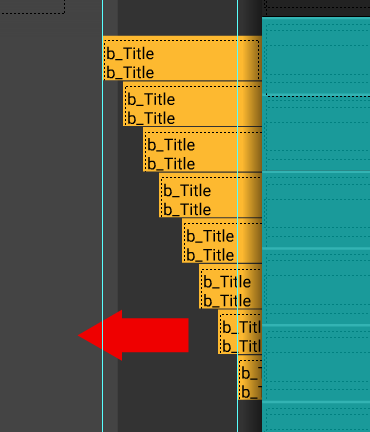
Is this possible? I have a secondary set of buttons that appear for the top level nav buttons, I would like these secondary buttons to transition in, from right to left one after another like a quick cascade when the timeline stops on its containing frame. Using Animate's stacked layer tween process would be too cumbersome for the scalability of these apps, it would be great if a bit of code would trigger a transition-in animation procedurally. Is this something GS can do? Or would there be another JS library more suitable? Thanks.
-
Hi guys, I love using AnimateCC in conjunction with Greensock but the only thing that has always been sort of a headache has been how to animate alpha gradient masks. After some trial and errors creating and animating the mask, here is the file I wanted to share with the community, hopefully it will benefit somebody. One important piece of information that the Adobe Support team shared as well was:"Please avoid adding scripts within the mask and maskee symbols or multiple level of nesting within them because they need to be cached as bitmap for masking to work." AlphaGradientMask_radial.fla.zip
- 2 replies
-
- 4
-

-
- canvas
- alphagradientmask
- (and 1 more)
-
 Note: This page was created for GSAP version 2. We have since released GSAP 3 with many improvements. While it is backward compatible with most GSAP 2 features, some parts may need to be updated to work properly. Please see the GSAP 3 release notes for details. Adobe Animate CC 2017 made big improvements to how external libraries like GSAP can be loaded into your projects. The video below shows everything you need to do to get up and running quickly. This video is intended for audiences that are familiar with working with Animate CC and have some knowledge of the GSAP API. Add GSAP to your Animate CC project Adding external scripts that are globally accessible can be done through the Actions panel as illustrated below. Safe EaselJS properties to animate Animate's HTML5 "export for canvas" renders everything at runtime using the EaselJS library. Every object in Animate is converted into an EaselJS object and it's important to be aware of which properties are available to be animated. For instance, there is no support in EaselJS for width, height, or 3D rotation (rotationX, rotationY). There's plenty you can do with the properties below: x y alpha scaleX scaleY rotation skewX skewY regX regY Since at its core GSAP can animate any property of any JavaScript object, all of the above properties are fair game. You don't even need to load any additional plugins. For more information on the above properties be sure to read the documentation for Easel JS DisplayObjects. Although it may be obvious to some, it's worth stating that CSS properties that the CSSPlugin typically handles like color, fontSize, border, transformOrigin, etc. don't exist in the EaselJS world. Once you understand what properties you can animate, you can tap into all the core tools of GSAP and use the same familiar syntax. var tl = new TimelineMax({repeat:3, repeatDelay:0.5}) tl.from(this.logo_mc, 1, {y:300, rotation:360, scaleX:0, scaleY:0, ease:Back.easeOut}) .from(this.GreenSock_mc, 0.5, {x:200, skewX:45, alpha:0}, "+=0.5"); Animate color properties with EaselPlugin Use GSAP's EaselPlugin to tween special EaselJS-related properties for things like saturation, contrast, tint, colorize, brightness, exposure, and hue which leverage EaselJS's ColorFilter and ColorMatrixFilter. //necessary to cache element before applying filters this.city.cache(0, 0, 800, 532); //left, top, width, height var tl = new TimelineMax({repeat:3, yoyo:true}); tl.from(this.city, 1, {easel:{exposure:3}}) .to(this.city, 1, {easel:{hue:180}}) .to(this.city, 1, {easel:{colorFilter:{redMultiplier:0.5, blueMultiplier:0.8, greenOffset:100}}}); You must load the EaselPlugin into your file in addition to TweenMax if you want to tap into the special features that EaselPlugin provides. EaselPlugin is included when you download GSAP or you can load it from CDNJS. Be sure to read the EaselPlugin docs for more information. Snag the source files Download source files to see the example code above in action.
 -
I don't have a codepen in this one because it involves multiple files... (I'm trying to use GreenSock to coordinate animations+audio from multiple sources.) I have an Iframe calling an html+js page that was generated using Adobe AnimateCC. <iframe id="animateCC" src="AnimateCC/hw.html" class="fullscreen"></iframe> I'm trying to call a function inside that Iframe. The playback menu from GSDevTools goes as far as the label associated with tl and then stops : var fn = document.getElementById('animateCC').contentWindow.init; tl.call(fn, [], this); document.getElementById('animateCC').contentWindow is always defined document.getElementById('animateCC').contentWindow.init is sometimes defined, sometimes undefined the call itself never works Inside the Iframe, the init() function looks like this: function init() { canvas = document.getElementById("canvas"); anim_container = document.getElementById("animation_container"); dom_overlay_container = document.getElementById("dom_overlay_container"); var comp=AdobeAn.getComposition("608A33886B013E4CA195C53BA6AACBD3"); var lib=comp.getLibrary(); handleComplete2({},comp);} Inside the Iframe I have a button: <button id="initButton" onclick="init();">Animate!</button> I can see the button. When I click it, it launches the animation.
-
Hi! Does anyone have any experience in animating paths (drawSvg style) with greensock in Animate CC? Does drawSvg translate in to use in Animate CC? regards,
-
Because you are one of the people who knew Flash and understood what made it great, I thought I'd ask. I was originally going to title this post "Any chance Greensock could replace CreateJS in AnimateCC?" Then I realized what I was asking was a little bigger. However, that is the gist of what I'm wondering. Is there a way to use the Greensock library as the engine that drives the animation when publishing from AnimateCC instead of CreateJS? The CreateJS library isn't getting updates (worse than Flash and Air). It's slow on mobile. Interaction is unbearably laggy. It's essentially unusable for any decent experience. But Greensock has always been the bleeding edge of speed, efficiency and stability. If it were powering all the timeline tweens and interactions when users published to html5, Flash could again be a viable tool for creating animation and games on the web. The Flash tool provided a wonderful GUI with which to create animation and games for coders and noncoders alike. When you published, it just worked. Nearly a decade after its 'death' we still haven't found a suitable replacement. Greensock is great. But there are those of us who find it prohibitively difficult to animate with code. And maybe I should just be asking for a Greensock GUI that has a timeline and MovieClips like Flash. But Animate is there. And it might just need the power and performance of Greensock to make it live again.