Search the Community
Showing results for tags 'animation'.


-

Trying to have a scroll triggered video as well as text alongside
Vedant Shah posted a topic in GSAP
In the given code, I'm attempting to create two synchronized animations using ScrollMagic. The first animation involves a video whose playback is controlled by scrolling, while the second animation is a text that flies in at a specific point in the video. To achieve this, I've used TweenMax and ScrollMagic, setting an offset value for the text animation to ensure it starts at the right moment. The issue I'm encountering is that on larger screens, the text animation comes in later than expected. I initially considered using the `triggerHook` value between 0 and 1 to address this problem, but it didn't provide the desired results. How can I make the offset value for the text animation dynamic, so that it starts at the right time, especially on larger screens? let scene = new ScrollMagic.Scene({ duration: 19000, triggerElement: intro, //video triggerHook: 0, }) .addIndicators() .setPin(intro) .addTo(controller); const height = window.innerHeight; const textAnim = TweenMax.fromTo(text1, 3, { y: 0 }, { y: -1.5 * height }); let scene2 = new ScrollMagic.Scene({ duration: 3000, triggerElement: intro, triggerHook: 0, }) .setTween(textAnim) .addTo(controller); // Calculate the offset based on scene's duration let scene3Offset = scene.duration() * 0.315 - 1000; // 31.57% of scene's duration const textAnim2 = TweenMax.fromTo( text2, 4, { y: height }, { y: -1.5 * height } ); let scene3 = new ScrollMagic.Scene({ duration: 3000, triggerElement: intro, triggerHook: 0, offset: scene3Offset, }) .setTween(textAnim2) .addTo(controller); -
Hello, I would like to know if we can create a retro game using GSAP? Is it really possible for beginners to create their own basic game using GSAP? Even without physics in the game just to control the character only. Or even control a snake in the snake game. Anyone tried to create a game using GSAP? Can you please share it?
-
is it possible to control SmoothScroller request animation frame (updates) externally ? I have react app and i need to sychnronyze better SmoothScroller with other animations i have going, and i would like to do smoothscroller animation/position calculation togetehr with my other animation.
-
Hey everyone, how can i create a animation like as u see that pen when cursor moves around of card, card moving with transform I guess... I want to create that animation. Thanks.
-
Hi community, https://htxrgj.csb.app/ I want to animate my animation using scroll within 1/4 or circle, or in arc shape, please checkout for code given on codesandbox. The main issue is that everything working fine but, while from each last element is move to one step up, then a translateX is not working smooth. and I want it smooth. I hope you got my point..! Thanks in advance..!
-
Hello! I just register to ask a question my programmer friend has. We want to create a website of our own, but he is puzzled as to how he can make images fade in and out when you reach a certain point in the text on the other side. We want the images to fade in or out and freeze to the specific image if text scrolling stops. I've searched the web for answers but with very limited luck i found answers... could you assist me and my friend? this is a very draft video editing i did but its kinda what we want the result to be. It will have multiple images that will changed every now and then according to how far you scroll down. test drive1.mp4
-
Hello, I am new to the GSAP community, I want to implement the GSAP horizontal Scroll. I have a screen of full view width and height section. I want to pause the horizontal scroll animation for 100% of the screen. In the meantime, I want to add the scroll animation to that page. For example: We are scrolling through our section and at one section our section is pinned, and then another animation starts. A new section on the right coming over the section before. Below is my implementation in the Next Js. "use client"; import React, { useEffect, useState } from "react"; import { useRouter } from "next/navigation"; import gsap from "gsap"; import { ScrollTrigger } from "gsap/ScrollTrigger"; import Login from "./login/page"; import Register from "./register/page"; import LandingPage from "./landingPage/page"; import LandingTransition from "./landingPageTransition/page"; import Category from "./categories/page"; import CategoriesList from "./categoriesList/page"; import PhilosophyPage from "./philosophy/page"; import Header from "./__components/header/Header"; import ArchetypePage from "./archetype/page"; import { escape } from "querystring"; import Accordion from "./__components/accordians/Accordians"; import Profile from "./profile/page"; import {useIsomorphicLayoutEffect} from '../helpers/isomorphicEffect' gsap.registerPlugin(ScrollTrigger); export default function Home() { const router = useRouter(); const [activeNav, setActiveNav] = useState(null); const [toggleNav, setToggleNav] = useState(1); useIsomorphicLayoutEffect(() => { gsap.registerPlugin(ScrollTrigger); let sections = gsap.utils.toArray(".panel"); let scrollTween = gsap.to(sections, { xPercent: -100 * (sections.length - 1), ease: "none", scrollTrigger: { trigger: "#container1", pin: true, scrub: 1, end: "+=14000", }, }); gsap.to("#textCatogries", { y: -120, backgroundColor: "#1e90ff", ease: "none", scrollTrigger: { trigger: "#textCatogries", containerAnimation: scrollTween, start: "center 80%", end: "center 20%", scrub: true, id: "2", }, }); gsap.set( ".gsap-marker-start, .gsap-marker-end, .gsap-marker-scroller-start, .gsap-marker-scroller-end", { autoAlpha: 0 } ); ["landing", "archtype", "category", "cetogiresList","philosophy"].forEach((triggerClass, i) => { ScrollTrigger.create({ trigger: "." + triggerClass, containerAnimation: scrollTween, start: "left 30%", end: i === 3 ? "right right" : "right 30%", markers: false, onToggle: (self) => gsap.to(".marker-" + (i + 1), { duration: 0.25, autoAlpha: self.isActive ? 1 : 0, }), }); }); }, []); const handleNav = (navNumber: any) => { if (navNumber === activeNav) { setActiveNav(null); } else { setActiveNav(navNumber); } }; return ( <div className=""> <Header navTheme={ toggleNav == 2 ? "bg-primary text-white" : toggleNav == 3 ? "" : "bg-[#E3FF00]" } toggleNav={activeNav === 2} handleNav={() => handleNav(2)} navCol={toggleNav} /> <div className="mainans "> <div className="containerMain" id="container1"> <section className={`panel landing`}> <LandingTransition /> </section> <section className={`panel archtype`} data-pin="true"> <ArchetypePage /> </section> <section className={`panel category`} data-pin="true"> <Category /> </section> <section className={`panel cetogiresList`} data-pin="true"> <CategoriesList /> </section> <section className={`panel philosophy`} data-pin="true"> <div className="Philosophy"> <PhilosophyPage scrollCheck={true} /> </div> </section> </div> </div> </div> ); }
-
I want to trigger an animation from a scrolltrigger in both directions, i.e it starts growing when the .intro class comes up into the viewport and then reverses when it scrolls back down again. I am hence looking to use Toggle Actions. I want the animation to continue unless the the class moves away. I can get it to work where its fully controlled by the scroll i.e. if the user stops scrolling, the animation stops, but I want the animation to complete or complete reverse once it has been triggered. In the code below, I've set it up with a separate scrolltrigger and tween, but you'll see commented out code where I tried to do it all in one. In the current version, it says "Cannot read properties of undefined (reading 'progress')" within drawStopSign, presumably because self.progress isn't defined. self.progress does work in the commented out consolidated version of scrolltrigger/ tween. Here is my code https://svelte.dev/repl/d09e192bca00453cae102eb91b4625c3?version=3.32.3
-
I am looking for examples of controlling a canvas animation with ScrollTrigger. The documentation suggests this is possible, but not sure where to start. I am creating banner ads with Adobe Animate and would like to use ScrollTrigger for presentation effects on my website. I have a video looping on my home page and would like to use ScrollTrigger to control the video. The video is currently streaming from Vimeo but I can make it in Animate as a canvas animation similar to the banners. I use GSAP from inside Adobe Animate for the superior easing effects and more precise controls. https://roguemotion.graphics
-
Hi, guys. I want to know how to run this Scrolltriger sprite animation on multiple section with different sprite sheet. So I made two js files with different file location It is not working. Please someone help me how to do it Thanks. spritescroll.js spritescroll2.js
-
I've been trying to work with GSAP since yesterday and I'm running into some problems and maybe some of you can point me into the right direction (I don't expect a full / complete solution). Let me explain it alongside my code: Snippet from HTML with TailwindCSS: <section id="intro" class="flex flex-col items-center relative bg-white text-black overflow-hidden"> <div id="scrolling-text-1" class="w-full py-8 md:py-12 lg:py-16 xl:py-24 2xl:py-32"> <div class="container grid lg:grid-cols-5 gap-8"> <div class="lg:col-span-2 py-12 sm:py-16 lg:py-20 xl:py-24"> <h5>Lorem Ipsum</h5> <h2 class="mb-12">Lorem ipsum dolor sit amet</h2> </div> <div class="lg:col-span-3 py-12 sm:py-16 lg:py-20 xl:py-24"> <p class="text-lg font-grotesk font-medium my-12"> Lorem ipsum dolor sit amet, consectetur adipiscing elit, sed do eiusmod tempor incididunt ut labore et dolore magna aliqua. Ut enim ad minim veniam, quis nostrud exercitation ullamco laboris nisi ut aliquip ex ea commodo consequat. </p> </div> </div> </div> <div id="scrolling-text-2" class="w-full py-8 md:py-12 lg:py-16 xl:py-24 2xl:py-32"> <div class="container grid lg:grid-cols-5 gap-8"> <div class="lg:col-span-2 py-12 sm:py-16 lg:py-20 xl:py-24"> <h5>Lorem Ipsum</h5> <h2 class="mb-12">Lorem ipsum dolor sit amet</h2> </div> <div class="lg:col-span-3 py-12 sm:py-16 lg:py-20 xl:py-24"> <p class="text-lg font-grotesk font-medium my-12"> Lorem ipsum dolor sit amet, consectetur adipiscing elit, sed do eiusmod tempor incididunt ut labore et dolore magna aliqua. Ut enim ad minim veniam, quis nostrud exercitation ullamco laboris nisi ut aliquip ex ea commodo consequat. </p> </div> </div> </div> </section> JS: import gsap from "gsap/dist/gsap"; import ScrollTrigger from "gsap/dist/ScrollTrigger" gsap.registerPlugin(ScrollTrigger); // fade-in/out animation let elem1 = gsap.to('#scrolling-text-1', {opacity:0, paused: true, y:"-50%"}) let elem2 = gsap.to('#scrolling-text-2', {opacity:0, paused: true, y:"0%"}) // pin section ScrollTrigger.create({ trigger: "#intro", start: "top top", end: "bottom top", pin: true, scrub: true, markers: true, animation: elem1 }) I have tried putting elem1 and elem2 into a timeline and executing elem2 after elem1 was finished but elem2 would never appear in the animation it would stay where it originally is. Here's the code from one of my attempts at trying to time elem1 and elem2: JS (attempt at timing elem1 & elem2): let elem1 = gsap.timeline({ paused: true, onComplete: function () { elem2.play(); } }); elem1.to("#scrolling-text-1", { opacity: 0, y: "-50%" }); let elem2 = gsap.timeline({ paused: true, }); elem2.fromTo( "#scrolling-text-2", { opacity: 0, y: "50%" }, { opacity: 1, y: "0%", ease: "none" } ); ScrollTrigger.create({ trigger: "#intro", start: "top top", end: "bottom top", pin: true, scrub: true, markers: true, animation: elem1, }); I tried to run elem2 after the animation of elem1 was done but that didn't seem to work. Can anyone tell me why or push me into the right direction? Thank you for reading and thank you in advance. EDIT: I tried this super simple addition with a timeline but to no avail. let tl = gsap.timeline(); tl.to('#scrolling-text-1', {opacity:0, paused: true, y:"-50%"}); tl.fromTo('#scrolling-text-2', {y:"100%", opacity:0}, {y:"0%", opacity:1}) ScrollTrigger.create({ trigger: "#intro", start: "top top", end: "bottom top", pin: true, scrub: true, markers: true, animation: tl //added timeline })
-
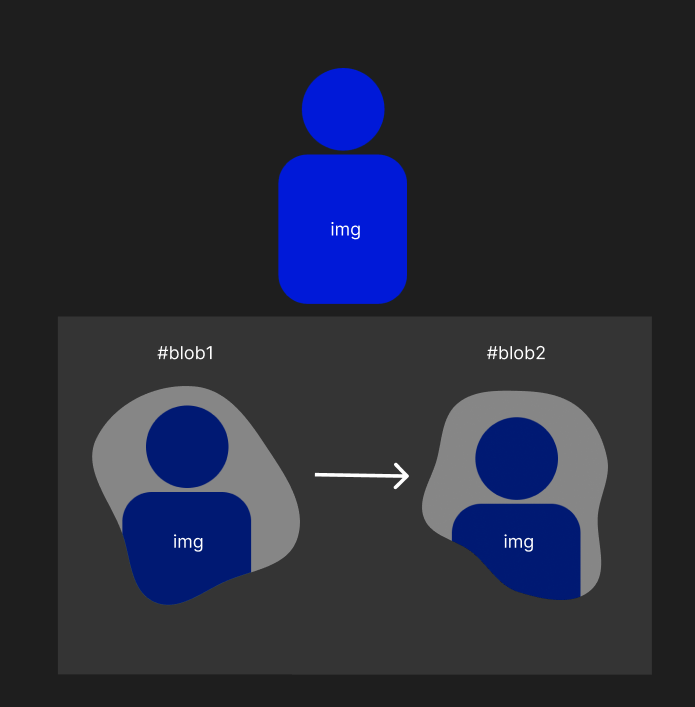
Hi everyone, I am working on a project where I want to create a blob effect using GSAP. I have animated two blob SVGs using GSAP as you can see in codepen attached below, but I am still learning, and I don’t know how to do everything. I have tried everything, mask-image, -webkit-mask-image but I'm not getting the result that I want. My goal is to mask an image into the blobs, like in the image I have attached. Can anyone please help me with this? How can I use GSAP to mask an image into the blobs? Thank you in advance for your help and suggestions.
-
 I'm sorry for the lengthy file to begin, this is the whole project which I thought may help anyone who could answer my plea. I have a problem trying to find out how to animate the Thwomp, and keeping it as part of the game as an enemy that makes the player start from the beginning again using the collision code from utils.js and importing the image from images.js. I have a short code, which I believe to be effective, but I'm not sure where to put it. const tl = new gsap.timeline({repeat:-1}) tl.to('#thwomp', { y: 300, ease: 'expo.in' }) tl.to('#thwomp', { delay: 2, y: 0, ease: 'expo', duration: 4 }) Any help will be greatly appreciated, thank you. canvas.js utils.js audio.js images.js
 -
Hi everyone, I am new in here. My employer wants me to create a page which has an animated background exactly like the grid in this web, whose grid is moving like waves. They want to use different grid image but with the same effect. When I check the website, they use GSAP, hence why I am here. I have been reading the documentations, and so far haven't found any method to create such animation. If anyone can help me, that would be highly appreciated.
-
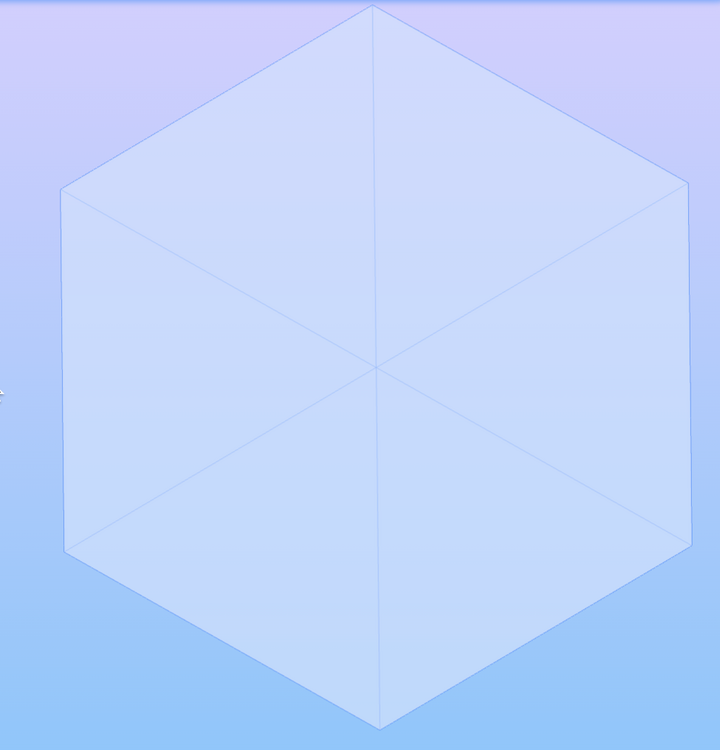
I have a problem with three js and gsap animation, its logic is that as I scroll, the faces of the cube are attached to the cube itself. when you attach a face to the cube, the face becomes for a while with 100% transparency. The problem is that let's say in production when I update the page in the section below the section with the animation I described above, all of the faces of my cube become opaque as if they are simultaneously joined to the cube, what can this be about and how can it be fixed? now will send my code in the next message animation: useIsomorphicLayoutEffect(() => { if (!width) return; if (width >= 1200) { const changeOpacity = (props: ChangeOpacity) => { const { variant = "increase", selector, start = "+=75", end = `+=${window.innerHeight}`, } = props; if (variant === "increase") { return gsap.to( {}, { scrollTrigger: { trigger: contextRef.current, scrub: 0.1, start, end, onUpdate: (self) => { const progress = self.progress; gsap.to(selector, { opacity: progress * 2, duration: 0, }); }, }, } ); } return gsap.to( {}, { scrollTrigger: { trigger: contextRef.current, scrub: 0.1, start, end, onUpdate: () => { gsap.to(selector, { opacity: 0, duration: 0, }); }, }, } ); }; const ctx = gsap.context(() => { changeOpacity({ selector: ".first-panel", start: `+=75`, }); changeOpacity({ variant: "decrease", selector: ".first-panel", start: `+=${75 + window.innerHeight + 75}`, }); changeOpacity({ selector: ".second-panel", start: `+=${window.innerHeight}`, }); changeOpacity({ variant: "decrease", selector: ".second-panel", start: `+=${window.innerHeight * 2}`, }); changeOpacity({ selector: ".third-panel", start: `+=${window.innerHeight * 2 + 75}`, }); changeOpacity({ variant: "decrease", selector: ".third-panel", start: `+=${window.innerHeight * 3}`, }); changeOpacity({ selector: ".fourth-panel", start: `+=${window.innerHeight * 3 + 75}`, }); changeOpacity({ variant: "decrease", selector: ".fourth-panel", start: `+=${window.innerHeight * 4}`, }); changeOpacity({ selector: ".fifth-panel", start: `+=${window.innerHeight * 4 + 75}`, }); changeOpacity({ variant: "decrease", selector: ".fifth-panel", start: `+=${window.innerHeight * 5}`, }); changeOpacity({ selector: ".sixth-panel", start: `+=${window.innerHeight * 5 + 75}`, }); }, contextRef); return () => ctx.revert(); } }, [width, contextRef]); codesandbox: https://codesandbox.io/p/sandbox/sharp-fast-j625lw problem: must be like this :
-
Hey, I'm New here! my question can bother you. I'm looking for a suggestion basically for my project. I'm developing a website landing section where I want to place a video on Scroll video should be play (I'm Just using a word video it can be any other bes approach) On the whole, as I study myself there are different techniques to do so. 1) video play/off on scroll like this { } 2) Image sequence { } 3) Sprite images https://webdesign.tutsplus.com/tutorials/how-to-animate-a-coffee-drinking-sprite-with-scrollmagic--cms-24795 a. which technique should I follow? b. Should I work on Canvas or just HTML divs'? speed of the loading the first time is my priority as the Apple website has quick response I just want your suggestion in this way.
-
 Hello, I've been using gsap for a while and I try my best to implement it in all of my projects. Due to the recent changes of Nextjs, I have been transfering all of my pure React.js applications to Nextjs. However, I am encountering some issues when it comes to animations and elements showing before the animation begins. Since I learned about gsap.context, I've been using it in my React.js and early Nextjs projects and it works perfectly. However, it seems that Nextjs 13.4.5 is having problems even when using gsap.context within useLayoutEffect. The issue occurs on the first render of the page. In oder words, it happens when you first visit the website. If you refresh it, the element stuttering wont happen. What I usually do is that I clear my history and cache to reproduce the issue again. The website will show the contents for one or less than a second, and the animation will play. I have developed a very basic application and deployed it on Vercel. I would like to know if anyone has had any problems with animations with the latest version of Nextjs and, if so, what are some possible solutions. I'm not sure if this a problem of Nextjs when loading files or gsap's compatability with the latest version of Nextjs. But I'm leaning more towards Nextjs due to the other problems I've been having with it. Here are the links to the website and Github repo: Website: https://gsap-animation-nextjs13-4-5.vercel.app/ Github: https://github.com/andresfelipe328/gsap-animation-nextjs13.4.5.git Thank you
 -
I want to implement an animation that would collect parts of the cube on a scroll. The farther you scroll, the more faces of the cube joined. I encountered a problem that the animation works only if markers: true. I read a thread on a similar case, it said that the parent has flex or that the height is not 100vh, but none of that worked for me. In the case where markers: false, the animation works until the first edge, and then the scroll works as normal, not as scrub. What are some other options to solve the problem? The link with the current problem: https://codesandbox.io/s/optimistic-poitras-cym566?file=/src/cube.tsx

-
 Hey Guys, I have implemented the new landing page for our website with GSAP & ScrollTrigger. It contains bunch of animations, including CSS and Image Sequence render on scroll etc. I want someone to audit the performance and suggest us/work with us for necessary changes to get the fluid performance of the animations. The issue is mostly in some animation timeline with more than 2 scene including a clip path change. Latest link to the page- https://website-production-ezzhdy36l-ultrahuman.vercel.app/v2/
-
- 1
-

-
- performance
- animation
- (and 2 more)
-
 Hi, I want to do this video. All content goes to the center in Zoom in/out. Could you please give me a hint? Video link: https://fiverr-res.cloudinary.com/video/upload/t_fiverr_hd/v1/video-secured-attachments/messaging_message/attachment/a5379de46d077980d280c733bfd23b85-1685272686476/IMG_9314?__cld_token__=exp=1685404524~hmac=229d38e5b3974e0de4b36336812a7fc3054ea9fc49cd79f5f6b0ae04f7de8180
 -
Hello @GSAP Helper I’ve been a GSAP animator for many years developing banners using HTML, CSS and JavaScript I’ve now moved into the Motion Designer role using Adobe After Effects and Blender 3D. Unfortunately everything thing is key frame based in these programs I honestly really miss the efficiency of GSAP. My favourite era was when we could use a hybrid Adobe Animate/Flash timeline and program GSAP to make animations Is there any chance there is a way to use GSAP in Blender 3D? It has a panel for scripting but I can’t figure out how to use GSAP with Python/Blender API The only way to use GSAP with 3D these days, is to export the model and animate in the browser Blender would be a very powerful tool is we could GSAP inside the programs like the Adobe Animate/Flash days Thanks for your time!
-
Hey guys, I met GSAP today and I was impressed with the quality of animations that it is possible to do, I found an example of how to make the horizontal scroll using vanilla js, someone who has already done it using react can give me an example of how to make this type of animation. Thank you very much :D
-
 Hello Guys, it's my first Forum Article. I'm using GSAP for nearly a year now. I'm using GSAP + GsapSmoothScroll + ScrollTrigger and Barba.js I have some slightly complex Animations on my Site and its extremely laggy on iPhone Safari I tried a lot of Solutions that I found hear, but nothing really works. Does someone have some Ideas how to fix. Here is a Link to the Website: This is my config for the ScrollSmoother. The Lag is specially on the page uid42 thats the link i put in hear. The other pages are ok not perfekt but ok: I hope its enough information. scroll = ScrollSmoother.create({ smooth: 0.2, // how long (in seconds) it takes to "catch up" to the native scroll position effects: true, // looks for data-speed and data-lag attributes on elements ignoreMobileResize: isMobile() && !document.querySelector("#uid1") ? true : false, normalizeScroll: isMobile() && !document.querySelector("body:not(#uid42)") ? true : false, }) On a Mission (hantha.net) Hope someone could help me.
 -
Hey everyone! I'm currently developing a filter system with GSAP Flip using layers as a transition. I have a problem with the appearance delay, my onEnter appear before the onLeave. https://codepen.io/damienmontastier/pen/vYVWoge Using an official GSAP codepen, I have reproduced the effect I would like: https://codepen.io/damienmontastier/pen/OJBOKOo I think I made a lot of mistakes and lot of stuff impossible, do you have any suggestions? For information, my final version (not the both codepen) is under Nuxt.js and I use nextTick to use the changes related to FLIP. Thanks in advance !
-
Hey there! First of all, I'm quite new to GSAP in combination with React. For the current project I'm using NextJs. And what I want to achieve is, when hovering over a link, a line animates. Right now, I'm using modular styles for the styling. That's the structure. What I want to achieve is, that when the user is hovering over the linkWrapper class, the linkLine animates from a width of 0% to a width of 100%. Unfortunately I don't know how to achieve this with NextJS & GSAP. <div className={styles.linkWrapper} onMouseEnter={onEnter} onMouseLeave={onLeave}> <Link href="#">V.1.1 / Y2023</Link> <div className={styles.linkLine}></div> </div>