Search the Community
Showing results for tags 'animation'.


-
Hi, I would like to get help to fix an issue I'm encountering with the DrawSVG plugin and GSAP. I would like to animate my SVG element on hover and when I mouse leave it should revert. Currently, It's working fine except- If there are are multiple buttons all animation are executing at the same time when I hove any of the element, which I don't want. I want to execute the animation individually for each button. How can I achieve this effect? Many Thanks, Sajidul
-
I want to make a half wheel animation with javascript, the purpose of the animation is an animation with 50 or more long names and I want to determine the winner in the variable, but I could not make this animation and I could not find any examples on the internet. example:

-
Hello everyone! I'm working with React+Three.js + GSAP. I'm trying to animate a 3D model to make it rotate infinitely around its Y axis. The animation itself is applied, but I encounter a bug. The issue is that the animation randomly stops (does not complete a full rotation), and to restart it, I have to either drag the model again or move it (change its coordinates); otherwise, the model just remains stationary. So, it does not seem like a loading issue since otherwise, it would continue rotating on its own. I've tried animating using GSAP and useFrame. I've attempted importing the model as .jsx, as .glb, but I get the same effect everywhere. I also made a rotation animation in Blender and imported it, but I have the same error. I also used other models. But I'm getting the same error. This is the first time I'm encountering such an issue. Please advise on what might be the problem. Here is a GIF demonstrating the operation: https://drive.google.com/file/d/14pjIwIL-RqjsGepeEYC2owZ97dopJgDC/view?usp=drive_link This is the code of my component with a 3D model. I've shortened it for convenience. The comments indicate functions that I also tried. It didn't work. import React, { useRef, useEffect } from 'react' import { useAnimations, useGLTF } from '@react-three/drei' import * as THREE from 'three'; import { useGSAP } from '@gsap/react'; import gsap from 'gsap'; import { useFrame } from '@react-three/fiber'; export function Model(props) { const group = useRef() const { nodes, materials, animations } = useGLTF('models/bmw_m4_csl_2023.glb') const { actions, names } = useAnimations(animations, group) /*useEffect(()=>{ actions[names[0]].reset().fadeIn(3).play() },[]) */ gsap.registerPlugin(useGSAP) /*useGSAP(()=>{ let ctx = gsap.context(() => { gsap.to(group.current.rotation,{ y: "+=1", repeat: -1, ease: 'none', repeatRefresh: true, duration: 4 }),group}) return () => ctx.revert(); },[]);*/ /* useFrame(() => { group.current.rotation.y += 0.01 })*/ useEffect(() => { if (!group.current) return; gsap.to(group.current.rotation, { duration: 2, repeat:-1, y:2*Math.PI }); }, []); return ( <group ref={group} {...props} dispose={null}> <group scale={0.01}> <group rotation={[-Math.PI / 2, 0, 0]} scale={100}> <mesh castShadow receiveShadow geometry={nodes.M4xNME_exhaust_M4xNME_mechanical_0.geometry} material={materials.M4xNME_mechanical} /> <mesh castShadow receiveShadow geometry={nodes.M4xNME_exhaust_M4xNME_silver_0.geometry} material={materials.M4xNME_silver} /> </group> <group rotation={[-Math.PI / 2, 0, 0]} scale={100}> <mesh castShadow receiveShadow geometry={nodes.M4xNME_radiator_M4xNME_Black_0.geometry} material={materials.M4xNME_Black} /> <mesh castShadow receiveShadow geometry={nodes.M4xNME_radiator_M4xNME_Grille7_0.geometry} material={materials.M4xNME_Grille7} /> </group> </group> ) } useGLTF.preload('models/bmw_m4_csl_2023.glb') export default Model; Here is the component where the component with the 3D model is called. import React, { useEffect, useRef } from 'react'; import Model from './Model'; import { OrbitControls } from '@react-three/drei'; import { Canvas } from '@react-three/fiber'; const ModelView = () => { return ( <Canvas frameloop='demand' camera={{ position: [20, 10, 20], fov: 12 }}> <directionalLight position={[-19.772, 15.337, -0.439]} intensity={3.5} color="white"></directionalLight> <directionalLight position={[21.998, 14.051, -3.370]} intensity={2.46} color="white"></directionalLight> <directionalLight position={[-0.069, 13.752, -21.463]} intensity={5.08} color="white"></directionalLight> <directionalLight position={[4.116, 16.240, 20.387]} intensity={2.4} color="white"></directionalLight> <ambientLight intensity={2.12}></ambientLight> <directionalLight position={[0.009, 0.076, 7.499]} intensity={1.6} color="white"></directionalLight> <OrbitControls enableZoom={false} maxPolarAngle={Math.PI / 2} minPolarAngle={Math.PI / 2} /> <Model /> </Canvas> ); }; export default ModelView;
-
Hi, i have made some animation with gsap, i used gsap.from for made the animation, but when i refresh with (CTRL+R) for F5 the animation on my bottom page don't play... i upload video for you can see what i talk .. my code : https://codepen.io/arkunis/pen/zYXKKLx video for you can see Thx for your help !
-
Hi, i am starting a new project where a slider has already been set up with swiper js. Now i was wondering if its possible to add a cool animation when i drag or scroll through the slider like on this website: http://manifesto.clapat.com/index-showcase-carousel.html the images seem to be cut on the sides and seem to have more depth also they skew in the direction they are dragged. I was just wondering if someone could give me some direction on how to approach this kind of effect with GSAP or if there is a tutorial that someone could point me to. So no debugging for now^^. Also i wanted to know, if this effect is possible with a slider made with swiper JS or if there are any complications. Additionally i would like to implement the transition effect when clicking on the slider images. I saw that it can be made with the FLIP plugin, i just hope it works within Swiper JS. Thanks
-
 How can I use GSAP to animate cards within elementRef such that each card pauses when entering the viewport during a scroll, and as I scroll further, the card fades in opacity while moving to the left before the next card comes into view? Sandbox Link I have added the link of the sandbox so that I can explain my goals more clearly. You should view the preview in a next window in the editor only then will you be able to see the horizontal scroll. Thank you very much for your help 🙏
 -
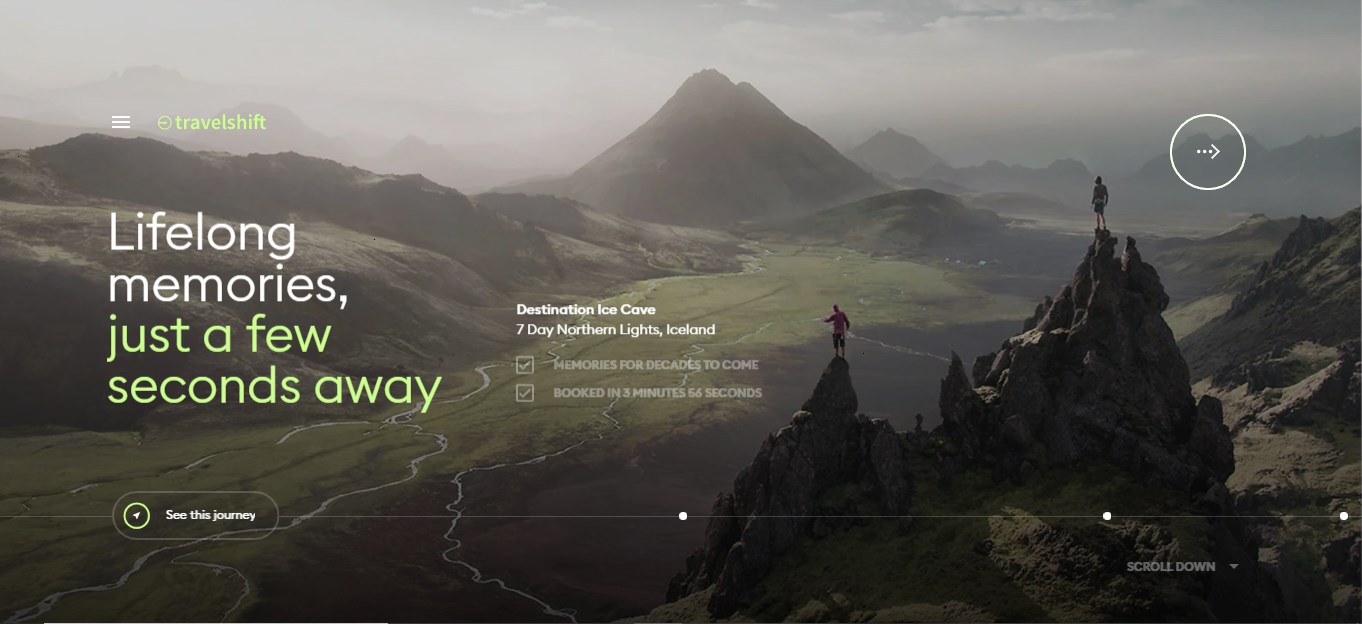
 Hi, I am a back end developer and have very least knowledge of JavaScript but I can understand code. I have been finding out whole day the code or logic used by https://travelshift.com/ they used to create top banner/slider which changes the slide/image by long click (about 1 second). I used chrome extension Wappalyzer and came to know that its using GSAP. I have been finding something similar but could not get any working code example. Can anyone please provide some similar example with code or any article link please. Also I want to know this animation name so I can google it better way. willing to get a response, thanks!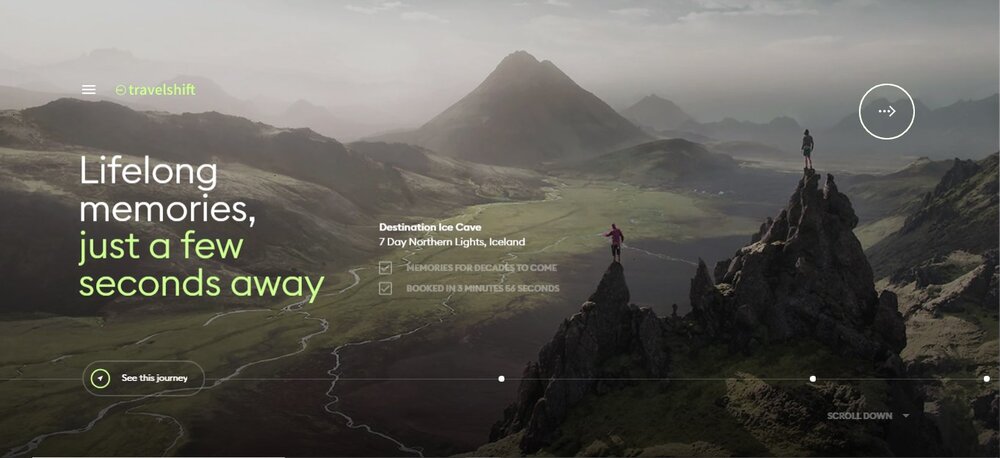
-
 Hello everyone, I have a task to create a banner like next: https://www.moxionpower.com/industries/ I've tried, but it isn't work fine.
 -
Hi, I'm currently making a personal website, and I was thinking I could implement a small animation to add to the details. The intended animation that I was trying to create was one that when the viewer of my website hovers overs certain <span> elements, those <span> elements would animate, without animating the other <span> elements. However, when I wrote my code, it didn't create the intended animation. Instead, it only animated the first <span> element regardless of whichever <span> elements that I hovered over. I have attached my CodePen demo URL as per the community guidelines, so if you want to take a look at my current code, it is readily available there. I would appreciate any inputs that I could get. Thank you!
-
 Hello everyone, and thanks in advance for help! I am trying to create horizontal scroll animation with 3 main section where first section should be 50% width and other 50% should be 50% of first image in second section. Right now I have created with 5 sections and same is working fine if there is not different concept for middle section. On load first div appears with 50% width and 50% of second div is visible in viewport Once middle div appears in viewport it should have 3 inner divs scrolling one by one Second div on viewport initially After scrolling one by one image should move left with text appearing left aligned After completion of the above animation, the second div should swipe left and the third div should appear. having different animations on it. https://codepen.io/subho0777/pen/gOEdjMV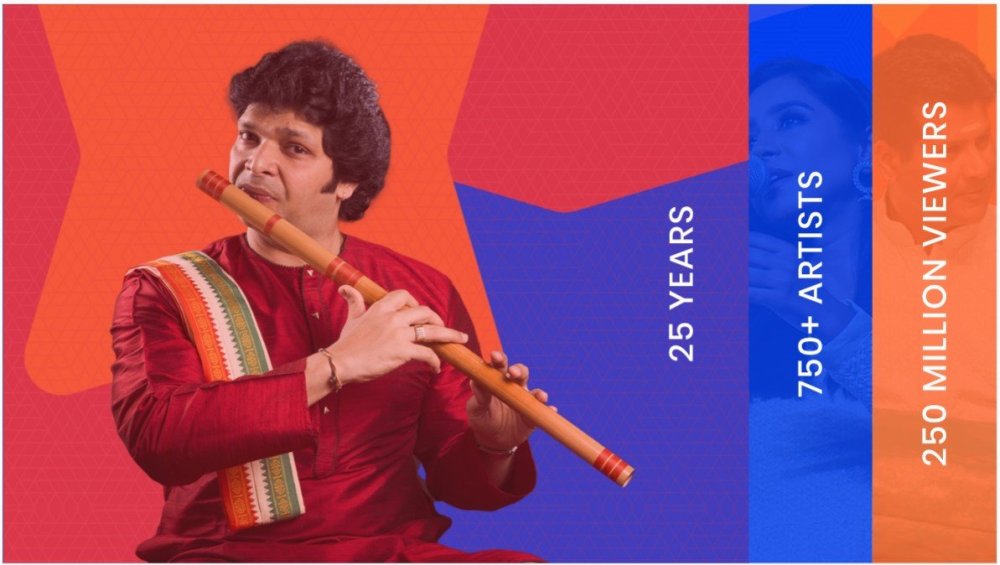

-
Hi everyone! I'm working on a landing page and I need to create a pre-loader that uses my handwritten logo as an SVG. Desired effect: The desired effect is a Stroke Reveal, implemented with GSAP3. How can I achieve this effect? Logo positioning: After loading, the logo/preloader should be positioned centrally on the navbar. Request for help: To achieve this project, I would need your help. What should I study? Best practices? What resources and tutorials do you recommend to learn more about?: Creating pre-loaders Stroke Reveal effect with GSAP3 Dynamic positioning of SVG elements What can I get inspiration from? Do you have any examples of websites or projects that use similar effects? Conclusion: Thank you in advance for your support! Additional information: I'm using GSAP3 My logo is a handwritten SVG The landing page is developed in HTML, CSS and JavaScript Thank you very much for your help!
.jpg.672cd0f3fd5464ae6bd65b44318c82bf.jpg)
-
 Location Remote (Global team, company based in Europe) Type Freelance, full-time engagement, with potential for long-term partnership About ThemePunch ThemePunch, a renowned name in the WordPress plugin space, has been a market leader for over a decade. Our flagship product, Slider Revolution, is at the forefront of creating fully animated, responsive websites. As we embark on the exciting journey of developing a new major update of Slider Revolution, we are seeking a talented and experienced JavaScript Developer to join our diverse, global team. Key Responsibilities - Develop and enhance the Slider Revolution project, focusing on creating a seamless and innovative website builder tool. - Implement advanced features using JavaScript, Three.js, and GSAP. - Work closely with the team to create animations, timelines, and manage layers within the product. - Ensure compatibility and optimal performance in the WordPress environment. - Utilize HTML5 and CSS to enhance visual and functional aspects of web designs. Qualifications - Profound expertise in JavaScript, along with frameworks/libraries such as Three.js and GSAP. - Strong background in web animation and a deep understanding of the principles of animation. - Extensive experience with WordPress, particularly in developing plugins or addons. - Proficiency in HTML5 and CSS, with an eye for design and layout. - Familiarity with website builder tools and a strong grasp of WYSIWYG editors. - A portfolio showcasing previous work and accomplishments in similar projects. What We Offer - The opportunity to work on a leading product in the WordPress plugin space. - A remote work setting that allows flexibility and comfort. - Collaboration with a dynamic and skilled team spread across various continents. - A long-term partnership with potential for full-time engagement. - A chance to influence the future of website building and slider technology. How to Apply Please submit your resume along with a portfolio of your work. Highlight your experience with JavaScript, Three.js, GSAP, and any relevant WordPress projects here and/or to jobs@sliderrevolution.com. We look forward to discovering how your skills and experiences align with our vision for Slider Revolution. Join us at ThemePunch and be part of shaping the future of web design and animation!
- 7 replies
-
- 1
-

-
- wordpress plugin
- javascript
- (and 7 more)
-
Hello, I'm new to GSAP and JS in general, but I wanted to add animation to my burger menu on click. let typeSplit = new SplitType(".mobile-menu-page-container", { types: "lines, words, chars", tagName: "span", }); // plain JavaScript version document.querySelector(".burger-wrap").addEventListener("click", function () { setTimeout(function() { gsap.from(".mobile-menu-page-txt .char", { y: "110%", opacity: 1, rotationZ: "10", duration: 0.2, ease: "power1.out", stagger: 0.05, }); }, 200); }); Everything works on the first click, but if I open and close the menu, it looks strange. What can I do? Thanks RPReplay_Final1706268273.mp4
-
Hello my Wonderful Community, I have created some pages with GSAP scroll trigger animations, but now I want to add smooth scrolling, whatever packages I found are creating fake scroll due to which my scroll trigger animations are not triggered. Is there any package or solution to solve it?
-
Hello good people at Team GreenSock, happy new year and all the best wishes! I'm trying to create something similar like in this example Zoomable treemap / D3 | Observable (observablehq.com) , can anyone help me and point me in the right direction? Thank you!
-
 The direction of Marquee changes on hovering when scrolling upwards but it works fine when scrolling downwards. Somebody pls help me with this. 🙃 CodePen File attached! HTML: <div class="marquee"> <div class="marquee-inner"> <div class="marquee-part"> Technology Redefined <div class="shape"></div> </div> <div class="marquee-part"> Technology Redefined <div class="shape"></div> </div> <div class="marquee-part"> Technology Redefined <div class="shape"></div> </div> <div class="marquee-part"> Technology Redefined <div class="shape"></div> </div> <div class="marquee-part"> Technology Redefined <div class="shape"></div> </div> <div class="marquee-part"> Technology Redefined <div class="shape"></div> </div> </div> </div> JS let currentScroll = 0; let isScrollingDown = true; const marquee = document.querySelector('.marquee'); const marq = document.querySelector('.marquee-part'); const mrq = document.querySelector('.marquee-inner'); const loop = horizontalLoop(mrq, { paused: false, repeat: -1, }); marquee.addEventListener("mouseenter", () => { gsap.to(loop, { timeScale: 3, ease: "power1.in" }); }); marquee.addEventListener("mouseleave", () => { gsap.to(loop, { timeScale: 1 }); }); window.addEventListener("scroll", function() { if(window.pageYOffset > currentScroll){ isScrollingDown = true; }else{ isScrollingDown = false; } gsap.to(loop, { timeScale: isScrollingDown ? 1 : -1, }).totalProgress(1); currentScroll = window.pageYOffset; }); /*---------------HORIZONTAL LOOP FN-------------------*/ function horizontalLoop(items, config) { items = gsap.utils.toArray(items); config = config || {}; let tl = gsap.timeline({repeat: config.repeat, paused: config.paused, defaults: {ease: "none"}, onReverseComplete: () => tl.totalTime(tl.rawTime() + tl.duration() * 100)}), length = items.length, startX = items[0].offsetLeft, times = [], widths = [], xPercents = [], curIndex = 0, pixelsPerSecond = (config.speed || 1) * 100, snap = config.snap === false ? v => v : gsap.utils.snap(config.snap || 1), // some browsers shift by a pixel to accommodate flex layouts, so for example if width is 20% the first element's width might be 242px, and the next 243px, alternating back and forth. So we snap to 5 percentage points to make things look more natural totalWidth, curX, distanceToStart, distanceToLoop, item, i; gsap.set(items, { // convert "x" to "xPercent" to make things responsive, and populate the widths/xPercents Arrays to make lookups faster. xPercent: (i, el) => { let w = widths[i] = parseFloat(gsap.getProperty(el, "width", "px")); xPercents[i] = snap(parseFloat(gsap.getProperty(el, "x", "px")) / w * 100 + gsap.getProperty(el, "xPercent")); return xPercents[i]; } }); gsap.set(items, {x: 0}); totalWidth = items[length-1].offsetLeft + xPercents[length-1] / 100 * widths[length-1] - startX + items[length-1].offsetWidth * gsap.getProperty(items[length-1], "scaleX") + (parseFloat(config.paddingRight) || 0); for (i = 0; i < length; i++) { item = items[i]; curX = xPercents[i] / 100 * widths[i]; distanceToStart = item.offsetLeft + curX - startX; distanceToLoop = distanceToStart + widths[i] * gsap.getProperty(item, "scaleX"); tl.to(item, {xPercent: snap((curX - distanceToLoop) / widths[i] * 100), duration: distanceToLoop / pixelsPerSecond}, 0) .fromTo(item, {xPercent: snap((curX - distanceToLoop + totalWidth) / widths[i] * 100)}, {xPercent: xPercents[i], duration: (curX - distanceToLoop + totalWidth - curX) / pixelsPerSecond, immediateRender: false}, distanceToLoop / pixelsPerSecond) .add("label" + i, distanceToStart / pixelsPerSecond); times[i] = distanceToStart / pixelsPerSecond; } function toIndex(index, vars) { vars = vars || {}; (Math.abs(index - curIndex) > length / 2) && (index += index > curIndex ? -length : length); // always go in the shortest direction let newIndex = gsap.utils.wrap(0, length, index), time = times[newIndex]; if (time > tl.time() !== index > curIndex) { // if we're wrapping the timeline's playhead, make the proper adjustments vars.modifiers = {time: gsap.utils.wrap(0, tl.duration())}; time += tl.duration() * (index > curIndex ? 1 : -1); } curIndex = newIndex; vars.overwrite = true; return tl.tweenTo(time, vars); } tl.next = vars => toIndex(curIndex+1, vars); tl.previous = vars => toIndex(curIndex-1, vars); tl.current = () => curIndex; tl.toIndex = (index, vars) => toIndex(index, vars); tl.times = times; tl.progress(1, true).progress(0, true); // pre-render for performance if (config.reversed) { tl.vars.onReverseComplete(); tl.reverse(); } return tl; }
 -
I need the marquee to increase its speed from the position the mouse is hovered on it. But in my case, it starts from a different position when the mouse is hovered. Please Help! CODE HTML <div class="marquee"> <div class="marquee-inner"> <div class="marquee-part"> Technology Redefined <div class="shape"></div> </div> <div class="marquee-part"> Technology Redefined <div class="shape"></div> </div> <div class="marquee-part"> Technology Redefined <div class="shape"></div> </div> <div class="marquee-part"> Technology Redefined <div class="shape"></div> </div> <div class="marquee-part"> Technology Redefined <div class="shape"></div> </div> <div class="marquee-part"> Technology Redefined <div class="shape"></div> </div> </div> </div> JS let currentScroll = 0; let isScrollingDown = true; let marquee = document.querySelector('.marquee-inner'); let tween = gsap.to(".marquee-part", { xPercent: -100, repeat: -1, duration: 4, ease: "linear", }).totalProgress(.5); marquee.addEventListener("mouseenter", () => { tween.duration(2) }) marquee.addEventListener("mouseleave", () => { tween.duration(4) }) gsap.set(".marquee-inner", {xPercent: -10});
-
I get this Error Message when trying to stop the marquee on mouse hover! Pls Help!! Error: Invalid property pauseOnHover set to true Missing plugin? gsap.registerPlugin() Code: HTML: <div class="marquee"> <div class="marquee-inner"> <div class="marquee-part"> Technology Redefined <div class="shape"></div> </div> <div class="marquee-part"> Technology Redefined <div class="shape"></div> </div> <div class="marquee-part"> Technology Redefined <div class="shape"></div> </div> <div class="marquee-part"> Technology Redefined <div class="shape"></div> </div> <div class="marquee-part"> Technology Redefined <div class="shape"></div> </div> <div class="marquee-part"> Technology Redefined <div class="shape"></div> </div> </div> </div> CSS: gsap.registerPlugin(ScrollTrigger); let currentScroll = 0; let isScrollingDown = true; let shapes = document.querySelectorAll(".shape"); const links = document.querySelectorAll(".marquee-inner"); let marquee = document.querySelector('.marquee-inner'); let tween = gsap.to(".marquee-part", { xPercent: -100, repeat: -1, duration: 5, ease: "linear", pauseOnHover: true, }).totalProgress(0.5); let loop = gsap.to(links, { repeat: -1, speed: 1 + 0.5, draggable: true, reversed: false, paddingRight: parseFloat(gsap.getProperty(links[0], "marginRight", "px")) }); marquee.addEventListener("mouseenter", () => { loop.pause() }) marquee.addEventListener("mouseleave", () => { loop.play() }) gsap.set(".marquee-inner", {xPercent: -10}); window.addEventListener("scroll", function() { if(window.pageYOffset > currentScroll){ isScrollingDown = true; }else{ isScrollingDown = false; } gsap.to(tween, { timeScale: isScrollingDown ? 1 : -1, }).totalProgress(1); currentScroll = window.pageYOffset; });
-
 I'm trying to call a function inside GSAP - I'm using React, but I'm getting error in my console: App.jsx:59 Uncaught TypeError: Cannot read properties of undefined (reading 'scrollTo') This is the code: import gsap from "gsap"; import ScrollTrigger from "gsap/dist/ScrollTrigger"; import { ReactLenis, useLenis } from "@studio-freight/react-lenis"; gsap.registerPlugin(ScrollTrigger); const App = () => { const lenis = useLenis(({ scroll }) => { // called every scroll }); const [showSpan, setShowSpan] = useState(true); const mainTitleRef = useRef(null); const secondaryTitleRef = useRef(null); const wavingHandRef = useRef(null); const section1Ref = useRef(null); const section2Ref = useRef(null); useLayoutEffect(() => { pinSection(); animateTitles(); return () => { // Cleanup code when the component unmounts ScrollTrigger.getAll().forEach((trigger) => trigger.kill()); }; }, []); // Empty dependency array to run once after the initial render const pinSection = () => { // Pin the section when it enters the viewport ScrollTrigger.create({ trigger: section1Ref.current, start: "top top", end: "1200 top", pin: true, markers: true, onLeave: () => { gsap.to(section1Ref.current, { opacity: 0, duration: 1, onComplete: scrollToSection2, }); // Set opacity to 1 when entering the trigger // scrollToSection2(); // gsap.add( function(){ scrollToSection2(); } ) }, onEnterBack: () => { gsap.to(section1Ref.current, { opacity: 1, duration: 1 }); }, }); }; const scrollToSection2 = () => { lenis.scrollTo(section2Ref.current, { duration: 5 }); }; As you can see scollToSection2 is a React function. Thank you for your help upfront!
 -
Hi Everyone, I recently recieved a project for a tour and travels website. I was scrolling through many design and thought of creating a parallax website with 3D models, but I haven't created any up until now. So I needed some suggestions on how to start and where to get the resources. Also, will there be any performance issues when hosting the website. (Website is not Dynamic, More like a Gallery type for an agency). How do I optimize the performance of the website while building it? What thinks should I be aware of? Any suggestions will be helpful. Thank You.
-
Hello! Help with advice on how to get started with SVG. I have a SVG web, and I want its center to stick to the mouse cursor with an elastic effect, and when leaving it, spring back to its original position. Or is it impossible to solve the problem with such an SVG? Thank you in advance! https://codepen.io/cnqftxxr-the-looper/pen/ZEwyjVL
-
 Hello Rohit this side, I am a frontend developer from India can you please guide me on how to start working on making a website like Awwwards and I want to learn more. It will be a great opportunity if you help me out.
 -
Hi there, I'm a newbie to GSAP, and while I was working on a tutorial related demo-project, I experienced a problem related to scrollTrigger animations. Though the content is displayed, the animations aren't working at all or are getting struck in midway. Sometimes no content is getting displayed. Please help me with this. I've put my demo code in the codepen.io url : https://codepen.io/Star-Bot/pen/VwgMgwN .
-
Hi guys! animation does not work on IOS, although it works on a computer and in adaptive mode, everything is correct, tell me what is the reason? https://gsap-doesnt-work.netlify.app/
-
i'm very new to the overall web development. https://makepill.com/en how can achieve the dot which follows the cursor. Although I've made it but in the above site it looks the cursor pulls the dot which skews a little. Also check this effect in their nav. I'll be grateful if someone could help out. Thanks in advance





(1).thumb.jpg.a18c5cc545c023f74ba9d43489029176.jpg)


.thumb.jpg.508ba629559fba639e5f03a505c5b072.jpg)