Search the Community
Showing results for tags 'javascript'.
Found 298 results


-
Hi guys I'm using TimelineLite to animate an html5 banner and I'm having trouble with one of the lines: here is my code: panel.animate = function () { var _tweenTime = this._tweenTime, _staggerTime = this._staggerTime, _frameTime = this._frameTime, _carTime = 5; this._timeline // frame 1 .to(expTxt0, _tweenTime, { alpha:0, ease:Power2.easeIn }, _frameTime) .to(expTxt1, _tweenTime, { alpha:1, ease:Power2.easeOut }) // frame 2 .to(expTxt1, _tweenTime, { alpha:0, ease:Power2.easeIn }, _frameTime) .staggerTo([ expTxt2, expTxt3, expTxt4, expTxt5, expTxt6, expTxt7, expTxt8 ], _tweenTime, { alpha:1, ease:Power2.easeOut }, _staggerTime) .to(renaultLogo, _tweenTime, { alpha:1, ease:Power2.easeOut }); // car animation this._timeline.add([ new TweenLite(car, _tweenTime * 2, { alpha:1, ease:Power2.easeOut } ), new TweenLite(car, _carTime, { left:373, top:158, scaleX:1, scaleY:1, ease:Power2.easeOut } ), new TweenLite(wheel0, _carTime, { rotation:"720", ease:Power2.easeOut }), new TweenLite(wheel1, _carTime, { rotation:"720", ease:Power2.easeOut }) ], 0); }; the line in question is the first line under the // frame 2 comment: .to(expTxt1, _tweenTime, { alpha:0, ease:Power2.easeIn }, _frameTime) In actionscript I would expect this to fade the expTxt1 <img> back down (after fading it up on the previous line). I've tried setting overwrite:false (not sure if that's a thing) and switching between using opacity and alpha but i can't think of anything else to do to make the code work. Can anyone see if I'm missing something please? Thanks obie
-
Hello, I love your products and everything Greensock stands for. Your products are top-notch, and the customer service is as good as the Kinko's customer service is bad. GreenSock customer service is like "Bizzaro Kinko's Customer Service." In other works: GreenSock - "Totes Awesome Sauce" Kinko's - "The Hangover 2 & Indiana Jones 4, kind of awful" I am trying to come up with the most efficient and "zazzy-licious" way to put in the background of one of my website page, the scrolling code that you see on computer screens in the background of movies and tv shows. I'm not sure if I want just pure binary (1's and 0's) or letters and numbers. I figured that I would find about 500 ka-trillion Google results showing different ways of doing this in various languages, but alas, I didn't really find much of anything. I'm using the Greensock Javascript libraries (v.12) and the latest version of Raphael.Js. I don't really need anyone to show me how to do this, by providing a working example (at least, not yet). I'm really looking for a broad outline of the steps I would need to take to accomplish this task in the most code efficient and least taxing burden on the browser way possible. Any help would be greatly appreciated. Thanks, Sweet J
-
UPDATE: Arggh. I am tired. Pesky quotation marks! I may be just tired today, but this is throwing me -- I'm getting a syntax error on the following line. I'm trying to tween multiple objects returned by jQuery to 0px (this is the ubiquitous accordion menu — I'm trying to replace jQuery slideUp and slideToggle with GSAP equivalents) TweenMax.to($('#nav li ul'),0.25,{css:{height:0px}}); Can GS parse the return of a jQuery selector that returns multiple values? I had thought so -- I'm probably missing a parenthesis, and I apologize if I am, but I don't see it!
-
 Hello, I love GreenSock, it's a phenomenal product. I am a Flash Developer migrating to HTML, Canvas, CSS, and Javascript web designing. The Javascript versions are excellent. The one challenge I am having is trying to make the CSS 3D Transformations work. I looked at the demos of how powerful these transformations can be at: http://www.greensock.com/transitions/ http://www.greensock.com/css3/ and the "CssPlugin" section of your documentation at: http://api.greensock.com/js/ But, unfortunately I see a whole lot of small snippets of code (i.e. the trailer for a really awesome movie that I can't wait to see), but I would really like to see the whole html page with the css and javascript included (i.e. the whole "unrated, director's cut with alternate endings and commentary.") After searching through the GreenSock forums I found this link that the great Carl Schooff posted some downloadable examples of CSS Transformations: http://forums.greensock.com/topic/6230-how-to-tween-css3-transform-properties/ What I'm trying to say, is I would really appreciate it, if it were a little easier to figure out how to use these powerful tools to the most. Thanks, for viewing & best wishes, J
 -
Hello, I've been working with the Javascript version of GreenSock v 12, EaselJs, and the Canvas element. I know that the Actionscript version of Greensock has a CircluarPath2D or something something like that, but I've searched Google and the Greensock forums and cannot find a way of actual animate the drawing of a shape like in Flash. I've seen tons of examples on "Transforming" shapes, and the drawing of shapes and then put them on the screen, but not any actual on-screen animated drawing of a shape/bezier. I also, looked into svg, but did not see an option there. Is it possible to do this without using masks? If so, please provide a very simple example or send me a link to how to do this Thanks for viewing, any help will be greatly appreciated.
-
Using jQuery and greensock together. Recently I designed a site and I worked VERY hard on the animation using greensock. I love it btw. However, I showed two friends that they had old browsers and when they clicked the links they did not even go to the right pages, they did nothing. My heart hurts that they can't see the animation but hurts more knowing they can't see the content because the links don't work. On another browser, firefox old version. 3.0 I think. They buttons worked but the video box did not animate and stayed on top so it messed up content below. My question: Is there a way to detect if they have javascript or some other work around so at least the links can work and in this case the video box will go away, so they can at least see the content? Here is the website I am talking about. See how the video box jumps off screen when you click a link, well its suppoed to, but not for all does it work. If not perhaps I can redirect them to a page that says... sorry you can't view this content you need to update your browser. http://www.BeauBird.com/hope.php Thanks for your help or suggestions so my work can be seen by all. -PapaDeBeau
-
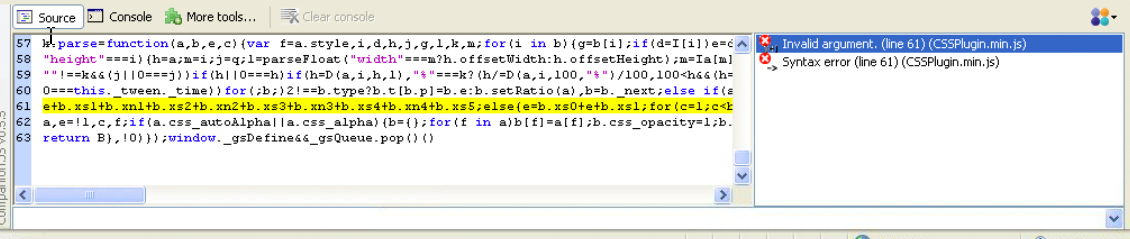
I'm having to develop a minisite which needs to be backwards compatible to IE7. I'm using jQuery and GS JS v12. I'm testing on browserstack.com -- a virtual IE7 running under a virtual Windows XP One of the errors I got is in CSSPlugin -- Invalid argument. I attach a picture at start of this message (click to see bigger). Two questions: 1) what might be going wrong? This code works fine in modern browsers. 2) is there a non-min version of the GS JS libraries to see things a little more clearly? obviously (1) depends on MY code, but I'm pretty sure there's nothing wrong with it as everything works with modern browser -- and it would be bloody hard to debug on this remote virtual machine, to see exactly which code of mine is being called — is there something with running v12 on IE7 that I should be aware of? I'm fine if it's not backwards-compatible, but just would like to know… Thanks

-
I'm new to JS/CSS (coming from AS3) -- I wonder if someone could help me figure out the following: I'd like to have tabs at the bottom of a page which, when rolled over (or clicked) slide up. The tabs will contain images of 45px height. I'd like, say, the extended tab to be something like 100px in height. I gather this has something to do with overflow, hidden, auto, etc -- I've seen solutions using jQuery slide, but I'm not sure how to do it with Greensock -- that is, I am well-versed in the GS engines, but putting it all together (CSS, DIVs, overflows, etc) is throwing me. Any help much appreciated!
-
As an erstwhile AS3 developer moving over to some JS, could someone clarify this for me? I was trying to move a div on screen and then (when invisible) set it back to where it started. Something like this (swapOut is a JQuery object): TweenMax.to(swapOut,0.4,{css:{x,opacity:0},onComplete:this.finishSwapImages,onCompleteParams:[swapOut,swapOut.css('x')]}); But I could never get it set back where I wanted? See the obvious error: I'm using 'x' instead of 'left'. When I inspected in Firebug I saw that my div's css had a transform-matrix set on it. When I went back and did this, all worked fine TweenMax.to(swapOut,0.4,{css:{left,opacity:0},onComplete:this.finishSwapImages,onCompleteParams:[swapOut,swapOut.css('left')]}); My question is: what's TweenMax doing for me with respect to x? Is this a proper CSS property? — or is TweenMax lending a helpful hand for us AS3 people and moving stuff in a tricky way when we (mistakenly) say 'x'? If so, what else is like this in the JS version? ("y" -> "top", etc?)
-
Hi, I wonder if we will have bezier support in javascript version soon? I had a great success with greensock and easelJs together, I can almost 100% duplicate what I have done with actionscript 3 before, apart from bezier curve animation...
-
I'm trying to figure out the best practice for an image swap. I'm coming from AS, new to JS, but I have a basic idea of what to do -- and nothing seems to work. I'm trying to use the old 'make a UL inline for a horizontal menu' trick -- I ran through all of these options but couldn't get any to work 1) loaded both images into the <li> with different z-indexes, thinking that I'd TweenMax the top image to 0 opacity on rollover -- even with float:left they sat next to each other not on top of each other. 2) I set the "over" image as the background with CSS and put the "out" image in the <li> and then tweened the "out" image to 0 opacity on rollover. Somehow this seemed to collapse the box -- the background image wasn't displayed when the front was invisible -- this seemed to be a result of the 'display:inline' The easiest thing is to simply swap 'src' on rollover -- but I'm looking for a gradual transition. Any suggestions? I know it's hard to talk about what I'm doing/not doing without my code, but in lieu of that, if someone could provide a sample, or a link, that would be helpful. Thanks!
-
Hey! First of all, this isn't an animation or tween problem but as there is no other Javascript section, I'm posting it here. Also I'm not entirely sure that it is caused by TweenLite but it is happening in my TweenLite line of code. I have an image and I want to generate a reflection effect for it so I duplicated the image, mirrored it and reduced the opacity through TweenLite (makes it so much easier!). In all browsers I have tested it so far it works fine (including IE7) but in Chrome it's behaving weird. The reflecting image is at the bottom of my page and should partially exceed the bottom border of the DIV it is in. What Chrome does is that the image itself does not go further down than the border of the content div but the canvas or area of the image does go down. This results in clipping the image. This could be an issue with the css I'm applying with the TweenLite line or it could be the way TweenLite handles it. If I comment out the line with where the TweenLite css is set, it gets positioned over the border just fine, but obviously without the right css attributes. Here is the Jsfiddle: http://jsfiddle.net/qTE2m/ here are screenshots of what I mean: Chrome: http://puu.sh/1xI15 FireFox: http://puu.sh/1xI24 The black line at the bottom is the border of the div the image is in.
-
Hi Jack, thanks for the gsap. From what i see the overwrite auto does not work for tweens initiated via css className. So if you have say an on-mouseover and add a css class {css:{className:"+=class1"}} and then mouse-out before the css property tweens are complete and remove the class {css:{className:"-=class1"}}, the first tween/s are not cancelled and continue to completion - and then the remove class takes effect immediately. If you use overwrite "all" - all tweens stop as expected. Cheers
-
So, I'm creating an Image Gallery. Clicking on buttons calls the "change_section" function, passing it the hires image id. I want to fade out the current image, load the new image, than fade it on the screen. But, for some reason when it losing track of the "this.hires" array that contains the image url, width, height and id. I think it's calling an undefined "Gallery" javascript object. Any insight would be appreciated. Gallery.prototype.change_section = function(_id) { this.new_section = _id; //// Started with TweenMax.to(this, .5, {hires_alpha:0, overwrite:2, onUpdate:reDrawMain, onComplete:this.check_hires}); ///I've tried this var obj = this; TweenMax.to(obj, .5, {hires_alpha:0, overwrite:2, onUpdate:reDrawMain, onComplete:obj.check_hires}); /// Calling just this works, and still sees the "this.hires" array in the Gallery object. So, I don't think it's my logic, but rather I'm not referencing the right javascript object with the onComplete call. this.check_hires(); }; Gallery.prototype.check_hires = function() { var i; for (i=0;i<this.hires.length;i++) { if(this.hires[i].id == this.new_section) { if(!this.hires[i].loaded && !this.hires[i].loading) { this.load_hires(); } else { this.active_section = this.new_section; this.open_hires(); } } } }; The code below is for reference. Maybe I have conflicting calls to TweenMax or something. Gallery.prototype.open_hires = function() { TweenLite.to(this, .5, {delay:.5, hires_alpha:1, overwrite:2, onUpdate:reDrawMain}); }; Gallery.prototype.load_hires = function() { trace("Gallery load_img") var obj = this; var i; var s; for (i=0;i<this.hires.length;i++) { if(this.hires[i].id == this.new_section) { var hires_img = new Image(); this.hires[i].obj = hires_img; hires_img.id = this.hires[i].id; hires_img.onload = function () { obj.hires_loaded(this.id); } this.hires[i].loading = true; hires_img.src = this.hires[i].img; } } }; Gallery.prototype.hires_loaded = function(_id) { var i; for (i=0;i<this.hires.length;i++) { if(this.hires[i].id == _id) { this.hires[i].loaded = true; this.active_section = _id; this.open_hires(); } } };
-
So has anyone been using Adobe Edge? Ok, so I really thought about whether this should be shared or not (and promoting some possibly bad Greensock usage/code in the process - thus sort of being detrimental to the point of Greensock JS in the first place). But hey, it's still using Greensock JS after all.. This tutorial shows how to import and use Greensock JS within Adobe Edge: http://chrisgannon.w...ipt-adobe-edge/ Adobe Edge is the new HTML/jQuery based animation program, and it may SOME DAY end up being the equivalent to the Flash IDE. That's if Adobe can figure out a way - not just to make cool animations - but also to create better, re-usable code behind the pretty scenes (so that other people can actually edit it if they're developers and not just animators). If Adobe succeeds, then this method of being able to import Greensock JS into Edge might be like you can do to import Greensock libraries in Flash and use it in the program. Edge is only still in Beta and has a long way to go before it's ready to do any professional projects.. because the size of the files it creates and organization of code is not great, let's just say. As such, think of this tutorial, and Edge as only a fun thing to play around in for now! At least now we know Greensock JS is usable in it!
-
Hi, I was implementing a tween based on CSS3's background-size today. That would map to "backgroundSize" as defined in CSSPlugin.js. However, the tween doesn't work in the latest Firefox. While it works perfectly in the latest Chrome. I digged down until I found about this condition in _parsePosition function in CSSPlugin.js: _parsePosition = function(v, o) { if (v == null || v === "" || v === "auto") { v = "0 0"; } Debugging this, I found that 'v' was passed in as 'auto' in Chrome. But it was passed in as 'auto auto' instead in Firefox. Since 'v' was not changed to '0 0' this leads to parsing problem resulting in 'NaN' in o.ox. And thus the effect doesn't work. My TweenMax code looks like something along these lines: controller.addTween( chart.offset().top, TweenMax.fromTo($('.bub', chart), .25, {css:{opacity:0, 'letter-spacing':'30px', backgroundSize:'0% 0%'}, immediateRender:true, ease:Quad.easeInOut}, {css:{opacity:1, 'letter-spacing':'0px', backgroundSize:'100% 100%'}, ease:Quad.easeInOut} ), 0, -350 ); I patched CSSPlugin.js locally so that it now handles 'auto auto' case. The backgroundSize transition now works correctly on my machine. if (v == null || v === "" || v === "auto" || v === 'auto auto') { v = "0 0"; } Hope this helps. Not sure of any proper channel to report issue for TweenMax? Natthawut
-
I'm still getting used to the Javascript world since unfortunately as flash web developer I have to make the gradual shift because of handheld devices. My question is how to create a preloader in Javascript using maybe Greensock plugin. I'm used to something like this in Flash function LoadingImageImage1(event:ProgressEvent) { var percent:Number = Math.round( ((event.bytesLoaded)*100)/(event.bytesTotal) ); ImageLoaderFeedback.scaleX = (percent/100); if( percent == 100) { TweenMax.to(ImageLoader2, 1, {delay:0.8,autoAlpha:0, ease:Cubic.easeOut}); } } Can anybody point me to the right direction of what I need to do. Thanks Cinoklu
-
Ok well I know I can tween one object in my array like so: // tween y prop of ball.position object TweenMax.to(balls[0].position, 1, {y: 50}); I am trying to tween all of my objects in an array like so. // try to tween all balls y prop of position object - DOESN'T WORK TweenMax.to(balls, 1, {position:{y: 50}}); The reason I thought this would work is because it is similar to css syntax on the site: //tweens multiple objects simultaneously TweenLite.to([e1, e2, e3], 1, {css:{autoAlpha:0}}); What is the syntax for this, I don't want to store "ball.position" in the array, just the ball. Thanks Neil
-
Hi all, I've been watching a few tutorials around tweening with the new GSAP for javascript but I'm still wondering how I would go about tweening text. I see that Carl has animated text in his video here: http://www.snorkl.tv...red-javascript/ so I'm wondering if those are just images or css text elements? Text animation in Flash through GS was a breeze which makes me think I'm not approaching the same goal (but in javascript) the right way. Essentially, I have a banner with graphic and text elements that I'd like to animate in a sequence. Are there any tutorials out there for this now? Carl, I know you're probably working on one so if you have time for some insight, I'd appreciate it! thanks!
-
Hi Jack, Just wondering if you had any plans on creating a JS equivalent to TransformManager in addition to the newly released Tween library. Thanks!
- 4 replies
-
- 1
-

-
- transformanager
- javascript
- (and 1 more)
-
So i am completely new to greensock and javascript animations in general and relatively new to javascript (although I know other web languages HTML, CSS, PHP, MYSQL) I have a website that works like a single page website where the navigation just goes to div ID's and I use a basic smooth scroll to the get there. My navigation is fixed to the top of the page. So in the navigation bar that is fixed to the top of the page, I have this little tag that I would like to drop down / expand when you are on a specific div and then shrink back up when you go away from that div If I am not making sense, here are some screen shots: The "home page" which is basically the first <div> in the stack http://cl.ly/33371i3B2q0V0D203T1u the "about page" which is the third <div> in the stack http://cl.ly/013H3f3c1i093C152J32
-
Hi all, I'm in my first JS GSAP project and I've just discovered what seems to be a long standing issue with Javascript: fading in elements after the page has loaded, causing a "flicker" before they're able to start in their opacity:0; state. I have my elements starting at opacity:0; in my CSS and in my JS, I'm using TweenMax.from to {css:{autoAlpha:0}. What's the best practice here to prevent that flicker? Any good workarounds specifically using GSAP correctly for a simple fade in? Thanks as always!
-
I am getting the error "invalid argument" from TweenMax.min.js line 16 in IE9 simulating IE8. Im trying to test my TweenLite code in IE8 &> but cant get past this error. Any help would be appreciated. -----update----- changed from TweenMax to TweenLite + CSSPlugin but now the error is popping up in the CSSPlugin script, line 14, character 12005. D