Search the Community
Showing results for tags 'npm'.
Found 28 results


-
Hello lovely forum! So, I use greensock every day, and my token is not expired. But somehow, I can't install anything today. Any idea? Thank you!
.thumb.png.5d4a1696bf1df98b94ca3d5e279aca01.png)
-
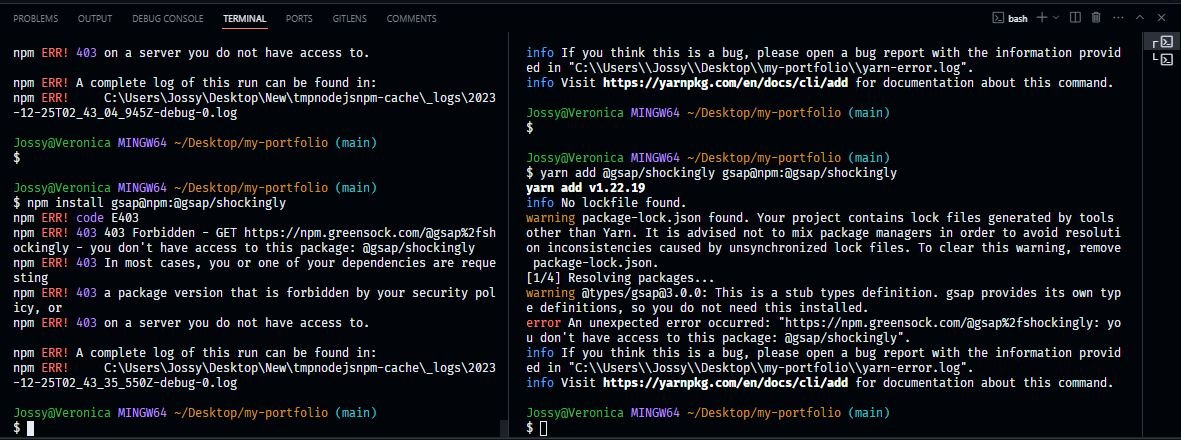
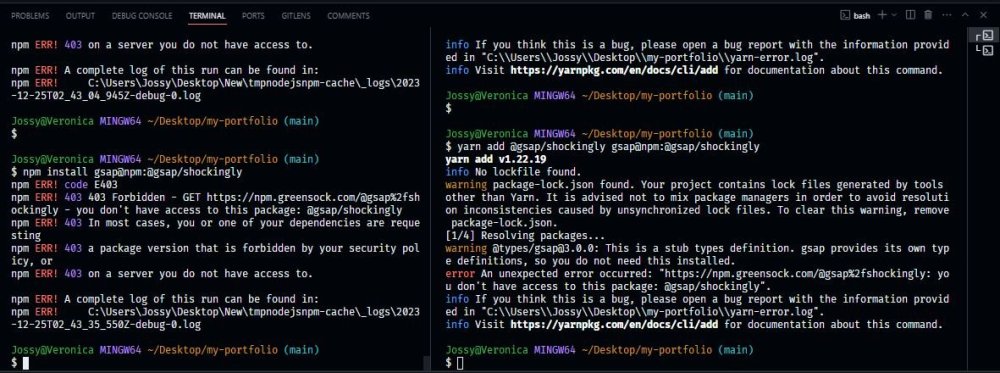
I am getting this error for my nextjs project, tried all the possible option still not working npm install gsap@npm:@gsap/shockingly npm ERR! code E403 npm ERR! 403 403 Forbidden - GET https://npm.greensock.com/@gsap%2fshockingly - you don't have access to this package: @gsap/shockingly npm ERR! 403 In most cases, you or one of your dependencies are requesting npm ERR! 403 a package version that is forbidden by your security policy, or npm ERR! 403 on a server you do not have access to. npm ERR! A complete log of this run can be found in: npm ERR! C:\Users\Jossy\Desktop\New\tmpnodejsnpm-cache\_logs\2023-12-25T02_43_35_550Z-debug-0.log
-
Hey all - I've been struggling to deploy a test project via Vercel, I can get the app to build but only when using the command: 'npm install gsap' If I use 'npm install gsap@npm:@gsap/business' or any other such as 'npm install gsap@npm:@gsap/shockingly' or 'npm install gsap@npm:@gsap/premium' then I get 403 errors: [17:29:08.248] Running build in Washington, D.C., USA (East) – iad1 [17:29:09.522] Cloning github.com/cyberpatrolunit/videoglove_landing (Branch: main, Commit: 4f8dc0d) [17:29:09.536] Skipping build cache, deployment was triggered without cache. [17:29:10.074] Cloning completed: 551.358ms [17:29:10.396] Running "vercel build" [17:29:10.902] Vercel CLI 32.6.1 [17:29:11.777] Running "install" command: `npm install gsap@npm:@gsap/premium`... [17:29:24.884] npm WARN ERESOLVE overriding peer dependency [17:29:38.358] npm ERR! code E403 [17:29:38.362] npm ERR! 403 403 Forbidden - GET https://npm.greensock.com/@gsap%2fpremium - bad authorization header. Please login again [17:29:38.362] npm ERR! 403 In most cases, you or one of your dependencies are requesting [17:29:38.363] npm ERR! 403 a package version that is forbidden by your security policy, or [17:29:38.363] npm ERR! 403 on a server you do not have access to. [17:29:38.365] [17:29:38.366] npm ERR! A complete log of this run can be found in: /vercel/.npm/_logs/2023-12-11T01_29_12_236Z-debug-0.log [17:29:38.414] Error: Command "npm install gsap@npm:@gsap/premium" exited with 1 I have a '.npmrc' in my root dir with : always-auth=true @gsap:registry=https://npm.greensock.com //npm.greensock.com/:_authToken={my_token} Send I've poked around finding similar issues but I still can't get authenticated.. Any insight would be greatly appreciated !
-
Hello! I've been playing with GSAP on codepen, specifically with the SplitText plugin. Everything works fine in the codepen, Im using a cdn that i found online. But when I install locally via npm, using the gsap-bonus.tgz, it doesnt find the SplitText plugin import { SplitText } from 'gsap/SplitText' Was this plugin deprecated or renamed? Thanks in advance! PS: In the codepen, I'm also trying to achieve the same effect for the split text being used in the following h4 element but on the p tag <h1 class="animated">hello there im animated</h1> I've added an overflowY: hidden to the h1 tag. But its not an optimal solution for when there's more than one lines of text. Was wondering if anyone had any insight as to how to achieve this the GSAP way. <--- Was able to achieve this by adding overflow hidden to inner div elements Thanks in advance!!
-
Hi all, During deploy using Elastic Beanstalk the instance runs npm install --production. We end up with the following error: npm ERR! code CERT_HAS_EXPIRED npm ERR! errno CERT_HAS_EXPIRED npm ERR! request to https://npm.greensock.com/@gsap%2fbusiness failed, reason: certificate has expired I have an .npmrc file included with our authToken as specified in the CI/CD section. We have tried manually adding the details to the .npmrc file using the .ebextensions but we have the same issue. This is driving me a little mad and not sure how to resolve. Thanks.
-
 6 months ago, I succeeded to install gsap business and all worked great. but today I decided to start a new project and I can not get gsap/business to work. I did put the appropriate code in my .npmrc file. but when I run npm install, I get errors about not being logged in. (logged into what? In my browser I am logged into gsap. And also github. What else can I possibly log in to?) PS C:\Users\chris\vscode\donut> npm install gsap@npm:@gsap/business npm ERR! code E403 npm ERR! 403 403 Forbidden - GET https://npm.greensock.com/@gsap%2fbusiness/-/business-3.6.1.tgz - You must be logged in to install/publish packages. npm ERR! 403 In most cases, you or one of your dependencies are requesting npm ERR! 403 a package version that is forbidden by your security policy, or npm ERR! 403 on a server you do not have access to. npm ERR! A complete log of this run can be found in: npm ERR! C:\Users\chris\AppData\Local\npm-cache\_logs\2021-04-26T22_02_43_858Z-debug.log PS C:\Users\chris\vscode\donut>
 -
If I am working with someone else and they have joined the Club but I am not part of the Club but I am going to assist with a project. Do I need to join the Club in order to use it myself or can I just use a token in order to do so? Currently I do have a token but when I try to install GreenSock I get: npm ERR! code E403 npm ERR! 403 403 Forbidden - GET https://npm.greensock.com/@gsap%2fshockingly - bad authorization header. Please login again npm ERR! 403 In most cases, you or one of your dependencies are requesting npm ERR! 403 a package version that is forbidden by your security policy, or npm ERR! 403 on a server you do not have access to.
-
I'm trying to have GSAP+ bonus files installed easily on projects. I've had some issues with yarn and conflicts/issue when changing the registry info. Can someone please post a short video on how to set up the yarn / the yarn registry so it doesn't jam up things so much? The steps i followed on the installation page seemed to have broken other things. So I feel like I really need my hand held through this setup. Also how do I avoid integrity checks failures with yarn when working on a different project? I've had some success deleting the yarn.lock file. I would like to know if there's some better way to go about this. Any help would be appreciated. ??
-
Hi, I would want to know if it is possible tu use premium plugins with the npm package (without having to download the package from my account). If it is not possible do you plan to have like a key to unlock the premium plugins using the npm package ? Thanks.
-
Hi all, how can I install the GSAP "ShockinglyGreen" package with Webpack-Encore? I mean how to get the +PLUS library in my node_modules with yarn or npm? Thank you
-
Hi gang! I'm new to the party but just finished my first GreenSock implementation. Congrats on v3! Seems like I showed up at the perfect time. Once you catch all of the documentation issues (Draggable seems to have literally improved overnight!) this library will truly be my new favourite thing. For example, here is my implementation of a fancy knob that will scrub at variable speed depending on how far you turn it to the left or right. It will scrub even when you're not dragging the knob. Experience gives me the wisdom to recognise that this implementation would not be terse or possible without such a well-thought out API surface. Kudos! knobber (element) { const timeline = gsap.timeline({ repeat: -1, onRepeat: () => { const r = ~~draggable.rotation timeline.repeatDelay(gsap.utils.mapRange(0, 180, 1.0, 0.1, Math.abs(r))) // this.direction(r > 0) } }) timeline.pause() timeline.to({}, { duration: 0.1 }) const draggable = Draggable.create(element, { type: 'rotation', inertia: true, onDragStart: () => timeline.play(), onDragEnd: () => timeline.pause(), snap: () => { return 0 } })[0].applyBounds({ minRotation: -180, maxRotation: 180 }) } Anyhow, the issue I'm now faced with is that this implementation is extracted from a demo I've prepared for our project, StimulusReflex. As you're well aware, it will work without Inertia, but it simply won't be as sexy. I'm actually perfectly happy to recommend that people purchase a GSAP membership, but I don't want to violate your TOC (or trust) by putting the gsap-bonus.tgz on our public repo. Right now I have it set up with yarn/webpack pulling in the local archive as your npm instructions describe. (You might want to tell people to purge their caches to get rid of old versions, btw!) This works great for my workstation and for deploying to Heroku, but how do you suggest I handle the package management issue? If I was to push the repo as-is to production, anyone checking out the code to experiment with locally is going to get slapped by yarn/npm because that file doesn't exist. I actually do have a suggestion for how you could approach this: add localhost:3000 to your CDN whitelist so that people can experiment with the paid tools on their own machine, but in a way where they can't deploy it. This has actually worked fairly well for FontAwesome, who actually took it a step further to allow paid users to whitelist their project domains through a web interface. The other related question I have is about what I'll call progressive enhancement: is there a way to detect whether you're running the paid version and if Inertia was available from inside your webpack context? Specifically, I want to import Inertia if it's available and skip it if it's not. This would include passing InertiaPlugin to gsap.registerPlugin and even dynamically passing true/false to the inertia var when creating a Draggable instance. If there's a good strategy for this which won't make webpack angry if the file doesn't exist, I'd love to hear about it. Again, I propose a solution: include an InertiaPlugin.js in the OSS version on GitHub that has function signature placeholders - like a Java interface - but only actually spits out console warnings if it's not present. This way developers could comfortably set inertia:true regardless of whether it's available or not.
-
I try to include RaphaelPlugin from npm and build it with webpack. On the development everything works well, the plugin is included and all good. On production build though the RaphaelPlugin is missing from the build. I tried multiple ways to include the file, but still something is wrong in production. Any ideas? import 'gsap/TweenLite'; import 'gsap/TweenMax'; import 'gsap/TimelineMax'; import * as RaphaelPlugin from 'gsap/umd/RaphaelPlugin';
-
Hi there, I have two javascript-files in my included in my html page, each calling this in it's beginning: import TweenLite from 'gsap'; Later, when I try to call the TweenLite.to function, I get this error in the second file that I include in my html: Uncaught TypeError: Cannot read property 'to' of undefined at bodyScroll (app.js:692) at HTMLAnchorElement.<anonymous> (app.js:640) at HTMLDocument.dispatch (jquery.js:5201) at HTMLDocument.elemData.handle (jquery.js:5009) Any ideas? EDIT: It seems like TweenLite pollutes the global namespace. Shouldn't this never be the case with browserify?
-
Hello community ! I'm having trouble importing plugins. I use the gsap npm doc with gsap v2.0.2. When I use this : import { TweenMax } from 'gsap'; TweenMax works perfectly fine. But when I want to use the scrollToPlugin with this for example : TweenMax.to('.my-div', 2, { scrollTo: { y: 'max' } }); I do this : import { TweenMax, ScrollToPlugin } from "gsap/TweenMax"; or import { TweenMax, ScrollToPlugin } from "gsap/all"; I get errors saying : TweenMax.js:13 Uncaught SyntaxError: Unexpected identifier or all.js:13 Uncaught SyntaxError: Unexpected identifier Thank you very much for your help !
-
Well I have this bundling process: Starting with coffeescript files being transpiled to their counterpart js files in single directory. So for all those JS files I can include and use them then with: require "./moduleX.js" Then bundle them with webpack to a single bundle.js And then I use pug to include the bundle.js into the single HTML file. The Problem: When using import TweenMax from "gsap/TweenMax" weird strings appear in the HTML outside of script tags and render the whole HTML useless. Such strings are: "\n\t\t\t *\n\t\t\t * @param {!string} ns The namespace of the class definition, leaving off \"com.greensock.\" as that's assumed. For example, \"TweenLite\" or \"plugins.CSSPlugin\" or \"easing.Back\".\n\t\t\t * @param {!Array. <string>} dependencies An array of dependencies (described as their namespaces minus \"com.greensock.\" prefix). For example [\"TweenLite\",\"plugins.TweenPlugin\",\"core.Animation\"]\n\t\t\t * @param {!function():Object} func The function that should be called and passed the resolved dependencies which will return the actual class for this definition.\n\t\t\t * @param {boolean=} global If true, the class will be added to the global scope (typically window unless you define a window.GreenSockGlobals object)\n\t\t\t */\n\t\t\tDefinition = function(ns, dependencies, func, global) {\n\t\t\t\tthis.sc = (_defLookup[ns]) ? _defLookup[ns].sc : []; //subclasses\n\t\t\t\t_defLookup[ns] = this;\n\t\t\t\tthis.gsClass = null;\n\t\t\t\tthis.func = func;\n\t\t\t\tvar _classes = [];\n\t\t\t\tthis.check = function(init) {\n\t\t\t\t\tvar i = dependencies.length,\n\t\t\t\t\t\tmissing = i,\n\t\t\t\t\t\tcur, a, n, cl;\n\t\t\t\t\twhile (--i > -1) {\n\t\t\t\t\t\tif ((cur = _defLookup[dependencies[i]] || new Definition(dependencies[i], [])).gsClass) {\n\t\t\t\t\t\t\t_classes[i] = cur.gsClass;\n\t\t\t\t\t\t\tmissing--;\n\t\t\t\t\t\t} else if (init) {\n\t\t\t\t\t\t\tcur.sc.push(this);\n\t\t\t\t\t\t}\n\t\t\t\t\t}\n\t\t\t\t\tif (missing === 0 && func) {\n\t\t\t\t\t\ta = (\"com.greensock.\" + ns).split(\".\");\n\t\t\t\t\t\tn = a.pop();\n\t\t\t\t\t\tcl = _namespace(a.join(\".\"))[n] = this.gsClass = func.apply(func, _classes);\n\n\t\t\t\t\t\t//exports to multiple environments\n\t\t\t\t\t\tif (global) {\n\t\t\t\t\t\t\t_globals[n] = _exports[n] = cl; //provides a way to avoid global namespace pollution. By default, the main classes like TweenLite, Power1, Strong, etc. are added to window unless a GreenSockGlobals is defined. So if you want to have things added to a custom object instead, just do something like window.GreenSockGlobals = {} before loading any GreenSock files. You can even set up an alias like window.GreenSockGlobals = windows.gs = {} so that you can access everything like gs.TweenLite. Also remember that ALL classes are added to the window.com.greensock object (in their respective packages, like com.greensock.easing.Power1, com.greensock.TweenLite, etc.)\n\t\t\t\t\t\t\tif (typeof(module) !== \"undefined\" && module.exports) { //node\n\t\t\t\t\t\t\t\tif (ns === moduleName) {\n\t\t\t\t\t\t\t\t\tmodule.exports = _exports[moduleName] = cl;\n\t\t\t\t\t\t\t\t\t ... I did not manage yet to stop webpack from using eval. Which could be part of the problem. I do have a workaround where I don't use npm, just adding the TweenMax.min.js to the same directory as the other js files and use TweenMax = require "./TweenMax.min.js" The problem is when using the MorphSVGPlugin it requires the module TweenLite as npm module. ERROR in ./compiled/js/plugins/MorphSVGPlugin.min.js Module not found: Error: Can't resolve 'TweenLite' in './compiled/js/plugins' So has anyone an idea on the issue with the thought build process? Or does anybody have an idea how I can get the workaround to also work for the MorphSVGPlugin? Help would be very appreciated
-
Hey folks, I'm trying to setup GSDevTools on a Vuejs using Npm and Webpack. All the plugins are in the folder: /node_modules/gsap I'm using Vuejs and my component looks like: <template lang="html"> <div> <div id="animate" @click="animateIt"> content </div> </div> </template> <script> import {TimelineMax, CSSPlugin, Sine, GSDevTools} from 'gsap' export default { name: 'ComponentName', data: () => ({ var_1: 'dummy' }), methods: { animateIt: function() { var t1 = new TimelineMax() t1.to('#animate', .2, { opacity: 1, ease: Sine.easeInOut }) .to('#animate', .2, { css: { color: red, }, ease: Sine.easeIn }) } }, mounted() { GSDevTools.create() } } </script> For others plugins they work as expected so i can import them when needed using for example: import {TimelineMax, CSSPlugin, Sine, Power4} from 'gsap' But if I add the GSDevTools as for the others this doesn't work. If I import the plugin with: import {GSDevTools} from 'gsap' // or import GSDevTools from 'gsap/GSDevTools' // or import GSDevTools from '../../../node_modules/gsap/GSDevTools' // or import * as GSDevTools from '../../../node_modules/gsap/GSDevTools' // or var GSDevTools = require ('gsap/GSDevTools') // or var GSDevTools = require ('../../../node_modules/gsap/GSDevTools') I got this error: I'm stucked, please Help!!! Thanks
-
I was attempting to use GSAP with Node.js, but I encountered some difficulties i could not manage to solve on my own. I am using the GSAP supplied by NPM (https://www.npmjs.com/package/gsap). I have read the other questions asked on this forum and tried their suggestions (http://greensock.com/forums/topic/7422-using-tweenlite-timelinelite-server-side-with-nodejs/), however, GSAP still throws an error saying that "document" is not defined. Help would be much appreciated
-
Hello, Maybe its a silly question but i was wondering the best way to get gsap into our project. Because i have paid the license, now i have a src/ folder with all the files. Before that i was using nicely the npm/yarn package for the gsap free version. But now i have to use the local ones ? This doesn't look the best too keep my gsap plugins updated. Am i suppose to check the web for new versions ? Or there is a way to load this "paid" plugins into my project as a npm package. Thanks in advance.
-
I am refactoring and running cleanup on a production app, and optimizing dependencies. We have a React component that uses GSAP for some transition-related stuff, but only the TimelineLite library. It's all simple stuff, without any eases or anything, so we have no need for any of the more complex GSAP items and can now scrub them out to optimize. Originally, we just imported the whole GSAP library via NPM like so: import 'gsap'; Per the GSAP npm docs (https://www.npmjs.com/package/gsap)... Now, I'd like to trim the fat off our import, and switched to: import { TimelineLite } from 'gsap'; However, this is compiling correctly but throwing the following client-side error: Uncaught TypeError: _gsap.TimelineLite is not a constructor Does anyone know why this is? Our weight savings from importing `TimelineLite` alone aren't huge, but they are worth doing. Do I need to import other parts of the GSAP libraries specifically? ---------- NOTES: I have also tried this with no luck. import { TweenLite, TimelineLite } from 'gsap'; Strangely, this does not work either: import { TweenMax, TimelineLite } from 'gsap'; but this does (for obvious reasons): import { TweenMax } from 'gsap'; Here is the animation we are using, super basic: new TimelineLite() .to('#urlCopyMessage', 0, { visibility: 'visible', opacity: 1 }) .fromTo('#urlCopyMessage', 0.35, { opacity: 0, y: 20 }, { opacity: 1, y: -30 } ) .to('#urlCopyMessage', 0.35, { opacity: 0, delay: 0.25 } ) .to('#urlCopyMessage', 0, { visibility: 'hidden' });
-
Hi, I´m building a lib for react that animates components during mount / unmount. This lib uses gsap for animations. Would it be ok for me to release it on npm?
-
.thumb.jpg.45ad1f0654d8c8cd759c47599fe1796d.jpg) OUTDATED! These webpack issues are getting out of hand, so I made a little demo to help you get started. But first, have you considered not importing GSAP? I would suggest using a CDN instead as your app will load much faster since it's not included in the bundle and can be pulled directly from the user's browser cache. GSAP is available on both cdnjs and jsDelivr. JsDelivr is kind of unique in that you can bundle all your files up in a single HTTP request! And dependencies that are not resolved by webpack can still become dependencies of the output by using the externals option. For example, if you are using React you could do this using the unpkg CDN. <script src="https://unpkg.com/react@15.3.1/dist/react.js"></script> <script src="https://unpkg.com/react-dom@15.3.1/dist/react-dom.js"></script> And then in your webpack.config, you would configure those libraries like this... module.exports = { externals: { "react": "React", "react-dom": "ReactDOM" }, ... }; If that's not an option for you, here's the repo I made. To run it, install webpack and the dev-server first npm install webpack webpack-dev-server -g, and then npm install to install the demo. Use npm start to start the dev-server on port 8080. If you're wondering where my gsap import is, there isn't one. I made TweenMax global using the ProvidePlugin. https://github.com/OSUblake/gsap-webpack
OUTDATED! These webpack issues are getting out of hand, so I made a little demo to help you get started. But first, have you considered not importing GSAP? I would suggest using a CDN instead as your app will load much faster since it's not included in the bundle and can be pulled directly from the user's browser cache. GSAP is available on both cdnjs and jsDelivr. JsDelivr is kind of unique in that you can bundle all your files up in a single HTTP request! And dependencies that are not resolved by webpack can still become dependencies of the output by using the externals option. For example, if you are using React you could do this using the unpkg CDN. <script src="https://unpkg.com/react@15.3.1/dist/react.js"></script> <script src="https://unpkg.com/react-dom@15.3.1/dist/react-dom.js"></script> And then in your webpack.config, you would configure those libraries like this... module.exports = { externals: { "react": "React", "react-dom": "ReactDOM" }, ... }; If that's not an option for you, here's the repo I made. To run it, install webpack and the dev-server first npm install webpack webpack-dev-server -g, and then npm install to install the demo. Use npm start to start the dev-server on port 8080. If you're wondering where my gsap import is, there isn't one. I made TweenMax global using the ProvidePlugin. https://github.com/OSUblake/gsap-webpack -
Hi, I've tried to import modules from gasp (1.9.1) with npm and webpack 2.2 but I think I made something wrong as I don't get the libs?? For example, when I import 'gsap/TweenLite' I get an Object back, but it has no 'to' property: import TweenLite from 'gsap/TweenLite'; console.log(TweenLite); // => Object {} console.log(TweenLite.to); // => undefined Shouldn't it be both functions? The same happens when I try to import TweenMax like: import TweenMax from 'gsap'; console.log(TweenMax); // => Object {} console.log(TweenMax.to); // => undefined When I try to import TweenLite directly I simply get nothing: import { TweenLite } from 'gsap'; console.log(TweenLite); // => undefined I'm not sure if it is a issue of mine, as I use greensock the first time. Does anybody have an idea? Thx!
-
Hi, I'm currently bundling up my client up using requires and browserify. I installed gsap using npm install, and it seems to only expose TweenMax. I managed to bundle Draggable using './node_modules/gsap/src/uncompressed/utils/Draggable.js', but hte resulting require('./node_modules/gsap/src/uncompressed/utils/Draggable.js') looks pretty ugly. Furthermore it sees that TimeLineLite is not exposed either, even though it's contained. How can I access the various components using the npm module? Thanks, Sven
-
I'm using gsap through NPM, packaged with webpack. If I do import TweenLite from 'gsap/TweenLite'; I don't have access to the dom elements, I get thrown an error. But if I import as following: import TweenLite from 'gsap'; It works, but then everything is included in the package, TweenMax etc... Anyone stumbled upon this problem?
-
I've been using Vue.js a lot lately, and working with the webpack template. Importing GSAP after `npm install -s gsap` works correctly, but the ScrollToPlugin has some oddities. In one of my Vue components, I have this: import "gsap"; import ModifiersPlugin from "../../../node_modules/gsap/src/uncompressed/plugins/ModifiersPlugin.js"; And ModifiersPlugin works great. But when I try to do the same for ScrollToPlugin... import ScrollToPlugin from '../../../node_modules/gsap/src/uncompressed/plugins/ScrollToPlugin.js'; I get this error in Vue/Webpack ./~/gsap/src/uncompressed/plugins/ScrollToPlugin.js Module not found: Error: Cannot resolve module 'TweenLite' in /Users/shaw/Sites/green-mountain/node_modules/gsap/src/uncompressed/plugins resolve module TweenLite in /Users/shaw/Sites/green-mountain/node_modules/gsap/src/uncompressed/plugins looking for modules in /Users/shaw/Sites/green-mountain/node_modules /Users/shaw/Sites/green-mountain/node_modules/TweenLite doesn't exist (module as directory) resolve 'file' TweenLite in /Users/shaw/Sites/green-mountain/node_modules resolve file /Users/shaw/Sites/green-mountain/node_modules/TweenLite doesn't exist /Users/shaw/Sites/green-mountain/node_modules/TweenLite.js doesn't exist /Users/shaw/Sites/green-mountain/node_modules/TweenLite.vue doesn't exist looking for modules in /Users/shaw/Sites/green-mountain/node_modules /Users/shaw/Sites/green-mountain/node_modules/TweenLite doesn't exist (module as directory) resolve 'file' TweenLite in /Users/shaw/Sites/green-mountain/node_modules resolve file /Users/shaw/Sites/green-mountain/node_modules/TweenLite doesn't exist /Users/shaw/Sites/green-mountain/node_modules/TweenLite.js doesn't exist /Users/shaw/Sites/green-mountain/node_modules/TweenLite.vue doesn't exist [/Users/shaw/Sites/green-mountain/node_modules/TweenLite] [/Users/shaw/Sites/green-mountain/node_modules/TweenLite] [/Users/shaw/Sites/green-mountain/node_modules/TweenLite] [/Users/shaw/Sites/green-mountain/node_modules/TweenLite] [/Users/shaw/Sites/green-mountain/node_modules/TweenLite.js] [/Users/shaw/Sites/green-mountain/node_modules/TweenLite.js] [/Users/shaw/Sites/green-mountain/node_modules/TweenLite.vue] [/Users/shaw/Sites/green-mountain/node_modules/TweenLite.vue] @ ./~/gsap/src/uncompressed/plugins/ScrollToPlugin.js 181:2-34 Looking at ScrollToPlugin.js, it seems to be triggered by this section of code at the very end, starting at line 174, which ModifiersPlugin does not have. //export to AMD/RequireJS and CommonJS/Node (precursor to full modular build system coming at a later date) (function(name) { "use strict"; var getGlobal = function() { return (_gsScope.GreenSockGlobals || _gsScope)[name]; }; if (typeof(define) === "function" && define.amd) { //AMD define(["TweenLite"], getGlobal); } else if (typeof(module) !== "undefined" && module.exports) { //node require("../TweenLite.js"); module.exports = getGlobal(); } }("ScrollToPlugin")); Looks like the `require` on line 183 is triggering the error. If I remove that block of code, the ScrollToPlugin works as expected. I haven't tested all the other plugins, but I would assume if they have that block, they will produce a similar error. Any idea what's going on?

.png.2e2dfd3934ccda13acb183c3a4f5fe4e.png)