Search the Community
Showing results for tags 'gsap'.


-
Hi, I would like to get help to fix an issue I'm encountering with the DrawSVG plugin and GSAP. I would like to animate my SVG element on hover and when I mouse leave it should revert. Currently, It's working fine except- If there are are multiple buttons all animation are executing at the same time when I hove any of the element, which I don't want. I want to execute the animation individually for each button. How can I achieve this effect? Many Thanks, Sajidul
-
Hello, I am having some troubles making a scrolltrigger animation in a nuxt component. Basically I have a lenis script for a nuxt page and inside this page a scrolltrigger script for the projectItem.vue component. I installed gsap via npm and imported it both in the page and the component. I don't know why but the code seems to work because we enter in the onEnter() callback but there is no animation at all. Here is a link to the stackBlitz of my project, hoping someone can help me : https://stackblitz.com/~/github.com/Mitiss25/portfolioFinal Thank you !
-
Hello, I am trying to recreate the text scroll effect from this website (https://synthetic-humans.ai/) using ScollTrigger but I cannot figure out how the text is pinned at the center. Here is what I came up with https://codepen.io/dev_loop/pen/ExJOLgx?editors=0010 I also tried making the sections fixed and increasing the body height based on how many sections were present but the animation state was already finished
-
Hello, I'm new to GSAP and I'm trying some handy animation. Here is what I'm trying to achieve https://genevoism.com/. I know they have used different approach but I belief such animation are possible in GSAP too. I using combination of ScrollTrigger, ScrollTo, Observer and using timeline pause and play method to achieve one scroll animation effect. By one scroll I mean that each of animation would be trigger per scroll. Approach I took : > Firstly I have made different timeline for different animation per section. > Than I tried to get user scroll using observer's onUp and onDown methods. > Than after per scroll I play my desired timeline and as one of the tween of that timeline gets completed I pause my timeline, further when user will scroll again timeline play's and pause's again. > When all tweens in one timeline gets completed, I switch to other timeline by pausing the first one. > I have also used a forEach loop on scroollTrigger.create so that I can pin the particular section as animation are being performed. What I want: I want set of animation such that when my section comes in viewport or is already present in viewport( like hero or banner ) the animation should get started as the user scroll. Each and every animation or tween should start and end between two scroll of user. And as all the animation in a section get's completed it should slide up or down as per user's scroll 100% or 100vh. Please have a look into the below pen and guide me where I'm going wrong. Thank you... <script async src="https://cpwebassets.codepen.io/assets/embed/ei.js"></script>
-
Hi all! I want to implement a site with scrolling from section to section (with a height equal to the height of the screen) using a gsap.to, provided that there are sections whose height can be either less or greater than the height of the screen. In general, it is somewhat similar to FullPage, but I don’t quite like its functionality and how it works in general. I made an example in CodePen. Here section_4 has a large height, and upon reaching this section everything works fine, but when scrolling back everything breaks... What am i doing wrong?
-
I want to make a half wheel animation with javascript, the purpose of the animation is an animation with 50 or more long names and I want to determine the winner in the variable, but I could not make this animation and I could not find any examples on the internet. example:

-
I was trying to achieve the clip-path stagger animation using GSAP similar to this website: https://alphatango.com/work if you hover over the below image we can easily see how the clip-path is changing. Interestingly, I achieved very close to it, but not exactly what's there is the alphatango site. Can anyone have an idea of how we go about it? Attached the codepen
-
Hello everyone! I have problems with the grid section, where each of the elements must in turn "open up" to the full screen. At the same time, it is important that the elements "feel" each other next to each other, so that each of the elements is pushed out of the screen. Right now my animation is not working properly, as each of the elements does not expand to the full screen. Please help me! https://codepen.io/karjala_kilka/pen/qBwyoab
-
Hello everyone!😁 I'm new on GSAP so it's possible that my problem is "normal" but I'm currently preparing my portfolio and for the "about" part I wanted to put a text animation on the scroll! In order to reveal the text when scrolling... But unfortunately since today the GSAP animation doesn't work... I tried to go back to previous versions of my site but nothing... Strangely enough, since yesterday everything was working properly on any support or browser, but since today... I've been having major problems even though I haven't really touched anything. I'm putting the code here and I'd like to thank you very much for your help, as I have the impression that it's a bug linked to the CDN...is there a way of correcting the bug or should I wait? https://codepen.io/GreenSock/pen/aYYOdN <script src="https://unpkg.com/split-type"></script> <script src="https://cdnjs.cloudflare.com/ajax/libs/gsap/3.11.4/gsap.min.js"></script> <script src="https://cdnjs.cloudflare.com/ajax/libs/gsap/3.11.4/ScrollTrigger.min.js"></script> <script> let typeSplit = new SplitType('[animate]', { types: 'lines, words, chars', tagName: 'span' }) gsap.from('[animate] .word', { opacity: 0.3, duration: 0.03, ease: 'power1.in', stagger: 0.03, scrollTrigger: { trigger: '[animate]', start: 'top 120%', end: 'bottom 110%', scrub: true, } }) </script>
-
Hi community, need some help. I'm facing a problem in setting up a custom cursor for my page in Next.Js. My cursor should only work for certain blocks - it is not visible on all other blocks. I managed to make the cursor itself, but I ran into a problem. I have a problem with initializing the appearance of the cursor when scrolling the page. That is: when I see my cursor and start scrolling up, my custom cursor will be visible on other sections (where it shouldn't even be) until I stop scrolling and move the cursor. I want it to initialize in my block correctly Here is an example where I think this works well (work block): https://www.fhoke.com/ And here is my demo. Here on the first block there is no cursor, on all other blocks there is. You can catch my error this way, start scrolling down the page from the first block and the custom cursor will not be visible until you stop scrolling and move the mouse. It works the same way in reverse https://codesandbox.io/p/sandbox/custom-cursor-chthqm?file=%2Fsrc%2FApp.tsx%3A24%2C11
-
Hello community. I am facing a problem that I am trying to make oppositional content scroll on my page. The idea is that when I scroll down, my content on the left side scrolls down with normal behavior and the content on the right side from the last block to the first block. But the scrolling in my example is out of sync, my content on the right side scrolls like twice as fast as the content on the left side https://codesandbox.io/p/sandbox/opposite-gsap-9p4yh7?file=%2Fsrc%2FApp.tsx
-
hello guys, i was trying to creating a horizontal section scroll, but its move left to right, i want to move the opposite direction.i have tried many solution given by ai but still the same. here is the codepen code, if someone can help it will be amazing https://codepen.io/Rare4pple/pen/jORMQrM ,
-
 Hi, I am just starting on gsap from last few weeks. I have a simple animation, I am trying to figure out from last few days. I have a circle and dots on the circle radius. Requirement is to scale the dots when the screen enters the section and when the user scrolls each dot should get a border indicating different content (which means a text change and image change). The issue I am facing is the borders around circle are able to appear correctly when scrolling down. But when scrolling up, the borders around the dots are not disappearing correctly. Only 3 dots out of 5 disappear when it reaches the first content, where 4 should disappear. I am not sure if I am having the right approach. Any help in the right directly is greatly appreciated. thanks in advance! Codepen attached.
 -
 We're using GSAP for animations, including Smoothscroll, ScrollTrigger, and TextSplit.The animations are based on image sequences displayed on a canvas using GSAP. However, when navigating from Page A to B and then back to A, the animation ceases to function. All the code is set up on the staging server. If you have expertise in Next.js with GSAP, I'd appreciate your help in resolving this issue. https://stackblitz.com/~/github.com/kartarsinghdebugged/stackblitz-starters-backanimations
 -
Hello, I hope everyone is well! I'm trying to make an animation where the element goes to position y=95 then waits 3 seconds and returns to position 0 and repeats the animation several times, but I'm not succeeding. I would like guidance to understand what I am doing wrong. Thank you very much in advance. https://codepen.io/daniel-silva-dxp/pen/VwNaZWg
-
I'm facing a problem with animate html inside foreignObject. when I click the button it animates. it works normally on desktop and Android devices and is debug responsive with iPhone on the Chrome dev tool. but when I'm testing in a real iPhone. it causing problems. the text and jumping big above the SVG and this is not i want. how can i fix it ? Please help me. this is the demo in codesandbox: animate html ìn foreignObject - CodeSandbox
-
 How can I use GSAP to animate cards within elementRef such that each card pauses when entering the viewport during a scroll, and as I scroll further, the card fades in opacity while moving to the left before the next card comes into view? Sandbox Link I have added the link of the sandbox so that I can explain my goals more clearly. You should view the preview in a next window in the editor only then will you be able to see the horizontal scroll. Thank you very much for your help 🙏
 -
I have added a Scrolltrigger Interaction where content switches based on the slide image active. When I'm scrolling in the content switching is very easy as I'm running a function changeSlideContent(index) onStart. When I scrub back to top, any idea how do I switch title, content, index, and dot with respect to their image active. For each slide Image, there is a data attribute through which content is changing. Any idea how to achieve this smoothly? I have attached the codepen link. I tried the whole day figuring out this, hoping the community will have my answers
-
I got an error here: Uncaught (in promise) TypeError: Cannot read properties of undefined (reading 'totalTime') at Timeline.restart (gsap.min.js:10:20564) at tl.clear (confettiCuisine.js:118:10) at Socket.<anonymous> (confettiCuisine.js:145:16) at Emitter.emit (index.mjs:136:20) at Socket.emitEvent (socket.js:498:20) at Socket.onevent (socket.js:485:18) at Socket.onpacket (socket.js:455:22) at Emitter.emit (index.mjs:136:20) at manager.js:204:18 and this is the code ::: function bel(){ const sound = new Audio('/sound/mixkit-fairy-message-notification-861.wav'); sound.addEventListener('canplaythrough', ()=>{ sound.play(); }) } let tl = gsap.timeline( {paused: true, repeat:2}); tl.play = function(){ tl .to(leftBell, { duration: 0.15, css: { scale: 1.2, skewY: "1deg", skewX: "-1deg" }, ease: Power0.easeNone }) .to(rightBell, { duration: 0.15, css: { scale: 1.2, skewY: "1deg", skewX: "-1deg" }, ease: Power0.easeNone }) .to(bodyBell, { x: 0, transformOrigin: "50% 50%" }) .to(bodyBell, { keyframes: [ { x: -3, rotate: 10}, { x: 1.5, rotate: -10}, { x: -1.5, rotate: 6.0 }, { x: 1.5, rotate: -4.4}, { x: -1.5, rotate: 2.2 } ], duration:0.4, ease: Power0.easeNone }); } tl.clear = function (){ this.kill(); this.restart(); } // const submit = () => { function submit() { form.addEventListener('submit', (e) => { e.preventDefault(); socket.emit('message', { content: chatInput.value, userName: Username.value, id: Id.value }); chatInput.value = ""; return false; }); // what i get from the server socket.on('message', (msg) => { if(window.location.pathname !=="/chat"){ displayMessage(msg); bel(); tl.play(); }else{ displayMessage(msg); tl.clear(); } chat.scrollTop = chat.scrollHeight; }) socket.on('load all messages', (data) => { data.forEach(message => { displayMessage(message); }) chat.scrollTop = chat.scrollHeight; }) }
-
Hello, Friends on the GSAP Forum, since there is a rollout of a hook `useGSAP()` working with the react/next. I wanted to know whats the smart and easiest way to create page transitions for the next.js using GSAP ofcourse. I've asked about this question to some of the people i know and most of them prefer to go with Framer Motion here, as its basically meant for it only, but since I am a GSAP fan, I want to know how i can achieve this with GSAP on Next.js, i hope with the simple straightforward guidance i can able to achieve this successfully!
-
I want the numbers to count Up when I reach a certain DOM when scrolling. But I can't.. I know there's a problem with my code, but I don't know how to fix it. [problem] 1. I don't see the start, end marker of the DOM set as a tracker. Even if it is seen, it is seen a place the is not related to the area. 2. The animation runs before the trigger element is even reached Here my code (And I'm using react base) I need your help import { useRef, useEffect } from 'react'; import { gsap } from 'gsap'; import { ScrollTrigger } from 'gsap/ScrollTrigger'; import { reviewList } from './reviewList'; import RadiusInText from '../common/RadiusInText'; import style from './index.module.css'; gsap.registerPlugin(ScrollTrigger); function ClientReview() { const countEls = useRef([]); const countContainer = useRef(); useEffect(() => { reviewList.forEach((item, index) => { const countEl = countEls.current[index]; gsap.to(countEl, { innerHTML: Math.ceil(Number(item.count)), duration: 4, scrollTrigger: { trigger: countContainer.current, start: 'bottm bottom ', end: 'bottom 50%', markers: true, }, }); }); }, []); return ( <div className={style.container} ref={countContainer}> <RadiusInText content="미니빔에서 작업한 결과들을 데이터로 확인해 보세요!" /> <h3 className={style.title}> 미니빔 서비스를 추천하는 <br /> 고객의 목소리를 들어보세요 </h3> <ul className={style.review_list}> {reviewList.map((item, index) => ( <li className={style.review} key={item.id}> <h3 ref={(el) => (countEls.current[index] = el)} className={style.length}> 0 </h3> <span className={style.title}>{item.title}</span> <p className={style.explain}>{item.explain}</p> </li> ))} </ul> </div> ); } export default ClientReview;
-
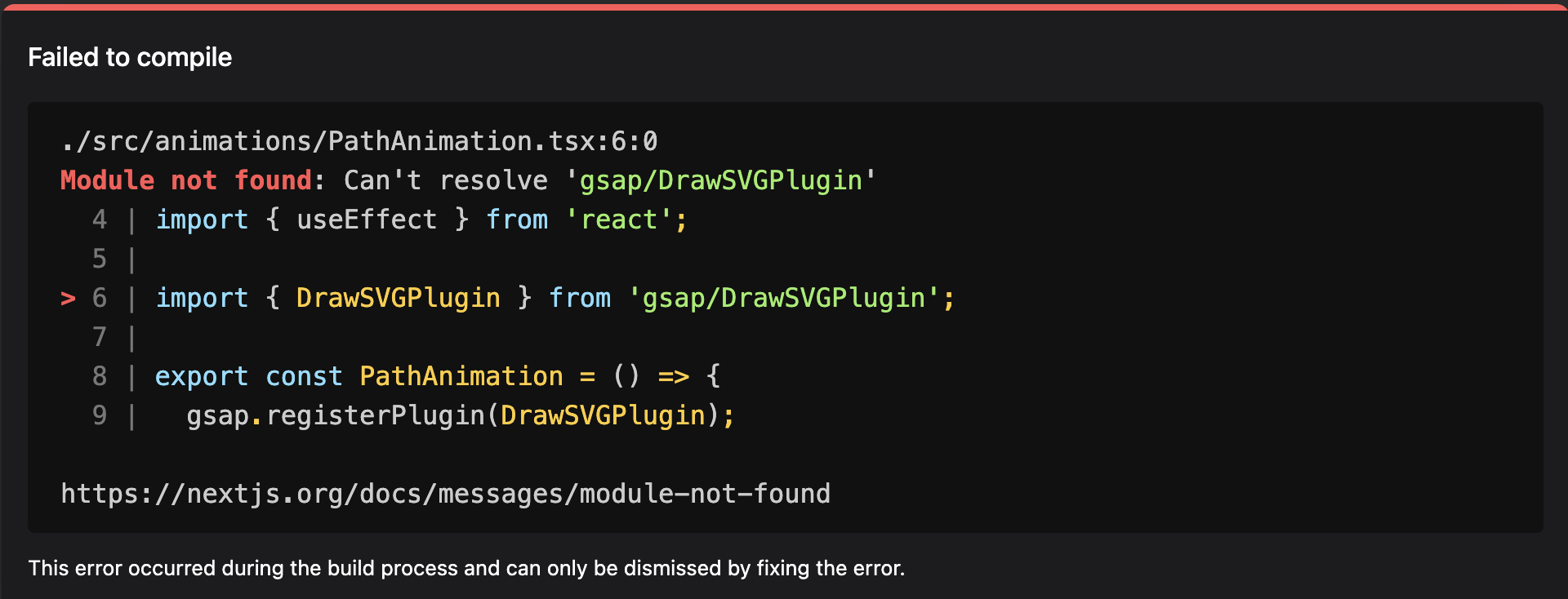
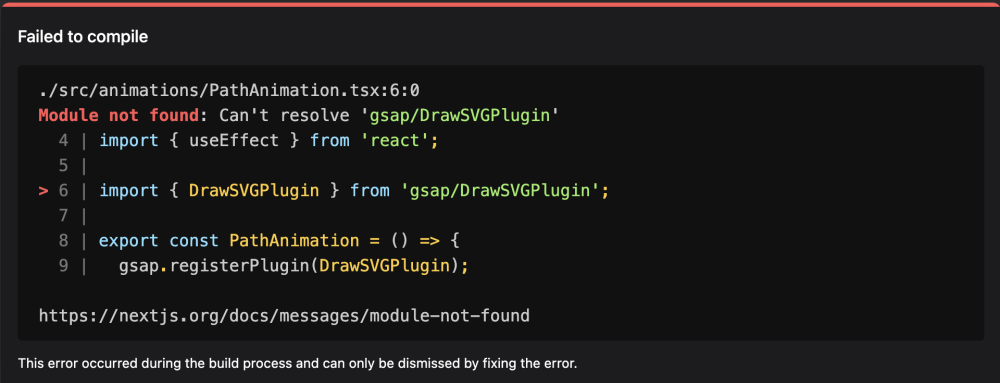
Hi, Receiving this "Module not found" error while importing DrawSVGPlugin module. the base gsap is working fine, just the drawSVGPlugin is throwing this error. import { DrawSVGPlugin } from 'gsap/DrawSVGPlugin'; export const PathAnimation = () => { gsap.registerPlugin(DrawSVGPlugin); } I am using NextJS 14.1.0. I tried importing the plugin from "/dist" "/all", but the issue persists. Thanks in advance for help.
-
Hi, Can anyone give suggestions for making perfect smooth page transitions using gsap in next js? Right now I have achieved it but when it is slow network speed it doesn't work as expected. The initial page exit (fade out) happens and there will be a delay to load new page, meanwhile current page fades out and fades in. What I actually want is current page should fade out and then route should change to new page then the new page should fade in.
-
 I want vertical progress bar in content section that will be completely filled when user reaches at the end of the content section.
 -
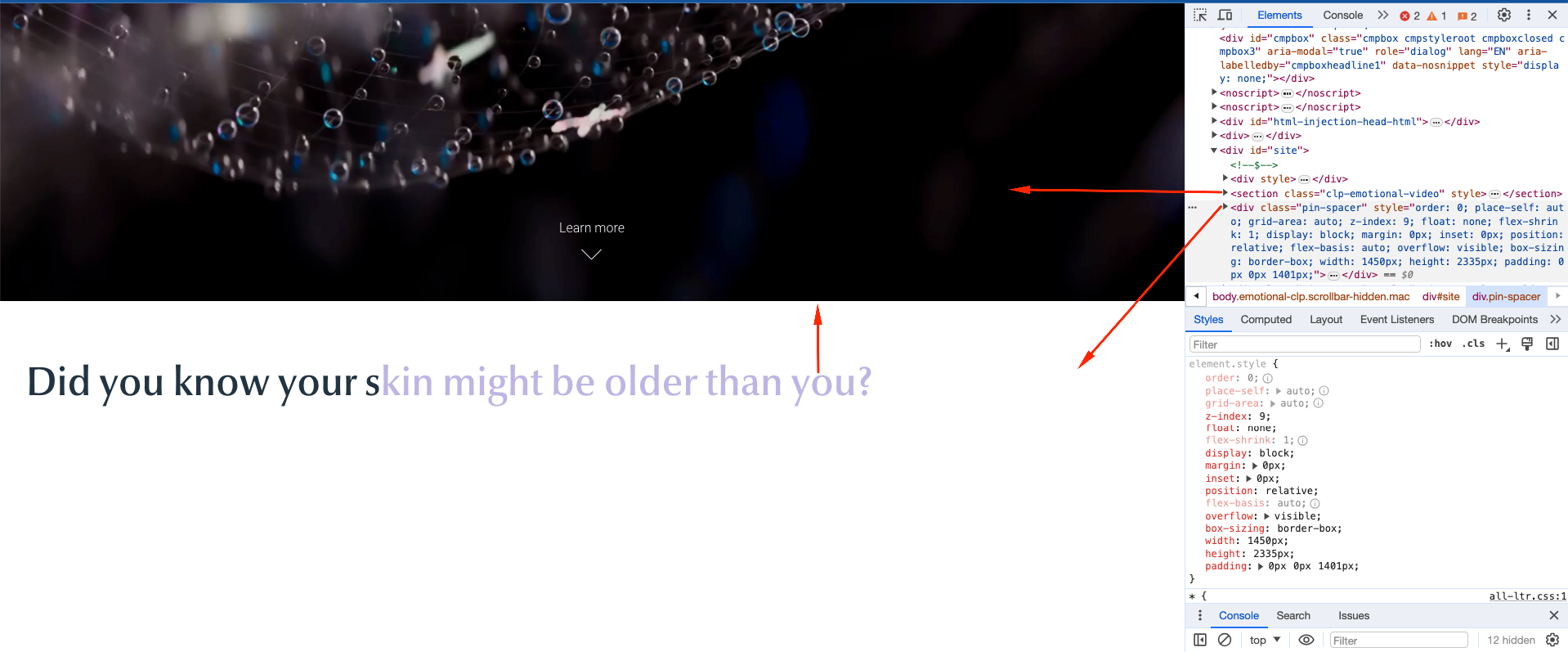
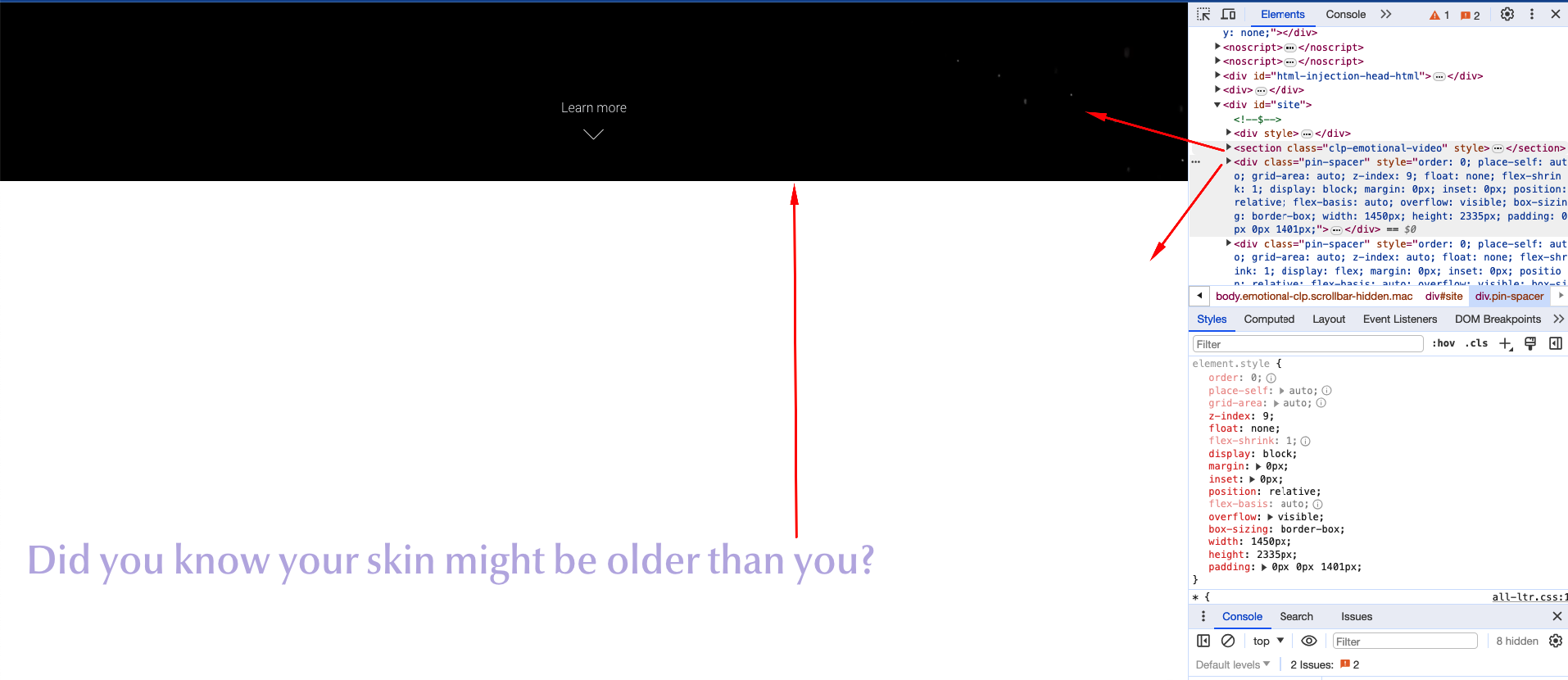
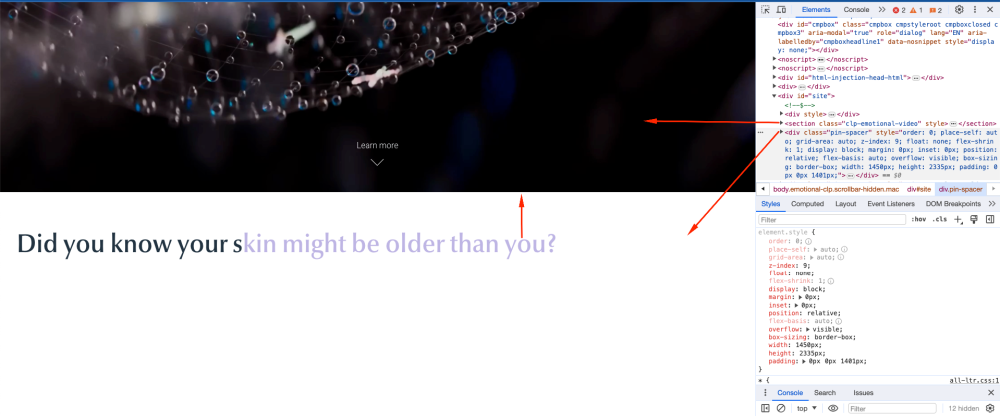
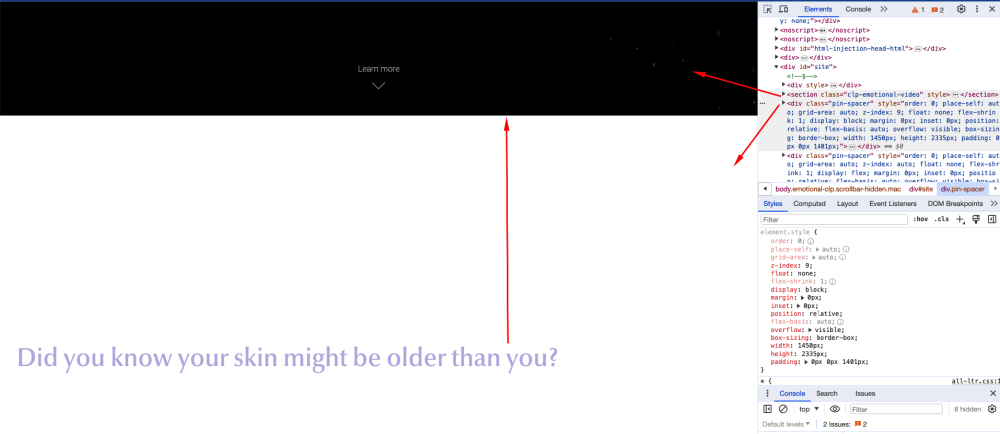
Hi Support Team, I have a problem on my page, in a couple of reloads of the page, next element of GSAP (<div class="pin-spacer">) is not calculating the video height above and is being overlapped with the video. I need it always to push the video up and not to be overlapped. This is the wrong behaviour: This is how it should always looks like: I would really appreciate if anyone will give a feedback asap. Looks like it's a tricky thing that effecting it. The gsap text component below is using "pin: true", if it helps as a hint. Issue is happening only some times and not always Wish you a great day all! Best, Kevin.


.thumb.png.2342147a63eea3e834a8c298d323d00b.png)