Search the Community
Showing results for tags 'timelinelite'.


-
Hi, I am getting a bit confused after looking at all the different restart of a tween examples... All I would like to do is store one tween (myTween) in a variable and later restart that tween. Here is my code: import com.greensock.TweenMax; import com.greensock.TimelineLite; import com.greensock.easing.*; var tl = new TimelineLite(); var myTween:TweenMax = new TweenMax(card, .5, {x:148, y:168, scaleX:1, scaleY:1, blurFilter:{blurX:0, blurY:0, remove:true}}); //runs the card unblur function .2 seconds into the previous tween tl.add([cardReg], "-=0.1") tl.to(txt1, 1, {alpha:1}, "+=1") .to(card, .4, {alpha:0, scaleX:3, scaleY:3}, "+=1") .restart(myTween); stop(); Please advise. Thanks!
-
Hi, My question may sounds a little bit stupid - Is there a way to iterate throgh each item's prop with staggerTo without using too many loops? What i want to implement is somethink like this: $boxes.each(function(i, box){ var $box = jQuery(box); var animation = new TimelineLite({ paused: true }); animation.staggerTo($box, 1, {left: $box.position().left, top: $box.position().top }); this.animation = animation; }); // OR even better: var animation = new TimelineLite({ paused: true }); animation.staggerTo($boxes, 1, {left: $box.position().left, top: $box.position().top }); Any help would be greatly appreciated
-
I'm wanting to be able to destroy a timeline (based on resizing). When i destroy the timeline, i want to remove all of it's initial set-up CSS. Here is how a timeline is set-up: var scene = new TimelineLite(); scene .add("start", 0); scene .from(panel, 20, { opacity: 0 }, "start") .from(panelText, 20, { y: "+=60px" }, "start") .from(background, 20, { scale: "1.15" }, "start") With this, the panel is set to Opacity 0 initially. I have timelines within timelines as each panel (17 of them) animate in various combinations. I don't want the timeline active on mobile so i can disable it, but is there a method like clearProps for removing all CSS generated by all the timelines? Or must this be done outside of GSAP? The codepen attached (i got from the closest post i could find relating to this issue) demonstrates it resetting to the start, but the elements still have their CSS properties.
-
-

-

-

-
I'm working...or trying to work with GSAP in Adobe Edge.. And want to learn TimelineLite, i viewed the quick tip, which look very clear. But when i want to make the simple one...it won't work...with "" without "" insert tweenMax...also tweenlineLite..., different kind of object...sad but true...no action Does anybody know, what i'm doing wrong? grt, marcel // insert code to be run when the composition is fully loaded here var myWheel = sym.$("RoundRect"); var rect = sym.$("rect"); var tl = new timelineLite(); tl.to(rect, {x:750}) .to(myWheel, {x:750});
-
Greetings everyone! Thank you for taking the time to read my question. I am using TweenLite and TimelineLite to create an animation timeline that simulates a user navigating a set of "sections". When the user clicks a button, I create a tween that animates a percent value over the course of 0.3 seconds. On "update" of this tween, the "progress" of my timeline is set using TimelineLite.progress(x). My issue is that if one of the sections is tweened for another reason to a different position on screen, when the timeline is progressed, the section immediately snaps back to where the timeline wants it, based on the original creation. What I would like is that the position of the section would tween from it's new, updated position, to the endpoint defined in the timeline. Is this possible? Here is some pseudo-code that should help illustrate my question. var percentObj = { current: 0 }; var myTimeline = new TimelineLite(); // ---------- // Set starting positions myTimeline.add( TweenLite.set($('#section1'), { 'css': { 'y': 0 } }), TweenLite.set($('#section2'), { 'css': { 'y': 1000 } }), TweenLite.set($('#section3'), { 'css': { 'y': 1000 } }) ); // ---------- // Now that starting values are set, // pause the timeline myTimeline.pause(); // ---------- // Create future animations that // will be triggered by the user // Animate to section2 myTimeline.add( TweenLite.to($('#section2', 1, { 'css': { 'y': 0 }, 'ease': 'Power1.easeInOut' }) ); // Animate to section3 myTimeline.add( TweenLite.to($('#section3', 1, { 'css': { 'y': 0 }, 'ease': 'Power1.easeInOut' }) ); // ==================== function buttonClick() { TweenLite.to(percentObj, 0.3, { 'current': 0.5, 'onUpdate': updateProgress } } function updateProgress() { myTimeline.progress(percentObj.current); }
-
Hi! I have a timeline animation which I would like to reverse, without reversing the last two tweens. In my jsfiddle example http://jsfiddle.net/identitoe/oLpvfqm4/2/ I would like to keep the last two tweens, the margin-top and the background-color and start reversing from the point I added the label. I just don' get it to work. Thank you
-
Sorry for not making a codepen, but my question is so pathetically simple I think it's unnecessary. The following works. (Obviously, it's just supposed to flash the two classes on and off in alternation.) But it doesn't work without the first (or last) two lines of code. Why not? I see redundancy here, and would like to refactor this properly. var foiled_crook = new TimelineMax({repeat:-1}); foiled_crook .set($('.crook'), {autoAlpha:"1"}) .set($('.crook-blocked'), {autoAlpha:"0"}) .add("foiled", "+=2") .set($('.crook'), {autoAlpha:"0"}, "foiled") .set($('.crook-blocked'), {autoAlpha:"1"}, "foiled") .add("trying", "+=2") .set($('.crook'), {autoAlpha:"1"}, "trying") .set($('.crook-blocked'), {autoAlpha:"0"}, "trying") ; Thanks, eh.
-
Hi, I am having a 101 issue I think, but am following the instructions as best as possible. Ultimately I am trying to create an Adobe Edge animation that completes after a mouse click (using multiple tweens in a TimelineLite function) and then links to a URL. The attached code is a simple test I created after my brain nearly burst trying to create the capability in the full animation. I also replaced the Window.Open with an Alert function for simplicity. All to no avail. The script is attached to the click event of an Adobe Edge animate element (it's a rectangle for completeness), the first alert works, the tween animates and then nothing... The browser console reports '"Javascript error in event handler! Event Type = element"'. Am I missing something in the .call parameters? All help much apreciated. Thanks! function GRsFunction( param1 ) { alert('from GRsFunction - ' + param1); } GRsFunction('This is the first call'); var tl = new TimelineLite(); //append a to() tween tl.to(sym.$("Rectangle"), 1, {left:450, top:95, scale:0.6, ease:Power2.easeInOut}); //then load up our call t1.call(GRsFunction, ["It's from TimelineLite"]); t1.play();
-
-
 Normally, adding a tween without a position parameter will add it after ALL the tweens. Is there an easy way to add a tween right after the last tween? This without manually using variables, manually sorting the .to calls and without creating sub-timelines (ideally) In the example, tl.addLabel("after-bluebox"); adds the label BEFORE the tween, if not present. I think that there could be a way to add it AFTER the tween, perhaps tl.addLabel("after-bluebox", "", true); where true means "after the last tween you added"
 -
import com.greensock.*; import com.greensock.easing.*; TweenLite.defaultEase = Linear.easeNone; var tl:TimelineMax = new TimelineMax(); tl.add( TweenMax.to(mc1,2, {x:"500"}),0.5 ); tl.add( TweenMax.to(mc2,2, {x:"500"}),1 ); tl.add( TweenMax.to(mc3,2, {x:"500"}),1.5 ); tl.add( TweenMax.to(mc4,2, {x:"500"}),2 ); tl.add( TweenMax.to(mc5,2, {x:"500"}),2.5 ); stage.addEventListener(MouseEvent.CLICK,Rewind); function Rewind(e:MouseEvent) { tl.tweenTo(0); } Hi, I'm trying to tween a TimeLine to a certain time in the timeline (0, in this case). Is it possible to control how quickly this it tweened to? even adding easing? Something like tl.tweenTo(0,2,{ease:Sine.easeInOut}); Thanks, Darren
-
If I have an animation somewhere on the timeline, also I have a defined value which contains the smallest duration when this timeline can finish, is there a better way to achive this than the attached codepen? tl.to("#redBox", 2, { x: 200, delay: 0.5 }); My animation's duration is 2,5 seconds, but I would like the timeline to complete only after 5 or more seconds. tl.to({}, 5, {}, 0); Then I have this empty animation with 5 seconds duration starting at position 0, but it seems too hacky. Is there any in built way to do this? (I saw that .duration(value) setter is not made for this as that just change the timescale. I don't want to change the behaviour of the animations.)
-
I have attached a Codepen with a special case. This is just taken out from a complex system and I'm unable to use different "use case" for the Tween creation. I have an element and I know that the target X value for this element is 0. I have an algorithm which creates the fromTo tweens for the preceding tweens and also a simple Tween with duration 0 to set the calculated "starting" value. (this 0 duration is a hack to position the element to the right place on play(0), because of the first fromTo has a delay and it won't render until the delay ended). So the question is, how could I add these tweens to the timeline and the set the timeline's position to 0, which would mean x: 500 in my example? Also it seems like on my Codepen example, that the duration 0 tween isn't work fine with the latest version. I'm using VERSION: 1.11.8 and it works fine there. It could be great if you could give a better solution for that hack. Thank you!
-
I found how to add lagSmoothing to tweenlite and max, but I have not been able to find or figure out how to use it with TimelineLite. Where would I add it in this for example? var tl = new TimelineLite(); tl.to(energyImage, 0, {opacity:0}); tl.from(shape, 5, {rotationY:"-=3000", ease:Sine.easeIn}); tl.from(shape, 1, {autoAlpha:0}, "-=4"); Thanks
-
Hello every one. This is my first post. And before i write anything, i would like to say how much i enjoy this library and how it opens great opportunities for any type of design. So many heart felt thanks are in order. http://goo.gl/DMBeAQ Basically, i got this page and scroll related animations(with John Polaceks SupersScrolloroma , shout out for his great script as well). As the page scrolls, so the pictures in phone changes. My problem is, when someone scrolls fast, the animations (like changing opacity from 0 to 1 and back) stops animating all together and just hang in there. So I've looked through the docs and kinda got lost on this issue. Since im designer and not a coder, somewhere along the reading i blew my head to the ceiling trying to find the solution for my problem. May be though i was looking for wrong keywords such as resetting animations altogether. Is there a way i can force tweenlite to do all the animations in order without jumping to other PS: i didnt use codepen because it didnt have superscrollorama (it seems) and i really think one of you will bump my head with an extremely obvious solution without even looking at my site Thanks in advance. PS2: Well i think it better to let you guys decide thats wrong rather than me saying something that would confuse you. So PS2: I dont want you to hunt for the code either, so here the part i believe is the problematic part. Please take note that, the problematic layers are usually "beaconimage1" which is "loading" image (since its being called several times) and "#beaconimaged" which is "detecting" image. But it can some other layer altogether. It really depends on luck. Every time i refresh and scroll down fast, some layer just gets stuck in the mid animation as i've mentioned above. ease:Quad.ease-Out had to be seperated because it countained letters which when combined makes a spam word " S E O " it seems. So in original code its together and not seperated. // START controller.addTween( '#start', (new TimelineLite()) .append([ TweenLite.to( $('#service_logo'), 0.3, {css:{opacity:0}, ease:Quad.ease Out}), TweenLite.fromTo( $('#phone'), 0.7, {css:{opacity:0, display:'none', marginBottom:-150}}, {css:{opacity:1, display:'block', marginBottom:0}, ease:Quad.ease Out}), TweenLite.fromTo( $('#beacontitle'), 0.7, {css:{opacity:0, display:'none', marginBottom:-150}}, {css:{opacity:1, display:'block', marginBottom:0}, ease:Quad.ease Out}), ]) ); // LOADING SCREEN controller.addTween( '#loading', (new TimelineLite()) .append([ TweenLite.to( $('#beaconimage1'), 0.5, {css:{opacity:0}}), TweenLite.fromTo( $('#beaconimaged'), 0.5, {css:{opacity:0, display:'none'}}, {css:{opacity:1, display:'block'}, ease:Quad.ease Out}), TweenLite.to( $('#beaconimaged'), 0.5, {css:{opacity:0},delay:1}), TweenLite.to( $('#beaconimagel'), 1, {css:{opacity:1, display:'block'},delay:1.5}), ]) ); // step 1b controller.addTween( '#ara1', (new TimelineLite()) .append([ TweenLite.to( $('#beaconimagel'), 1, {css:{opacity:0},delay:0.1}), TweenLite.fromTo( $('#beaconimage4'), 1, {css:{opacity:0, display:'none',marginTop:16}}, {css:{opacity:1, display:'block',marginTop:0}, ease:Quad.ease Out,delay:1}), TweenLite.fromTo( $('#beaconimage5'), 0.5, {css:{opacity:0, display:'none', marginTop:20}}, {css:{opacity:1, display:'block', marginTop:0}, ease:Quad.ease Out,delay:1.5}), TweenLite.fromTo( $('#beaconimage6'), 0.5, {css:{opacity:0, display:'none', marginTop:-20}}, {css:{opacity:1, display:'block', marginTop:0}, ease:Quad.ease Out,delay:1.5}), ]) ); // step 2 // step 1b controller.addTween( '#box2', (new TimelineLite()) .append([ TweenLite.to( $('#beaconimage4'), 0.5, {css:{opacity:0}}), TweenLite.to( $('#beaconimage5'), 0.5, {css:{opacity:0}}), TweenLite.to( $('#beaconimage6'), 0.5, {css:{opacity:0}}), TweenLite.to( $('#beaconimage1'), 0.5, {css:{opacity:1}, delay:1}), ]) ); // step 2 // THE END controller.addTween( '#end', (new TimelineLite()) .append([ TweenLite.to( $('#phone'), 0.1, {css:{marginBottom:75}}), TweenLite.to( $('#beacontitle'), 0.1, {css:{marginBottom:75}}), ]) ); // step 2
-
 This may be obvious, but I was wondering the best practice for dealing with Timelines on rollover/out states? Specifically I do a Timeline animation on rollover of an object (using jQuery's hover()) — on rollout I want to kill that timeline and tweenback — I use a simple TweenMax on the rollout because I don't simply want to reverse the Timeline (that would be the obvious and elegant solution), as the 'out animation' is different from the 'in animation'. The best I could come up with is to store the Timeline in the object, and then kill it on rollout (myTImeline.kill()) and then do the 'out animation'. Is there a more elegant way? I take it because a Timeline is a complex thing that there's no equivalent to TweenMax's 'kill all tweens of this object'?
 -
I have an object that is within scope of two tweens. I want to relatively tween a numeric property of this object in both tweens, however the tweens both seem to be making their own internal copy of the object during the tween and overwriting the object. Thus the resulting value of the object is equal to the value of the tween that finishes last and thus gets to overwrite the property the last. See my codepen for an example. How would I make these tweens compete against each other?
-
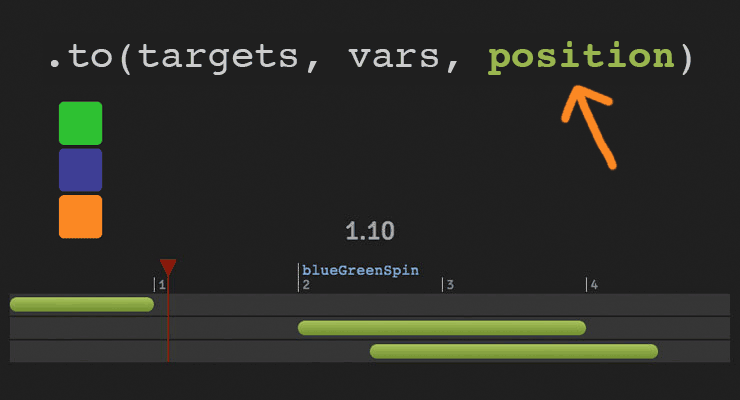 The secret to building gorgeous sequences with precise timing is understanding the position parameter which is used in many methods throughout GSAP. This one super-flexible parameter controls the placement of your tweens, labels, callbacks, pauses, and even nested timelines, so you'll be able to literally place anything anywhere in any sequence. Watch the video For a quick overview of the position parameter, check out this video from the "GSAP 3 Express" course by Snorkl.tv - one of the best ways to learn the basics of GSAP 3. Using position with gsap.to() This article will focus on the gsap.to() method for adding tweens to a Tween, but it works the same in other methods like from(), fromTo(), add(), etc. Notice that the position parameter comes after the vars parameter: .to( target, vars, position ) Since it's so common to chain animations one-after-the-other, the default position is "+=0" which just means "at the end", so timeline.to(...).to(...) chains those animations back-to-back. It's fine to omit the position parameter in this case. But what if you want them to overlap, or start at the same time, or have a gap between them? No problem. Multiple behaviors The position parameter is super flexible, accommodating any of these options: Absolute time (in seconds) measured from the start of the timeline, as a number like 3 // insert exactly 3 seconds from the start of the timeline tl.to(".class", {x: 100}, 3); Label, like "someLabel". If the label doesn't exist, it'll be added to the end of the timeline. // insert at the "someLabel" label tl.to(".class", {x: 100}, "someLabel"); "<" The start of previous animation**. Think of < as a pointer back to the start of the previous animation. // insert at the START of the previous animation tl.to(".class", {x: 100}, "<"); ">" - The end of the previous animation**. Think of > as a pointer to the end of the previous animation. // insert at the END of the previous animation tl.to(".class", {x: 100}, ">"); A complex string where "+=" and "-=" prefixes indicate relative values. When a number follows "<" or ">", it is interpreted as relative so "<2" is the same as "<+=2". Examples: "+=1" - 1 second past the end of the timeline (creates a gap) "-=1" - 1 second before the end of the timeline (overlaps) "myLabel+=2" - 2 seconds past the label "myLabel" "<+=3" - 3 seconds past the start of the previous animation "<3" - same as "<+=3" (see above) ("+=" is implied when following "<" or ">") ">-0.5" - 0.5 seconds before the end of the previous animation. It's like saying "the end of the previous animation plus -0.5" A complex string based on a percentage. When immediately following a "+=" or "-=" prefix, the percentage is based on total duration of the animation being inserted. When immediately following "<" or ">", it's based on the total duration of the previous animation. Note: total duration includes repeats/yoyos. Examples: "-=25%" - overlap with the end of the timeline by 25% of the inserting animation's total duration "+=50%" - beyond the end of the timeline by 50% of the inserting animation's total duration, creating a gap "<25%" - 25% into the previous animation (from its start). Same as ">-75%" which is negative 75% from the end of the previous animation. "<+=25%" - 25% of the inserting animation's total duration past the start of the previous animation. Different than "<25%" whose percentage is based on the previous animation's total duration whereas anything immediately following "+=" or "-=" is based on the inserting animation's total duration. "myLabel+=30%" - 30% of the inserting animation's total duration past the label "myLabel". Basic code usage tl.to(element, 1, {x: 200}) //1 second after end of timeline (gap) .to(element, {duration: 1, y: 200}, "+=1") //0.5 seconds before end of timeline (overlap) .to(element, {duration: 1, rotation: 360}, "-=0.5") //at exactly 6 seconds from the beginning of the timeline .to(element, {duration: 1, scale: 4}, 6); It can also be used to add tweens at labels or relative to labels //add a label named scene1 at an exact time of 2-seconds into the timeline tl.add("scene1", 2) //add tween at scene1 label .to(element, {duration: 4, x: 200}, "scene1") //add tween 3 seconds after scene1 label .to(element, {duration: 1, opacity: 0}, "scene1+=3"); Sometimes technical explanations and code snippets don't do these things justice. Take a look at the interactive examples below. No position: Direct Sequence If no position parameter is provided, all tweens will run in direct succession. .content .demoBody code.prettyprint, .content .demoBody pre.prettyprint { margin:0; } .content .demoBody pre.prettyprint { width:8380px; } .content .demoBody code, .main-content .demoBody code { background-color:transparent; font-size:18px; line-height:22px; } .demoBody { background-color:#1d1d1d; font-family: 'Signika Negative', sans-serif; color:#989898; font-size:16px; width:838px; margin:auto; } .timelineDemo { margin:auto; background-color:#1d1d1d; width:800px; padding:20px 0; } .demoBody h1, .demoBody h2, .demoBody h3 { margin: 10px 0 10px 0; color:#f3f2ef; } .demoBody h1 { font-size:36px; } .demoBody h2 { font-size:18px; font-weight:300; } .demoBody h3 { font-size:24px; } .demoBody p{ line-height:22px; margin-bottom:16px; width:650px; } .timelineDemo .box { width:50px; height:50px; position:relative; border-radius:6px; margin-bottom:4px; } .timelineDemo .green{ background-color:#6fb936; } .timelineDemo .orange { background-color:#f38630; } .timelineDemo .blue { background-color:#338; } .timleineUI-row{ background-color:#2f2f2f; margin:2px 0; padding:4px 0; } .secondMarker { width:155px; border-left: solid 1px #aaa; display:inline-block; position:relative; line-height:16px; font-size:16px; padding-left:4px; color:#777; } .timelineUI-tween{ position:relative; width:160px; height:16px; border-radius:8px; background: #a0bc58; /* Old browsers */ background: -moz-linear-gradient(top, #a0bc58 0%, #66832f 100%); /* FF3.6+ */ background: -webkit-gradient(linear, left top, left bottom, color-stop(0%,#a0bc58), color-stop(100%,#66832f)); /* Chrome,Safari4+ */ background: -webkit-linear-gradient(top, #a0bc58 0%,#66832f 100%); /* Chrome10+,Safari5.1+ */ background: -o-linear-gradient(top, #a0bc58 0%,#66832f 100%); /* Opera 11.10+ */ background: -ms-linear-gradient(top, #a0bc58 0%,#66832f 100%); /* IE10+ */ background: linear-gradient(to bottom, #a0bc58 0%,#66832f 100%); /* W3C */ filter: progid:DXImageTransform.Microsoft.gradient( startColorstr='#a0bc58', endColorstr='#66832f',GradientType=0 ); /* IE6-9 */ } .timelineUI-dragger-track{ position:relative; width:810px; margin-top:20px; } .timelineUI-dragger{ position:absolute; width:10px; height:100px; top:-20px; } .timelineUI-dragger div{ position:relative; width: 0px; height: 0; border-style: solid; border-width: 20px 10px 0 10px; border-color: rgba(255, 0, 0, 0.4) transparent transparent transparent; left:-10px; } .timelineUI-dragger div::after { content:" "; position:absolute; width:1px; height:95px; top:-1px; left:-1px; border-left: solid 2px rgba(255, 0, 0, 0.4); } .timelineUI-dragger div::before { content:" "; position:absolute; width:20px; height:114px; top:-20px; left:-10px; } .timelineUI-time{ position:relative; font-size:30px; text-align:center; } .controls { margin:10px 2px; } .prettyprint { font-size:20px; line-height:24px; } .timelineUI-button { background: #414141; background-image: -webkit-linear-gradient(top, #575757, #414141); background-image: -moz-linear-gradient(top, #575757, #414141); background-image: -ms-linear-gradient(top, #575757, #414141); background-image: -o-linear-gradient(top, #575757, #414141); background-image: linear-gradient(to bottom, #575757, #414141); text-shadow: 0px 1px 0px #414141; -webkit-box-shadow: 0px 1px 0px 414141; -moz-box-shadow: 0px 1px 0px 414141; box-shadow: 0px 1px 0px 414141; color: #ffffff; text-decoration: none; margin: 0 auto; -webkit-border-radius: 4; -moz-border-radius: 4; border-radius: 4px; font-family: "Signika Negative", sans-serif; text-transform: uppercase; font-weight: 600; display: table; cursor: pointer; font-size: 13px; line-height: 18px; outline:none; border:none; display:inline-block; padding: 8px 14px;} .timelineUI-button:hover { background: #57a818; background-image: -webkit-linear-gradient(top, #57a818, #4d9916); background-image: -moz-linear-gradient(top, #57a818, #4d9916); background-image: -ms-linear-gradient(top, #57a818, #4d9916); background-image: -o-linear-gradient(top, #57a818, #4d9916); background-image: linear-gradient(to bottom, #57a818, #4d9916); text-shadow: 0px 1px 0px #32610e; -webkit-box-shadow: 0px 1px 0px fefefe; -moz-box-shadow: 0px 1px 0px fefefe; box-shadow: 0px 1px 0px fefefe; color: #ffffff; text-decoration: none; } .element-box { background: #ffffff; border-radius: 6px; border: 1px solid #cccccc; padding: 17px 26px 17px 26px; font-weight: 400; font-size: 18px; color: #555555; margin-bottom:20px; } .demoBody .prettyprint { min-width:300px; } Percentage-based values As of GSAP 3.7.0, you can use percentage-based values, as explained in this video: Interactive Demo See the Pen Position Parameter Interactive Demo by GreenSock (@GreenSock) on CodePen. Hopefully by now you can see the true power and flexibility of the position parameter. And again, even though these examples focused mostly on timeline.to(), it works exactly the same way in timeline.from(), timeline.fromTo(), timeline.add(), timeline.call(), and timeline.addPause(). *Percentage-based values were added in GSAP 3.7.0 **The "previous animation" refers to the most recently-inserted animation, not necessarily the animation that is closest to the end of the timeline.
- 6 comments
-
- 4
-

-

-
- gsap
- position parameter
- (and 9 more)
-
 See the Pen GreenSock Home Page Animation by GreenSock (@GreenSock) on CodePen. Here is the demo we use on our homepage. Although it incorporates a few advanced techniques, at its core it is just a bunch of timelines nested inside a master timeline. This technique of nesting timelines is actually quite simple and with a little practice you'll be doing the same.
 -
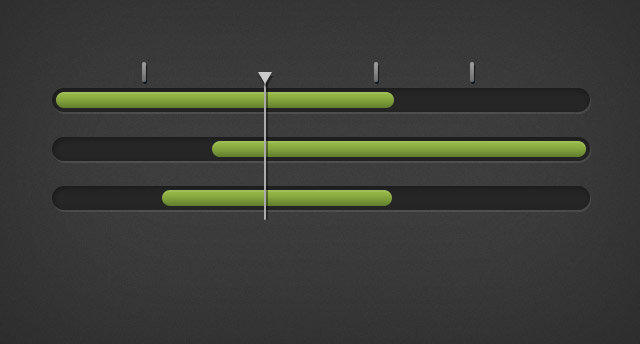 Note: TimelineLite has been deprecated in GSAP 3 (but GSAP 3 is still compatible with TimelineLite). We highly recommend using the gsap.timeline() object instead. While GSAP 3 is backward compatible with most GSAP 2 features, some parts may need to be updated to work properly. Please see the GSAP 3 release notes for details. TimelineLite is a lightweight, intuitive timeline class for building and managing sequences of TweenLite, TweenMax, TimelineLite, and/or TimelineMax instances. You can think of a TimelineLite instance like a container where you place tweens (or other timelines) over the course of time. build sequences easily by adding tweens with methods like to(), from(), staggerFrom(), add(), and more. tweens can overlap as much as you want and you have complete control over where they get placed on the timeline. add labels, play(), stop(), seek(), restart(), and even reverse() smoothly anytime. nest timelines within timelines as deeply as you want. set the progress of the timeline using its progress() method. For example, to skip to the halfway point, set myTimeline.progress(0.5); tween the time() or progress() values to fastforward/rewind the timeline. You could even attach a slider to one of these properties to give the user the ability to drag forwards/backwards through the timeline. speed up or slow down the entire timeline using timeScale(). You can even tween this property to gradually speed up or slow down. add onComplete, onStart, onUpdate, and/or onReverseComplete callbacks using the constructor’s vars object. use the powerful add() method to add labels, callbacks, tweens and timelines to a timeline. base the timing on frames instead of seconds if you prefer. Please note, however, that the timeline’s timing mode dictates its childrens’ timing mode as well. kill the tweens of a particular object with killTweensOf() or get the tweens of an object with getTweensOf() or get all the tweens/timelines in the timeline with getChildren() If you need even more features like, repeat(), repeatDelay(), yoyo(), currentLabel(), getLabelsArray(), getLabelAfter(), getLabelBefore(), getActive(), tweenTo() and more, check out TimelineMax which extends TimelineLite. Sample Code //instantiate a TimelineLite var tl = new TimelineLite(); //add a from() tween at the beginning of the timline tl.from(head, 0.5, {left:100, opacity:0}); //add another tween immediately after tl.from(subhead, 0.5, {left:-100, opacity:0}); //use position parameter "+=0.5" to schedule next tween 0.5 seconds after previous tweens end tl.from(feature, 0.5, {scale:.5, autoAlpha:0}, "+=0.5"); //use position parameter "-=0.5" to schedule next tween 0.25 seconds before previous tweens end. //great for overlapping tl.from(description, 0.5, {left:100, autoAlpha:0}, "-=0.25"); //add a label 0.5 seconds later to mark the placement of the next tween tl.add("stagger", "+=0.5") //to jump to this label use: tl.play("stagger"); //stagger the animation of all icons with 0.1s between each tween's start time //this tween is added tl.staggerFrom(icons, 0.2, {scale:0, autoAlpha:0}, 0.1, "stagger"); Demo See the Pen TimelineLite Control : new GS.com by GreenSock (@GreenSock) on CodePen. Watch The video below will walk you through the types of problems TimelineLite solves and illustrate the flexibility and power of our core sequencing tool. Learn more in the TimelineLite docs. For even more sequencing power and control take a look at TimelineMax.