Search the Community
Showing results for tags 'splittext'.


-
Are there any issues animating h1 <h1 id=“txt1”>SplitText <br>text.</h1>, or is it best practice to always use divs <div id=“txt1”>SplitText <br>text.</div> when animating with splittext? Thanks
-
 Hi there, I'm having a weird issue when trying to use ScrambleText Plugin to tween a single character, split by the SplitText plugin and searching in the forums, i found the following thread: Split Text / ScrambleText - Random Stagger, which in a comment from @Carl has the following example that i used to create this animation ( I didn't comment there as the thread is from 2015). Greensock SplitText Demo Now my problem is that while tweening the character, the tween has some "dead" time in between each character, i have tried fixing the timing using the duration of each tween, the duration of the timeline and the position of each tween in the timeline but it seems that i don't really understand how the ScrambleText Plugin really works. If anyone has any idea how i can configure this to run as if i was scrambling the text as a single word instead of each character as a regular ScrambleText Plugin tween would please, let me know. Thanks.
 -
Hello! I have recently encountered a problem where I am trying to revert the parent divs after a browser resize, but it is not reverting at all! I am trying to revert the "paragraph-" and "headerParentSplit" before the animation starts (as long as it has been set before) I have tried debugging by console logging this if statement, and it does go through, although it still does no difference. First picture with only one header line, is how it should look like. This is what happens when you enter the website with a fullscreen resolution. The other picture with a red and black background for the header, is how it looks like. The reason behind this is that the div is split into lines when the resolution was smaller (therfore it is two divs). It does not revert with the following code.. function setupSplits() { const paragraph = document.querySelectorAll("p"); const header = document.querySelectorAll("h1, h2"); if (headerParentSplit != null) { headerParentSplit.revert(); paragraphParentSplit.revert(); } var headerParentSplit = new $SplitText(header, { // type: "words", linesClass: "split-parent", }); var paragraphParentSplit = new $SplitText(paragraph, { // type: "words", linesClass: "split-parent", }); header.forEach((header) => { // Reset if needed if (header.anim) { header.anim.progress(1).kill(); header.split.revert(); } header.split = new $SplitText(header, { type: "lines,words", linesClass: "split-line", }); // Set up the anim $gsap.set("h1, h2", { visibility: "visible", }); header.anim = $gsap.from(header.split.words, { scrollTrigger: { trigger: header, toggleActions: "restart pause resume reverse", start: "top 95%", }, duration: 0.7, ease: "circ.easeOut", yPercent: 100, opacity: 0, stagger: 0.015, }); }); paragraph.forEach((paragraph) => { // Reset if needed if (paragraph.anim) { paragraph.anim.progress(1).kill(); paragraph.split.revert(); } paragraph.split = new $SplitText(paragraph, { type: "lines,words,chars", linesClass: "split-line", }); $gsap.set("p", { visibility: "visible", }); paragraph.anim = $gsap.from(paragraph.split.words, { scrollTrigger: { trigger: paragraph, toggleActions: "restart pause resume reverse", start: "top 95%", }, duration: 0.6, ease: "circ.easeOut", yPercent: 100, opacity: 0, stagger: 0.005, }); }); } onMounted(() => { setupSplits(); $ScrollTrigger.addEventListener("refresh", () => { setupSplits(); }); });


-
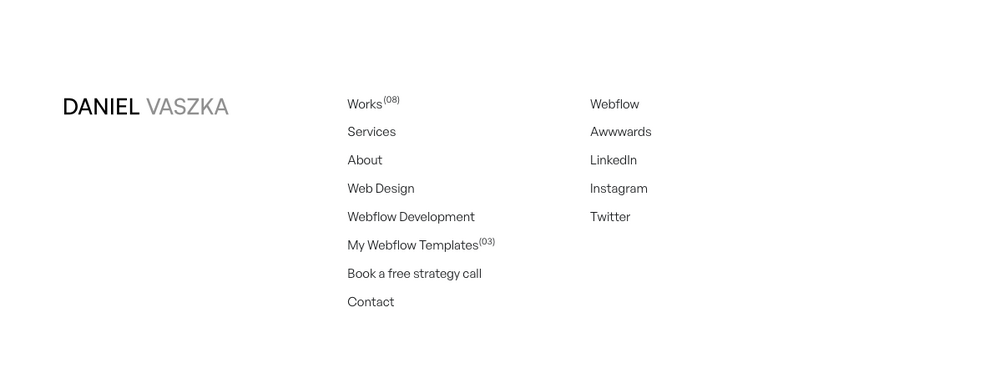
Hello, I would like help understanding how to create a hover effect in the text similar to the footer of this site (https://danielvaszka.com/). Can someone help me?
-
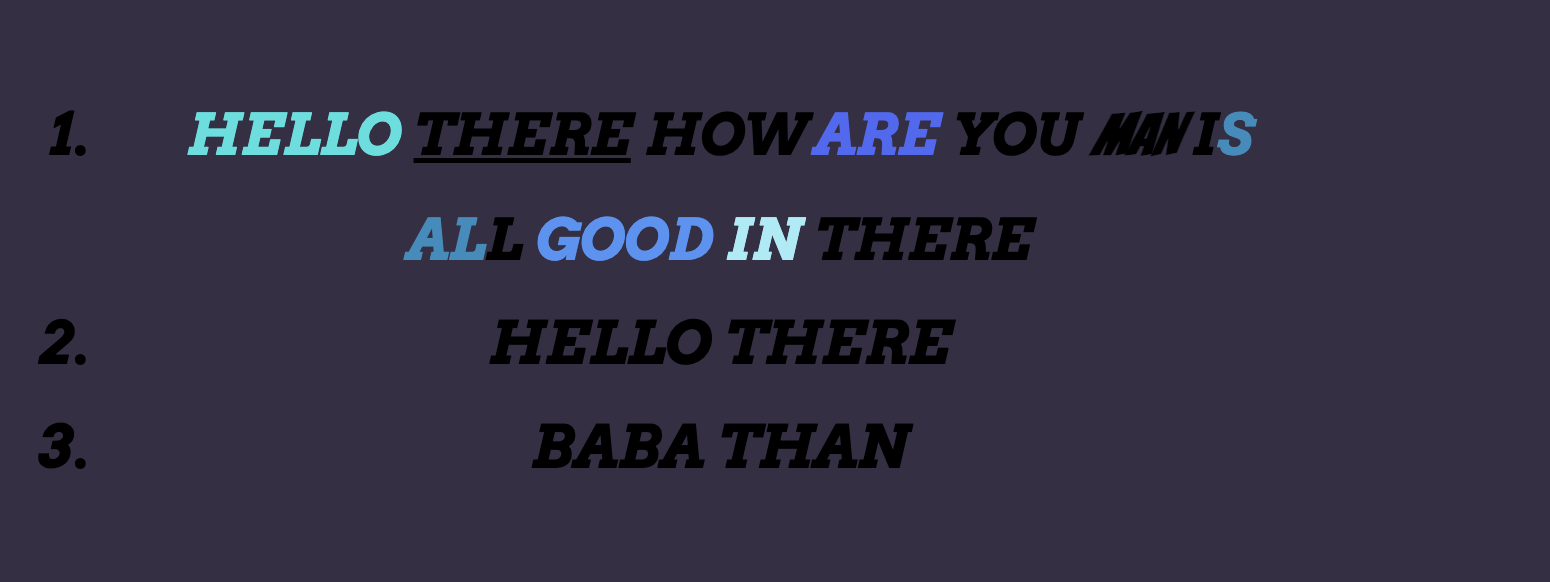
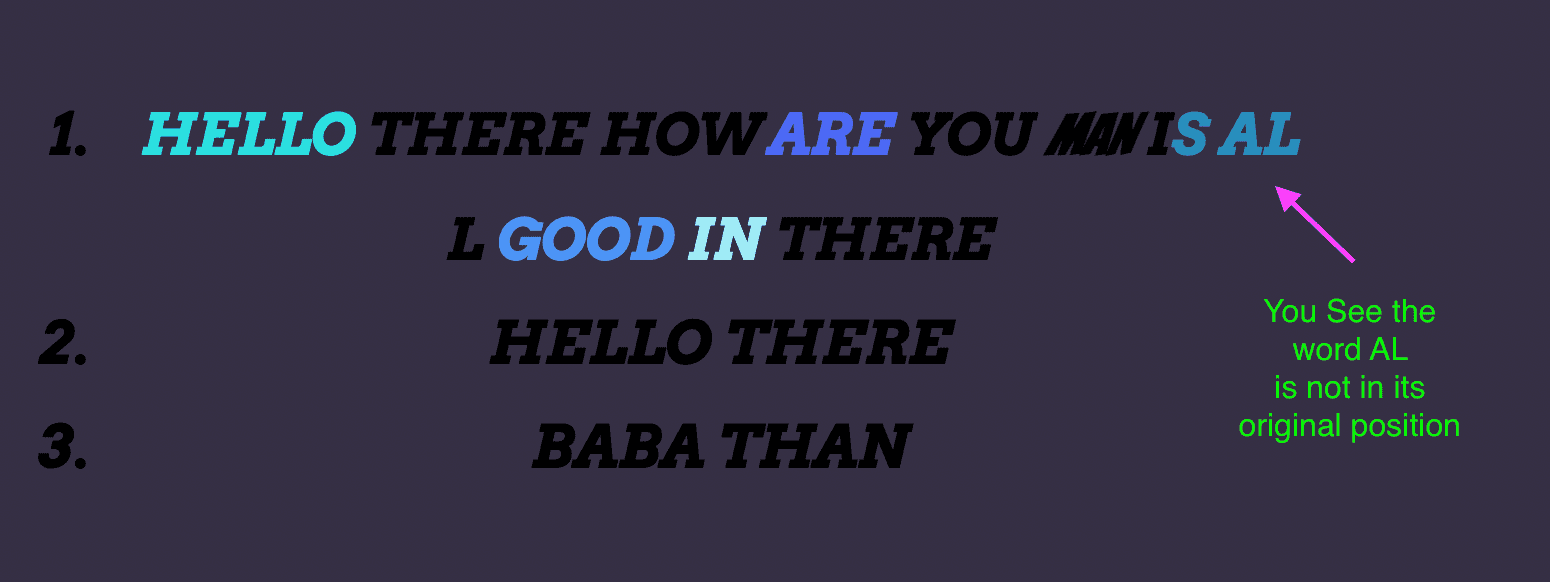
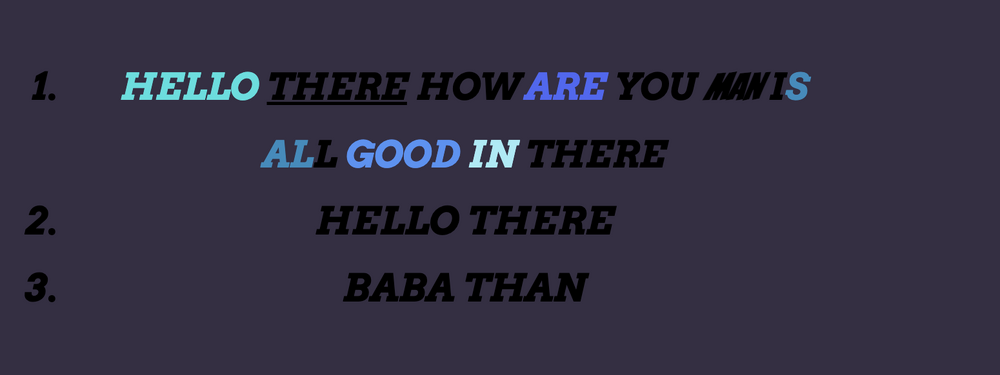
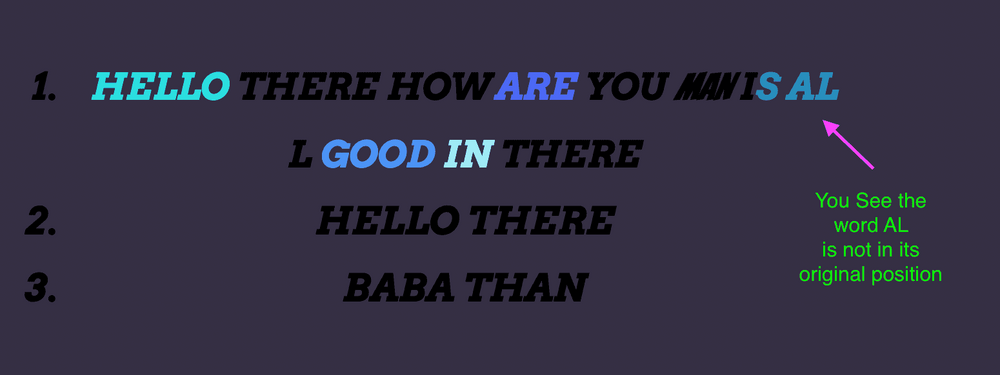
Hello Team, we are facing three issues with the SplitText Module. Issue 1: The DOM created by SplitText is not placed in the same position as the original DOM The Original DOM: The DOM created by SplitText: Issue 2: The Word split is not happening based on Whitespace. The words "IS ALL" in the first list items are split like ["I", "S", "AL", "L"] the expected output is ["IS", "ALL"] Issue 3: The Word "There" in the first list items is not underlined in the final output. Kindly note that Note: the user edits all the dom, so we cannot change the DOM structure. CLICK the click here button to start the animation CLICK the reset button to reset the animation and back to its original position.
-
Hi there! I'm using astro + https://vuejs.org/ components and swup.js for page transitions. I'm also using GSAP for animations I've found a problem while navigating. On first load, text in "TransformAnimation.vue" prints with animation and everything looks and works cool. If I then go to some other page (About, blog..) the text disappears even though js runs and works correctly I thought it was because of swup, but I've seen that if I comment/delete the SplitText GSAP part, the text always appear... I don't get why my GSAP code is deleting the text? :/ I leave a minimal demo(thanks @GreenSock): https://stackblitz.com/edit/testing-astro-swup-vue?file=src%2Flayouts%2FLayout.astro,src%2Fpages%2Findex.astro,src%2Fpages%2Fabout.astro,src%2Fpages%2Fblog%2Findex.astro,src%2Fcomponents%2FTransformAnimation.vue,src%2Fcomponents%2FHeader.astro Thanks!
-
I modified the official `splitText` example so that the text is not displayed by default, when the `show` button is clicked the text is displayed, when the `disappear` button is clicked the text disappears, then when I click the `show` button again the text is not displayed, I want to click the `disappear` button and then click the `show` button to display the text again, how should I modify it? Thanks
-
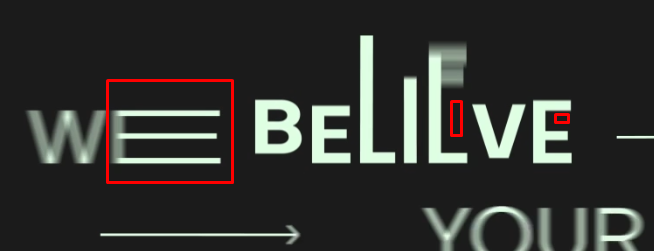
Hello... I'm struggling here with such animation that I can't find a solution with CSS, font-stretch is not a solution in this case. At least, is it possible to achieve in web development? It's stretching letters by different positions and angles. Espcieally it's more visible with letter `E` Any help or suggestions please ?
-
Hello, first time asking here, hope I'll do it well ^^ On my pen, I successfully got a sliptText animation starting when mouseenter the black box. But at first, I was expecting the sliptText animation starting when #creation enters in viewport (using ScrollTrigger) which isn't the case here. Any ideas ?
-
Hello everyone, I'm currently implementing CSP in our Rails application, we're using SplitText VERSION: 0.6.1 and I'm having some issues with it since it applies some inline styles. Is there a way of modifying this code to not use inline styles or a version of SplitText that doesn't have this issue? Stackoverflow question https://stackoverflow.com/questions/73891388/javascript-inline-style-csp-violation

-
 Hello Team , Why does onStart callBack is triggered for the first element passed in array. tl.set([...chars], { opacity: 0 }) tl.to([...chars],{ opacity: 1, ease: Linear.easeNone, willChange: "transform, opacity", immediateRender: false, onStart: placeHand, stagger:duration / chars.length, duration : (duration/chars.length) }); in version 2 it gets called for every element that has been included in the array, if in v3 it triggers only for the first element then what will be the fix, i want to call the onStart callback for every element in the array.
 -
 Hi all, I have a working prototype using GSAP SplitText (displayed at the bottom of this post) which stagger-reveals a title, by changing position and opacity of each letter individually. What I'd like to do is mimic the text reveal animation here: http://loveforiceland.com/ which animates each line simultaneously while still stagger-revealing each letter. And the way the letters are revealed are by moving up from behind a kind of mask instead of fading in by animating the letter's opacity. This example gets close: https://codepen.io/camcgreen/pen/qBqMPQp but reveals each line as a whole instead of letter-by-letter. Additional requirements: 1. <a> tags be preserved in the title (as they are in my prototype) 2. The title must be responsive which I imagine means the initial markup can't be grouped by line since line breaks will depend on screen width. Is this possible with GSAP? Thanks!
 -
 Hi there! I have prepared a codepen that will hopefully help find the solution to my problem. I am using both ScrollTrigger and SplitText to try to animate some text. My goal is to do the following: 1. Have the first h1 animate into the page when the page loads. 2. Once the user scrolls down a bit, the h1 will animate out and the h2 will then animate into the page. This "works". The issue is once you scroll back up. When you scroll back up the h2 will animate out and the h1 will animate back in, however the h1's first character will not be visible. I noticed that if I comment out the first part of my timeline (the from()), it then works perfectly, however I can't seem to get it to work if I animate the h1 when the page loads. Here's another codepen showing what I just mentioned above (commenting from()): https://codepen.io/julienkos/pen/MWEVvQE. Please let me know if you can help! I appreciate it.
 -
Hi, I have a SVG text and I'd like to animate it as though someone was writing it. I know it'd be easier with paths elements but I have it as tspans instead. I have tried using drawSVG but it seems that only works with paths. Any help is totally appreciated. The SVG code: <g id="Group_80" data-name="Group 80" transform="translate(-649.918 -257.351)"> <g id="Brand" transform="translate(652.062 329.976)"> <text id="Check_me_out_and_see" data-name="Check me out and see" transform="matrix(0.985, -0.174, 0.174, 0.985, 0, 88.908)" stroke="#000" strokeWidth="1" fontSize="65" fontFamily="Satisfy-Regular, Satisfy" > <tspan x="0" y="61" ref={bstext}> Check me{' '} </tspan> <tspan x="0" y="155"> out and{' '} </tspan> <tspan x="0" y="249"> see </tspan> </text> </g> A screenshot: Thanks

-
Hello! I've been playing with GSAP on codepen, specifically with the SplitText plugin. Everything works fine in the codepen, Im using a cdn that i found online. But when I install locally via npm, using the gsap-bonus.tgz, it doesnt find the SplitText plugin import { SplitText } from 'gsap/SplitText' Was this plugin deprecated or renamed? Thanks in advance! PS: In the codepen, I'm also trying to achieve the same effect for the split text being used in the following h4 element but on the p tag <h1 class="animated">hello there im animated</h1> I've added an overflowY: hidden to the h1 tag. But its not an optimal solution for when there's more than one lines of text. Was wondering if anyone had any insight as to how to achieve this the GSAP way. <--- Was able to achieve this by adding overflow hidden to inner div elements Thanks in advance!!
-
Hi! I'm having problems with some Vue components in Nuxt and SplitText. I'll try to explain: I have a global mixin that detects all [data-animation] elements with the scroll and fire an specific animation. Some of these elements are components and ha. This works fine when I use opacity, X and Y, scale, etc... but when I use Split Text it doesn't. I got an hydrate error and the animation doesn't work. This is the code for the animation: if (elm.dataset.animation === 'lines-down-up-mask'){ var split = new SplitText(elm, { type: "lines", linesClass: 'lineParent' }); var split_parent = new SplitText(elm.getElementsByClassName('lineParent'), { type: "lines", charsClass: 'lineChild' }); gsap.set(split_parent.lines, { y: '110%' }); gsap.to(split_parent.lines, { scrollTrigger: { trigger: elm, scrub: false, start: 'top bottom', }, stagger: { each: 0.1, ease: 'power1.in', y: 0, }, onComplete: function(){ split.revert(); } }); } This is one of the components: <Partners data-bg-color="white" data-text-color="black" data-logo-color="black" data-scroll-section :title="partnerList.title" :partners="partners" /> And inside the component I have this: <template> <section class="partners"> <div class="headline headline--4 partners__title" data-animation="lines-down-up-mask">{{ title }}</div> <MovingMarquee :images="partners" partner_logos /> </section> </template> I hope someone could help me, because I don't know why it happens :( Thanks

-
I have this issue with SplitText where the text inside a <span> is breaking into another line and I have no idea how to fix it. According to the docs they spans shouldn't be a problem, but I don't know what is causing this In my example, the "this is the THIRD line" should be on the same line
-
Hey guys, I'm using SplitText plugin to show like a typing animation, the problem is that sometimes I have buttons inside the paragraph and the plugin is also typing those character when I don't need the text inside the buttons to have that animation. It's there a way to get avoid that text to be splited? I try several techniques, one was to remove the paragraph with the buttons outside of the SplitText animation, the problem there is that I need the movement to the next line
-
 Hello GSAP friends! I am having trouble combining some ScrollTrigger and SplitText features in the correct way. I have several sections that use ScrollTrigger to pin when in view and have a timeline that animates their opacity in and out. (section.slide) Of these sections, those that also have the class 'slide-text' are using SplitText to split their H2 content for animation. (section.slide.slide-text h2.animatedcharacters) I'd like the text to also use SplitText's animation feature to animate the text via scrub when its parent section comes into view both onEnter and onEnterBack, with it resetting onLeave and onLeaveBack. I've looked at several demos and have pinned down the SplitText animation I'd like to use (see the comments at the end of my JS). Please see my attached CodePen. I have the pinned sections the way I'd like them, and I also have the text splitting, but I don't know how to integrate the SplitText animation into the existing scrollTrigger params and timeline. Apologies, but this is as far as I've gotten, I can't seem to combine the various demo content I've explored to get the code for my specific case. Many thanks!
 -
Hey all, I'm trying to experiment with SplitText, So I have a simple menu with submenu, blue colored menu items have children, when user click on it first level menu items will move up and submenu will appear from bottom, I want to use stagger for each char, but stagger also will be implemented for menu items, what I don't want. I understand that I'm doing it wrong, but I can't imagine what should I do. Can you help me, please?
-
Hi everyone, I’m discovering GreenSock animation framework, seems pretty powerful. But I’m struggling reproducing the following text animation (that maybe some of you will find basic?) : https://www.buildinamsterdam.com (by animation, I'm speaking about the very first text animation on black screen where text appears from the bottom by words, then disappears on the left by chars, then black background disappears by collapsing into 3 vertical bands) Before asking for your help, I've done my research on the forum and I discovered the need to use SplitText add-on. I've set up a first approach on this pen : For the exit animation, how do I handle the "overflow hidden" wrapping of all chars to make them disappear when they move left ? How should I start for the 3 vertical bands reveal animation ? Thanks for your kind help, very much appreciated
-
Hello! I want to layout some text on an SVG path and have an animation play in a loop, on hover. On mouse out, the text should go back to its initial state. I used SplitText and the MotionPath plugins in my CodePen and it looks kind of what i want, but i have the following issues: Timeline related: The intended initial layout, is the one you'll see if you comment out addPause (line 44). I thought i'd probably need to change the startTime of the timeline, but that's not working. What am i missing? On mouseout, i'd like to tween the timeline to its initial state (the corrected initial layout), but again not working as expected. Any ideas? SplitText & MotionPath related: Right now the letter & word spacing is off. It's tight to the stagger values. So how can i maintain the default ones? (This animation is intended to work with words of different lengths). Is there a callback i could use onResize that would re-calculate the correct position of the letters? Any help in any of the above would be much appreciated Thanks in advance
-
Hello, I'm using SplitText to add animation to lines of text based on the following example: gsap.from(split.lines, {duration: 1, x: 200, autoAlpha: 0, ease: "power3", stagger: 0.05}); The animation is working as expected. However, as the text is split into separate tags it means that it's not responsive and leaves whitespace (which is shown in the gsap example). Is there any way around this? Any help would be appreciated. Thanks
-
Hi there, I have been working on a horizontal scrolling page with ScrollTrigger. Within this we want to be able to animate text headings as they come into view. In the pen there are 5 slides with Slide 2 and Slide 4 both with headers that we want to animate. Ive nearly got it working but : Slide 4 starts in its completed state and doesn't animate until it hits the Start point. So it is sitting on the left and then it jumps to the from point and animates. I think Im doing it in a very inefficient way and that maybe the ScrollTrigger needs to be with the SplitText tween but I went down that path and got myself in a mess! Any assistance would be hugely appreciated! Cheers, Mike
-
Hi, I have made a vertical slider with text, i want to add in the SplitText plugin that i have added but doesn't seem to work it on the code. I have added the codepen below. Can anyone help to see where i am going wrong. Thank you very much