Search the Community
Showing results for tags 'rotate'.
Found 58 results


-
.thumb.jpg.508ba629559fba639e5f03a505c5b072.jpg) Hello guys, I am new to GSAP, recently I am trying to rotate a gradient infinitely but having issues. Help is appreciated. Thanks for this wonderful forum.
Hello guys, I am new to GSAP, recently I am trying to rotate a gradient infinitely but having issues. Help is appreciated. Thanks for this wonderful forum. -
I'm trying to use greensock for an animation I have to rotate a number of objects around the mouse. Anybody has any idea on how to use this code and be able to rotate multiple objects around the mouse by just one class?
-
Hello all of you, I'm trying to create an icon animation where the two lines that make it up must always rotate in a clockwise direction, regardless of the animation state (forward or backward). Despite the need to create the simplest possible demonstration, I've still used the VueJS3 Framework, because I wonder if the unexpected result I'm getting isn't somewhat related to the way the functions are launched. I'm really having trouble understanding why I'm getting the result I'm getting. If anyone can shed some light on this, I'd be very grateful! - Why the animation seems incomplete at the first click - Why on second click there is just one element moving up - Why on all next click the animation seems to be played at reverse Expected result: On first click, the "chevron" icon rotate clockwise to look up 🔺 On second click, the "chevron" icon still rotate clockwise to retreive is initial look down 🔻 and so one. So the icon has two state (up and down) but toggle it by rotating always clockwise.
-
Hi, I have an element that rotates infinitely 360 degrees using GSAP. I've also implemented direction-based rotating on scroll using ScrollTrigger. It works great initially but once you begin to scroll either up or down and the scrolling stops, the element jumps to its original rotating position and begins rotating again which isn't ideal. This is the code that I'm using: gsap.to(this.rotatingText, {rotation: 360, duration: 40, repeat: -1}); var rotate = gsap.timeline({ scrollTrigger: { trigger: "html", scrub: 0.2, start: "top top", end: "+=10000" } }).to(this.rotatingText, { rotation: 360 * 5, duration: 1, ease: "none" }) Ideally, I would love it to, be that after scrolling, it gets the element's current rotated position and then begins rotating again from that point. You can view a video screenshot of the issue here: https://www.veed.io/view/6de5e2cc-072e-45d7-bb30-d015766ae546?sharingWidget=true&panel=share Any help would be greatly appreciated. Thanks
-
Hi, Firstly many thanks for taking a look at my query. I am getting inconsistent behavior on rotation of my clip path. Chrome and Safari are behaving correctly, but Firefox seems to be acting very strange. I would appriciate if someone could explain why. Many thanks ?
-
Hi everyone! I'm really enjoying gsap so far, its capabilities are truly spectacular! I'm trying to create an effect of a <div> rotated in the 3d space rotates back to the XY plane while simultaneously slides down to match the position of another <div>. The effect I aim to replicate can be found here, more precisely the image on the computer screen rotating and sliding down. I want to avoid having to use fixed values for the translation and thought about using Flip.fit() for moving the target element into place together with a scrollTrigger. Alas, it seems as if the 3D rotation is not being considered by the function, resulting in an awkward final state for the sliding element. Does anybody have any ideas on what's going wrong and how I could implement this?
-
Hi all, I have several problems with the animation of my book. 1. I tried to make a rotateY on my book but the controls did not work on my code (play(), pause(), paused()), so I make a rotate in CSS that I disable by adding or removing a class 2. The animation works perfectly on the first opening and closing cycle, but on the following ones the currentAngle variable is buggy 3. I would like to be able to click on the book only if the animation is finished Here is my code : https://codesandbox.io/s/sad-mcnulty-7k49my I really need your help ;) Thanks to all
-
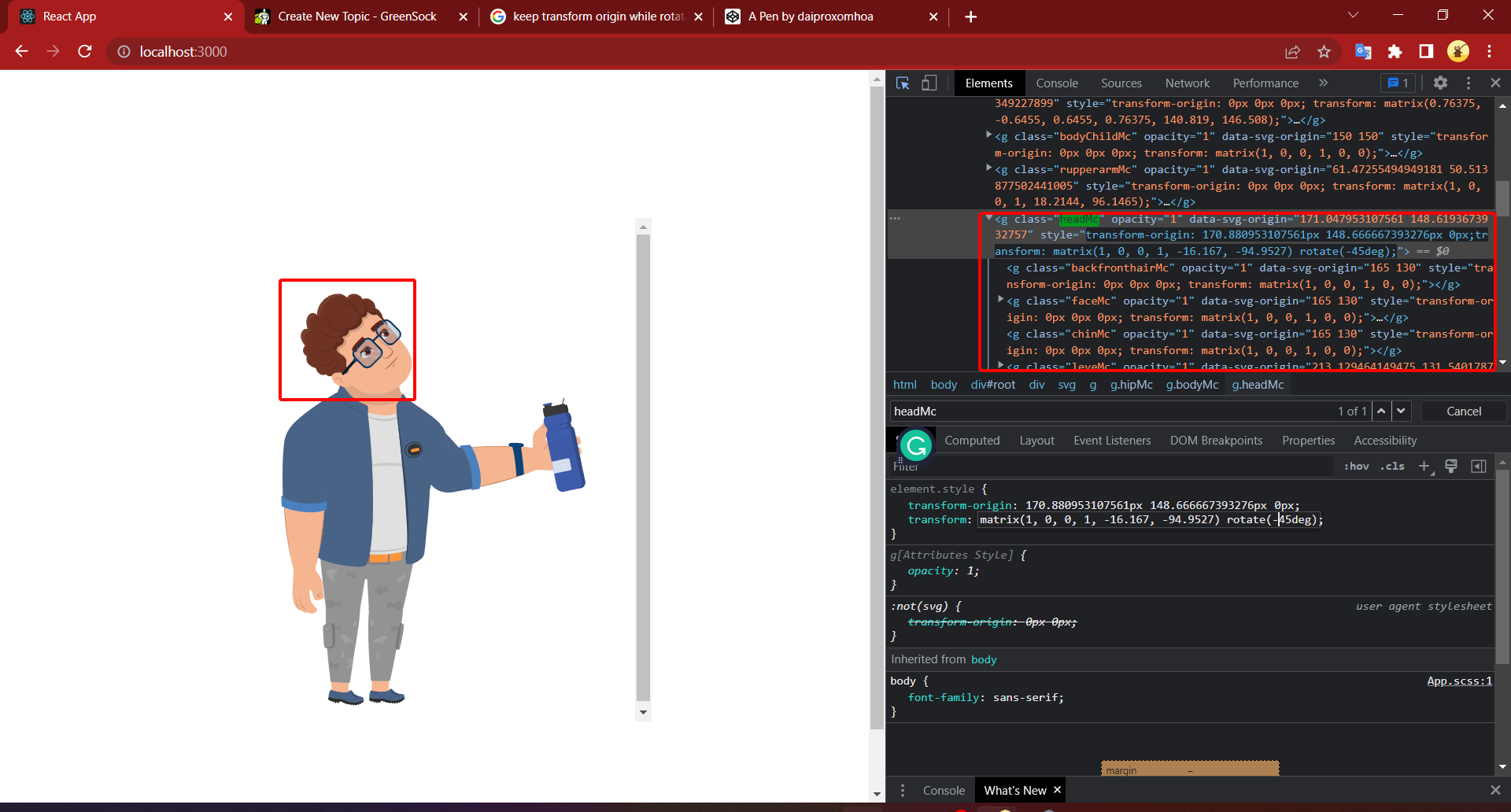
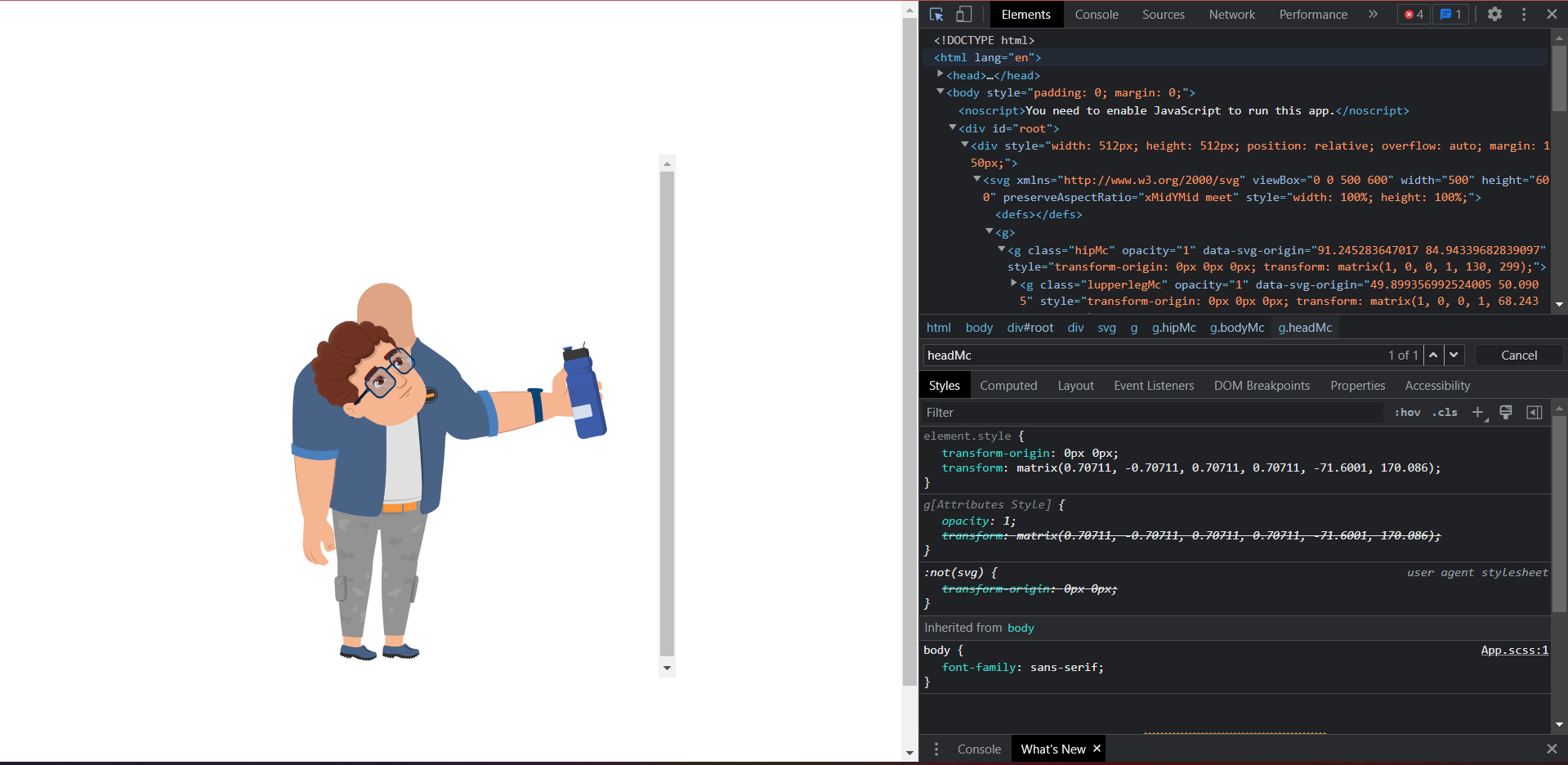
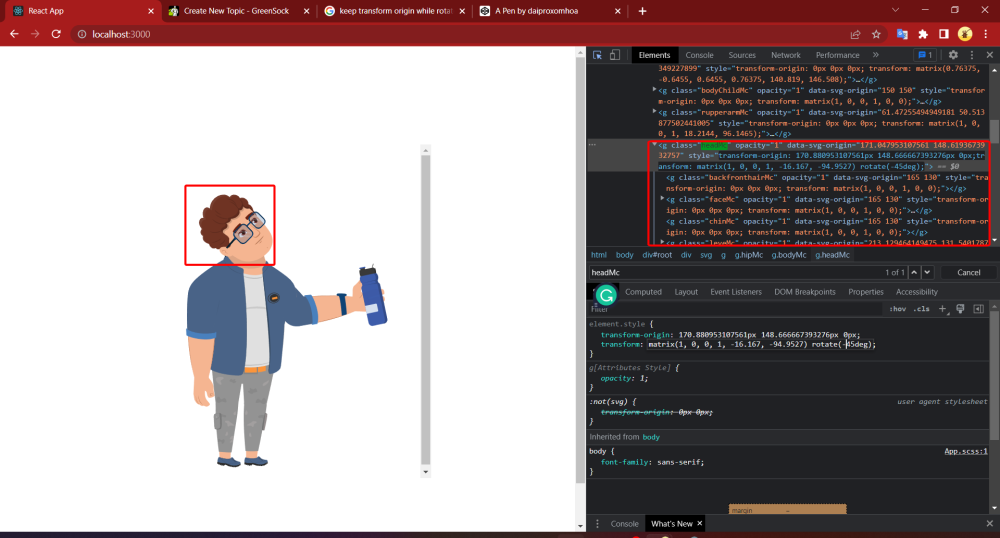
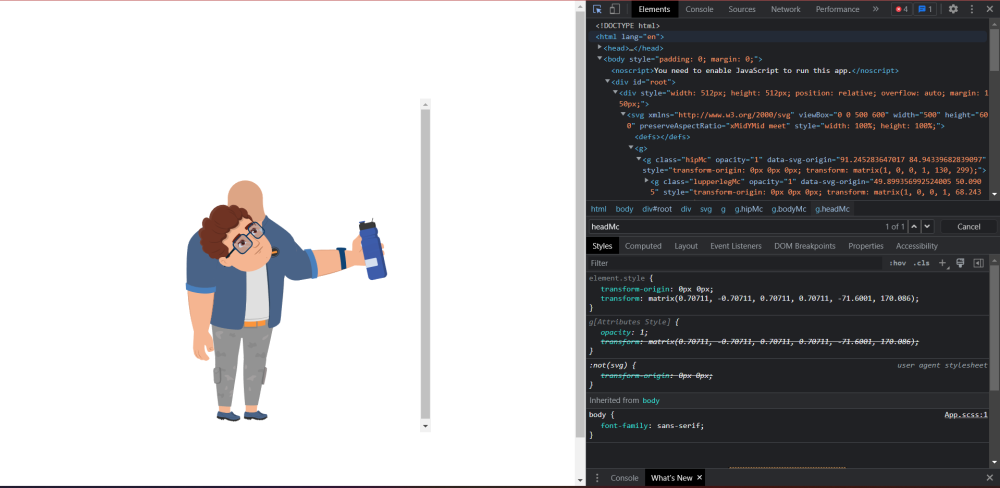
This is what i have when i rotate headMc by transform css. This is a result which I have when I use Gsap : gsap.set('.headMc', { transformOrigin: '170.880953107561px 148.666667393276px', rotation: -45 }); What I have to do to get the result when I use css like the first image; Link svg :
-
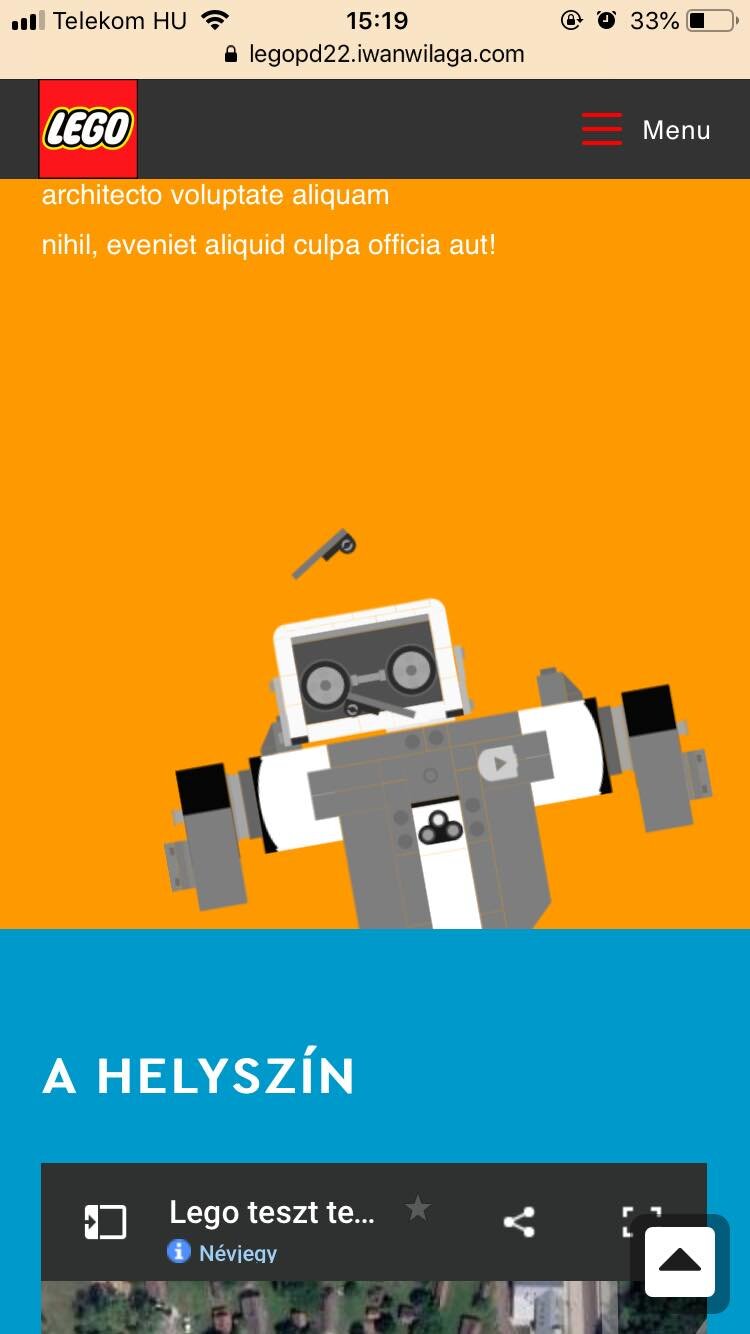
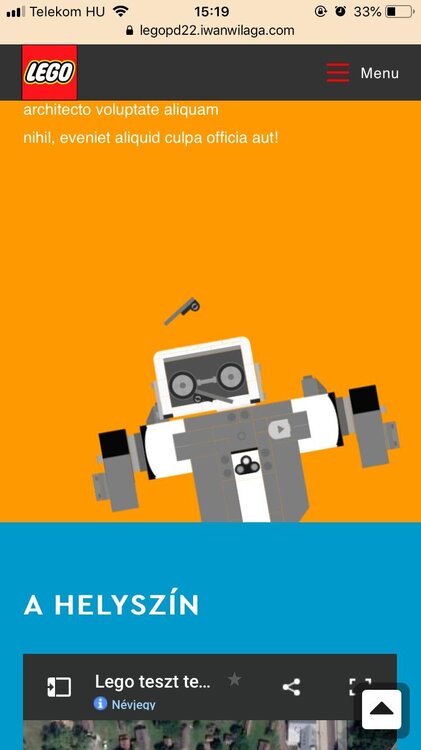
Hello good People! I have an issue with (apparently)`transform:rotate()` css in an animation where i use ScrollMagic which uses GSAP 2.x I can't reproduce exactly this on CodePen, yet can't add the 2.x version gsap js. Here is the current dev site: https://legopd22.iwanwilaga.com/ Please check the robot animation on scroll (with orange background) especially on iOS / apple devices. So it breaks on my old iphone6. Other android phone and desktop doing well on any browser i checked. Do you have hints please why this happens? I applied these css but didn't fix it. transform-origin:center!important; transform-box:fill-box!important; Using TweenMax(). and nested timelines function SVG_Vernie_Robot_Anim(){ let ctrl = new ScrollMagic.Controller(); var timeline_robot_inner_elements = new TimelineLite(); var timeline_robot_slide = new TimelineLite(); var timeline_master = new TimelineLite(); var robot = document.querySelector("svg#robot-vernie"); var robot_head = document.querySelector("g#Head_Vernie"); var robot_eyebrow_left = document.querySelector("g#Eyebrow_Left"); var robot_eyebrow_right = document.querySelector("g#Eyebrow_Right"); timeline_robot_slide .add(TweenMax.to(robot, 1, {transform:`translateX(${is_mobile ? 100 : 250}px) translateY(${is_mobile ? 25 : 0}px) rotate(-10deg) scale(1.5)`},0)) .add(TweenMax.to(robot_head, 1, {transform:'rotate(15deg)'},0)) ; timeline_robot_inner_elements .add(TweenMax.to(robot_eyebrow_left, 1, {transform:'rotate(-25deg)'},1)) .add(TweenMax.to(robot_eyebrow_right, 1, {transform:'rotate(25deg)'},1)) ; timeline_master .add(timeline_robot_slide,0) .add(timeline_robot_inner_elements,2) ; new ScrollMagic.Scene({ triggerElement: ".wp-block-getwid-section.szekcio-terkep", duration: 200, //px }) .setTween(timeline_master) .addTo(ctrl); } SVG_Vernie_Robot_Anim(); To me seems the problem is with rotation. Other `translate` properties work ok. Can you reproduce the same issue? Thank you so much! Best, Wiktor
-

rotate rotate image out of viewport into the viewport as scrolling
rohitsinghshan posted a topic in GSAP
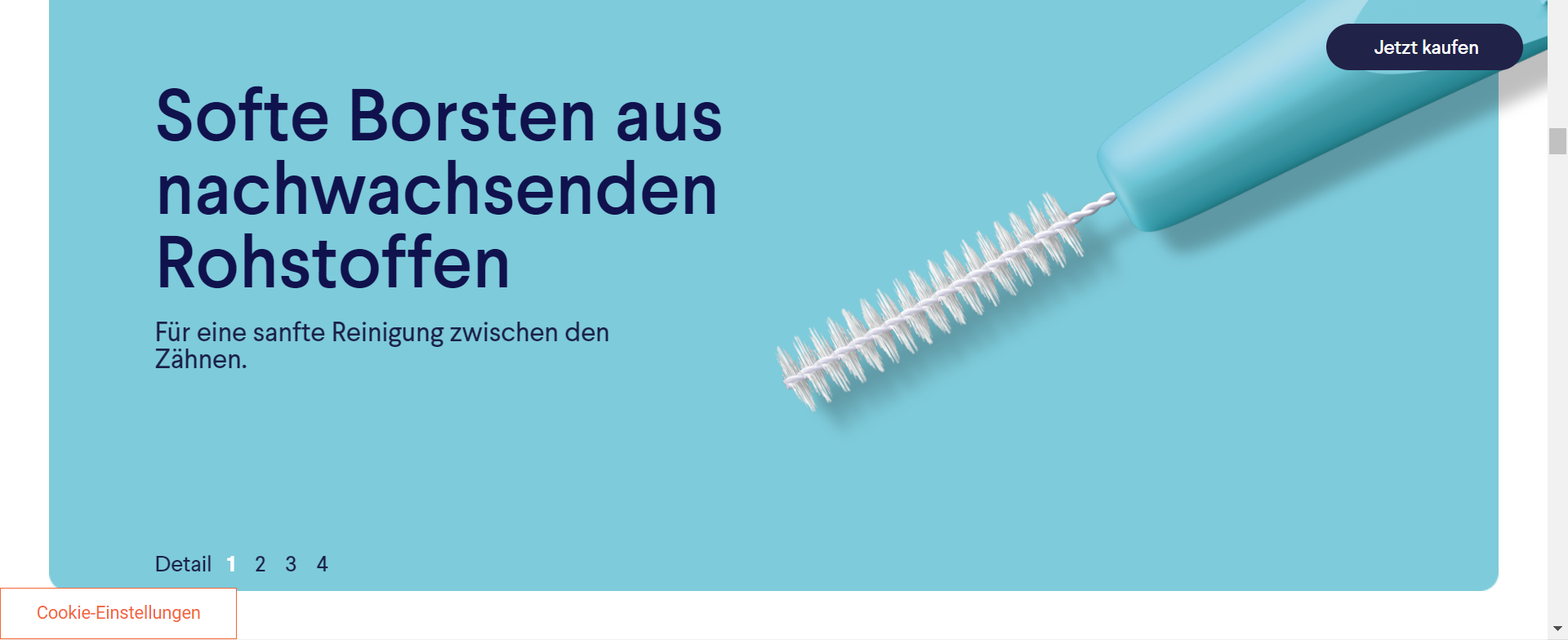
I wanna achieve this animation on the website https://www.dr-best.de/interdental/ where 2nd brush comes to the viewport as scrolling while rotating. I have achieved the 1st sticky brush animation but have a problem in the 2nd one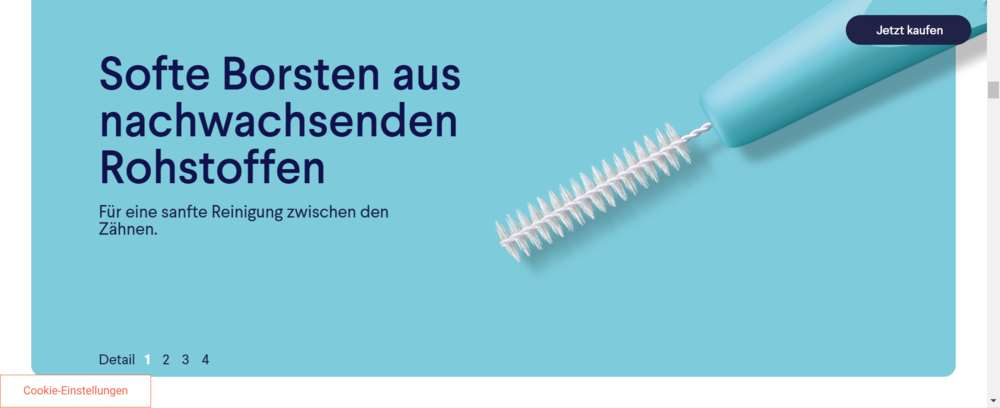
-
Hi everyone I've started yesterday playing around with GSAP for work and so far i'm having a lot of fun :D. My objective is to have a simple 3d object at the center of my scene and a camera to rotate around it. So far so good. But i'm having trouble implementing a reset function for the camera, when a button is clicked the camera should go back to the starting position with an animation. https://jsfiddle.net/tomthebearded/dkug68to/ As you can see when you run the jsfiddle what i've tried until now is changing the position of the camera with gsap.to but it's not right effect for my project. Changing the position in this way makes the camera basically move close to the center before moving out to reach the final position. What i need is more a rotation around the object to reach a defined position. Is there a way to achieve this?
-
 Hello Dear GSAP Community, Could someone help me to achieve cool effect in my codepen? As You can see there is image of blue bubbles which I want to rotate. This is description what I would like to receive: - The image has to react on scroll speed and direction. The faster You scroll, the faster it is spinning, also with differend spinning direction. It is already working. - When page is not scrolling the image is rotating itself, but it direction of rotation is dependent from last scroll direction or rotate right, when first time on page and not scrolled yet. You will see this effects but bugged. There is no smoothly change animation, but its reset when stop scrolling. So, those animations are there, but they are not cooperating with each other and probably they won't work due to way I wrote there. Is it possible to make it work? I hope everything is understandable.
 -
Hi. I am starting to go mad trying to resolve this, so I thought I would post a question here instead. I am try to implement a rotation such that everything on the page view box (the outermost group -- depicted by the purple outline) rotates about its pre-defined origin point (shown by the cross - located at 50% 50% of view port in this case, but could be anywhere). At present the resultant rotation is relative to the compound contents of the Group (i.e. all the House elements) -- spinning around itself , whereas I need it to be relative to the parent view box -- effectively spinning around a fixed point on the page. So... the outer Group element ('street' in my codepen example) needs to behave like a parent-filler rather than a child-wrapper, with the origin offsets relative to the parents offset and dimensions. Note: The content items can be arbitrary i.e. multiple houses, cars etc. (set by a user), and the content may also exceed the bounds of the purple view box. None of these factors should affect the pre-defined rotation origin of the 'street'. (start) (desired @ 90 deg)
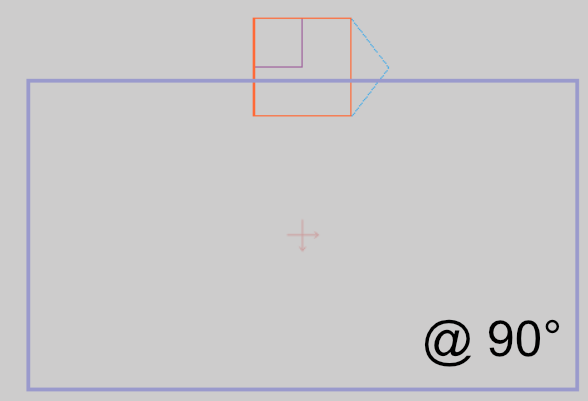
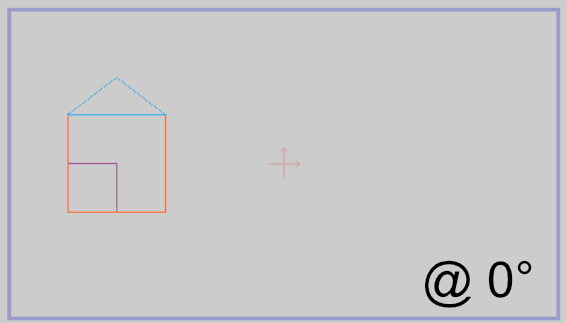
-
Hi there, I'm trying to speed rotation animation on scroll with use of ScrollTrigger. It works pretty well except when I do a fast scroll the rotation gets crazy and I don't really know how to limit the speed... Maybe I do it all wrong, I tried to clamp value but any ideas on how to limit that correctly? Thanks for your help ! Alex
-
Hiya everyone. I am new here but really hoping someone can help me out as I would love to use this amazing library to achieve this cool effect just posted on codrops; (https://tympanus.net/codrops/2020/07/01/creating-a-menu-image-animation-on-hover/). You'll see in the article it explains that the effect works on the direction of your cursor - actually it has two effects, one for when the image is revealed/hidden and the other for moving the mouse over the nav title. I'm trying to adapt the direction based element of this effect into a Webflow project and I am struggling with this because the tutorial seems to go the long way round of achieving these effects (see the layout at the start of the tutorial) and also the fact that there are multiple JS files created. I am fairly new to js and also GSAP (love it though) so a lot of this is a bit overwhelming and also makes it very hard to achieve using Webflow but essentially I would like help with these two directional based effects on hover; 1) I just want to reveal and hide elements on hover with the direction dependent on the mouse direction 2) moving the mouse to the left rotate's the image to the left, and to the right it does the inverse. If anyone is able to offer me help I would hugely appreciate it! Thanks so much
-
I have this below svg in my web application: and i have two buttons to rotate this element clockwise/anticlockwise 3d through y axis when user click on each button, how can i do that? is it possible to do it with Snapsvg? There is also this question on SO: https://stackoverflow.com/questions/61685984/rotate-svg-element-3d-with-javascript-or-jquery
-
I would like to force a rotating drag element to rotate according to the mouse X axis instead of the actual circular move, I don't know if this feature is implemented in Draggable. PS : The slider on the Codepen doesn't affect anything, it's only here to help understand my problem. Thanks!
-
Hey, just wanted to share a small fun pin i made today morning with you guys.. Greensock rocks things, and make so easy and smooth the animation, so you can focus on he rest of the codes always, and let Gsap do what he can best. Btw. i read about the pipe() and gsap.quickSetter() which maybe would make things even more smooth here ? Do you think it would make a big different? Feel free to use this and or give feedback if you think things could be done better, smoother, cooler ! Thanks and Happy Tweening to you all !
-
Hello and apologizing up front, first time posting here ?. Also my first foray into GSAP keep that all in mind. Trying to animate a shape path in an svg logo; attached pen is not the actual logo but it does include a triangle in the real wild I'm wanting to use GSAP3 to just slowly 'spin' the triangle; not rotate it. I included more below if you scroll down to what I'm hoping I can make it look like with a regular just css animation as a demo. THANK YOU ahead of time for any help!
-
Hi, 1. I have a second hand of a clock rotating for 60 seconds 2. I have a minute hand of a clock that should rotate 360/60 after every 60 seconds. The problem is I am using reapeatDelay to delay the minute hand for every 60 seconds but when it plays again, it resets back to the original position 0deg. How do I make the rotate animation continue from where it stopped? Here is a pen https://codepen.io/codebeast/pen/gNNaRp In the pen above, I changed the timing from 60sec to 5sec so you can see what's going on faster.
-
Hello, i’m trying to learn how to use GSAP. I want to make a “washing machine” rotation effect : - On click object start rotating slowly for 2seconds - rotate at max speed for 2 seconds - rotate slowly 2 secondes till it’s stop (todo later : stop with ease:Elastic.easeOut effect) I thought I could write the 3 orders one after one but when I do so, GSAP only ‘do the first one’ (i didnt use any duration because i'm trying first to make the 3 speeds working) $('#whiteCube').on('click', function(){ TweenMax.to("#whiteCube", 2, {rotation:360}); TweenMax.to("#whiteCube", 2, {rotation:720}); TweenMax.to("#whiteCube", 2, {rotation:360}); }); I don't know if this question is related to GSAP but, any idea why only the first click is launching the function ? the other clics are detected but doesn't launch the rotation. any tips ? codepen.io/Demky/pen/pXBPGr thank you.
-
The pen shows a typical way of getting the x/y coordinates for a rotated element. I can use this, but wondering if there might be some hidden gem in GSAP that calculates these points already or, if there might be a faster way to get these values...
-
The square revolves around itself twitching and not doing that smoothly. can anyone help a newbie tell how to fix this? html <body> <div class="test"> <div class="block"> <div class="test-block"></div> </div> </div> </body> css .test{ position: fixed; width: 100%; height: 100vh; background: #000; z-index: 5555555555; top: 0px; left: 0px; display: flex; justify-content: center; align-items: center; } .block{ position: absolute; width: 350px; height: 350px; background: #fff; } .test-block{ position: relative; display: inline-block; vertical-align: top; top: 150px; left: 150px; width: 50px; height: 50px; background: darkgreen; } js var tl = new TweenMax({repeat: -1}); var testBlock = $('.test-block'); tl.to(testBlock, 4, {rotation: 360 , ease:Linear.easeNone , transformOrigin:"50% 50%"})
-
Hi, I try to create an effect like in this example but mine have some bugs on fast hover in and out. Ex: http://m2hagency.com/carprice *** Scroll to the bottom page. Any help would be appreciated. Thanks
-
Hey guys I've got a question concerning transformOrigin behaviour and why there is a difference in end-location of a group in SVG; Why does this; tlBalloon1.addLabel("start", 0); tlBalloon1.fromTo(balloon1, 0.35,{ css: {y: 0, opacity: 0, scale: 0.25}}, { css: {y: "-=10", opacity: 1, scale: 1, transformOrigin:"right bottom"}, ease:Back.easeOut.config(3)}, "start"); tlBalloon1.fromTo(balloon1, 0.35,{ css: {rotation: "-=20"}}, { css: {rotation: 0, transformOrigin: "right bottom"}, ease:Back.easeOut.config(3)}, "start"); Pen A have a different outcome then this; tlBalloon1.addLabel("start", 0); tlBalloon1.fromTo(balloon1, 0.35,{ css: {y: 0, rotation: "-=20", opacity: 0, scale: 0.25, transformOrigin:"right bottom"}}, { css: {y: "-=10",rotation: 0, opacity: 1, scale: 1}, ease:Back.easeOut.config(3)}, "start"); Pen B OKAY guys I found out myself. It appears when I start with offsetting attributes and I would like to transform to original I have to set transformOrigin in altered from-section.