Search the Community
Showing results for tags 'morphsvg'.


-
Hi, I'm trying make a landing page with an animated blob in the background that morphs infinitely but transforms into specific shapes on some text blocks, in the example let's say i want to talk about security once i get to the security block the blob changes into a shield. Everything kind off works, the looping blob is working but when i get to the text block that i want the blob to transform into a shield it transforms for a few moments than goes back to the blob like it glitches, i want the shield to stay as long as block is on view and when out of the block to go back to the blob. I'm pretty sure this is something very easy to do but I started learning gsap yesterday because of a new place I started working at
-
This is my first using GSAP, and I'm stuck in errors. I tried to import `MorphSVGPlugin` in `Next.js` app and `React.js` app and it is not importing it. I am writing the exact code given in GreenSock | Docs | Installation, but it is giving Could not find module in path: `'gsap/MorphSVGPlugin' relative to '/src/App.js'` error in `React.js`, and `Module not found: Can't resolve 'gsap/dist/MorphSVGPlugin'` error in `Next.js` CodeSandbox URL: xenodochial-haze-nxelbo - CodeSandbox
-
Hi, I want to create a pinned section to morph the SVG and then continue scrolling much like this example. Unfortunately, I haven't been able to figure out how to pin and morph the SVG. Kindly help. Thank you. https://codepen.io/akapowl/pen/zYqLyPQ/6a2480c123d88dc391faba0ea5cc590f
-
Hi all, I have been experimenting with MorphSVG and I am trying to make a button where the border morphs to a sort of arrow shaped border when you hover over it. This has been fairly successful but I see that the left side of the SVG morphs a bit and the animation still feels a bit too wavy. How can you approach a problem like this? I am not that experienced with MorphSVG and would love some insight.
-
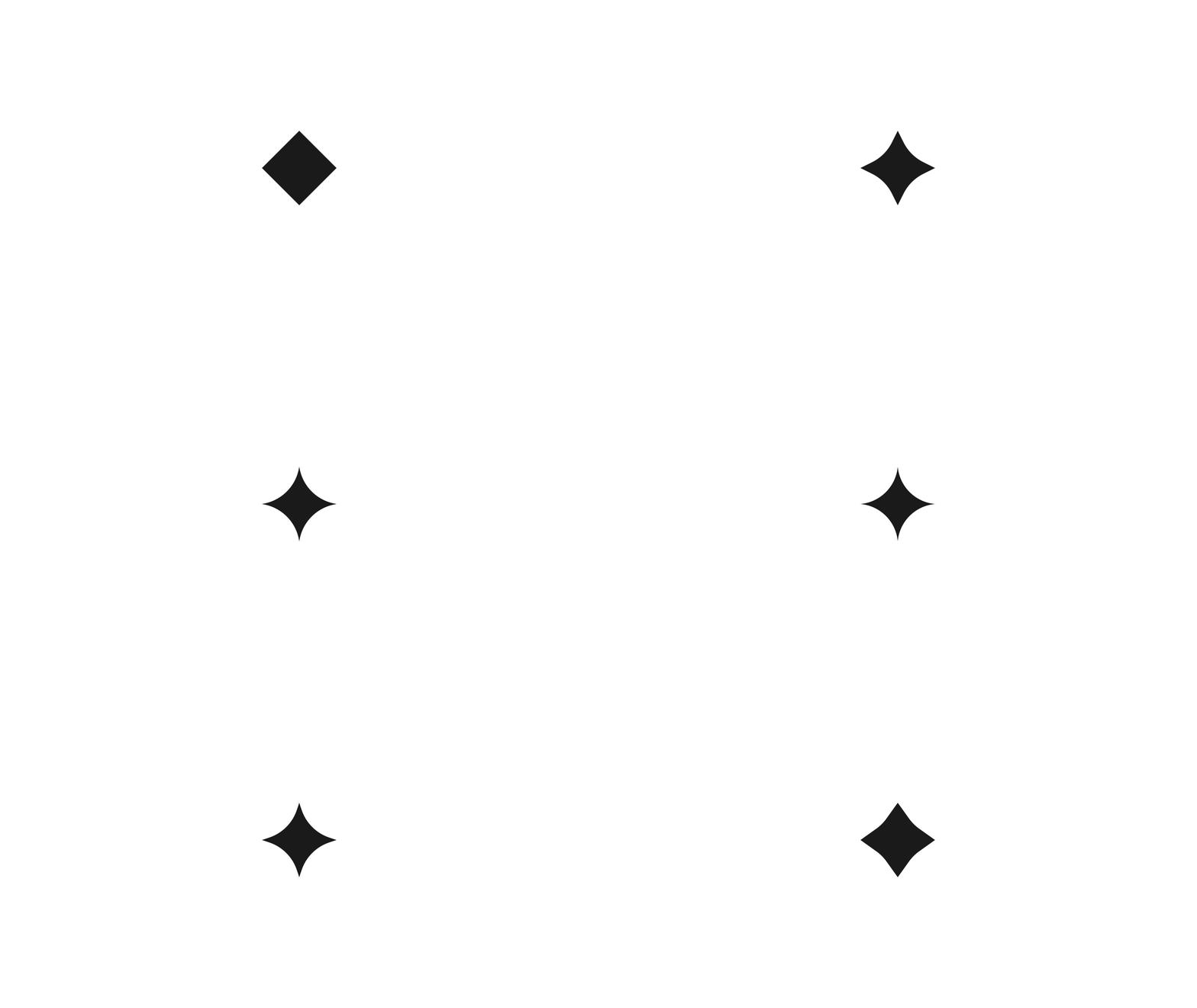
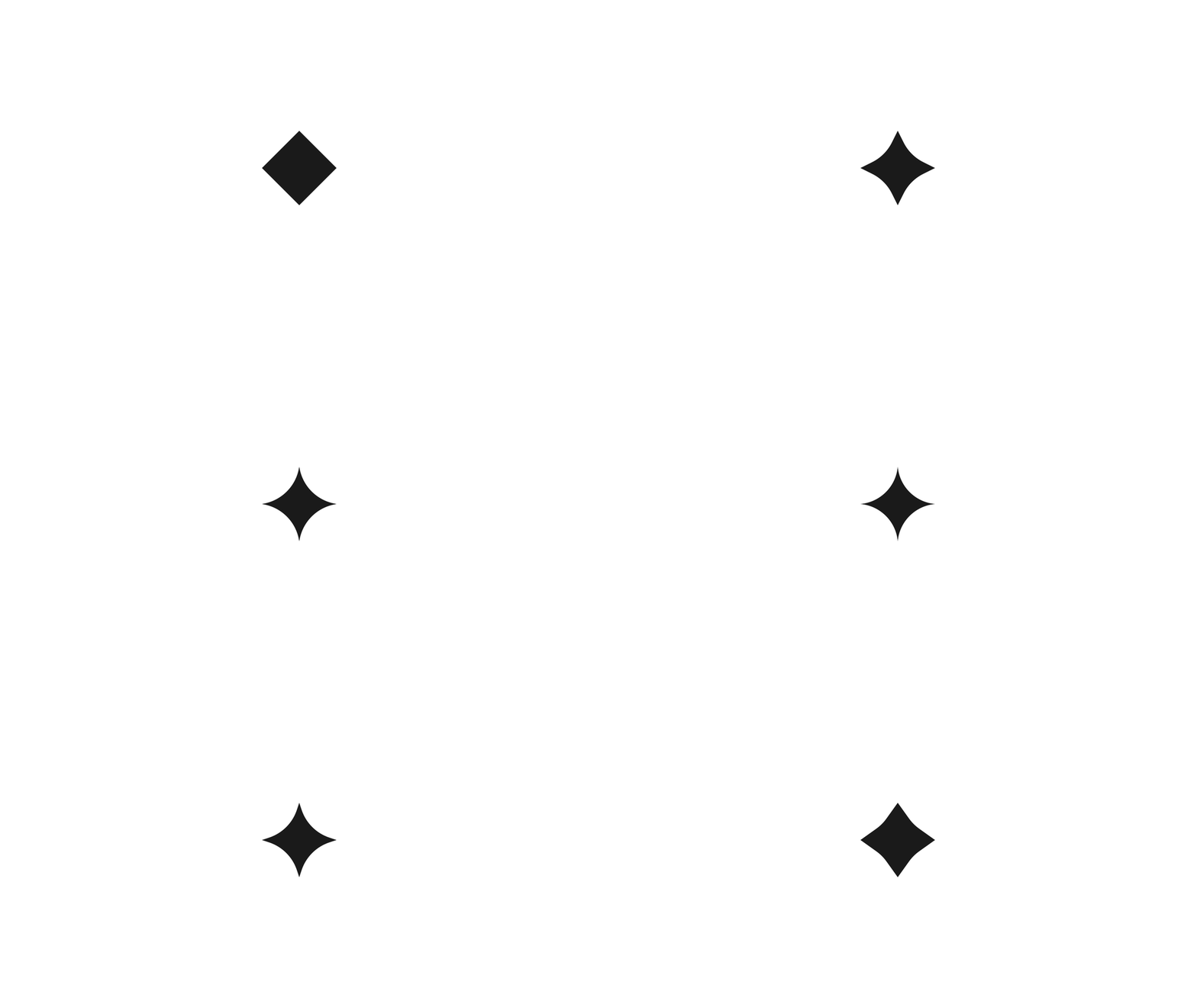
Hi I'm trying to do a seemingly simple morph but the outcome is not quite like desired. I'm morphing a square shape into a "diamond shape" made with same amount of anchor points and made with corner radius in illustrator for the rounding. The desired animation would look something like this: But as seen in the Codepen the morph between the paths looks different. Any ideas how to make a svg morph similar to the reference?
-
So I am using relative values yPercent:"+=80" to move my 3 bubbles based on which the user chooses to reveal or not. They work fine sometimes but after playing around with it a bit, they start to act in strange ways, am I missing something in my method? If this is not clear or something I made too complicated please let me know! thanks for the help ;)
-
I am trying to animate a cable with a plug using MorphSVG. Morphing both the cable and plug as one path gives distorted results, so I separated them. However, they do not animate together correctly. How can I sync these animations so that the plug stays on the end of the cable? I have two more of these types of animations that I need to build. Please see my codepen.
-
When I hover off (mouseleave) I want to speed up the reverse of the animation timeline. the .timeScale(2) isn't working for me.
-
I am try bring an SVG element to the front of the dom within the timeline. At the moment all the elements animate in the order of the html. Is there a way to bring elements to to the front? If you uncomment the the .fromTo tween in the middle of the timeline it will become clearer what my issue is. The white drawSVG path doesn't come to the front after setting the ZIndex. Thanks
-
So I have adjusted the origin of all the individual letters (changing shape index made no difference) and this was the best morphing result I could get. Is there anything I can adjust to make the kinks and bumps in the morph any smoother? I have reduced the amount of points in my paths as much as possible... but maybe there is possibility to adjust things in illustrator.
-
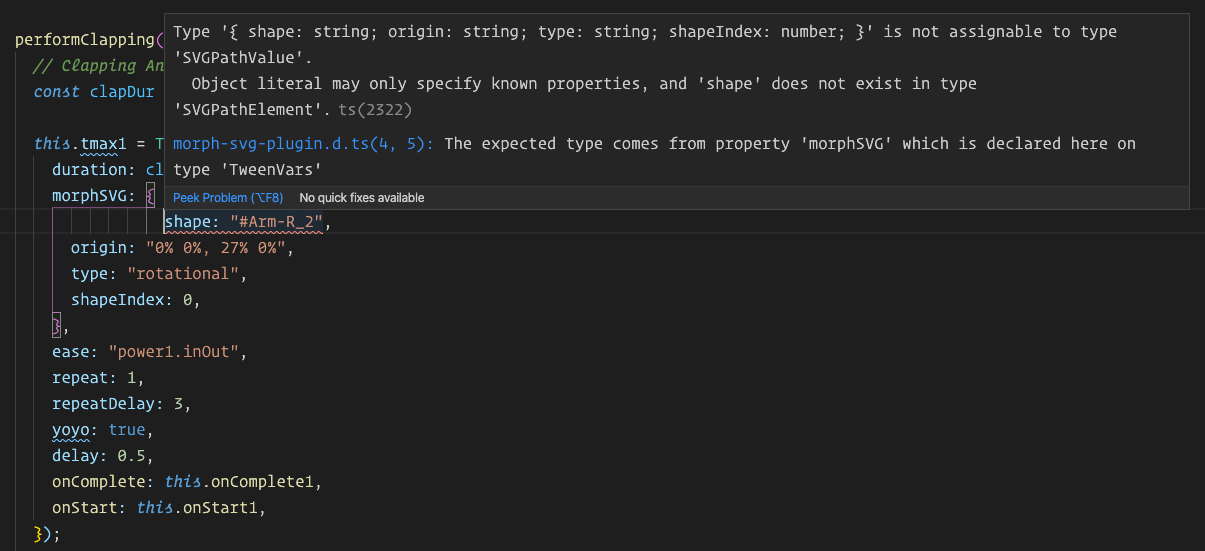
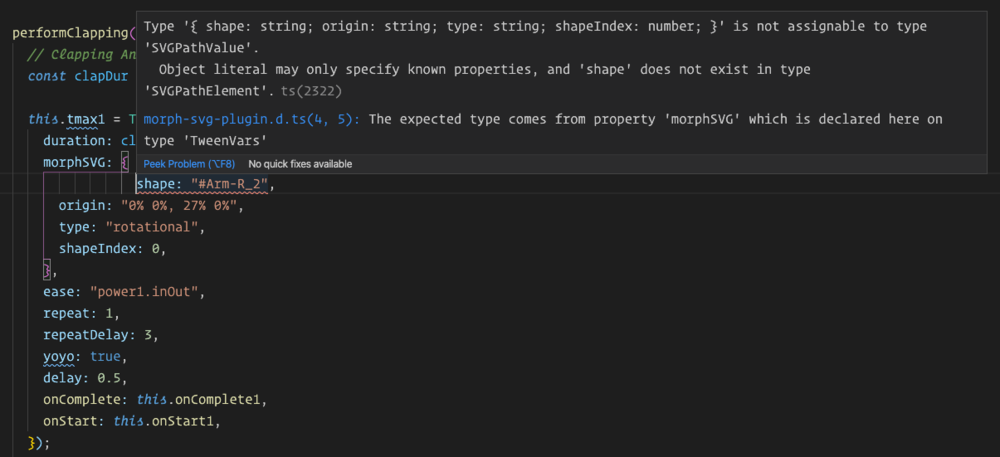
There may be some typings errors with the MorphSVG Plugin when used in Angular 9. When structuring a tween with morphSVG {} object parameters, a type error occurs on the shape parameter (see image). Note, this works fine in CodePen. this.tmax1 = TweenMax.to("#Arm-R_1", { duration: clapDur, morphSVG: { shape: "#Arm-R_2", // <-- shape parameter error origin: "0% 0%, 27% 0%", type: "rotational", shapeIndex: 0, }, ease: "power1.inOut", repeat: 1, repeatDelay: 3, yoyo: true, delay: 0.5, onComplete: this.onComplete1, onStart: this.onStart1, }); Here's the full type error: ERROR in src/app/components/qast-session/fan-stage/fan/fan-sets/yogi/yogi.component.ts:34:9 - error TS2322: Type '{ shape: string; origin: string; type: string; shapeIndex: number; }' is not assignable to type 'SVGPathValue'. Object literal may only specify known properties, and 'shape' does not exist in type 'SVGPathElement'. 34 shape: "#Arm-R_2", ~~~~~~~~~~~~~~~~~ node_modules/gsap/types/morph-svg-plugin.d.ts:4:5 4 morphSVG?: SVGPathValue; ~~~~~~~~ The expected type comes from property 'morphSVG' which is declared here on type 'TweenVars' I can get it work in Angular if I do NOT use a morphSvg parameter object, but I need to pass the additional parameters: this.tmax3 = TweenMax.to("#Arm-R_1", { duration: clapDur, morphSVG: "#Arm-R_2", xPercent: xPct, ease: Power1.easeIn, repeat: -1, yoyo: true, }); Thanks for your assistance in advance. Jeff Boothe
-
Hi guys, I've an issue with Safari rendering when I use MorphSvg Plugin to change SVG path of a mask. With other browser I've no problem, but with Safari Desktop (monitor over 1920x1080), and Safari Mobile, the SVG morphing animation is not fluid. I'm using the scrollPlugin, but also without that integration the result is the same. Any ideas? Thanks to everyone. safari-rendering-issue.mp4
-
Hello, I was wondering if is possible to change the direction in which 2 paths are being morphed. Currently, my path is being morphed from left to right, which doesn't look that great. Is it possible to modify it so that it starts morphing from the center and expand outwards? The link to my animation is https://codesandbox.io/s/confident-violet-lywmu?file=/src/Animate.js
-
I am trying to get a curved arrow to grow along a path, but having difficulty making it work correctly. Does anyone have any suggestions on how to make this work? MorphSVG doesn't work as desired, as I need to have it look like it the arrow head is leading the growth, rather than just transforming into another shape. Right now my codepen uses a mask to gradually show the line and I am moving the arrow head along a path using "pathDataToBezier". Which works okay, but it doesn't synchronize with the mask animation... despite my efforts to change timing and positioning of the mask, there must be a better way!
-
I’ve seen a few questions recently about getting better morphs so I thought I’d share a little tip that may help my fellow AI users. Whether you’ve created your own vectors or downloaded some stock artwork, the scissors tool is a quick way to get better morphs. You can also completely control the start point of your DrawSVG animations. I have an example using a couple heart shapes. This is just an icon from a collection I downloaded. The designer has the first point in the upper right curve of the heart. That’s probably not the best start point for any type of animations, so that needs to be fixed. Step 1 – Cut that path. Grab your scissors tool (it’s in the fly-out menu under the eraser). Line that up with the anchor point at the bottom point of the heart and cut. You’ll now have two anchors at that location. Step 2 – Select the points at the cut location and then join them together. It’s under the Object --> Path –-> Join (or Ctrl+J shortcut.) That is now the new start point of the path. You can now export the SVG. Here’s the difference with DrawSVG. You can see on heart one (as originally designed) the path starts drawing from an unnatural position. In heart two I’ve made that cut at the bottom and the animation feels better and animates the way a heart would naturally be drawn. Here’s the difference with MorphSVG Again, the first heart and star are left as the original designer created them. You can see the morph looks pretty good, but it has a bit of a twist to it. I used the scissors on both heart two and star two with a cut right at the center of the bottom. This morph looks much more natural. The bottom point of the heart splits into the bottom two points of the star and the twisting motion is now gone. There's your hot tip for Valentine's Day. Happy tweening and morphing everyone.
-
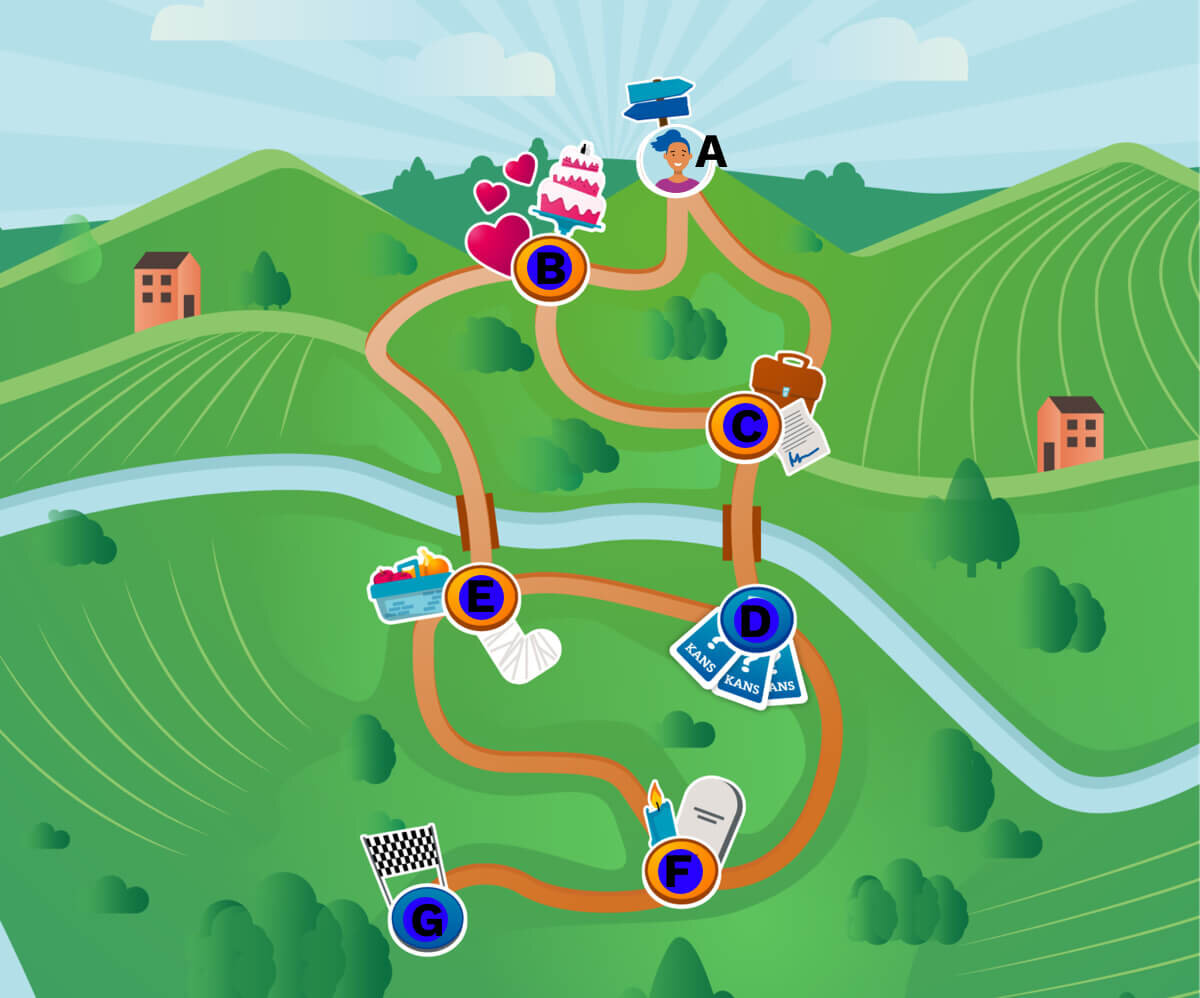
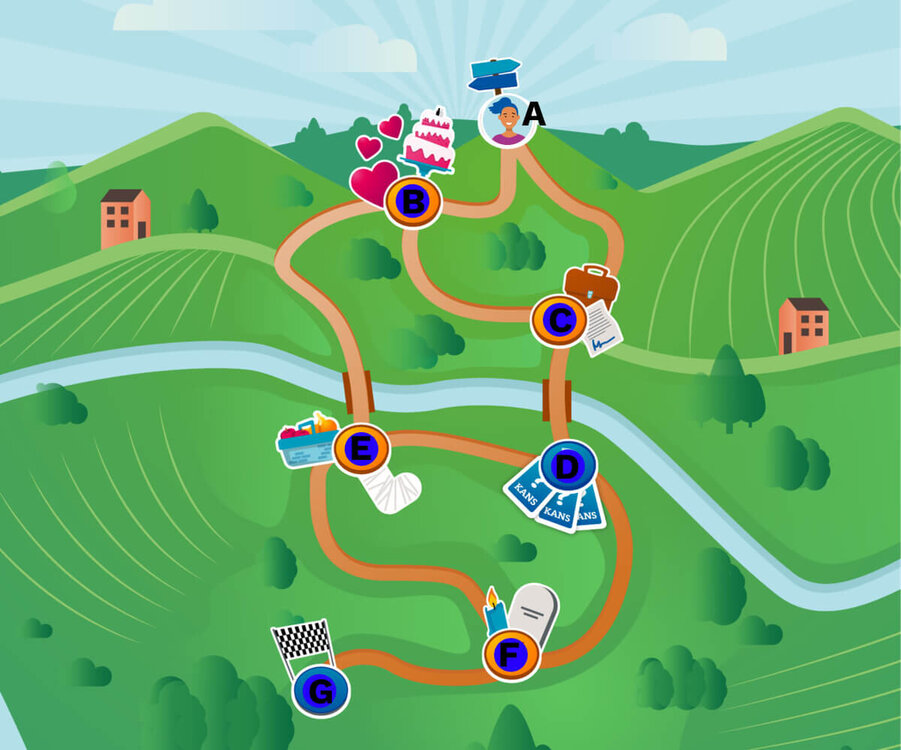
We haven't set up a codepen yet, but included is the visual design created for a web-based game to develop. We found a few examples of GSAP getting actually somewhat close to how it should work, but we find it hard to find a push in the right direction when it comes to intersections in the path below. The marker (avatar on A) should be able to move to points B and C when the player clicks one of those points. From point B, the player should be able to move to C or E From point C, the player should be able to move to B or D or E. Etcetera. Is this actually possible using GSAP with the MorphSVGPlugin and BezierPath?
-
 Hi there , Adam here and to say I'm amazed at the capabilities of this library would be an understatement of epic proportions , fair play everyone here this is savage ?. So , My animation I want to perform is almost complete but I'm having terrible trouble with the text on the morphed into shape(my company logo) . I can see it's being morphed and i'm guessing it's a zIndex and bring to Front problem but I can't quite figure out why it won't come to the front , I've tried all normal methods which normally work but to no avail . My only guess would be that it is actually coming to the front but because i'm animating all the different shapes to the background to create the effect this is invariably doing lets say , one background then text then all other backgrounds . This is what I think is happening although I would love some one to have a look for me please
 -
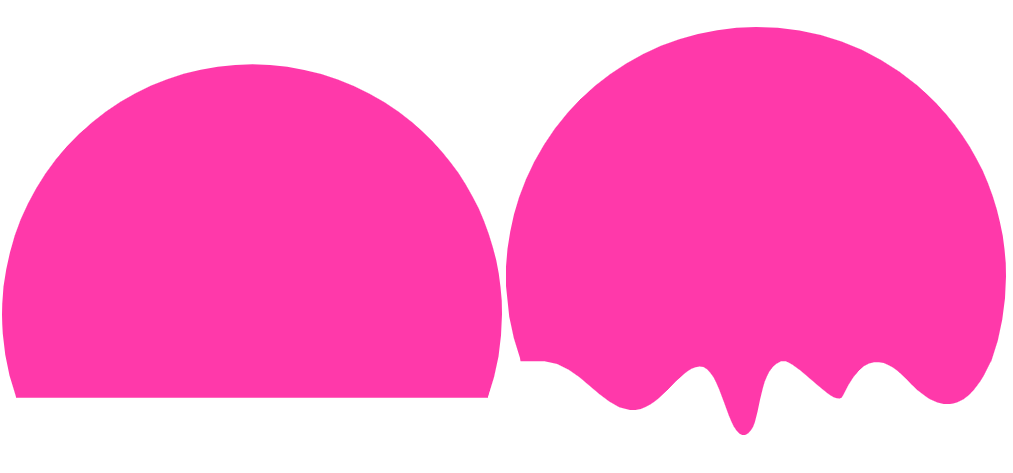
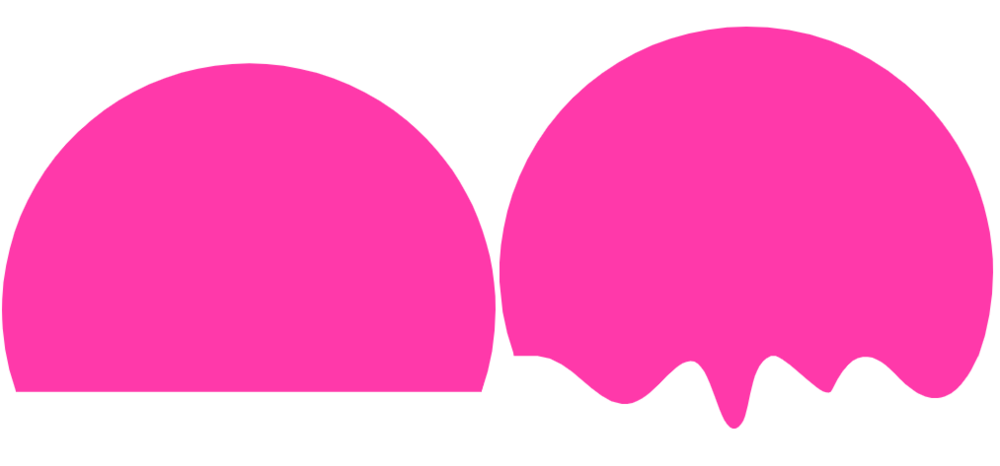
Hey guys, I just joined the club earlier today and briefly went through the documentation. I am trying to morph the shape on the left into the shape on the right. The effect I was hoping to achieve is to make the left shape(original state) look like it's starting to drip down like it's melting. I tried using leveraging the findShapeIndex() function but none of the indexes there replicated that effect. Does that mean that what I am trying to achieve is not possible or is there a different approach I can use? Any ideas would be greatly appreciated! Thanks
-
Hi, I created this animation and tried to import it to my website. https://codepen.io/Philastan/pen/VwLRMwx Surprisingly i only got the first part of my animation working and after some fiddling I got the same result in Codepen, while there are basically the same libraries loaded. https://codepen.io/Philastan/pen/eYNLZYX After reading in the documentary I ended up trying to use tl = gsap.timeline({ paused:true }); instead of the timelineLight - but still: Same issue. It seems like Gsap gets stuck at the Morphing Part. I am happy about any kind of help! Phil
-
 Hey guys. I am trying to make a morph shape with gsap plugin. The result I want to achieve is: THE GOAL IS: Find svg's with class "morph" and runs timeline animation only for the one's that is in the viewport. THE ISSUE I HAVE: I did some work in the codepen, but the issue is, that every time my window detects the svg class "morph" it start to animate all the shapes/timelines on the website - and not only the ones visible in the viewport. Any ideas how to adjust my codepen? Thank you in advance
 -
 When I try to use MotioonSVGPlugin without importing it I get this: Invalid property morphSVG set to .OrbitIndicatorProgradePath001 Missing plugin? gsap.registerPlugin() I get this readout when trying to import MorphSVGPlugin: index.js:3 Uncaught ReferenceError: MorphSVGPlugin is not defined at index.js:3 Here is how I am trying to import it as per the plugins page: //Import plugisn from GreenSock gsap.registerPlugin(MotionPathPlugin); gsap.registerPlugin(MorphSVGPlugin); I am honestly really new to coding if it was not obvious. So the codepen may not show you what you need to know. So here is what I have in my actual code to grab it with: Draggable.create($prograde,{ lockAxis: true, //allows locking to an axis type:"x", //locks to the x axis bounds: document.querySelector(".control-prograde"), //makes it so it wont drag outside of the box. dragResistance: .5, onDragEnd: function() { gsap.to(this.target, 0.25, {x: 0, y: 0});// when user lets go it sends the icon back to its start position. gsap.to(".OrbitIndicatorDefault001", 1, {morphSVG: ".OrbitIndicatorProgradePath001"}); // gsap.to(".svg_rocket", {duration: 5, motionPath: ""}); //starts the animation when the user lets go. // $DefaultOrbit.classList.add('hidden'); // $DefaultExplain.classList.add("hidden"); // $ProgradeElipse.classList.remove("hidden"); // $ProgradeExplain.classList.remove("hidden"); }, onDrag: function(){ console.log($prograde.style.transform) ; } } ); Lastly I am not sure how to get the thing to run on the codepen, I am lost and trying to figure this all out. Thanks for the help!
 -
Hi there! This might be more of an SVG composition question than an MorphSVGPlugin question, but hoping someone might be able to lend some tips on achieving the right effect for this: https://codepen.io/nolan330/pen/qBdZxJO In the pen, you might notice that the morph "primarily" expands the pentagon into the dodecagon, with the triangle and square sort of collapsing ("merhhhh...") into single points respectively. I'm wondering how I might be able to refine the morph, perhaps using shapeIndex or tweaking the SVG itself, so that the 3 independent shapes more "equally" contribute to the final dodecagon. (I apologize I don't have a more precise vocabulary for this!) The idea was that 3 + 4 + 5 = 12 (points), and 2 * 2 * 2 = 8 (stroke, who knew stroke grew exponentially!?), so the 3 original closed shapes might sort of compose smoothly into the final dodecagon. I think it could look pretty neat if configured correctly, but it seems like it will depend on a more clever path for the 3 independent shapes. So far, I've tried kind of a "cheat", where the shapes are just one continuous line, but I think it could still be improved: https://codepen.io/nolan330/pen/LYVNQmp I also tried changing the shapeIndex on the continuous line, but it doesn't seem to significantly impact the outcome: https://codepen.io/nolan330/pen/oNXxEyb In any case, any tips or feedback welcome! And I apologize if this is more of a SVG fundamentals question/unfit for the forum. -nolan
-
Hi guys, I'm trying to give a color for each path. my issues is the color of the first path is applied to all the rest! thanks very much. site to see the animation: www.mwmtest.com/bio JS: // Signs Anim // var tlBio = new TimelineMax({ repeat: -1, delay: 3, repeatDelay: 0.2, yoyo: true }), earth = document.getElementById('earth'); tlBio.to(earth, 2, { morphSVG: '#fire' }, '+=1').to(earth, 2, { morphSVG: '#water' }, '+=1').to(earth, 2, { morphSVG: '#space' }, '+=1').to(earth, 2, { morphSVG: '#wind' }, '+=1'); CSS: #earth { fill: pink !important; } #fire { fill: yellow !important; visibility: hidden; } #water { fill: blue !important; visibility: hidden; } #wind { fill: green !important; visibility: hidden; } #space { fill: red !important; visibility: hidden; }
-
Hello Would you please think with me on how to make such animation https://revolution.themepunch.com/bubble-morph-effect-add-on-for-wordpress/ What I found special is that lines connect to each other when they become close and also get separated when moving away. Also about the moving shape, should we create an array of points where the shape morph to or there may be another better way for doing this
-
 Note: This page was created for GSAP version 2. We have since released GSAP 3 with many improvements. While it is backward compatible with most GSAP 2 features, some parts may need to be updated to work properly. Please see the GSAP 3 release notes for details. MorphSVG's default settings typically deliver beautiful results but sometimes you may need to tweak things to get a certain effect or avoid weird transitional states or kinks. This video explains advanced features of MorphSVGPlugin that give you plenty of flexibility. Watch the video For more information and plenty of interactive demos, check out the MorphSVG docs. Happy tweening!