Search the Community
Showing results for tags 'draggable'.


-
I'm using this slider from an other gsap question, however I would like to add buttons to go to next and prev slide. However I'm not totally aware in how can add this functionality. I've been looking on "startDrag()" method but didn't get it. Can someone help me with that?
-
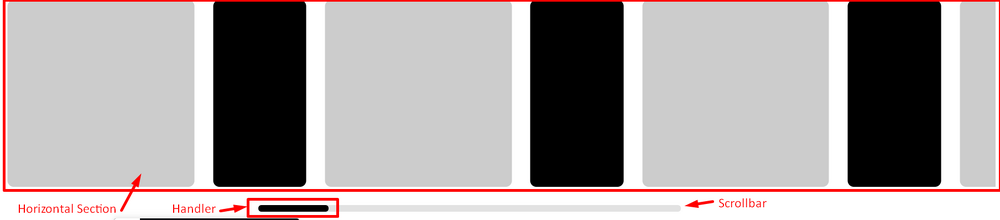
Hello everyone! As I was advised in the last post, I used the Draggable plugin to create a scrollbar to see the progress of my Fake-Horizontal section. I'm expecting that .scrollbar__handler move whenever any scroll happens to move the handler to the corresponding ratio according to the scroll position of the .reviews__inner ( Fake-Horizontal section ) The problem is that the handler doesn't move at all. Scroll was made an example of this post. I attach a demo and a photo with a description of the elements:
-
Hello , i have this code made with react and Draggable , dont know why the left and right handler dont correctly set the width of the container , did i make a mistake , thanks in advance : https://codesandbox.io/s/confident-hermann-i8753p?file=/src/App.js
-
Hi boys, I'm using Gsap for almost a year and I love it. i finished a new website, with my first draggable slider. The problem with the slider (is a fullscreen one), is that I can't scroll down in mobile. You can try to scroll simulating a phone with the "Togle device toolbar" from Chrome dev tools. Of course is possible with the mouse, but not dragging. Any idea? Thanks a lot!! https://dominiotemporal.com.ar/perifa/ My slider config (taken from an answer in this forum) var slideDelay = 6; var slideDuration = .3; var slides = document.querySelectorAll(".slide"); var prevButton = document.querySelector("#home-slider-next"); var nextButton = document.querySelector("#home-slider-prev"); let slideButtonContainer = document.querySelector(".home-slider-nav"); var numSlides = slides.length; for (var i = 0; i < numSlides; i++) { gsap.set(slides[i], { xPercent: i * 100 }); } var timer = gsap.delayedCall(slideDelay, autoPlay); var animation = gsap.to(slides, { duration: 1, xPercent: "+=" + (numSlides * 100), ease: "none", paused: true, repeat: -1, modifiers: { xPercent: gsap.utils.wrap(-100, (numSlides - 1) * 100) } }); var proxy = document.createElement("div"); gsap.set(proxy, { x: 0 }); var slideAnimation = gsap.to({}, {duration: 0.1}); var slideWidth = 0; var wrapWidth = 0; resize(); var draggable = new Draggable(proxy, { trigger: ".slides-container", throwProps: true, onPress: updateDraggable, onDrag: updateProgress, onThrowUpdate: updateProgress, snap: { x: gsap.utils.snap(slideWidth) } }); window.addEventListener("resize", resize); prevButton.addEventListener("click", function() { animateSlides(1); }); nextButton.addEventListener("click", function() { animateSlides(-1); }); function updateDraggable() { timer.restart(true); slideAnimation.kill(); this.update(); } function animateSlides(direction) { timer.restart(true); slideAnimation.kill(); var x = snapX(gsap.getProperty(proxy, "x") + direction * slideWidth); slideAnimation = gsap.to(proxy, { duration: slideDuration, x: x, onUpdate: updateProgress }); } function autoPlay() { if (draggable.isPressed || draggable.isDragging || draggable.isThrowing) { timer.restart(true); } else { animateSlides(-1); } } function updateProgress() { animation.progress(gsap.utils.wrap(0, 1, gsap.getProperty(proxy, "x") / wrapWidth)); } function resize() { var norm = (gsap.getProperty(proxy, "x") / wrapWidth) || 0; slideWidth = slides[0].offsetWidth; wrapWidth = slideWidth * numSlides; gsap.set(proxy, { x: norm * wrapWidth }); animateSlides(0); slideAnimation.progress(1); } function snapX(x) { return Math.round(x / slideWidth) * slideWidth; }
-
 Hi all, I'm trying to disable or kill a draggable element within an SVG. After calling disable() on the draggable, the onClick function still fires. Other effects of disabling are as expected: the element can no longer be dragged, the "grab" cursor style is removed, the onDragEnd function no longer fires. Have also tried kill(), with the same results. Here's a minimal example, tested in Chrome and Firefox. <svg version='1.1' xmlns="http://www.w3.org/2000/svg" x='0px' y='0px' viewBox='0 0 200 200'> <rect x="0" y="0" width="50" height="50" class="draggable1"></rect> </svg> <script type="module"> import { gsap } from 'gsap' import { Draggable } from "gsap/Draggable"; gsap.registerPlugin(Draggable); Draggable.create(".draggable1", { type:"x,y", bounds: "svg", onClick: function() { console.log("clicked"); }, onDragEnd: function() { console.log("drag ended"); } }); Draggable.get(".draggable1").disable(); // onClick function still fires </script> Let me know if you need further info. Cheers Steve
 -
 Hi there, does anyone know how I can bind that slider I createt using dragdealer to a lottie animation? I know that you can bind a timeline to an input like this, but i dont know how to translate to the right frame of a lottie animation. I would really appreciate any help, thanks.
 -
Hello, I'm trying to animate an image with the help of Draggable. I have adapted this example https://codepen.io/GreenSock/pen/mdVEpKK with my dragger, I don't understand why it's not working. Anyone can help me to understand? Thank you!
-
 Hallo! So this is a minimal version of the thing I'm actually working on, but essentially it's a map of a campus. Dragging works great, and zooming works fine; but what I'm trying to achieve is, whenever you click on a 'building' (read: brightly-coloured block), it moves to the left side of the viewport, vertically centred. I'm using data-attributes on my buildings for this, and I thought I had it, but: a) it doesn't account for different viewport sizes (so it's not vertically centred); and 2) once you zoom in, that positioning all goes out the window, and clicking on a building doesn't put it anywhere near the intended place. I just realised I might be able to get away with resetting the zoom level to 1 whenever someone clicks on a building (maybe?), so at least the x co-ords would (probably?) still work; but the vertical centring is a bust no matter what. Maths is not my strong suit, so any ideas on how to tackle this would be gratefully received ?
 -
Hello everyone! I'm trying to connect a circle shaped blue svg (but shown as a semicircle for design needs) with 4 control dots to a carousel made with the Swiper.js library, so that this semicircle (in HTML it is under the ROUNDED SLIDER comment), can act as a "controller" draggable to the carousel. What I need to do is: - The circle is only half visible and each point must be connected to a slide of the carousel, so that by dragging it, the swiper "responds" showing the slide connected to the dot of the blue semicircle positioned at the top of the semicircle. - The slides could be more than 4 (I have been having nightmares for weeks ...). - Each point will therefore correspond to a slide. - When I'm on the first slide I shouldn't be able to rotate the semicircle clockwise and when I'm on the last slide I shouldn't be able to rotate clockwise. - It shouldn't be possible to rotate the semicircle more than 90 degrees at a time. - If I rotate the semicircle by less than 90 degrees the movement should complete itself (the blue dot is “magnetically” moved down) to get to the next slide (insomnia and migraine associated with this point, with obvious anxiety attacks ...) What I have thought and done so far is: 1. I’ve created the carousel and make its Init (the css is really basic and only manage position of elements in the page). 1.1 when the slide changes I’ve managed to "take" the year and the title using the data attribute, but I’m not able to create the logic to assign to each semicircle dot the correct title/year. // ANCHOR Slider INIT let swiperHistory = new Swiper(".j_init_history_slider", { slidesPerView: 1, spaceBetween: 60, centeredSlides: true, loop: true, grabCursor: true, //OR mousewheel mousewheel: false, autoplay: false, autoplayspeed: 6000, autoplay: { delay: 5000, disableOnInteraction: true }, navigation: { nextEl: ".swiper-button-next", prevEl: ".swiper-button-prev" }, on: { //slideChange OR realIndexChange slideChange: function () { // ANCHOR get current slide index and text for yeas and title let index = this.realIndex + 1; // slide 1 => slides[1] // ANCHOR get the slide years let years = this.slides[index].children[0].dataset.years; // ANCHOR get the slide title let title = this.slides[index].children[1].dataset.title; // ANCHOR give to each svg circle points the correct year an title // Maybe I must create an array and then loop titles and years...or assign it manually to each points or what?? northYear.textContent = years; northTitle.textContent = title; } } }); 2. I’ve identified the 4 points (calling them temporarily, for easier recognition, with the capital points north, south, east and west, they must contain the data "title" and "year" of the swiper's slides). //ANCHOR Text (years) over the circle points let northYear = document.getElementById("north_year"); let eastYear = document.getElementById("east_year"); let southYear = document.getElementById("south_year"); let westYear = document.getElementById("west_year"); //ANCHOR Text (title) over the circle points let northTitle = document.getElementById("north_title"); let eastTitle = document.getElementById("east_title"); let southTitle = document.getElementById("south_title"); let westTitle = document.getElementById("west_title"); 3. using the gsap draggable I’ve created some control variables for the rotation for the 90 degrees of the semicircle svg dots //ANCHOR Variables for circle animation let relativeDegree = 0; let checkDegree = 0; let check90 = 0; let globalrotation = 0; 4. I’ve created two temporary control buttons for the rotation of the 4 cardinal dots of the semicircle and the dots rotate correctly (but there is something strange with the titles that seem to change or rotate in an uncoordinated way ... I cannot understand which is the problem), but these buttons are not necessary for the final project, they will be removed. 5. the semicircle works on drag (even if the first click on the dot seems to be blocked), but when you drag the semicircle, the dots are slipped out from time to time (and it seems to me more each time) from their own "central meridian" and I don't understand what I'm doing wrong 8. onRelease I wanted to make sure that if I rotate the semicircle by less than 90 degrees the movement should complete itself to get to the next slide, but it doesn't work, it behaves really weird, there is definitely something I'm doing wrong with its logic (in fact the code is currently commented). 9. TODO ... connect the swiper to the drag ... for this point I was completely confused and I can't go on (in the code there are some attempts that don't work, also because I have been using gsap for a short time and I don't I feel very experienced), because I miss the fundamental part where I connect the slides to the semicircle, where I take the titles from the swiper and assign them to the right dot, and I can't "adjust" the drag of the semicircle correctly. I have been stuck for weeks, for me it is a really complex job, I was very doubtful about asking for help, but at this point, apologizing if this post is incorrect, wrong or not relevant with the forum (in case I remove it immediately!), I really need help. I immediately thank anyone who can and wants to intervene in any way. Thank you...!
-
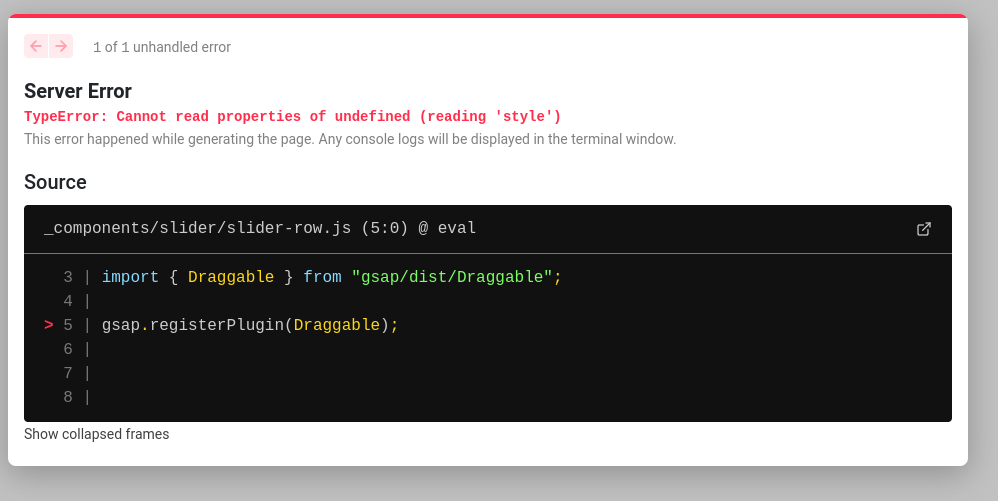
 hi All I did was add the following two lines of code and I got this error. import {gsap} from "gsap/dist/gsap"; import { Draggable } from "gsap/dist/Draggable"; gsap.registerPlugin(Draggable);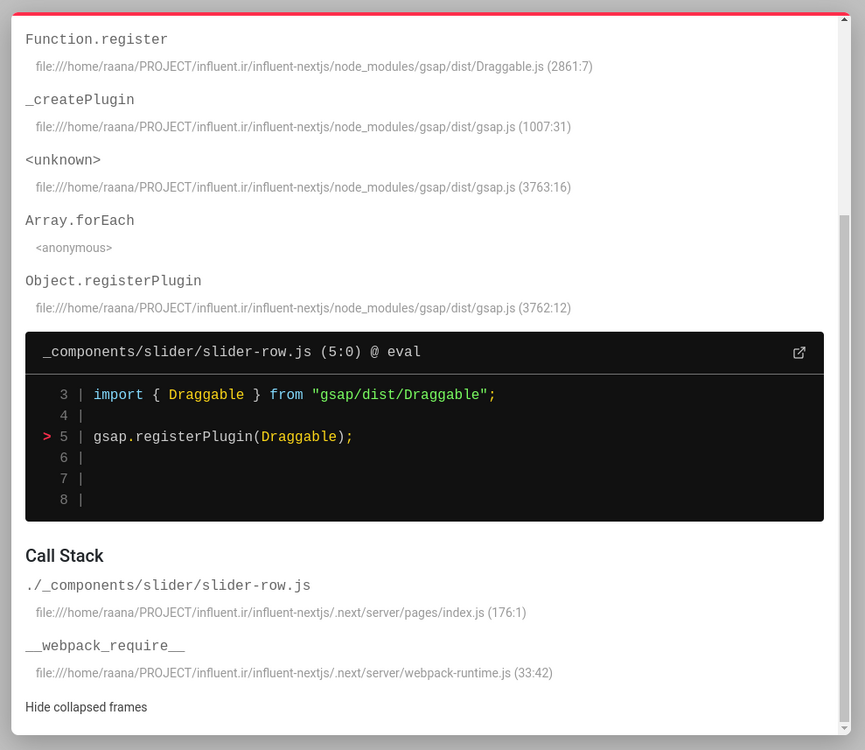
-
Thanks for the amazing library. I've been using it a long time and recently bought the plugins to show how much I appreciate it. I ran into an issue today that I'm a little confused about. I'm new to Draggable and I'm trying to create an off canvas menu that when opened with a button, takes up 80% of the screen width. The user can drag to close the menu on either the menu itself or the 20% gap to the right. I have this part working. The problem is when I try to make it so the user can click the 20% gap to be able to close the menu without dragging it. On the desktop this works fine how I have it set up, but on mobile I have to tap the area twice to get the draggable onClick to fire. Here is a code sandbox showing this. Try on desktop clicking the blue section when the menu is open. It should close with one click. But on mobile, you have to tap first then tap again. https://codesandbox.io/s/vue-gsap-zvrzyo?file=/src/App.vue Any insight as to what I could do better and why this isn't working would be much appreciated!
-
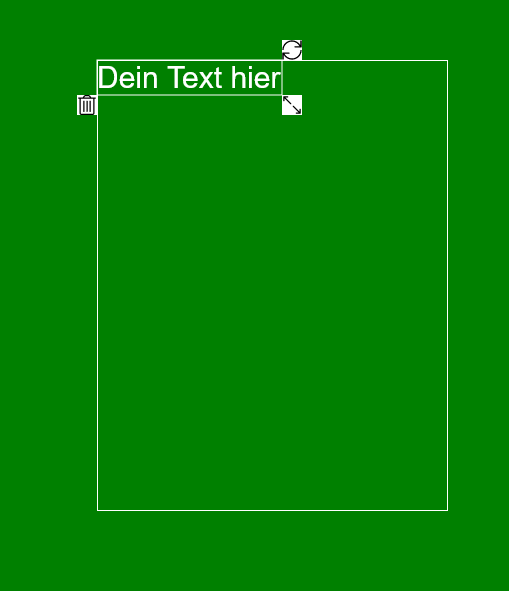
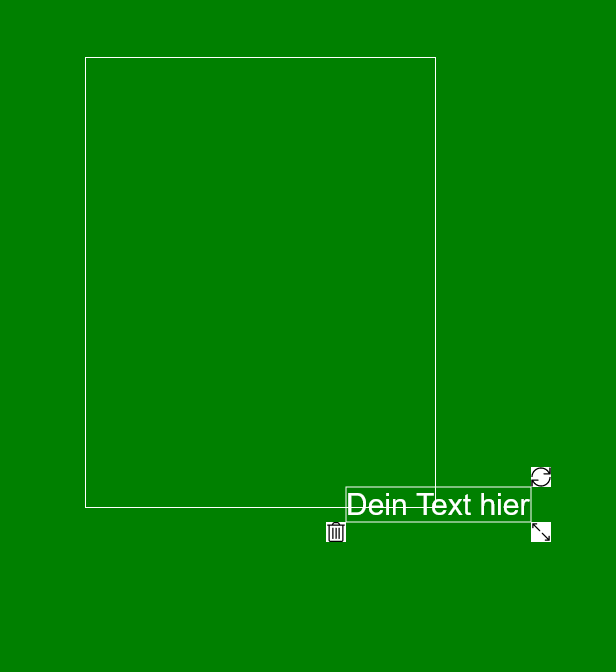
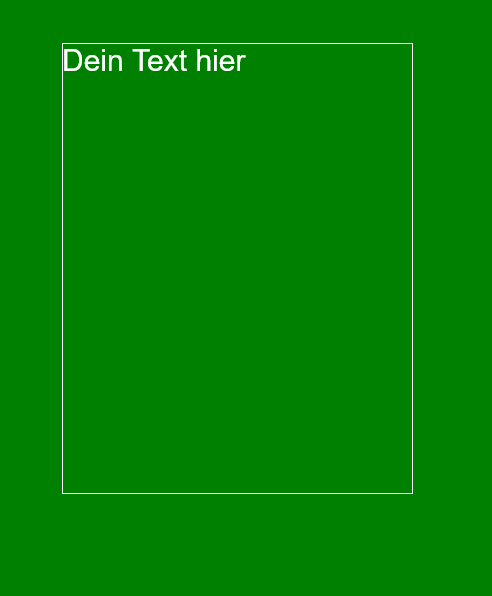
Hey I have currently a Problem with the bounds. I have a element with dynamic elements around. So if I move my element the other elements are shown. If I stop moving the elemens will be removed. The problem is that the right and the bottom borders not correctly working. The 3 elements arround are the dynamic elements. If I stop moving the elements are removed But the bottom and the right corner did not work. My draggable object looks like this Draggable.create(`#${id}`, { type: 'x,y', bounds: { target: '#boundArea', top: 0, left: 0, }, ...otherFunctionsAreHere(liveSnap, onPress, onDrag and onDragEnd) }); bottom: 0 or right: 0 are no available options If I set a height and a width of the white rect to my bounds. The bounds looks like this The text can be changed.
-
Hi guys! I'm new here and I'm struggling to edit this slider by synchronizing slider index with titles index. It was pretty easy to make it work on nav click, but as you can see it can't count which is the destination index, and it only counts one for titles. Have you some suggestions? Also I would like to add an active class to che center slide in order to make the others with some opacity.. Thank you!!
-
 Intro: Theres probably not a simple anwser to this but I wanted to see if someone more gsap experienced than me knew of some cool trick that could help me before I go on to do some overly complicated way of solving my issue. Whatver the case, thanks to anyone who is willing to give my issue a shot one way or another. Context: So, I want to create a component builder that lets users drag and drop blocks in place. As part of this I am using GSAP Draggable to drag and drop an element. The riddle im stuck on at the moment is I want the element to snap into place when its dragged over an area that can receive it. The simple solution is to just use the hitTest() function to detect if eligeble element is hit and then get either the points off that element to use in the livesnap, or get the transforms to match that element or something like that. Problem is that in a more complex example, for my use case, I dont actually want to manually create a uniqe function for every possible snappable area since there might be a lot. The ultimate solution would be if I could somehow dynamically fetch whatever snappable element we have hit. But as far as I can tell, from the docs, the hitTest() doesnt actually return the hit element, it just returns a boolean which kinda forces me to do something uniqley for each individual element that can get hit. Question: Is there a straight forward way to dynamically get whatever element I hit with the hitTest()? Codepen: Ive provided a codepen that acts like a massive simplification of what I am trying to do just to narrow it down to exactly what I am asking and making easy to experiement with solutions. Hope that makes it simpler to understand.
 -
 Hey guys, it's Beholder4096, back again with another obscure bug. This time, the mind-boggling infestation here has taken me to discover two possible ways this bug can be demonstrated, so please bear with me.. I have an object (green in the CP example) which I need to make draggable, after user clicks another object, that is overlapping it (yellow in the example). When the overlapping yellow box on top is clicked, the draggable instance of green is created and green becomes draggable. So far so good. However, if I rerun the example and click the yellow and hold mouse button without movement and then release, the onClick of the draggable object doesn't fire! (all other events do fire, even onDragEnd() even though we were not dragging). I know it looks like it's for obvious reason.. But this behavior makes UI extremely inconsistent in my use case where I am very depending on this to work! Here the user can either (1) click the yellow overlapping object and release immediately (and the green object runs the onClick as it should) or the user can (2) click the yellow, hold the mouse for dragging and drag the green object to the destination. I have noticed that the exact same bug happens when clicking ONLY green object and releasing it without movement, but only when the Draggable.create() code is in the inline javascript onmousedown event. Please refer to the CP example where I have implemented both ways the bug can show. I must stress all of the other draggable events run ok, even the onPress event, which is also quite illogical since when I click the yellow box I never pressed on the green. And in the case of inline-js, I literally click the green and onPress registers but onClick doesn't work. While onDragEnd fires as well even though I totally didn't drag, just clicked. Aah, these crazy bugs, how come no one ever notices them? Please, PLEASE fix this as I would have to do a super-crazy workaround if the 2-box overapping scenario didn't work as it should. tl/dr: Click yellow box or green box. Do not drag. What happens: pretty much nothing, just draggable element gets to the front. What is expected: the onClick event of the draggable green box should fire and show alert.
 -
Hello, I have create an image sequence that users interact with using Draggable. The sequence is supposed to 'snap' to certain frames and I've written a function to do that. The problem I've encountered is that the cursor position is no longer accurate after the 'snap' occurs. If a user clicks and drags the image sequence and releases the click, the image sequence moves through the appropriate images to the destination slide. When the user then clicks and drags again, the image sequence 'jumps' to a slide number of slides away - which isn't smooth. I'm wondering if I've missed some way of resetting a cursor position variable, or if i even need to do this in this manner. Any suggestions or pointers are welcome, thanks.
-

onDragEnd() is setting defined x position but without transition.
Ayaf Noneym posted a topic in GSAP
I am trying to make something like thisI want to set specific position of x if value of drag on x axis is greater than defined number everything is working just fine but without transition or I can say without bounceEffect . Additionally I also want to reset position of draggable element on focusLost -
Hello humans, I am building a range input Vue component, like so many before me. Nothing fancy, but it should behave perfectly. It has to: be draggable ✅️, react on up-right/down-left (not in demo) ✅️, gracefully snap to mouse position when mousedown on the slider 'path' ❌️ and continue dragging ✅️, and also gracefully snap to mouse position on click on the slider 'path' (or rather to the nearest snap point) ❌️. But it: Jumps all over the path when mousedown--move a bit--mouse stop (and similar combinations of movement). Overshoots, or stops moving on mouseup without reaching the mouse. About the code: I omitted a lot of updating the styles on drag and such, but I did leave a couple of examples how I would go about it, i.e. using gsap.getProperty(slider.target, ...) so you can tell me if it should be done differently. I am accessing the slider target via slider.target because this is logging as udefined in my Vue SFC with <script setup> sugar. Any ideas about that? Another question is regarding updating Draggable. I sprinkled a couple of onComplete: slider.update to try and keep everything in sync, but I didn't achieve much. Or did I? How to unglitch it? Help me understand. Stevan
-

draggable Draggable does not trigger OnDrag and Snap in React.
Thomas Devolder posted a topic in GSAP
So I am trying to rotate a circle and snap it to 90 degrees but I can rotate it but It doesn't trigger the onDrag en snap function. I don't know why, I also don't get any errors. let rotationSnap = 90; Draggable.create(vinyl, { type:"rotation", OnDrag: () => console.log('works'), snap: function(endValue) { console.log(endValue); console.log(Math.round(endValue / rotationSnap) * rotationSnap) //this function gets called when the mouse/finger is released and it plots where rotation should normally end and we can alter that value and return a new one instead. This gives us an easy way to apply custom snapping behavior with any logic we want. In this case, just make sure the end value snaps to 90-degree increments but only when the "snap" checkbox is selected. return Math.round(endValue / rotationSnap) * rotationSnap; } }) } -
Hi there! I am trying to create a slider that shows a number, depending on its position (like an input range with a number directly on the thumb) using the Draggable plugin. I have defined a bounds object to keep the slider within these bounds. However, since the thumb's size increases during dragging, the thumb does not stay within the bounds all the time. Draggable allows the thumb to move into a position that would have kept it in its original bounds (not its updated bounds). The issue becomes apparent if you try to drag the slider from 1 to 100 in one go. Notice also, when you arrive at 100 and then let go, the slider snaps into the correct position. How can I change my setup to make sure that the slider stays within the bounds at all times? Thanks!
-
hi guys, i need your help, it's been a couple days that i'm trying to solve this. i have a box wich contains SVGs that are draggable, that box needs its box-sizing to be "content-box", and the draggable SVGs bounds needs to be inside the box (not touching the borders) that's why i created a bounds-box which take 100% width and height of the parent box, and set the draggable bounds to that bounds-box, it works fine , the only problem is when i zoom in or out, the bounds change after dragging the svg around and u can see that the bounds got -1px on every side. thank you.
-
Hi! I've got a row with elements which can be dragged inside dropzones. All is working well but I can't get the dragged objects to fit exactly within the dropzone. Can someone point me in the right direction? Thanks in advance, Pieter
-
Hi, let me start by saying i love gsap and the hard work you guys put in it, since thats out of the way as you can see in my code pen i have two problems i need to solve. 1. When i drag and click on a card before inertia velocity go to zero the cards container animation position rest to x zero break. 2. When a crad onclick happens i want the animation drag to stop and when clicked again or a close button to reverse animation and rest where the card was. I feel am close but i need help ?
-
I hope he supports both type: 'x, y' and type: 'rotation' But if I set it this way, it's always the last I went through Greenlock draggable's documentation and couldn't find it My English is not good, but I still like to read our documents, I hope you can help me with that. thank you ?
-
 Hi everyone, I'm trying to create an image sequence that can be played backwards or forwards by scrolling the page up and down. But I also need the sequence to be controllable using a video style progress bar. Using some of the code that I've copied from these forums I've managed to get the image sequence working and I've also managed to create a play bar control with a playhead that can be dragged left and right. But I can't get the playhead to control the current image that is displayed in the image sequence. In the code for the image sequence I specify the number of frames, so I'm assuming I need to divide the length of the progress bar into an equivalent number of 'units' and then advance or rewind the image sequence every time the play head is dragged by one 'unit'.