Search the Community
Showing results for tags 'canvas'.


-
Hi, guys. I want to know how to run this Scrolltriger sprite animation on multiple section with different sprite sheet. So I made two js files with different file location It is not working. Please someone help me how to do it Thanks. spritescroll.js spritescroll2.js
-
Hi everyone, I'm trying to follow a guide from this code pen i saw on this forum Canvas Basic Starter (codepen.io) which is about using gsap to animate canvas elements. This works with rect but when using arc to construct circles it's neither clearing the previous frames and changing color or looping like the guide. I'm not sure what's going on. please any suggestions?
-
I have an animation that draws a progressively increasing circle on the canvas until it occupies the entire canvas: const maxRadius = Math.ceil( Math.sqrt(canvas.width ** 2 + canvas.height ** 2) / 2 ); const centerX = canvas.width / 2; const centerY = canvas.height / 2; let radius = 5; function animate() { if (radius >= maxRadius) { canvas.remove(); return; } context.beginPath(); context.arc(centerX, centerY, radius, 0, Math.PI * 2); context.closePath(); context.fill(); radius += 5; requestAnimationFrame(animate); } animate(); And I tried to rewrite it using GSAP but it doesn't work: const maxRadius = Math.ceil( Math.sqrt(canvas.width ** 2 + canvas.height ** 2) / 2 ); const centerX = canvas.width / 2; const centerY = canvas.height / 2; let radius = 5; gsap.to({ radius: maxRadius }, { duration: 1, radius: maxRadius, onUpdate: () => { context.beginPath(); context.arc(centerX, centerY, radius, 0, Math.PI * 2); context.closePath(); context.fill(); }, onComplete: () => { canvas.remove(); }, ease: "power1.inOut" }); Please help me
-
So I want to resize my WebGL canvas to be bigger than window.innerHeight but more like document.body.scrollHeight. I also don't want to lose the ration, so I would resize the width by the way (with ratio). I already achieve some sort of resizing, but either the ratio wasn't good or the effect was not on the cursor anymore, like it was some hundreds pixels away from the cursor place.
-
This is probably really obvious, but i can't make it work. Basically I adapted the code from the given codepen to my react project but I can't get it to work in the way I want. What I'm trying to do is make use of image sequence animation triggered by scrolling while also snapping to full screen sections. I've managed making these work individually but when I tried combining them is when I ran into trouble. The conclusion I came to is: the way I have it setup now, for the scroll snapping to work is body overflow:hidden and everything is taking place in a container div configured for snapping which is scrolling. Now the canvas animation is not triggering because it is expecting for the window to scroll which is not actually happening it is the div that is. I think the solution should be me directing and giving the right scroller to ScrollTrigger but I can't get it to work. I'm going to share the code below and I thank anyone in advance for any help provided. index.css Home.js Solutions I tried are a combination of the code below: I should mention that using this code above made the animation play trough once upon refreshing the site but it would not respond to the scroller. I'm sorry if the post is breaking any forum rules and if I didn't explain the problem quite as well as I could've.
-
Hello, I have create an image sequence that users interact with using Draggable. The sequence is supposed to 'snap' to certain frames and I've written a function to do that. The problem I've encountered is that the cursor position is no longer accurate after the 'snap' occurs. If a user clicks and drags the image sequence and releases the click, the image sequence moves through the appropriate images to the destination slide. When the user then clicks and drags again, the image sequence 'jumps' to a slide number of slides away - which isn't smooth. I'm wondering if I've missed some way of resetting a cursor position variable, or if i even need to do this in this manner. Any suggestions or pointers are welcome, thanks.
-
Hello! Relatively new to GSAP but have loved the forums for awhile now, hugely helpful for almost anything I encounter! However, I've stumbled into a canvas animation I can't quiet figure out. I have a canvas wave animation whose height is controlled by an "amplitude" value on line 7. I am unsure of where the .to tween must be placed to have access to the draw function and the amplitude. Would love any pointers you may have to offer! Please let me know if there is any additional information I can provide. Thanks, Nye
-
 Hi, There are some issue in canvas when implements 3d horizontal flip. Is there a way to make a horizontal flip animation in canvas - fabricjs? Thanks in advance.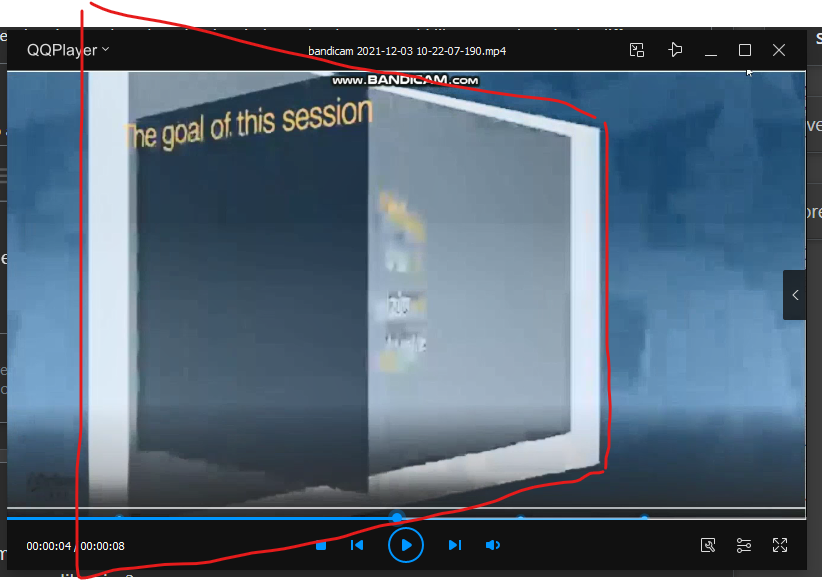
-
Hey guys So i am making a project with gsap3 kind of like the apple airpod website I have like 500 + images and on scroll these images are being rendered in the canvas. I want to animate some text which will depend on the frame count the sequence is - frame ==0 animate in some text frame>0 animate out the previous text frame>10 again animate in some text frame>200 animate out the previous text so it goes... can some one tell me how can i do this in a efficient way. Thanks
-
I was wondering how does this kind of white wave from this site possibly made by GSAP? Is there any additional plugin necessary? I took so many times investigating this site. Hope I find the answer here. Thanks https://krotravelengineering.jp/
-
Hello again guys ✌️ I´m right into the ‘basic‘ ScrollTrigger thing for quite a while now. Since I´ve upgraded myself with ShockinglyGreen, so things getting even greater with the MorphSVGPlugin, which progress of transformation can be controlled with ScrollTrigger. The Results are impressive. After playing around with this while interacting with svg elements directly in the DOM, I slightly get disturbed by the fps drops this can cause with other animations or if you get your page in bigger screen dimensions or resolutions (4K / Retina). I stumbled upon a great library called paper.js which can bring path information into canvas, which (in theory) should appear as the more performant approach, especially if you scale things up. Also the feature to group and edit things in paperscipt could be a good partner by creating for example a sweet set of dynamic fullscreen transitions without touching the DOM. The example below shows that it´s contents created with paper.js / paperscript can be changed by gsap and ScrollTrigger in a simple manner: demo It would be great to have a smart way to archive the MorphSVGPlugin behaviour inside this canvas stage which is controlled by ScrollTriggers progress. Maybe there is another general solution or it isn´t even really faster from an performance perspective than I expected. I´ll fork a simple demo to see morphSVG in action Seen on: Would love to read some thoughts from you about that Best Wishes, Richard
-
Dear forum participants. I need your professionalism in coding. I can’t understand what is used to achieve effects such as in these examples: 1. When you click on any project from the bottom up, the rounded form of the divlock block https://jesperlandberg.dev/ 2. a very similar effect we can see when you click on the menu at https://www.chiaraluzzana.com/about 3. when you hover over any project + when you click on this project, a similar effect appears https://www.martinehrlich.com/ I hope I threw off enough examples to understand what I mean. I want to achieve a smooth distortion of the standard div block. With CSS, this smooth effect is not possible. Please tell me the script or explain how to repeat it? I also found a library with a similar menu, but I don’t quite understand whether it is or not: https://tympanus.net/Development/OffCanvasMenuEffects/bubble.html
-
Hi, guys! I'm wondering if there is a way to move an element without the need to hover the cursor on the draggable element? Thank you!
-
I am looking for examples of controlling a canvas animation with ScrollTrigger. The documentation suggests this is possible, but not sure where to start. I am creating banner ads with Adobe Animate and would like to use ScrollTrigger for presentation effects on my website. I have a video looping on my home page and would like to use ScrollTrigger to control the video. The video is currently streaming from Vimeo but I can make it in Animate as a canvas animation similar to the banners. I use GSAP from inside Adobe Animate for the superior easing effects and more precise controls. https://roguemotion.graphics
-
Just curious if Draggable now works with EaselJS and Canvas? I found a post from almost 7 years ago where the answer was no, but that was 7 years ago and now I know that GSAP 3 is compatible with EaselJS I even use it inside of Adobe Animate which I do a lot of programming in. But my issues is If draggable is compatible now I am not sure how I can target my movieclips. Draggable.create(Main.MorningTasks.getChildByName(Root.ScheduledTasks.Morning[i].text), { type:'x,y', bounds: Main, onClick: function() { console.log(Task.name); }, onDragEnd: function() { console.log('Released ' + Task.name) } }); Following the example on Draggable Plugin Page, what I have I think should be right. Just looking for some guidance, I love GSAP and would love to be able to use draggable as well.
-
I am trying to develop an infinite canvas animation which show cases a number of clickable images on it. On moving the cursor the images will move in the opposite direction, I tried this with div now, is it possible to use Canvas for an infinite scroll effect. Plugins used: TweenMax, TweenLinte, ScrollToPlugin, Draggable
-
Hey all, after adding SVG support for elCanvas I wanted to also add the ability to draw an svg outline In the code pen I attached( which i used the public examples version of drawsvg on) I am attempting this 1) Draw a svg on the document with the same paths as the one in the canvas 2) Animate the svg outlines with drawSVG 3) On update match strokeDasharray to setLineDash and lineDashOffset so the canvas shape gets updated As you see it works! However every time I would need to draw an svg into the canvas I would first need to put one on the document, I wanted to ask is there a way around this? Is there a way to get the lineDash/DashArray data without having to draw an svg visually? When I put some animations with this effect into our game the devs might get upset I'm drawing all these elements just for reference I guess this is mainly a question to you awesome devs that made the lib in the first place @GreenSock but also to anyone else who might know. I had another consideration where I could make modifications to the plugin itself, but I really didn't wanna touch that, trying to do this without needing to modify Gsap code Thanks in advance!
-
Hi Everyone, The CodePen associated with this was forked from @OSUblake. I was successful in adding viewport responsiveness and circular button expansion but am failing in reversing to a circular button collapse. I believe I set the circular canvas diameter and arc correctly but when clicking the close icon on the menu button there is no canvas animation. I would appreciate some assistance and sincerely thank you in advance.
-
Let me start by saying that I know this is a Chrome/Chromium issue. The CodePen works as expected in Firefox. Also, I know Blake has warned about using foreignObjects but I'm stuck with using them because, in my app, I have to use foreignObjects to render image layers to canvas creating a stack of PNG sequences inside a master SVG. I'm also forced to be able to support Chrome/Chromium. Here's the deal. I've run into a stacking context issue which I thought I had resolved before by doing something subtle to the SVG container using TweenMax to force the browser to do a redraw. Here, though, the issue is a little different. I have to allow my users to shift the order of each foreignObject which I accomplish using a javascript insertBefore. But, as you can see in the CodePen, if you shift the animated element to the back of the stack and then re-run the animation the browser is rendering it on TOP of the stack for as long as the animation is running. Then, once the animation is completed, the browser renders the element to the back of the stack where it belongs. Forcing a redraw like I've done in the past is not working. Any help would be greatly appreciated.
-
I am trying to add the gradient effect of the small arc in my canvas image. Using context.createLinearGradient(0, 0, 400. 400); secondGradient.addColorStop(0, 'white'); secondGradient.addColorStop(0.2, 'black'); secondGradient.addColorStop(0.8, 'black'); secondGradient.addColorStop(1, 'white'); But unable to get the expected results, also would be great if someone can explain how createLinearGradient works with circle. the idea is to have the edge effect of the arc's end. If I had to guess, I think I am doing something wrong with the context.createLinearGradient(0, 0, 400. 400); part. Thanks in advance.
-
Lets have a look at this awesome 4 column animation. Website: orangina.eu Any idea how to make the 4 column hover animation using gsap?
-
Hi all, happy to join this forum with my first post! I've been using GSAP for quite some time now (Loving it!), and I also started to integrate his capability along with other cool drawing libraries. In this case, I'm having some hard time figuring out why frame-rate and animation performances decrease drastically on Safari and Firefox (Chrome is buttery smooth) when animating the following SVG shape using a combination of GSAP and two.js (Canvas Rendering). I've tried to change the rendering intent from canvas to SVG (via the two.js API) and animate a standalone SVG with GSAP only. In all scenarios, I'm experiencing the aforementioned issues. Does anyone have some good suggestion? Many thanks in advance!
-
Custom Ease vs Bezier vs Bigger Timeline Performance Question
elegantseagulls posted a topic in GSAP
Hey GSAP friends! I'm tweening a SVG circle's radius value and need it to sorta vibrate as it expands and contrasts. I'm just wondering, from a performance standpoint, what should give me best performance: var tl = new TimelineMax({repeat: -1, ease:Power0.easeNone}) //A: tl .to(svg, 2, {attr:{r:150}, ease: CustomEase.create("custom", "M0,0,C0,0,0.051,0.218,0.06,0.256,0.073,0.245,0.138,0.197,0.155,0.185,0.166,0.209,0.213,0.311,0.22,0.324,0.222,0.316,0.291,0.284,0.294,0.276,0.299,0.29,0.362,0.23,0.386,0.284,0.466,0.375,0.446,0.529,0.474,0.56,0.479,0.538,0.574,0.486,0.58,0.462,0.622,0.505,0.803,0.689,0.905,0.792,0.911,0.871,0.923,1.026,0.925,1.045,0.929,1.038,0.973,0.959,0.98,0.948,0.982,0.954,1,1,1,1")}) .to(svg, 2, {attr:{r:100}, ease: CustomEase.create("custom", "M0,0,C0,0,0.051,0.218,0.06,0.256,0.073,0.245,0.138,0.197,0.155,0.185,0.166,0.209,0.213,0.311,0.22,0.324,0.222,0.316,0.291,0.284,0.294,0.276,0.299,0.29,0.362,0.23,0.386,0.284,0.466,0.375,0.446,0.529,0.474,0.56,0.479,0.538,0.574,0.486,0.58,0.462,0.622,0.505,0.803,0.689,0.905,0.792,0.911,0.871,0.923,1.026,0.925,1.045,0.929,1.038,0.973,0.959,0.98,0.948,0.982,0.954,1,1,1,1")}) //B: tl .to(svg, 4, {bezier:{curviness:1.25, values:[{ {attr:{r:90}}, {attr:{r:40}},{attr:{r:50}},{attr:{r:80}},{attr:{r:150}},/*...etc...*/{attr:{r:95}},{attr:{r:100}} ]}} }) //or C: tl .to(svg, .1, {attr:{r:90}}) .to(svg, .1, {attr:{r:40}}) /*...etc...*/ .to(svg, .1, {attr:{r:150}}) /*...etc...*/ .to(svg, .1, {attr:{r:100}}) I know the level of control/readability will be different with each, but just wondering from a performance standpoint what will be best, or if it'd be minimal? Also, how would one go about testing this? There will be more going on in the timeline (several circles being animated in a similar way). -
There are 4 same sized pictures that's I have cut in 4 equal parts, the problem is I can't make them animate on hover. The part I have hovereda should become wider. I tried to make it this way - but this example doesn't work with reactive variables in Vue, I'd declared in object with coordinates.
-
http://robinmastromarino.com/ Hi I want to make a slider in this way. Could you help me with a similar project