Search the Community
Showing results for tags 'scroll trigger'.
Found 31 results


-
hello guys, i was trying to creating a horizontal section scroll, but its move left to right, i want to move the opposite direction.i have tried many solution given by ai but still the same. here is the codepen code, if someone can help it will be amazing https://codepen.io/Rare4pple/pen/jORMQrM ,
-
I have a pinned section in my page, which makes the other Scroll triggers I have in different child components have their starting positions inaccurate. I tried refreshing the Scroll trigger(using ScrollTrigger.refresh()) in the main page(file) but the issue remained. Also I want to know if there is a way I can pass down an instance of Scroll trigger and Gsap to my other components, so If i refresh that one instance, it updates everywhere, or is there a better way to handle having multiple gsap and scroll triggers in different components but still being able to control them from the main page? Also I want to know if the better approach is to write all my animations in one useEffect with all the jsx in one page(file) or have some of the animations for different parts of the page as components which include their respective jsx. So pretty much everything in one page or components style ? I ask this because the component approach has been a headache for me, because one way or another the starting points end up inaccurate. I would apperciate if someone could help with a direction I could take. This is a simplified version https://stackblitz.com/edit/vite-react-tailwind-fpc1wz?file=src/App.jsx where I tried to refresh a child component but it didn't work
-
 Hello im trying to achieve this effect with locomotive scroll Graphic hunters and here is the link to my code on GitHub and here it is live. I tried adding this javascript for scroll trigger and I also added the locomotive scroll for some reason it seems locomotive is maybe making it not work. gsap.registerPlugin(ScrollTrigger); // Call this function when the DOM content has loaded document.addEventListener("DOMContentLoaded", function() { // Initialize other functions like initLoaderHome(), initTimeZone() as needed initLoaderHome(); initMagneticButtons(); initTimeZone(); initBasicFunctions(); initScrolltriggerCheckScroll(); initScroll(); initScrolltriggerAnimations(); }); function initScroll() { let scroll = new LocomotiveScroll({ el: document.querySelector("[data-scroll-container]"), smooth: true, lerp: 0.075, }); scroll.on("scroll", ScrollTrigger.update); ScrollTrigger.scrollerProxy("[data-scroll-container]", { scrollTop(value) { return arguments.length ? scroll.scrollTo(value, 0, 0) : scroll.scroll.instance.scroll.y; }, getBoundingClientRect() { return { top: 0, left: 0, width: window.innerWidth, height: window.innerHeight }; }, pinType: document.querySelector("[data-scroll-container]").style.transform ? "transform" : "fixed", }); window.addEventListener('resize', () => { scroll.update(); ScrollTrigger.refresh(); }); ScrollTrigger.addEventListener("refresh", () => scroll.update()); ScrollTrigger.refresh(); } /** * Scrolltrigger Animations Desktop + Mobile */ function initScrolltriggerAnimations() { // Disable GSAP on Mobile // Source: https://greensock.com/forums/topic/26325-disabling-scrolltrigger-on-mobile-with-mediamatch/ ScrollTrigger.matchMedia({ // Desktop Only Scrolltrigger "(min-width: 1025px)": function() { if (document.querySelector(".bg-img")) { // Scrolltrigger Animation : Example $(".bg-img").each(function(index) { let triggerElement = $(this); let targetElement = $(this); let tl = gsap.timeline({ scrollTrigger: { trigger: triggerElement, start: "100% 100%", end: "150% 0%", scrub: 0, } }); tl.to(targetElement, { opacity: 0, ease: "Power3.easeOut" }); }); } }, // End Desktop Only Scrolltrigger // Mobile Only Scrolltrigger "(max-width: 1024px)": function() { if (document.querySelector(".example")) { // Scrolltrigger Animation : Example $(".example").each(function(index) { let triggerElement = $(this); let targetElement = $(".example"); let tl = gsap.timeline({ scrollTrigger: { trigger: triggerElement, start: "0% 100%", end: "100% 0%", scrub: 0 } }); tl.to(targetElement, { rotate: 90, ease: "none" }); }); } } // End Mobile Only Scrolltrigger }); // End GSAP Matchmedia } but it wont work for some reason, when I apply markers: true it shows fade working but it doesnt work when no markers. I also not my locomotive code is causing that javascript I provide to not work. thats why it wont fade. I have no idea why it would do that.
 -
Hello my Wonderful Community, I have created some pages with GSAP scroll trigger animations, but now I want to add smooth scrolling, whatever packages I found are creating fake scroll due to which my scroll trigger animations are not triggered. Is there any package or solution to solve it?
-
Hi Friends, im trying to achieve this simple effects using scroll pinning and scroll trigger. So based on my codepen i have a div which holds 5 sections which i want to animate. So for my first section, when top of the viewport touches the top of the section 1 it will pin that section then the .section-1-content-wrapper will animate from left to right (this one is working as expected) Then when i continue to scroll to section 2, when the viewport touches the top of section 2 it will pin that section then the .section-2-content-wrapper will animate from bottom to top (this one is working as expected) Then when it comes to section 3, this one however gave me a little issue, whereby the start of the animation cant seem to stay at the top of the section 3, it will continue to move up and stick so near to the end of section 2 animation as i scroll down which is not what i want, i want it to stay at the top of the following section. Like the one when i scroll from section 1 to 2, the start of the animation will stick to the top of the following section. Basically aside from section 1 , i want the animation to be similar to section 2 which is moving the content from bottom to top for the rest of the sections Another thing is i noticed that i have been repeatedly declare this gsap.to(), and i not sure will it affect the code performance. I am really new to this GSAP animation, and this issue had me scratching my head. I hope you all could help me. Thank you so much.
-
I'm aiming to create an engaging user experience where a phone button starts off hidden and smoothly reveals itself as the user scrolls down from the top. Additionally, I'd like the button to gracefully expand in size from a dot to a fixed position at the bottom right of the page. <HeaderSection> <div className="md:flex-none underline dark:text-white"> <p className="font-recoleta font-bold text-[30px] leading-[40.8px]"> 1.2+ </p> <p className="uto-regular-h6 capitalize">customer</p> </div> <h1 className="page-header lg:ml-[50px] xl:ml-[131px] font-normal dark:text-white"> <span className="uppercase font-normal lg:text-[85px] lg:leading-[100px] font-uto xl:text-uto-h1 md:text-uto-h2 text-[36px]"> we create <br /> amazing digital </span>{" "} <span className="capitalize lg:text-recolate-h1 font-recoleta block text-recolate-h3 font-normal"> <span className="opacity-50">experiences</span> <span className="text-awe-red">.</span> {/*dot*/} </span> </h1> <div className="iconContainer fixed bottom-[5%] right-[5%] z-[9999] opacity-0"> <button className="w-12 h-12 lg:w-[100px] lg:h-[100px] bg-white flex justify-center items-center rounded-[50%] shadow-2xl mr-4 lg:mr-0 group/phone hover:bg-awe-red group duration-200"> <span className=""> <svg width={50} height={50} viewBox="0 0 40 40" fill="none" xmlns="http://www.w3.org/2000/svg" className={``} > <path fillRule="evenodd" clipRule="evenodd" d="M21.6667 3.75C20.9763 3.75 20.4167 4.30964 20.4167 5C20.4167 5.69036 20.9763 6.25 21.6667 6.25C23.2535 6.25 24.8247 6.56254 26.2908 7.16979C27.7568 7.77703 29.0888 8.66708 30.2109 9.78913C31.3329 10.9112 32.223 12.2432 32.8302 13.7092C33.4375 15.1753 33.75 16.7465 33.75 18.3333C33.75 19.0237 34.3096 19.5833 35 19.5833C35.6904 19.5833 36.25 19.0237 36.25 18.3333C36.25 16.4182 35.8728 14.5219 35.1399 12.7525C34.407 10.9832 33.3328 9.37555 31.9786 8.02136C30.6245 6.66717 29.0168 5.59297 27.2475 4.86009C25.4781 4.12721 23.5818 3.75 21.6667 3.75ZM35 31.6667V28.9234C35 27.5604 34.1702 26.3347 32.9046 25.8285L29.5144 24.4724C27.9048 23.8286 26.0703 24.526 25.295 26.0766L25 26.6667C25 26.6667 20.8333 25.8333 17.5 22.5C14.1667 19.1667 13.3333 15 13.3333 15L13.9234 14.705C15.474 13.9297 16.1714 12.0952 15.5276 10.4856L14.1715 7.09537C13.6653 5.82984 12.4396 5 11.0766 5H8.33333C6.49238 5 5 6.49238 5 8.33333C5 23.0609 16.9391 35 31.6667 35C33.5076 35 35 33.5076 35 31.6667ZM20.4167 11.6667C20.4167 10.9763 20.9763 10.4167 21.6667 10.4167C22.7063 10.4167 23.7357 10.6214 24.6962 11.0193C25.6567 11.4171 26.5295 12.0003 27.2646 12.7354C27.9997 13.4705 28.5829 14.3433 28.9807 15.3038C29.3786 16.2643 29.5833 17.2937 29.5833 18.3333C29.5833 19.0237 29.0237 19.5833 28.3333 19.5833C27.643 19.5833 27.0833 19.0237 27.0833 18.3333C27.0833 17.622 26.9432 16.9176 26.671 16.2605C26.3988 15.6033 25.9998 15.0062 25.4968 14.5032C24.9938 14.0002 24.3967 13.6012 23.7395 13.329C23.0824 13.0568 22.378 12.9167 21.6667 12.9167C20.9763 12.9167 20.4167 12.357 20.4167 11.6667Z" className="fill-awe-red group-hover/phone:fill-white" /> </svg> </span> </button> </div> </HeaderSection>
-
 Hi, there. I'm considering GSAP and ScrollTrigger to implement a horizontal scroll animation. ◯What I would like to implement Horizontal scrolling (2 blocks) Parallax of images Display of headings and body text ◯Plug-in ScrollTrigger When I implemented it, there is no behavior problem with 1 block, but when I increase to 2 blocks, scrolling and other behaviors do not seem to work at all. 【In the case of 1 block】 (Please press 0.5x or 0.25x) https://codepen.io/tozpsqam-the-animator/pen/WNPXEOe 【In the case of 2 blocks】 https://codepen.io/tozpsqam-the-animator/pen/YzBYPRO Is there any way to work the behavior of images, headings, and body text work even with two blocks? By the way, even in the case of two blocks, if the behavior of images, headings, and body text are disabled, it will work fine. 【In the case of 2 blocks (without the behavior of images, headings, and body text)】 https://codepen.io/tozpsqam-the-animator/pen/eYxeWRM
 -
Hey there, Scroll trigger is not working when body overflow is hidden. I want the circle to move from top to bottom following the svg motionPath on mouse wheel. Is there any way to make this work?
-
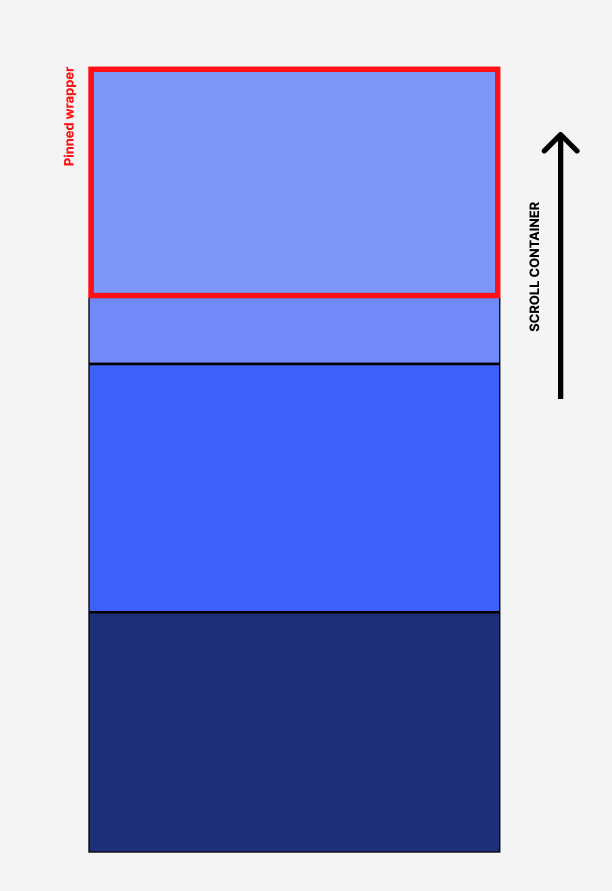
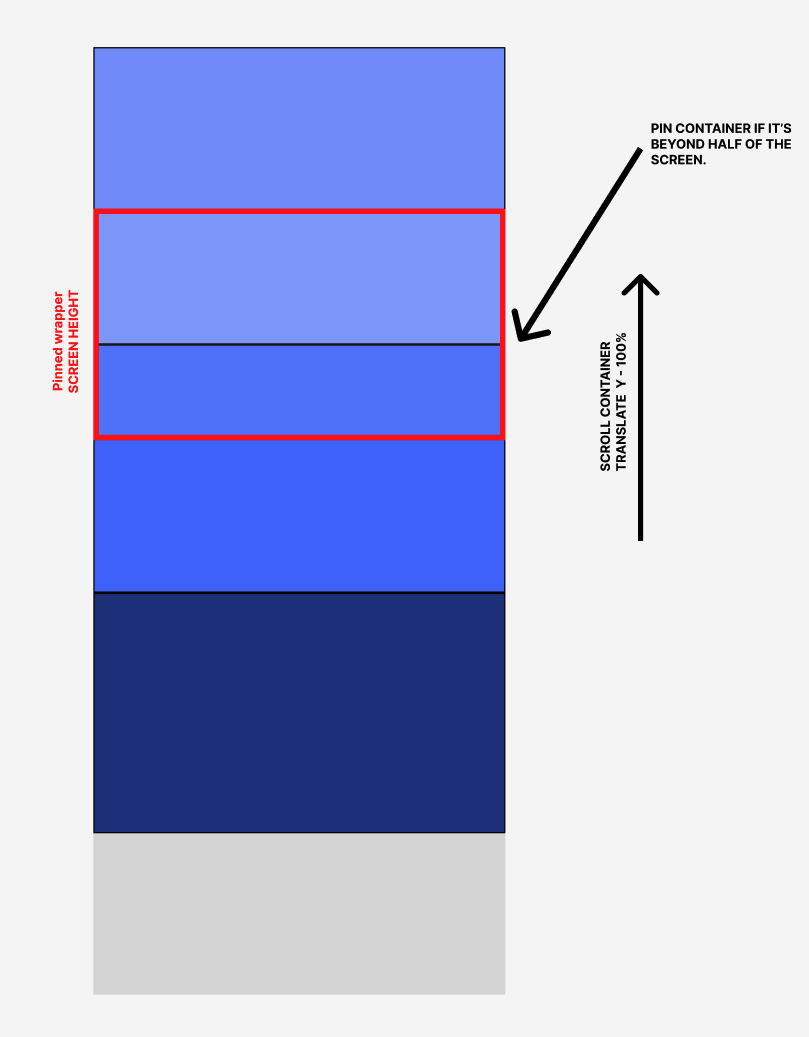
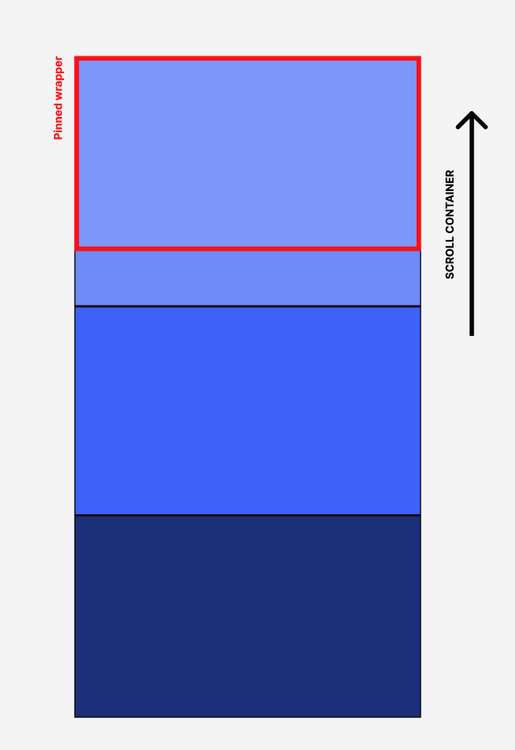
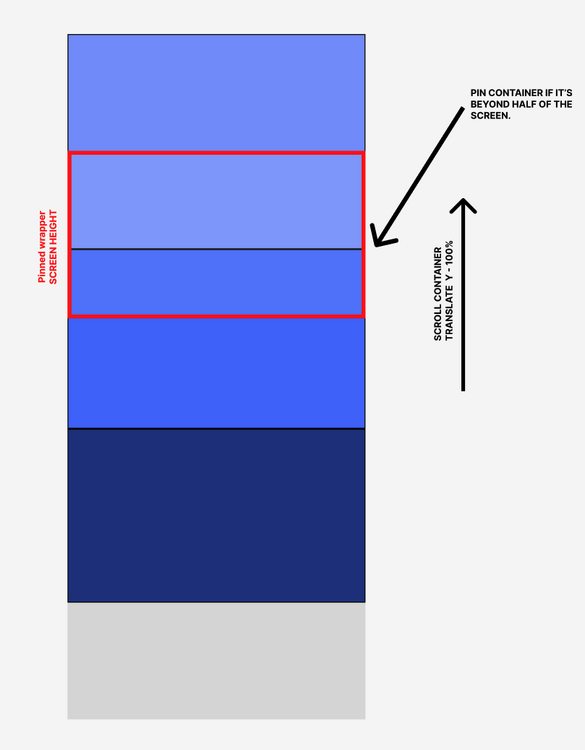
Hello! First of all, Nice and fantastic work on the update of the GSAP website! I am trying to achieve something. I've seen some demos, but my case is slightly different, and maybe I need clarification about how snapping works and possible errors I'm having on the setup or the general idea. I'll try my best to explain myself. 1. I'm trying to pin the container and scroll the inner wrapper by translating it 100%. 2. The last thing I did was to be able to pin to the nearest "start" or the "end" of the section ONLY if it's past the start/end of a section. I attached my code pen example. Sorry if this doesn't go into this forum but I haven't had luck on stack overflow.
-
I saw this on Cenoa's website and I have been trying to recreate it with Gsap in a Nuxt 2 project. Can anyone help? Screen Recording 2023-10-16 at 07.15.09.3gp
-
Hey, I want to animate the white striped bar with the current animation. Additionally, the blue text should be visible when it comes into the view-port, and the purple text should be visible when it goes out of the view-port. Please help.🙂
-
Hey guys, new to react and gsap here, also haven't used codepen before so I don't know how to import my models and use react there - thus the code looks messy and doesn't display anything but just putting it there for you guys to better visualise the problem I tried Scroll Trigger with 2d elements and they work fine, however when I try it with 3d elements it displays the usual error I see around about the missing plugin. I've tried searching for similar threads/problems but all those are for 2d elements and have not worked to solve my issue. My code with gsap.to works, but the scroll trigger afterwards doesn't work. I assume the problem is related to scroll trigger for 3d models? I wrapped it in a <Canvas> element. Error: Invalid property markers set to true Missing plugin? gsap.registerPlugin() Here is the code again in case codepen doesn't work: import React, { useEffect, useRef } from 'react'; import { useGLTF, PerspectiveCamera } from '@react-three/drei'; import { gsap } from 'gsap'; import { ScrollTrigger } from 'gsap/ScrollTrigger'; import { useControls } from 'leva'; import { useSound } from 'use-sound'; import * as THREE from 'three'; import { useFrame } from '@react-three/fiber'; import { OrbitControls, Html } from '@react-three/drei'; export default function BoxTest(props) { const { nodes, materials } = useGLTF('./models/box.glb') const ref = useRef(); const tl = useRef(); const { scale, rotation, position } = useControls({ scale: 0.8, rotation: [4.5, 6.5, 3], position: [-0.6, -1.4, -1] }); useEffect(() => { gsap.registerPlugin(ScrollTrigger); tl.current = gsap.timeline(); tl.current.to(ref.current.position, {y: 5, markers: true, ScrollTrigger: { trigger: tl.current, scrub: true, }}) }, []); return ( <> <ambientLight intensity={1} /> <OrbitControls enableZoom={false} /> <group dispose={null}> <group {...props} dispose={null}> <PerspectiveCamera makeDefault={false} far={100} near={0.1} fov={22.895} position={[7.359, 4.958, 6.926]} rotation={[-0.627, 0.71, 0.441]} /> <mesh ref={ref} scale={scale} position={position} rotation={rotation} geometry={nodes.Cube.geometry} material={materials.Material} /> </group> </group> </> ); } useGLTF.preload('./models/box.glb');
-
I am using this slider as a way to slide through items, now the problem is not in desktop view, there it works well, the main issue is in mobile view which seems to be bugging out and leaving a huge pin space and when scroll down the pin space wont get small or something which makes the items to scroll but there being huge gap between next element i tried doing my research for a day but could not find the issue, chatgpt was also not able to help angry-tess-mzkscz - CodeSandbox THis is my codesandbox link, please open it in new window and then use mobile view with dev tools to replicate the issue
-
 If you are an expert, hit me a message right now, please contact me right now I have a few hours of work today, it's urgent. If you have experience in the observer, that would be great otherwise, the scroll trigger will work, but I need premium quality of smoothness and finish in animation. Html is already ready you only have to apply the gsap code for animation. I need an expert who can apply the animation right away, not a beginner who needs days to create animations.
 -
Hi all., Great day. When we're using the smooth scroll script the functionality is not working fine as we expected. As per your demo in codepen (https://codepen.io/GreenSock/pen/KKXZOyZ), we tried to include the height with a static value like (height: 9000px;) reference - https://prnt.sc/6K97ufrgm4CE . Shortvideos reference, https://recordit.co/hdjCQztnJM and https://recordit.co/3At0AA5qWD Unfortunately, we can't include the constant value here, the height will differ for each page. So, we tried to get the entire body height from the script. We haven't got any luck on this. Now, we are facing the height calculation methods only. So, anyone please help us to complete this without calculating the height? Thanks in advance
-
Hi Team, We are trying to implement scroll tab functionality using GSAP & ScrollTrigger. On scroll, the content description and image have to change. The problem is that the content and image need to display correctly. It's getting hidden; sometimes, we need to scroll twice to display the content and images. Thank You
-
 Hello guys, So I am facing a small problem related to scroll smoother and scroll trigger. I have explained the whole problem in this 4 mins video. Can anyone help me to get this fixed please. Video link: https://www.loom.com/share/11acaf84a85a40f8a616db46a7aacdb5 Thanks, Nafiul
 -
Hello, I was building entire multi page website with using GSAP only in Next.js for scroll trigger on every page for some elements. At, last I decided to also add locomotive scroll as well. But after adding it to the project all scroll trigger doesn't work at any page. Why is that I cannot find the answer. Also is there any method to achieve smooth scroll without disabling scroll trigger. Thank You !
-
I have trouble with the margins of my slider container once I finish scrolling. I bet this is because of conflicts with another scrollTrigger, which should enlarge the backgrounds of similar sections on the scroll. Unfortunalety this is my first use of GSAP and I can't understand how to fix it. Just scroll my Pen and notice how Our Products text is jumping. You might need to open it in Codepen, looks like this problem is not reproducible in the widget. Thanks in advance!
-
Hi, Me again, I know there are lot of experienced developer on this forum. As a beginner I need help with an issue. I have made a scrollTrigger option and wanted to scroll only 1 section at a time. But I'm not sure how to do it. No matter how fast or slow I scroll I always want to scroll/pass only 1 section. Please see my demo and any help would be appreciated. Thanks Guys!
-
When you hover over the photos a svg morphs. Displaying a white shape over the bottom of the image. If you hover while scrolling there's a 1px gap below the svg and the bottom of the photo. I've tried adjusting CSS and some other JS tests with placement of the morphed svg. But can't seem to make the 1px gap disappear on scroll. Any advice would be greatly appreciated. Thank you!
-
In my codepen I have a script tag that runs a scroll trigger pin. I've tested the pin and know it works. But when it's added via the script tag (in the HTML) the start and end marker move on scroll smoother scroll. Is this multi script approach possible? Or should I just keep all scroll trigger/scroll smoother JS in one file? Here's the scroll trigger script for reference: import gsap from 'gsap' import { ScrollTrigger } from 'gsap/ScrollTrigger' gsap.registerPlugin(ScrollTrigger) function imagesMove() { let galleryImages = gsap.utils.toArray('.gallery picture') let wrapper = document.querySelector('.gallery .wrapper') let startWidth = wrapper.getBoundingClientRect().width - window.innerWidth gsap.to(galleryImages, { x: () => -startWidth, ease: "none", scrollTrigger: { trigger: ".gallery", pin: ".gallery", scrub: 0.5, anticipatePin: 1, start: "top: +=15%", end: "+=" + (window.innerHeight * galleryImages.length - 1), markers: true, } }); ScrollTrigger.refresh() } imagesMove()
-
How can we implement reactjs website animation with videos on scroll? On scroll, videos can be played continuously in a screen. The exact example is like below: https://staratlas.com/ Thank you.
-
Hi everyone, I've seen this demo to use CSS scroll snapping. I've tried to mix this setup with looped scrolling https://codepen.io/GreenSock/pen/rNOebyo) but I can't find the right setup. Is this mix possibile? Any ideas about? Thanks in advance
-
You can check my website Here . Why this is happened ?


.thumb.jpg.508ba629559fba639e5f03a505c5b072.jpg)