Search the Community
Showing results for tags 'amd'.
Found 5 results
-
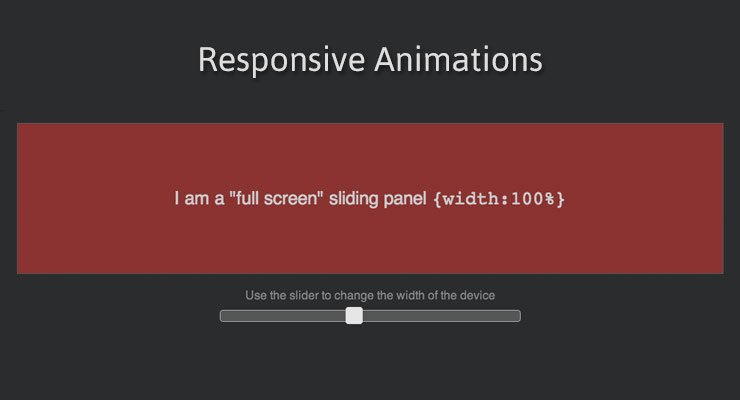 Note: This page was created for GSAP version 2. We have since released GSAP 3 with many improvements. While it is backward compatible with most GSAP 2 features, some parts may need to be updated to work properly. Please see the GSAP 3 release notes for details. Percentage-based transforms (great for responsive animation) Have you ever had to Google "vertically center a div with CSS"? Maybe you used a bunch of jQuery code that measures the width and height of a bunch of elements so that you can center them based on half-width and half-height? Ever used an onresize event to painstakingly recalculate the size and position of multiple elements that you need for a full-screen, responsive animation? We have very good news for you. CSSPlugin recognizes two new special properties: xPercent and yPercent which can be combined with regular x and y transforms to deliver unprecedented positional control. And yes, since these are transforms, they can be GPU-accelerated for outstanding performance. Example: using xPercent for responsive fullscreen sliders / carousels With the new xPercent property you can easily create fullscreen sliders that don't require lots of costly calculations when screens change size, nor do you have to create separate animations for different devices. Notice how in the demo below you can change the width of the black container and the animation seamlessly adjusts. No code trickery behind the scenes, the TimelineMax animation is built only once. See the Pen xPercent / basic by GreenSock (@GreenSock) on CodePen. To achieve this type of centered layout you could use the following simplified approach //CSS to place origin of all elements in the center or their parent .myClass { position:absolute; left:50%; top:50%; } //JS //center all .myClass elements around their origins TweenLite.set(".myClass", {xPercent:-50, yPercent:-50});//handles all vendor prefixes of translateX(-50%) translateY(-50%) //now we can animate myElement's x/y such that its center is 100px,200px from the origin TweenLite.to(myElement, 1, {x:100, y:200}); CSSPlugin accomplishes this under the hood by prepending a translate(x,y) to the normal matrix() or matrix3d() that it sets on the element. <div class="myClass" style="transform: translate(-50%, -50%) translate3d(150px, 0px, 0px);"></div> As a convenience, if you set the regular x or y to a percent-based value like 50%", GSAP will recognize that and funnel that value to xPercent or yPercent property for you, but we recommend using xPercent/yPercent directly. Thanks to Gary Chamberlain for prompting this feature. Better RequireJS/AMD/Browserify/Node/CommonJS compatibility We have received quite a few requests to make GSAP work with module/dependency tools like RequireJS, Browserify, etc. and we're happy to announce that as of version 1.13.1, that wish has been granted. So, for example, with Browserify you can require("./TweenLite.js") and it'll work. If you're a RequireJS user, snag a super simple example set of files here. A special thanks to David Hellsing for his assistance. Save kb by skipping jQuery. Default selector: document.querySelectorAll() Probably the most common reason that developers load jQuery is to leverage it as a selector engine but all modern browsers support document.querySelectorAll(), so as of version 1.13.1, GSAP uses that as a fallback (after attempting to detect a selector engine like jQuery). That means that you can do something like this, for example: TweenLite.to("li:first-child, li:last-child", 1, {opacity:0.5}); Without loading jQuery. And more Several minor bugs have been squashed too, so make sure you snag the latest files to make sure you're rockin' buttery smooth 60fps animations. Recommended reading: Main GSAP JS page lagSmoothing() and other performance improvements in 1.12.0 Myth Busting: CSS Animations vs JavaScript Why GSAP? A practical guide for developers
 -
 TL;DR I upgraded our project to use 1.19.0 after using 1.18.2 and requirejs couldn't find TweenLite unless I defined it explicitly in the require config paths object. Is it the expected behavior? We do amd with requirejs. My GSAP section in the paths object looks like this (there is also a base url defined of our external libs server): paths: { // ... TweenMax: {min: serviceURL('tweenmax/1.19.0/minified/TweenMax.min'), source: serviceURL('tweenmax/1.19.0/uncompressed/TweenMax')}, TimelineMax: {min: serviceURL('tweenmax/1.19.0/minified/TweenMax.min'), source: serviceURL('tweenmax/1.19.0/uncompressed/TweenMax')}, ScrollToPlugin: {min: serviceURL('tweenmax/1.19.0/minified/plugins/ScrollToPlugin.min'), source: serviceURL('tweenmax/1.19.0/uncompressed/plugins/ScrollToPlugin')}, DrawSVGPlugin: {min: serviceURL('tweenmax/1.19.0/minified/plugins/DrawSVGPlugin.min'), source: serviceURL('tweenmax/1.19.0/uncompressed/plugins/DrawSVGPlugin')}, // ... } This setup worked for a long time now without changing anything but version numbers up until 1.18.2. After changing the paths to 1.19.0 I got a console error by reuirejs saying it got 404 on TweenLite because it tried to load it from localhost - require.min.js:34 GET http://localhost/TweenLite.js The way to overcome it was to add a line in paths for TweenLite too TweenLite: {min: serviceURL('tweenmax/1.19.0/minified/TweenMax.min'), source: serviceURL('tweenmax/1.19.0/uncompressed/TweenMax')}, Is it an expected behavior? Is it a bug? Am I missing something in the require config? Thanks. Tom.
 -
I'm having fun getting Draggable and TweenMax working with RequireJS (as part of a Durandal project). I think there might be a bug in Draggable, it looks to me like it is missing a dependency definition for CSSPlugin. The define for it looks like this: _gsScope._gsDefine("utils.Draggable", ["events.EventDispatcher","TweenLite"], function(EventDispatcher, TweenLite) { On line 1757 CSSPlugin gets referenced as a global object: setRatio:(_isOldIE ? function() { TweenLite.set(target, tempVars); } : CSSPlugin._internals.setTransformRatio || CSSPlugin._internals.set3DTransformRatio) This line fails with an exception when I am loading Draggable via RequireJS. I have fixed it by changing the define call to: _gsScope._gsDefine("utils.Draggable", ["events.EventDispatcher","TweenLite", "plugins.CSSPlugin"], function(EventDispatcher, TweenLite, CSSPlugin) { Does this look like a valid fix or am I missing some other reason why this call to CSSPlugin as a global object should be like it is ?
-
Thanks to Greensock for helping me find my way on Twitter. I thought I'd share my solution for any other people out there that are searching for a configuration of Require + Backbone through external modules & shim's like I was: require.config({ paths: { 'jquery': 'libs/jquery-2.1.1', 'underscore': 'libs/underscore', 'backbone': 'libs/backbone', 'TweenLite': 'libs/greensock/TweenLite', 'CSSPlugin': 'libs/greensock/plugins/CSSPlugin', 'EasePack': 'libs/greensock/easing/EasePack' }, shim: { 'underscore': { exports: '_' }, 'backbone': { deps: [ 'underscore', 'jquery' ], exports: 'Backbone' }, 'TweenLite': { exports: 'TweenLite' } } }); require([ 'backbone', 'app/app', 'TweenLite', 'CSSPlugin', 'EasePack' ], function(Backbone, App, TweenLite) { 'use strict'; App.initialize(); });
- 2 replies
-
- 2
-

-
- backbonejs
- requirejs
- (and 3 more)
-
[sOLVED] IMPORTANT: When using GS with require.js dont override the GS variables like that: define(['ScrollToPlugin', 'TweenLite', 'TimelineLite'], function(ScrollToPlugin, TweenLite, TimelineLite) { // your code here }) Hello, I am doing something weird probably because I cant add Tween to Timeline. var tw = TweenLite.to(window, 0.7, {scrollTo:{y: 300}, ease:Power3.easeInOut}); console.log(tw); var tl = new TimelineLite(); tl.add( tw ); and the same when testing this way: var tl = new TimelineLite(); tl.add( TweenLite.to(window, 0.7, {scrollTo:{y: 300}, ease:Power3.easeInOut}) ); Both ways I see the error: Uncaught Cannot add [object Object] into the timeline; it is not a tween, timeline, function, or string. The output from console.log(tw) begins with: Object {vars: Object, _totalDuration: 0.7, _duration: 0.7, _delay:0, _timeScale: 1…} _active: false _delay: 0 _duration: 0.7 _ease: Object _easePower: 3 _easeType: 3 _firstPT: Object It looks like a tween anyway.. What I am doing wrong? Same code in jsFiddle is working fine. Pls. help with a hint. EDIT: I am loading all .js files with require.js (AMD loader). What is the correct way of loading GS plugins with require.js shim?