Search the Community
Showing results for tags 'draggable'.


-
Hi everyone, Thanks again for the amazing tools, I am a long term user now and still amazed everyday by the gsap platform ♥️ I am trying to completely stop the dragging and tweens of a Draggable instance when clicking on a button in order to move the dragged item programmatically and prevent jumps. I use the endDrag function, but when the draggable instance is configured to use inertia and snaps, it always complete the snap first no matter what. How can I be sure that every tween is stopped when using endDrag(), even the inertia related ones? I can create a codepen if it is not clear enough. Thank you for your help.
-
Hi, I've got some Qs, I wanna create a draggable slider in react like in "http://robinmastromarino.com" and as I was checking the forum, I got confused about the algorithm and also, as I added and tried some of code instances, it didn't work. I use gsap module itself, not react-gsap. plz help
-
Hi All, I created a JS class that uses the Draggable plugin. Once I added a second slider to the codepen, it will only drag on the first slider. I checked the documentation and gave each one an id just to be sure. The strange part about it's when I try to drag the second slider. It moves the first one instead the the second. Can anyone tell me what I am doing wrong when creating my Draggable.create() on line 214?
-
Hi All, I'm having two issues with my current pen: • The draggable bounds don't seem to be working correctly. I'd like them to stop at the min and max. I've tried them as a query-able element or as an object (maxX, minX). • My proxy element is moving and affecting the drag space when it moves. Here's the pen I've been trying to emulate in gsap 3. This one is written in gsap 2: https://codepen.io/GreenSock/pen/JawEyN
-
Hello Greensock team ! I tried to achieve what i want before posting here, but finally need some help... Basically, I'd like to be able to drag a Pixi container with the Draggable plugin and inertia. Also note that the container is wider than the canvas, so have to correctly set the bounds. I tried with a proxy but can't figure out how to sync the container position with the proxy one. Any suggestion or example ? Thank you !
-
I am incorporating some basic draggable functionality into a web banner and was wondering if there was an easy way to disable the "toss" ability. I have some text that is animating based on user interaction and i was hoping there was an easy way to just turn this ability off. I can refactor my work into a pen if that makes it easier but i thought it might not be necessary. Thanks in advance!
-
Hi! I have a problem using draggable plugin with DrawSVG plugin. I have a clock which I can drag to move hands. When I release (dragend), a timer is starting. But if I want to update timer when timer is in progress, I can't reset svg. So more I update, more the svg decreases quicky. Do you have any idea? Thx a lot I'm sorry i don't know how to import libs on codepen... :/
-
Hi, guys! I'm wondering if there is a way to move an element without the need to hover the cursor on the draggable element? Thank you!
-
I've a draggable bar, which can be drag horizontally. What I want to do is, on page scroll Is it possible to trigger draggable event to drag? Or is there any other way to achieve this. I already posted this question in StackOverflow but didn't get any response, So if someone could help me on this that would be appreciated.
-
Just curious if Draggable now works with EaselJS and Canvas? I found a post from almost 7 years ago where the answer was no, but that was 7 years ago and now I know that GSAP 3 is compatible with EaselJS I even use it inside of Adobe Animate which I do a lot of programming in. But my issues is If draggable is compatible now I am not sure how I can target my movieclips. Draggable.create(Main.MorningTasks.getChildByName(Root.ScheduledTasks.Morning[i].text), { type:'x,y', bounds: Main, onClick: function() { console.log(Task.name); }, onDragEnd: function() { console.log('Released ' + Task.name) } }); Following the example on Draggable Plugin Page, what I have I think should be right. Just looking for some guidance, I love GSAP and would love to be able to use draggable as well.
-
Here's a CodePen illustrating an issue that I've struggled with on and off again for a couple of years now. I'm not sure if these struggles are due to my misunderstanding, or if there is a problem with Draggable.js. This first demo is using the latest version of gsap and the beta version of draggable. I'll add a reply with a demo and analysis of version 3.0.2, which behaves differently. The menu pulls out from the left. (Could be a little more refined, but it works for this demo.) The shaded gray region at the right of the menu is a little grab bar that protrudes when the menu is closed. The button in the middle toggles allowNativeTouchScrolling for the draggable menu. For testing on Android and iOS you'll probably need to use the debug view of the codepen in order to fit everything properly. Here are my testing results (beta Draggable): Android: allowNativeTouchScrolling = false No scroll (expected). Drag works. Changing axis of drag motion to vertical during a drag event does not release drag. This is what I would expect. Android: allowNativeTouchScrolling = true Scroll works. Changing axis of scroll motion to horizontal during a scroll event does not release scroll. This is what I would expect. Can't drag menu. Draggable releases from touch after moving a very short distance. iOS: allowNativeTouchScrolling = false No scroll (expected) Drag works. Changing axis of drag motion to vertical during a drag event does not release drag. This is what I would expect. iOS: allowNativeTouchScrolling = true Scroll works. Changing axis of scroll motion to horizontal during a scroll event does not release scroll. This is what I would expect. Drag works. Changing axis of drag motion to vertical during a drag event does not release drag. This is what I would expect. Windows (Chrome, touch screen): allowNativeTouchScrolling = false No scroll (expected). Drag works. Changing axis of drag motion to vertical during a drag event does not release drag. This is what I would expect. Windows (Chrome, touch screen): allowNativeTouchScrolling = true Scroll works. Changing axis of scroll motion to horizontal during a scroll event does not release scroll. This is what I would expect. Can't drag menu. Draggable releases from touch after moving a very short distance.
-
I have a Draggable demo that displays some odd behavior, especially in Android webview (and Chrome). Here's a list of what I am seeing. Swipe arrow to the right and watch what happens. Do the same in Chrome on Android. If you hold your finger for too long, the click event will fire and detach your finger from the draggable element. I've tried everything I can think of to stop this from happening with no luck. In Chrome for Android, if you are swiping down as you begin your touch, it will almost immediately detach from the .circle element. This behavior does not happen on iOS or with Windows using a touch screen. The draggable circle (.circle) is bounded by the containing element (.drag-channel). It appears that the width of the bounding region is correct, but it is misaligned as it starts at the outside edge of the lefthand border of .drag-channel. Because of that, it stops short of reaching the righthand edge of the .drag-channel. In iOS, if you tap the circle and release really fast (it's hard to do), the background color seems to stick in some kind of intermediate state. I'm not sure if this is an issue with the onPress and/or onRelase events, or an internal issue with css in webkit. If someone with more experience with Draggable could take a look at this for me I would appreciate it greatly. Thanks, Tom
-
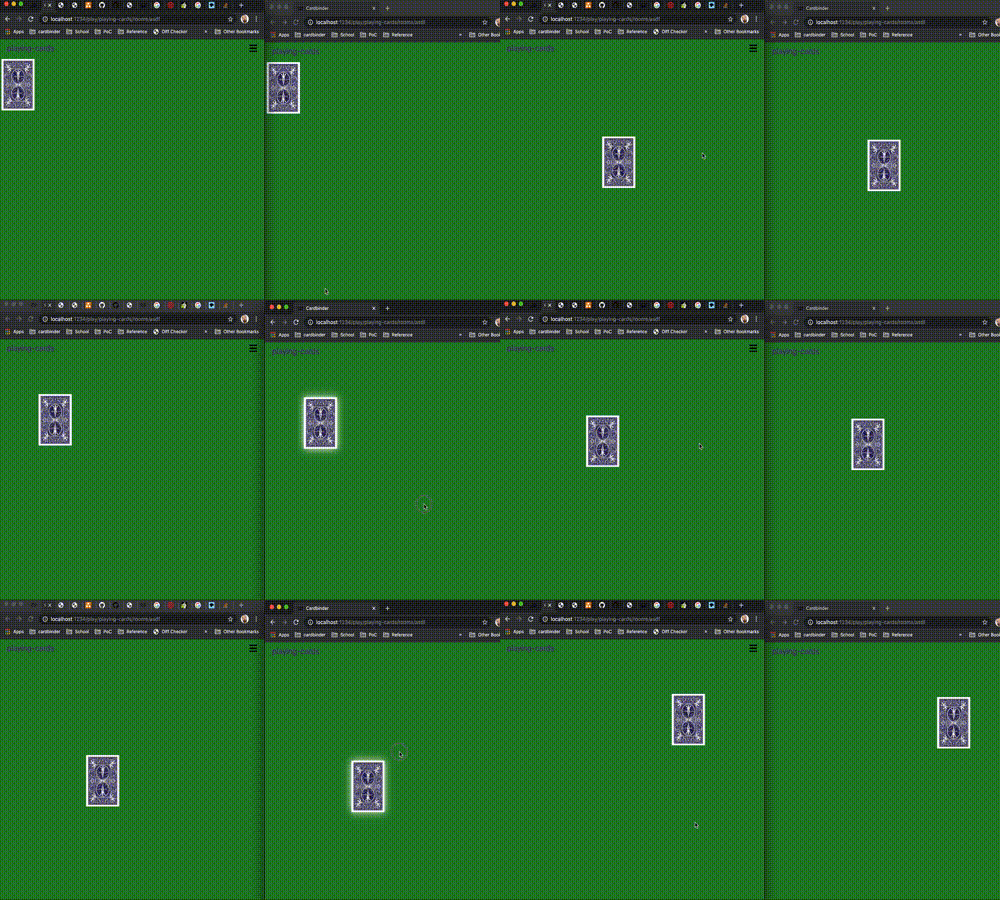
Hello there! I'm not entirely sure this has anything to do with gsap, but I don't know who else to ask. I'm working on an app to play cards, and broadcasting events. I won't bore you with those details. I use Draggable with the onDrag listener, then broadcasting the draggable's style.transform I pick up the changes with this: eventSource.addEventListener("cardPosition", (e) => { const data = JSON.parse(e.data), target = document.getElementById(data.message.id); target.style.transform = data.message.transform; }); This works, but the dom seems to be confused about the position of the element when grabbing it from another client. Attached is a gif showing an example.
-
I would like to force a rotating drag element to rotate according to the mouse X axis instead of the actual circular move, I don't know if this feature is implemented in Draggable. PS : The slider on the Codepen doesn't affect anything, it's only here to help understand my problem. Thanks!
-
Hi friends, I'm trying to develop a carousel based on this example. I removed the "infinite" feature and I'm trying to create a transition on cards while dragging, that is: while dragging the slider, Card 1 scale down (to the size of other cards) and Card 2 scale up. (When the transition ends I'll get Card 2 title inside and inject in "carousel__card-title" element with another animation). Because of this I think it needs snap in order to determine when a single card transition ends and eventually let control by navigation arrows (next/prev). I'm struggling to understand how to handle the transition controlled by the dragging. Any helpful ideas? Thanks https://codepen.io/gooogooo/pen/oNjzpor
-
OK - Whew! This was a great challenge for me. I learned a lot and I think it is worth sharing. I was initially inspired by the post about creating a sortable list. It reminded me of this classic tile puzzle that I am sure most of you have seen. Of course, the idea is to put all of the tiles in order. I certainly had a few challenges... Preventing the tiles from overlapping. Obviously, in the real puzzle you don't get to leap frog other tiles. I didn't truly accomplish this but have an acceptable workaround. Limiting drags to a single tile space at a time. I ended up utilizing the endDrag() to interrupt the dragging after a single snap which is a tile space value. Getting the "blank space" to move appropriately based on the tile that is being moved. My personal goal was to keep the code as minimal as possible. I reviewed many of the code pens related to dragging and boundaries and boy, were they complicated. I am very proud to say that I kept this all working in under 30 lines of JavaScript! I call this Phase 1 because my next step will be to track the tiles in such a way that we can launch an animation for the winner. In the meantime, enjoy this tile puzzle.
-
Here is a question that I was pondering. I was studying the applyBounds() for draggable objects. This allows me to restrict objects to a particular area. Is there a way to restrict objects from an area? In this sample pen - I can keep the three balls in the larger box just fine but what if I want to keep them from overlapping at any time - no matter where they are positioned in the box? I'm not even asking that they push each other around but I would just need to drag around them rather than over them. Did I miss a simple thing somewhere? (Just imagine three baseballs in a shoebox) They cannot occupy the same space at the same time.
-
I am trying to develop an infinite canvas animation which show cases a number of clickable images on it. On moving the cursor the images will move in the opposite direction, I tried this with div now, is it possible to use Canvas for an infinite scroll effect. Plugins used: TweenMax, TweenLinte, ScrollToPlugin, Draggable
-
Hi, New to GSAP & absolutely loving it so far! Ran into an issue though with Draggable on mobile. It works great on desktop/ipad, but when I try and drag a div horizontally along an svg line on my (old & janky) Motorola, it brings up the context menu (copy/select etc.). I've tried putting in the allowContextMenu explicitly, as below, but it still doesn't seem to latch onto the target (a div). Has anyone encountered this issue before? Any advice/help would be amazing! Sorry I haven't created a codepen - the scenario involves 2 massive svgs and loads of timeline code as well Happy to send a GitHub link privately if that would help? Thanks! Draggable.create('#dragNavigator', { type: 'x', bounds: document.getElementById('container'), allowContextMenu: false, cursor: 'grab', onDragStart: function() { // some code }})
-
Hi guys, This is my first time working with gsap and I'm running into an issue with my slider. I've created this slider, now it's starting on <div class="first"> on the left. What I'd like to do is to center the slider on <div class="third"> on render. I'd appreciate your help
-
Having problems with touch on some projects that are using Draggable I am now diving into this. I'm having problems with touch on both rotating draggables as well as translating draggables on several browsers, but Firefox seems to be the most problematic one. This thread though is about a particular draggable issue that only seem to affect Firefox, while other browsers seem to work fine: The codepen included here is, as you can see, as easy as it can get. A svg circle where Draggable is put on with inertia and rotation. Touch in this example is running fine in browsers like Chrome and Ms Edge (chromium based browsers), but touch is not working at all in Firefox (Windows) here. In the codepen I used the actual gsap template from this forum, which is still using version 3.2.3, but I've also seen this beviour in version 3.2.4 locally here. [edit] the touchstart seem to be triggering something in draggable though, because when just moving the mouse after trying to drag with touch, the object gets dragged, eventhough none of the mousebuttons are pressed. Also this issue occurs with Draggable type set to 'x,y' as well as set to 'rotation'
-
Hello guys! I'm truly new using Draggable product and I'm having a problem that I didn't find any solution on web I want to increase size to my container when the target hits the edge of. Actually, I'm using edgeResistance and it work very well but instead, I need to start a function that verifies the size of container and increase X px to width or height (depends where it hits) There's any option to verify when the target hits the edge and where (x,y)? Thank you
-
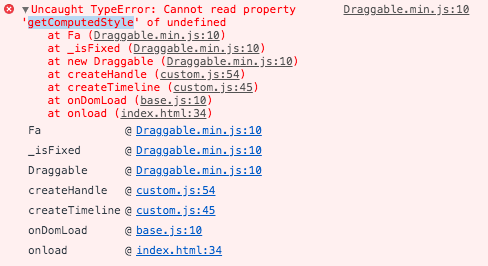
"Draggable.min.js:10 Uncaught TypeError: Cannot read property 'getComputedStyle' of undefined" All dependencies are ok ... is it a CSS default or other overlapping issue ?
-
Hi guys, looking at the docs (https://greensock.com/docs/v3/Plugins/Draggable), setting either dragClickables:true or adding the data attribute on the HTML element you want to be clickable data-clickable="true" would make the browsers default behaviour take precedence. However, using the proxy approach, the draggable is only an empty div. Are there best practises on making children clickable in this case? One solution that came to mind was to find the closest element based on it's x/y position and the click x/y , but hopefully there is a smarter way of doing this?
-
I am creating a drag & drop exercise. When the user is done dragging, the dragged object should automatically animate to its target. This works correctly in normal circumstances. However, when the parent container is scaled, the calculation for determining the target position does not work and the dragged object does not land correctly on the target. I thought it might be related to dragging using x and y, so I changed the code to use left and top. I still have the same issue. You can see the issue in the CodePen. The viewport container element automatically resizes to fit the browser window/frame. Note that I use a function called getDocumentRelativePosition (which can be seen in the CodePen) to determine the left and top values of elements, because in practice, the dragged object can be inside a different relative container than the target object. Any ideas?