Search the Community
Showing results for tags 'fixed'.
Found 16 results
-
Hi all! I've made a carousel where you can scroll through a series slides, each with its own image + captions. For each slide, I set up two captions (one on top and another at the bottom) and set them in a fixed position so that the captions remain in place as you scroll through the carousel. However, even though the captions stay in place, all the text is overlapped on top of each other, and I can't figure out how I can get the fixed captions to update when changing slides. I'd be eternally grateful if someone out there can help me out! I've included a link to a codepen I've been racking with for a while now. Thanks all!
-
Hello everyone! I am trying to achieve some type of animation that seems to be a little bit hard to implement for me. I want a user to scroll a page till they reach a desired block (a text block) where only part of it is visible. When block hits top of the viewport it should grow to 100vh and start scrolling to show the content inside. When scrolled to the bottom of text block the page should continue scrolling down. On scrolling up to the page the animation should reverse. I seem to be facing a couple of issues with my current progress: 1. When I scroll to the text block or scroll out of it sometimes it feels like I should scroll one more time or move a cursor to make scroll work. Looks like it's 'focusing on/out " of inner scrollbar. It's very well seen when you scroll with a mouse, not touchpad. 2. When I scroll down the page and start scrolling up if the cursor is hovering over even the smallest part of my text block it starts scrolling it. I would like the block to take the whole screen and only start scrolling after that. I guess I need second scrollTrigger instance for that? Thanks in advance for your help! I am only discovering the world of GSAP, so pardon me if the question is simple. I was searching the forum for quite a while to find something similar and didn't succeed.
-
Please check the codepan , i want to scroll the content between the fixed div. but as of now the div is fixed but the inner content is not scrolled.
-
 I’m trying to reproduce an effect i saw on this website : https://stuart.com/delivery-express-courier/ Just after the section with this title : Eco-friendly courier service, go green with us You can see the result on the temp website: https://swoopin.webflow.io/ There is 3 sections, and on the scroll, the image on the left stay fixed then fade to each other, while the text on the right continue to scroll normally I started workin on it, i got essential but it's buggy How could i fix that ? <script> gsap.to('#IMAGE-ELEMENT', { scrollTrigger: { trigger: '#IMAGE-ELEMENT', start: 'top top', pinReparent: true, pin: '#IMAGE-ELEMENT', endTrigger: '#LAST-SCROLLABLE-CONTENT', end: 'top top', } }); gsap.to('#CONTENT-ELEMENT-2', { scrollTrigger: { trigger: '#CONTENT-ELEMENT-2', start: 'top center', onEnter: () => { var imageUrl = 'https://uploads-ssl.webflow.com/5f369e90e946a4c5add5fc1a/5f3d850c8947f9d2f61724d0_shutterstock_447317020.png'; $('#IMAGE-ELEMENT') .fadeOut(10) .delay(10) .queue(function (next) { $(this).css("background-image", "url(" + imageUrl + ")"); next(); }) .fadeIn(); console.log(1); }, onEnterBack: () => { var imageUrl = 'https://uploads-ssl.webflow.com/5f369e90e946a4c5add5fc1a/5f3d850c8947f9d2f61724d0_shutterstock_447317020.png'; $('#IMAGE-ELEMENT') .fadeOut(10) .delay(10) .queue(function (next) { $(this).css("background-image", "url(" + imageUrl + ")"); next(); }) .fadeIn(); console.log(2); } } }); gsap.to('#LAST-SCROLLABLE-CONTENT', { scrollTrigger: { trigger: '#LAST-SCROLLABLE-CONTENT', start: 'top center', onEnter: () => { var imageUrl = 'https://uploads-ssl.webflow.com/5f369e90e946a4c5add5fc1a/5f3fde6487584b24a32bac96_shutterstock_254033086-901x644.jpg'; $('#IMAGE-ELEMENT') .fadeOut(10) .delay(10) .queue(function (next) { $(this).css("background-image", "url(" + imageUrl + ")"); next(); }) .fadeIn(); console.log(3); }, onEnterBack: () => { var imageUrl = 'https://uploads-ssl.webflow.com/5f369e90e946a4c5add5fc1a/5f3fde6487584b24a32bac96_shutterstock_254033086-901x644.jpg'; $('#IMAGE-ELEMENT') .fadeOut(10) .delay(10) .queue(function (next) { $(this).css("background-image", "url(" + imageUrl + ")"); next(); }) .fadeIn(); console.log(4); } } }); gsap.to('#CONTENT-ELEMENT-1', { scrollTrigger: { trigger: '#CONTENT-ELEMENT-1', start: 'top center', /* onEnter: () => { var imageUrl = 'https://uploads-ssl.webflow.com/5f369e90e946a4c5add5fc1a/5f3d850c2c39379303de0a17_camion%20poster.png'; $('#IMAGE-ELEMENT') .fadeOut(10) .delay(10) .queue(function (next) { $(this).css("background-image", "url(" + imageUrl + ")"); next(); }) .fadeIn(); console.log(5); }, */ onEnterBack: () => { var imageUrl = 'https://uploads-ssl.webflow.com/5f369e90e946a4c5add5fc1a/5f3d850c2c39379303de0a17_camion%20poster.png'; $('#IMAGE-ELEMENT') .fadeOut(10) .delay(10) .queue(function (next) { $(this).css("background-image", "url(" + imageUrl + ")"); next(); }) .fadeIn(); console.log(6); } } }); </script> Thank you !
 -
Hi, I'm currently working on an animated landing page based on scroll triggered animations. I have a 'hero section' which has elements animating within it (tree, decorations, etc), these need to animate while the 'hero section' remains pinned while the user scrolls to progress through the animations. My issue is that I cannot scroll when hovering over the hero section when it's pinned and for some reason the container is having "top: 172px" added to it. Somehow the scroll works well when scrolling on that additional grey area (which I don't intend to have as I want the hero section in full height), and the scroll on the hero section doesn't work. I tried adding "z-index: -1" to the hero section and started the pinning trigger at "start: top -20%" then it works as a workaround (source: "https://codepen.io/stevencamilleri-mrg/full/MWvXVNB"), however with that the button inside the content will not remain clickable anymore. Can anyone look into what I might be doing wrong? The idea is to have the user zoom in/out the tree with different content and decorations showing up. PS. I would suggest viewing in full view on Codepen in desktop
-
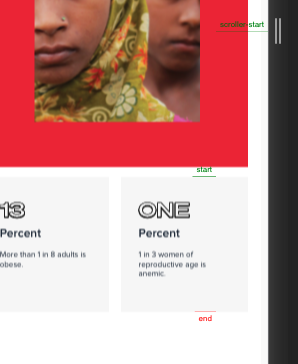
Hello, I have a problem but I can't seem to find an answer. I have this custom modal that has a Fixed position but it's scrollable since there is a lot of content. I need to animate something inside the modal so I create my scrolltrigger when I open the moda, but the trigger doesn't seem to work. Even if I scroll the trigger line never moves. I left an example as a codepen also I left an image of my site, on the image the start never moves to the scroll-start line of the trigger never move. I try using the scroller property but it's not working either. Any solutions I could try??
-
Hi, I’m new here and I’m trying to have a fixed header fade out upon scrolling down, with a button to have it fade in and out manually (if scrolled down). I’ve got the fade-on-scroll part working but I’m struggling with the fade toggle. I thought I would create some tweens and two independent timelines to which I add the tweens (with different timing in each timeline), and then I associate one timeline with ScrollTrigger and the other one will be executed on click of the button but somehow this doesn’t work. Note, I’m using this in combination with jQuery This is the code I have so far: var anim_header = gsap.timeline({ scrollTrigger: { trigger: $('body'), scrub: true, //markers: true, start:'top top', end: '+='+$('body > header').outerHeight()*1.75+'px' } }), toggle_header = gsap.timeline().pause(), fadeHeader = gsap.to($('body > header'), { opacity: 0 }); anim_header.add(fadeHeader); toggle_header.add(fadeHeader); toggleButton.click(function() { if(!$('html').hasClass('header_active')) { toggle_header.reverse().then(function() { $('html').addClass('header_active'); }); } else { toggle_header.play(); $('html').removeClass('nav_active'); } }); I thought I could just add the same tween to different timelines and they would work independently but apparently this isn’t working; it seems like one timeline overrides the other one.
-
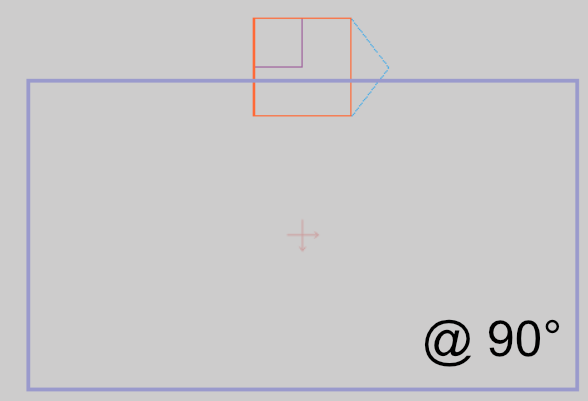
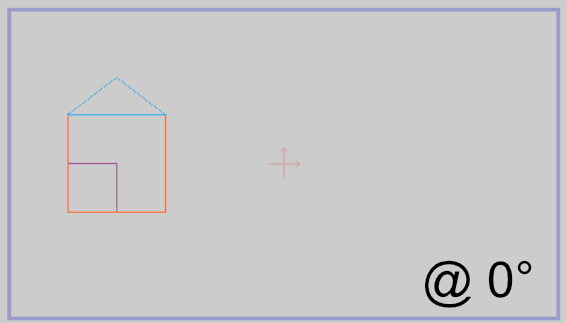
Hi. I am starting to go mad trying to resolve this, so I thought I would post a question here instead. I am try to implement a rotation such that everything on the page view box (the outermost group -- depicted by the purple outline) rotates about its pre-defined origin point (shown by the cross - located at 50% 50% of view port in this case, but could be anywhere). At present the resultant rotation is relative to the compound contents of the Group (i.e. all the House elements) -- spinning around itself , whereas I need it to be relative to the parent view box -- effectively spinning around a fixed point on the page. So... the outer Group element ('street' in my codepen example) needs to behave like a parent-filler rather than a child-wrapper, with the origin offsets relative to the parents offset and dimensions. Note: The content items can be arbitrary i.e. multiple houses, cars etc. (set by a user), and the content may also exceed the bounds of the purple view box. None of these factors should affect the pre-defined rotation origin of the 'street'. (start) (desired @ 90 deg)
-
Hi, I'm looking for help regarding scroll trigger and items positioned fixed within a pinned section. I'm having an issue where I have a modal that needs to stay in window view once it's open, but it looks like it's being positioned relative to its pinned parent and I'm able to continue scrolling as normal. Hoping someone would be able to help me out!
-
Hi there, I'm wondering if there is a solution to emulate a fixed background with GS ? I have created 2 versions of the same site. One uses background fixed with a swipe parallax effect here http://fressko.webflow.io/ the other uses gs to tween the slides in and out of opacity as seen here http://freshko.webflow.io/ all of this is done via scroll magic and it's ability to pin. QUESTION - is there ANY way to recreate the swipe / scrolling fixed background effect from http://fressko.webflow.io/ so I can use it on http://freshko.webflow.io/
-
function replaceVerticalScrollByHorizontal(event) { if (event.deltaY > 0) { // prevent vertical scroll event.preventDefault(); // manually scroll horizonally instead TweenMax.to('.card-holder', 1, { onStart: () => {console.log(this)}, scrollTo: { x: `+=${event.deltaY}`, y: 0, } }) } return; } window.addEventListener('wheel', replaceVerticalScrollByHorizontal); I'm trying to catch the scroll on the window and make the deltaY value scroll the '.card-holder' element. Does anyone know why this isn't working at the moment?
-
Hi everyone, I recreated a codepen that replicate more or less my problem (for using that click somewhere in the white area) I'm trying to achieve something like the one you can see. I need to open a "fixed popup" that everytime change it's initial position. If you try the pen everything works fine for the only first click but if you try to click again you can see that the "modal" still opening from the position you clicked the first time. Can anyone explain whats is going on? ps: I added a delay so you can see clearly what's is going on. Thanks eveyone!
-
Hi all, I've encountered a strange situation: when an item whose css position is set to 'fixed' is placed within another div that has been scaled using TweenMax, the fixed item is no longer fixed. Any ideas?... Thanks for the great work ! Elior
-
Bonjour, i have some issues when i place a Draggable inside a fixed div-container. It works but mouse-pointer is not extactly over the dragged element. When the div is positioned absolute it's works like a charm? How could i solve this problem? Best, Boris
-
I have a Draggable "knob" that sits in a header with a fixed position. It initially works as intended, but once you start scrolling down the page it gets harder and harder to rotate the knob - almost as if there's resistance being added to the knob as you scroll further down. Here's a quick codepen to demonstrate what's happening (scroll down and try using the knob): http://codepen.io/anon/pen/hrvnw Is there a way to configure or adjust Draggable so that I don't have to do a workaround like temporarily setting the position of the header to absolute while the knob is being used?
-
 Hello people! I have a <nav> with absolute position and inside of it some links <a>. After some scrolling I change its position to fixed to stick it at the top. (using stickOnScroll plugin) At the beginning I bind a mouseover to tween color of the text in <a> and works fine, but when I change it to fixed position the tween disappear. Thank you so much! <nav class="full-width" id="home_menu"> <ul class="container"> <li><a href="javascrip:void(0)">slim center</a></li> <li><a href="javascrip:void(0)" id="menu2">tratamientos</a></li> <li><a href="javascrip:void(0)">estilo de vida</a></li> <li><a href="javascrip:void(0)">por un méxico más sano</a></li> </ul> </nav> nav#home_menu{ position: absolute; height: 60px; top: 700px; width: 100%; border-top: solid 1px white; border-bottom: solid 1px white; } nav#home_menu ul{ min-height: 60px; height: 60px; top:0; width:1200px; left:50%; ; } nav#home_menu ul li{ display: inline; float: left; } nav#home_menu ul li a{ display: inline-block; margin-top: 23px; width: 295px; text-align: center; } $("#home_menu").stickOnScroll({ topOffset: 0, setParentOnStick: true, setWidthOnStick: true, onStick: onSticknav }); function onSticknav() { $('#menu2').bind('mouseover', overMenu); } function overMenu(e) { TweenMax.to($(e.currentTarget), .4, {color:"#009aff"}); }