Search the Community
Showing results for tags 'timelineMax'.


-
How do I execute a function after an animation has completed? I've got a simple animation: I grab an element, and then I animate it. Lets say my animation function is called changeState(). I want to do this sequence: 1. changeState() 2. selectNextElement() 3. changeState() selectNextElement() should only run once changeState() has completed it's animation sequence. Here's my stub for changeState: // get current block and animate it function changeState() { var currentBlock = $(".current") ; // colortween the current block var tl = new TimelineMax() ; tl.to( currentBlock, 1, { backgroundColor:"rgb(205,151,20)" } ) .to( currentBlock, 1, { backgroundColor:"rgb(152, 129, 74)" } ) ; }
-
Hi, I've created a TimelineMax instance with a series of child TweenMax animations. I need to play the timeline backward and forward to transition between two states. This works great. When executing a reverse() only, I want some of the child animations to have lower position values, to speed up the animation as a whole. I keep references to the ones I want to target, and then use remove() to strip them from the timeline, before then re-adding them for the reverse(), with revised values. I've scoured the forum for an answer and have read much about how changing child tweens does not affect the overall duration of a timeline (which, when you alter / remove child tweens somewhere in the middle, makes sense) but in this case, the tweens I want to remove are the last ones in the timeline. Before I re-add them, is there a way to force the timeline to recalculate its duration, so that when they are re-added, they are appended after the last child. As it stands now, there is 'dead space' on the timeline where the tweens were, and so, when re-adding them, there is a long pause before they are played. The pause gets longer with each play() and reverse() (and remove() and add() as the total duration grows and grows.
-
Playing around ive manage almost get the desired effect im going for. simply: when one menu is opened, the other closes, vice versa. i'm not sure this is the best way of doing things (if you'll be so kind to look at the code in the codepen ive tried to comment to make it easier) the problems: when clicking quickly back and forth between the two buttons everything gets glitchy/janky. i'm very new to this library any pointers in the right direction are appreciated.
-
Hello, I am wondering if there is a nice and simple way to set all tweens duration of a timeline to 0 so it does not animate anything but instead applies the props instantly and other timelines. Essentially go to the end without animation anything. I created a codepen which uses seek to do this sort of thing, would this be the right approach or is there something more elegant?
-
Hi all, I would like to replicate the App Store Featured App/Games animation. See this to see what it may look like: https://alfian.d.pr/B7ZbXP Basically, there will be 2 elements in which the styles would be the animated before modal is opened and a different styling after modal is opened. In the App Store case, its the image (increase width size) and the modal title (change x value position). In my Codepen, I would like to replicate such an animation but I have no clue to using the GSAP code to do this. I know I asked a similar question to which the answer was to use SPA (Single-Page Application), but for this case I think its possible to animate with modals. I am using this plugin for the full screen modal pop-up. Any ideas? Thanks, Alfian
-
So I have a Timeline that has a series of staggerFrom. Each staggerFrom has an onComplete event that fires properly. However, I want my parent Timeline to yoyo: true, and repeat once (repeat:1, repeatDelay:1) so it reverses back. If I add those parameters, the onComplete event from each staggerFrom is not firing on reverse. Is there anything I am missing? TIA! Please note that I need to get some properties of the element (like the width and left position) after the each stagger animation. And I have multiple staggerFrom and tweens within my parent timeline.
-
Hey everybody, I have a question about to start a second timelineMax. I was discovering and trying out the splitText. Now I have a problem. I added a red text with "Move the box". I want this to appear after the start button has been pressed. I'm thinking about a postion parameter? I've tried many options, but I can't figure it out. This is the code of the red text. This must be appear when the start button is pressed. var tl= new SplitText("#box > p", {type: 'chars', charsClass: 'overflow'}); var tl = new TimelineMax(); tl.staggerFromTo('.overflow', 0.1, {opacity: 0, y: 50}, {opacity: 1, y: 0}, 0.05); Could someone help me out? Thanks in advance
-
Hello ! Finished our first GSAP Animation recently (massive thanks to @OSUBlake and @Carl) and just revisiting to tweak a few things. Having trouble with controlling sub timelines contained within functions, via a master timeline. Could anyone possibly let me know what I'm missing here? I suspect it's something to do with returning functions to the master timeline and not the timelines contained within them, therefore they can't be controlled at the top level. Have tried applying support given here and here but for the life of me can't get it to work as expected.. I'm trying to remove the Flutter() function at mobile breakpoint, restart the master timeline with just Sphere() then add flutter() again and restart when sized back up past 420px. Thanks!
-
Hi all, I need to do some calculations after timeline (TimelineMax) duration changes. I take it can change because of number of things, i.e. adding or removing tweens, changing repeat values, etc. etc. There are a number of components in my application that could cause the change, so I'm looking for a method to somehow intercept or detect the change... hopefully there's a callback or something that I've just missed in the docs...:) -Mika
-
I'm currently playing around with an animation, I'm trying to get a square to animate down and rotate. The finished position should be a a diamond / rotated 45 degrees. I have 3 squares and I want to show the progress, it's kind of hard to explain but i've nearly got it working just feels laggy. I was 1 box to stop and the next to keep animating from that point. I feel i'm going about it all wrong as there is a lot of duplicate code. Any help would be appreciated.
-
Hi, so with the help of you guys, I was able to create something, but I'm still stuck on one small thing, I can't seem to restart the animation when clicked by a button, after clicking the second button, when the first button is clicked(in the pen), the animation just slows down, and text overlaps each other, any help would be really appreciated, thanks again!
-
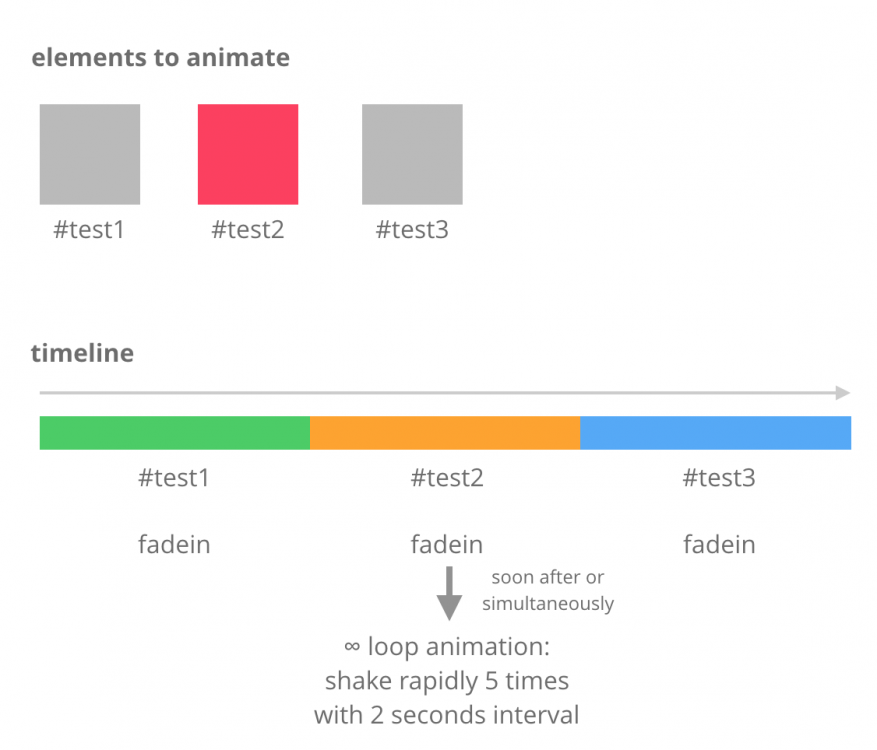
Hi. I have one timeline(Max) and animating three elements sequentially. I want 2nd element to fade-in and also want it to animate(shake) endlessly with interval immediately after fade-in. I have an example code in codepen. If someone got some time please take a look. I thought repeatDelay property would work but it comes in every yoyo animation. What I want is 5 yoyo animations then 2 second break and so forth. Thanks
-
Greetings, I'm new at GreenSock ( first project ) and as you may guess, I do have some struggles, I want to group the tweens in the timeline, rather than going individually, first two goes at the same time and then the second two and so on... I really try to figure out by myself, I add a minus delay but it's not working properly with ScrollMagic or I can't make it work. Here is my code: let controllerPerspectiveFirst = new ScrollMagic.Controller(); perspectiveTimeline = new TimelineMax(); perspectiveTimeline .to( '#as-perspective-bg--mountain--01', .4, { autoAlpha: .72, scaleY: .8, scaleX: .8, ease: Power4.easeOut } ) .from( '#as-perspective-bg--mountain--02', .4, { scaleY: 1.4, scaleX: 1.4, autoAlpha: 0, ease: Power4.easeOut } ) .to( '#as-perspective-bg--mountain--01', .4, { autoAlpha: 0, scaleY: 0, scaleX: 0, ease: Power4.easeOut } ) .to( '#as-perspective-bg--mountain--02', .4, { width: '180vw', scaleY: .6, scaleX: .6, ease: Power4.easeOut } ) .from( '#as-perspective-bg--desert', .4, { scaleY: 1.4, scaleX: 1.4, autoAlpha: 0, ease: Power4.easeOut } ); Thanks much.
-
Hi, My issue is to do with triggering a nested timeline in reverse, using Greensock and ScrollMagic. I realise ScrollMagic is a separate library but the difference in behaviour I am experiencing is to do with creating timelines either inside a function, or directly on a scrollmagic scene, so I hope somebody can possibly help. I have created two codepens that sort-of replicate my issue. Unfortunately my actual issue is client work so I can't show the same code. But I've recreated the crux of the issue. Additionally my actual code has a pinned element rather than these elements being separate, but hopefully this is enough to explain my issue. Expected behaviour: Scroll down the page - section 1 animation staggers out, section 2 animation staggers in. Scroll down again, section 2 animation staggers out, section 3 animation staggers in. Scroll back up the page - section 3 animations staggers out, section 2 animation staggers in. Again, section 2 animation staggers out, section 1 animation staggers in. I have created a function for fadeIn and fadeOut, and I then create another function "section2Anim", "section3Anim" that is a timeline containing both fadeout and fadein, in order for these two to happen at exactly the same time. (It's not visible on my demo because I don't have the element pinned, but on my pinned version, doing them at the same time basically means one set of dots appear to transform into the next set of dots. Problem: So, I found that the smoothest way to do this, which worked super well for me, when scrolling down the page, is method one, creating section2Anim as a function, and then applying it to the scrollmagic scene. This is this bit of my code: var section2Anim = function () { var tl = new TimelineMax(); tl .add(fadeOutAnimation('#section1 svg circle'), 0) .add(fadeInAnimation('#section2 svg circle'), 0); return tl; }; new ScrollMagic.Scene({ triggerElement: '#section2' }) .setTween(section2Anim) .addTo(controller); You can see this working nicely scrolling down the page in my first codepen, however it does not work in reverse when scrolling up : I have found that the only way to make it work in reverse too, is to not use the function and instead directly assign section2Anim to be the new TimelineMax. like this : var section2Anim = new TimelineMax(); section2Anim .add(fadeOutAnimation('#section1 svg circle'), 0) .add(fadeInAnimation('#section2 svg circle'), 0); new ScrollMagic.Scene({ triggerElement: '#section2' }) .setTween(section2Anim) .addTo(controller); You can see this working both forwards and backwards in my second codepen : So why not just use the latter method, you ask? Well my problem is, as soon as I use this latter method instead in my client code, my animation starts not working properly from the outset, it leaves some of the dots behind (the SVG circles), and doesn't fully trigger the animation. It seems to get stuck and lag, even when just scrolling down. After a while of scrolling it may start to work smoothly. What I am confused about is that in my first method, assigning the function, the animation works really smoothly which is what I want! But I just need it to work in reverse... and because this is all fairly new to me and I am not the best at Javascript anyways (more of a CSS gal), I am confused about why one way reverses and the other way doesn't. I should mention I have also tried some other things with the second method, like pausing the timeline, then playing it on enter of the scroll magic scene, sadly it was still laggy. I appreciate my demo does not show the lagginess or leftover dots, because I had to cut them down for the demo, so maybe this seems fine. But I just can't wrap my head around why the first method, assigning the function of "section2Anim" to the scroll magic scene, works so nicely, but doesn't reverse, whilst the second does reverse, but doesn't work nicely in my actual code. Any help at all much appreciated, thanks so much. Panda
-
(I am trying to use two separate timelines for open and close animations. I have two tests set up which have the same error.) I pass references to timelines to my callback functions. When I pass them as timeline instances, the callback function reports that they are undefined. I can work around it by passing the names of the timelines as strings but that is clumsy. What am I missing? You'll need to have the console open to see the errors. They also manifest themselves after a few toggle actions as timelines don't get reset properly.
-
Hi guys first time asking help here ?, I'm doing some stuff with timelinemax and trying to make animation without make another starting while the first is active, i've discovered the isActive property but even by trying it and reading some other post i didn't get any solution for my method, does anyone can help me thank you if (!tl.isActive()) { tl .add('move') .set(this.$refs.mask, { clearProps: 'all' }) .set(this.$refs.tabs, { clearProps: 'all' }) .set(icons, { clearProps: 'all' }) .set(mask, { x, y, scale, }) .to(this.$refs.picture, 0.8, { x, y, scale, ease: Power4.easeOut, }, 'move') .to(this.$refs.triggers, 0.1, { opacity: 0, ease: Power4.easeOut, }, 'move') .to(mask, 0.3, { autoAlpha: 1, }, 'move+=0.4') .to(tab, 0.3, { backgroundColor: '#F4F0E9', ease: Power4.easeOut, }, 'move+=0.2'); }
-
I'm looking to reverse the TimelineMax onComplete but I can't seem to get it to work. I'm new to this library, there are probably better ways to achieve what I want here. I'll list out the goals: Auto play a tween of the blocks from left to right (working in this Codepen) On mouseover and eventually on touchover reverse the animation with reduced speed and continue to move (working in this Codepen) When the animation goes fully out of the window reverse and come back across the other way (not working) I've tried a few different ways/options but no luck so far. Any help would be appreciated.
-
Hi, I'm doing a simple morph that repeats between two shapes (with a rotation on as well). When the animation runs, it morphs, then seems to pause for 3 seconds, then seems to do a fluid repeat morph between the two states (which is what I want), and then starts again? How do I get a morph to fluidly go from one shape to another on repeat with out the pause. I'm using yoyo: true as well and thought this would solve it? I'm flummoxed. var tl = new TimelineMax({repeat: -1, yoyo: true}); tl .to("#shape-1", 3, {morphSVG:"#shape-2", rotation: 180, ease: Power1.easeIn}) .to("#shape-2", 3, {morphSVG:"#shape-1", rotation: 180,ease: Power1.easeOut}) Many thanks,
-
Hi all! I'm working on finding the "best way" to approach animating the width of an object using the current implementation of GSAP TimelineMax paired with ScrollMagic: https://gist.github.com/jodriscoll/bda71b0245776294779cc1f9573186cd As most of you may know, animating the width of an element does not leverage the GPU, causing a reflow of the DOM, which is bad for performance, can break with bad JavaScript, reduces the 60hz/fps target, etc., etc. Unfortunately, I noticed the way the TimelineMax animates an object's property is through transform: matrix3d(). Which in turn, prevents the explicit usage/designation of transform: scaleX() to alter the width to/from through the TimelineMax().to properties. A summarized snippet of where I'm managing this configuration can be seen below: // ... const ScrollLines = new TimelineMax() .to( animate.down, 1, { x: animate.neg, y: animate.pos, width: 0, repeat: 1.25, ease: Sine.easeOut, yoyoEase: true }, "together" ) .to( animate.up, 1, { x: animate.pos, y: animate.neg, width: 0, repeat: 1.25, ease: Sine.easeOut, yoyoEase: true }, "together"); // ... Actual question: Is there a way to alter the width of an element while still utilizing the core matrix3d calculation in TimelineMax? You can see the current implementation of this animation on youcanwa.org, or view the demonstration here. Any suggestions or help would be much appreciated!
-
Hello, I have been using GreenSock tools for a few months now, but I am hitting a bit of a wall with timelines that I don't know how to overcome. I have successfully created 4 animated timelines that individually run when I call a start() function, e.g. TL1.start(), TL2.start(), etc. I now want to create a conditional timeline that plays one to four of the other timelines depending on an argument in the super-timeline's function, e.g. : function superTimeline() { this.superTL = new TimeLineMax(); // code code code this.start( number) { var number = number this.superTL.add(TL1.start, 0); if ( number > 1 ) { this.superTL.add(TL2.start, 2); } if ( number > 2 ) { this.superTL.add(TL3.start, 4); } etc... this.superTL.restart(true, false); } } My problem is that the super timeline is not even calling the first, non-conditional timeline function (TL1.start). Can someone please tell me what I'm doing wrong? Cheers, GR
-
Hi, I´m new to this but i love it so far....except for this problem. I made several timelines for my animations, but i can´t get them to loop/repeat. One works fine, but ill guess I´ll have to nest them some way? Or have I got it all wrong?? var t1 = new TimelineMax(); t1.to(txt1_1, 0.5, {opacity:1, ease: Power2.easeOut}).to(txt1_1, 11, {opacity:1}).to(txt1_1, 0.5, {opacity:0, left: -300}); var t2 = new TimelineMax(); t2.to(txt1_2, 0.5, {opacity:1, ease: Power2.easeOut, top:0}).to(txt1_2, 2, {opacity:1}).to(txt1_2, 0.5, {opacity:0, top:30}); var t3 = new TimelineMax(); t3.to(txt1_3, 0.5, {opacity:1, ease: Power2.easeOut, top:0, delay:3}).to(txt1_3, 2, {opacity:1}).to(txt1_3, 0.5, {opacity:0, top:30}); var t4 = new TimelineMax(); t4.to(txt1_4, 0.5, {opacity:1, ease: Power2.easeOut, top:0, delay:6}).to(txt1_4, 2, {opacity:1}).to(txt1_4, 0.5, {opacity:0, top:30}); var t5 = new TimelineMax(); t5.to(txt1_5, 0.5, {opacity:1, ease: Power2.easeOut, top:0, delay:9}).to(txt1_5, 2, {opacity:1}).to(txt1_5, 0.5, {opacity:0, left: -300}) ; var tlp1 = new TimelineMax(); tlp1.to(panel1, 0.5, {opacity:1, ease: Power2.easeIn, left:0, delay:12}).to(panel1, 5, {opacity:1}).to(panel1, 0.5, {opacity:0}); var tlp2 = new TimelineMax(); tlp2.to(panel2, 0.5, {opacity:1, left: 680, ease: Back.easeOut.config(1.2), delay:11.5}).to(panel2, 5.5, {opacity:1}).to(panel2, 0.5, {opacity:0});
-
Hi all, Im having trouble triggering my 'slideshow', i got the basics working with the timeline, but whenever i restart it, the 'x : ''-='' doenst add the amount, but starts from the previous x value. I have a 'activeCount' variable running, which disables the buttons when the max amount of slides is reached. This part works fine in the console, but ofcourse not really visible when the timeline isn't working correctly. Can someone help me with this? Cheers.
-
I have a timeline consisting of tweens that change an SVG text element. The text element begins with a value of 400. The first tween will change the text content to 300, the second tween to 200, and the third and final tween to 100. When the page is finished loading, instead of showing the initial value the text element is set to (in this case 400), it shows the value the element will be set to by the FIRST tween (300). Not the final tween, (100) nor the middle tween (200), but the first one. How do I ensure that when the page is loaded, the target elements to be tweened are set to it's initial values BEFORE playing the timeline, and not any of it's future values to be set later?
-
I am using a draggable knob along an svg path. The path is a quadratic bezier curve which has the y coordinates going up and then down. How should I progress the draggable instance so that I am able to fill the path while dragging the knob on the path? To simply put it, I want the path to be filled while dragging the knob and the portion of the path to be filled should be only upto the knob. Also the mouse pointer should be in sync with the draggable knob. Any suggestions or leads are appreciated.
-
Hi! Here is my issue. I have an animation with a TimelineLite. This TimelineLite contains others nested timelines. Basically the main one is just tl.add(t1).add(t2).add(t3).add(t4).add(t5); So here is my problem now. I want to play either of theses timelines through a global one. Depending of the button click, I'll add one of theses timelines. ... master.add(tl); master.add(t1); master.add(t2); At the beginning, when I play the master with main one, it works well and the WHOLE animations is played, as soon as I play one of the nested timeline alone, and I play the master one again, the nested ones I played are removed and don't occurs in the whole animation anymore. Just to remind you: tl: main tX: nested timelines master: timeline containing either of the timelines above I assume as soon as you add a timeline into another one, the reference to this one into the main one is removed, is it right? How to deal with that? Thanks! Codepen here: https://codepen.io/anon/pen/NzWqpy