
Search the Community
Showing results for tags 'deployment'.
Found 5 results
-
 Hi, I'm trying to deploy using DeployHQ but it fails during the npm install phase due to auth errors. npm ERR! code E403 npm ERR! 403 403 Forbidden - GET https://npm.greensock.com/@gsap%2fshockingly/-/shockingly-3.8.0.tgz - You must be logged in to install/publish packages. npm ERR! 403 In most cases, you or one of your dependencies are requesting npm ERR! 403 a package version that is forbidden by your security policy, or npm ERR! 403 on a server you do not have access to. It works great locally with no problems at all. I've added the .npmrc file with these lines in it: (AUTH_TOKEN being replaced with my token) //npm.greensock.com/:_authToken=${AUTH_TOKEN} @gsap:registry=https://npm.greensock.com Any suggestions on how to solve this?
 -
 Hi, I've built a React site with GSAP and LocomotiveScroll, and added a bunch of ScrollTriggers. Everything works fine and as expected in my local machine, however, when I deploy the site into vercel all the animations that were suppose to get triggered with ScrollTrigger immediately start animating as soon as the page loads. I've seen some other forums with the same problem, however, none of those solutions have worked for me like changing .from() into .fromTo() or calling gsap.registerPlugin(ScrollTrigger) inside useEffects() of every page with a ScrollTrigger animation or adding "lazy: false". I get a this below error in all the pages that has a ScrollTrigger: react_devtools_backend.js:2655 Invalid property scrollTrigger set to {trigger: '#main', start: 0, end: '+=50%', scrub: true, scroller: '#main-container', …}end: "+=50%"lazy: falsescroller: "#main-container"scrub: truestart: 0trigger: "#main"[[Prototype]]: Object Missing plugin? gsap.registerPlugin() ----------------------------------------------------------------------------------------------------------------------------------------------------------------------------------------------- almost all of the pages with a ScrollTrigger has a code like this: const Skills = () => { useLocoScroll(); const mainRef = useRef(); useEffect(() => { gsap.registerPlugin(ScrollTrigger); const ctx = gsap.context(() => { gsap.from("#curtain", { duration: 10, x: "-100vw", ease: Power4.ease, scrollTrigger: { trigger: mainRef.current, start: "top top", end: "bottom center", scrub: true, scroller: "#main-container", toggleActions: "play none none reverse" } }) }, mainRef) return () => ctx.revert(); }, []) return ( <> <div style={{position: "relative", overflow: "hidden"}}> <div style={{position: "relative", overflow: "hidden", height: "100vh"}} ref={mainRef}> <div className={styles.curtain} id="curtain"></div> <div className={styles.pageTransitionBlack} id="main"> <Navbar /> <Header headerText={"My Skills"}/> </div> </div> </div> </> ); } export default Skills;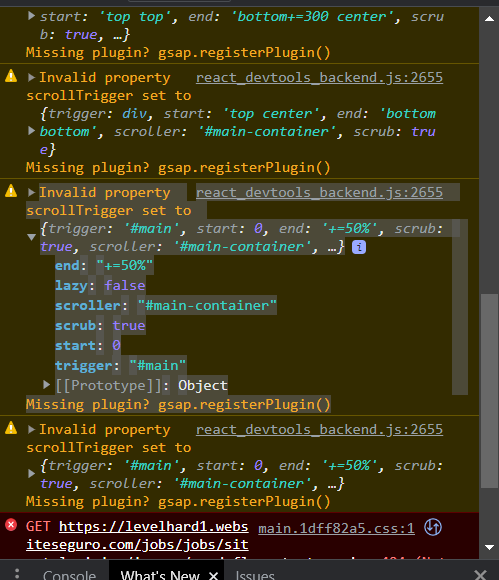
-
Hi all, During deploy using Elastic Beanstalk the instance runs npm install --production. We end up with the following error: npm ERR! code CERT_HAS_EXPIRED npm ERR! errno CERT_HAS_EXPIRED npm ERR! request to https://npm.greensock.com/@gsap%2fbusiness failed, reason: certificate has expired I have an .npmrc file included with our authToken as specified in the CI/CD section. We have tried manually adding the details to the .npmrc file using the .ebextensions but we have the same issue. This is driving me a little mad and not sure how to resolve. Thanks.
-
 Hey, I have kinda a big Issue - i've implemented a Text Rotation into a React Application. Locally everything works completely fine. After building it and deploying it on a Server (as a static version) it crashes and is not rotating as it was rotating locally. When it arrives at the last step it scrolls all items down until the first. it's not rotating from the beginning. Check for the Comment " // Start Rotation Animation". GSAP v3.8.0 is installed. Check the WeTransfer link for demo videos of local and staging env. https://we.tl/t-9MCJFOHefo Check the Demo Instance: https://gsap.elbcouture.com/ (maybe you have to reload it a few times, if the issue didn't happend) /* global fullpage_api */ import React, { createRef, useEffect, useRef } from 'react'; import gsap, { Power0 } from 'gsap'; import styled from 'styled-components'; import Header from 'components/Header'; import Stage from 'components/Stage'; import Headline from 'components/Headline'; import ScrollToExplore from 'components/ScrollToExplore'; import xsmallVideo from '../../assets/video/intro/414x896.mp4'; import smallVideo from '../../assets/video/intro/768x1024.mp4'; import mediumVideo from '../../assets/video/intro/1024x768.mp4'; import largeVideo from '../../assets/video/intro/1920x1080.mp4'; const StyledIntro = styled(Stage)` padding: 0; &::before { z-index: 1; pointer-events: none; } `; const StyledHeader = styled(Header)` display: block; @media screen and (min-width: 1024px) { display: none; } `; const StyledContent = styled.div` position: absolute; z-index: 1; margin-top: 71px; padding-left: 15px; @media screen and (min-width: 414px) { margin-top: 115px; } @media screen and (min-width: 768px) { margin-top: 70px; } @media screen and (min-width: 1024px) { right: 0; display: flex; flex-direction: column; justify-content: center; margin-top: 0; width: 50%; height: 100%; } @media screen and (min-width: 1440px) { right: 0; display: block; margin-top: 228px; width: 50%; height: 100%; } @media screen and (min-width: 1920px) { width: 46%; } @media screen and (min-width: 2560px) { margin-top: 15%; } `; const StyledMaskedText = styled(Headline)` font-size: 54px; line-height: 65px; ${({ backgroundImage }) => backgroundImage?.small ? `background: url(${backgroundImage.small}) no-repeat;` : ''} background-size: cover; background-position: center; -webkit-background-clip: text; background-clip: text; -webkit-text-fill-color: transparent; @media screen and (min-width: 414px) { font-size: 64px; line-height: 77px; } @media screen and (min-width: 768px) { font-size: 104px; line-height: 125px; } @media screen and (min-width: 1024px) { font-size: 74px; line-height: 88px; } @media screen and (min-width: 1440px) { font-size: 98px; line-height: 129px; } @media screen and (min-width: 1920px) { font-size: 124px; line-height: 124px; } @media screen and (min-width: 2560px) { font-size: 130px; line-height: 120px; } `; const StyledHeadline = styled(Headline)` height: 52px; font-size: 44px; line-height: 52px; color: #00917e; overflow: hidden; white-space: nowrap; @media screen and (min-width: 414px) { height: 62px; font-size: 51px; line-height: 62px; } @media screen and (min-width: 768px) { height: 100px; font-size: 83px; line-height: 100px; } @media screen and (min-width: 1024px) { height: 71px; font-size: 59px; line-height: 71px; } @media screen and (min-width: 1440px) { height: 103px; font-size: 86px; line-height: 103px; } @media screen and (min-width: 1920px) { height: 132px; font-size: 105px; line-height: 132px; } @media screen and (min-width: 2560px) { height: 160px; font-size: 140px; line-height: 160px; } `; const StyledList = styled.div` list-style-type: none; padding: 0; margin: 0; `; const StyledVideo = styled.video` position: absolute; left: 0; right: 0; bottom: 0; width: 100%; @media screen and (min-width: 1024px) { position: static; display: block; height: 100vh; } `; const StyledHeadlineItem = styled.span` display: block; `; const Intro = ({ backgroundImage, switchingHeadline, active, lastActive, text, scrollTo }) => { const stageRef = useRef(null); const videoRef = useRef(null); const overlineRef = useRef(null); const headlineRef = useRef(null); const sublineRef = useRef(null); const listRef = useRef(null); const listItemRef = useRef([]); const scrollToExploreRef = useRef(); useEffect(() => { switchingHeadline.push(switchingHeadline[0]); if (listItemRef.current.length !== switchingHeadline.length) { // add or remove refs listItemRef.current = Array(switchingHeadline.length) .fill() .map((_, i) => listItemRef.current[i] || createRef()); } }, [switchingHeadline]) const getVideoSrc = (width) => { if (width >= 1920) return largeVideo; if (width >= 1024) return mediumVideo; if (width >= 768) return smallVideo; return xsmallVideo; }; // Start Rotation Animation const vSlide = gsap.timeline({ repeat: -1, paused: true, }); useEffect(() => { console.log('el', listItemRef.current) listItemRef.current.forEach((_slide, index) => { const label = `slide${index}`; const lineHeight = headlineRef.current.clientHeight; if (active) { if (index === 0) { vSlide.to( listRef?.current, { delay: 0, duration: 0.4, y: index * -1 * lineHeight, ease: Power0.ease, }, label ); } if (index > 0) { vSlide.to( listRef?.current, { delay: 3, duration: 0.4, y: index * -1 * lineHeight, ease: Power0.ease, }, label ); } vSlide.play(); } vSlide.add(label); }); }, [vSlide, active]); // End Rotation Animation const [isVideoLoaded, setIsVideoLoaded] = React.useState(false); const src = getVideoSrc(window.innerWidth); const onLoadedData = () => { setIsVideoLoaded(true); }; useEffect(() => { if (active) { videoRef.current.currentTime = 0; gsap.set([overlineRef.current, headlineRef.current, sublineRef.current], { y: 0, opacity: 1, }); gsap.set(scrollToExploreRef.current, { opacity: 1, }); } if (lastActive) { videoRef.current.play(); gsap.to(overlineRef.current, { opacity: 0, delay: 0, duration: 0.25, ease: Power0.in, }); gsap.to(headlineRef.current, { opacity: 0, delay: 0, duration: 0.25, ease: Power0.in, }); gsap.to(sublineRef.current, { opacity: 0, delay: 0, duration: 0.25, ease: Power0.in, }); gsap.to(scrollToExploreRef.current, { opacity: 0, delay: 0, duration: 0.25, ease: Power0.in, }); vSlide.pause(); } }, [active, lastActive, vSlide]); return ( <StyledIntro className="fp-noscroll" ref={stageRef}> <StyledHeader /> <StyledContent> <StyledMaskedText ref={overlineRef} backgroundImage={backgroundImage}> {text?.[0]} </StyledMaskedText> {switchingHeadline && ( <StyledHeadline ref={headlineRef}> <StyledList ref={listRef}> {switchingHeadline?.map((item, index) => ( // eslint-disable-next-line react/no-array-index-key <StyledHeadlineItem key={`${item}-${index}`} ref={listItemRef.current[index]}> {item} </StyledHeadlineItem> ))} </StyledList> </StyledHeadline> )} <StyledMaskedText ref={sublineRef} backgroundImage={backgroundImage}> {text?.[1]} </StyledMaskedText> </StyledContent> <StyledVideo ref={videoRef} playsInline muted src={src} onLoadedData={onLoadedData} style={{ opacity: isVideoLoaded ? 1 : 0 }} /> <ScrollToExplore className="scroll-to-explore" isLight label={scrollTo} dataLabel={scrollTo} ref={scrollToExploreRef} onClick={() => ( fullpage_api.moveSectionDown() )}/> </StyledIntro> ); }; export default Intro;
 -
Hi gang! I'm new to the party but just finished my first GreenSock implementation. Congrats on v3! Seems like I showed up at the perfect time. Once you catch all of the documentation issues (Draggable seems to have literally improved overnight!) this library will truly be my new favourite thing. For example, here is my implementation of a fancy knob that will scrub at variable speed depending on how far you turn it to the left or right. It will scrub even when you're not dragging the knob. Experience gives me the wisdom to recognise that this implementation would not be terse or possible without such a well-thought out API surface. Kudos! knobber (element) { const timeline = gsap.timeline({ repeat: -1, onRepeat: () => { const r = ~~draggable.rotation timeline.repeatDelay(gsap.utils.mapRange(0, 180, 1.0, 0.1, Math.abs(r))) // this.direction(r > 0) } }) timeline.pause() timeline.to({}, { duration: 0.1 }) const draggable = Draggable.create(element, { type: 'rotation', inertia: true, onDragStart: () => timeline.play(), onDragEnd: () => timeline.pause(), snap: () => { return 0 } })[0].applyBounds({ minRotation: -180, maxRotation: 180 }) } Anyhow, the issue I'm now faced with is that this implementation is extracted from a demo I've prepared for our project, StimulusReflex. As you're well aware, it will work without Inertia, but it simply won't be as sexy. I'm actually perfectly happy to recommend that people purchase a GSAP membership, but I don't want to violate your TOC (or trust) by putting the gsap-bonus.tgz on our public repo. Right now I have it set up with yarn/webpack pulling in the local archive as your npm instructions describe. (You might want to tell people to purge their caches to get rid of old versions, btw!) This works great for my workstation and for deploying to Heroku, but how do you suggest I handle the package management issue? If I was to push the repo as-is to production, anyone checking out the code to experiment with locally is going to get slapped by yarn/npm because that file doesn't exist. I actually do have a suggestion for how you could approach this: add localhost:3000 to your CDN whitelist so that people can experiment with the paid tools on their own machine, but in a way where they can't deploy it. This has actually worked fairly well for FontAwesome, who actually took it a step further to allow paid users to whitelist their project domains through a web interface. The other related question I have is about what I'll call progressive enhancement: is there a way to detect whether you're running the paid version and if Inertia was available from inside your webpack context? Specifically, I want to import Inertia if it's available and skip it if it's not. This would include passing InertiaPlugin to gsap.registerPlugin and even dynamically passing true/false to the inertia var when creating a Draggable instance. If there's a good strategy for this which won't make webpack angry if the file doesn't exist, I'd love to hear about it. Again, I propose a solution: include an InertiaPlugin.js in the OSS version on GitHub that has function signature placeholders - like a Java interface - but only actually spits out console warnings if it's not present. This way developers could comfortably set inertia:true regardless of whether it's available or not.

