Search the Community
Showing results for tags 'smooth scrollbar'.
Found 3 results
-
 I am having an issue I have seen described in other contexts but haven't found a solution for. My project is using the Next.js framework for react, Smooth Scrollbar, and ScrollTrigger. I have a .to() with a scrollTrigger object inside that is in a <Navigation /> component. The text at the top of the page is just supposed to pin itself and scroll with the window, but it only works in some cases. I think I'm not fully understanding some lifecycle thing here. All these methods of reproducing my errors are also commented at the top of the index.js file in the sandbox With Smooth Scrollbar enabled, the scrollTrigger object stored in the <Navigation /> component, and the <Navigation /> component imported and nested in the main functional component, the effect does not work after refreshing the page. If you go into the scrollTrigger object in the <Navigation /> component and update one of the values (change the 'end' value to a different number) this will trigger a hot reload without refreshing the browser. If you scroll back to the top and scroll down, you will see the effect is now working. If you comment out the entire useEffect() hook in the main index.js component this will disable Smooth Scrollbar. If you save the file and refresh you will see the effect working as intended, without having to trigger a hot reload, but now there is no Smooth Scrollbar. If you reset the sandbox to the original state, uncomment the HTML in the main index.js components return, comment out the <Navigation /> component right above it, save and then refresh, you will see that the effect works on load, with Smooth Scrollbar, without having to trigger a hot reload, but now I've lost the ability to nest components. CodeSandbox link Direct link to results in browser (A little easier for refreshing) Any help would be greatly appreciated. I'm out of ideas at this point.
 -
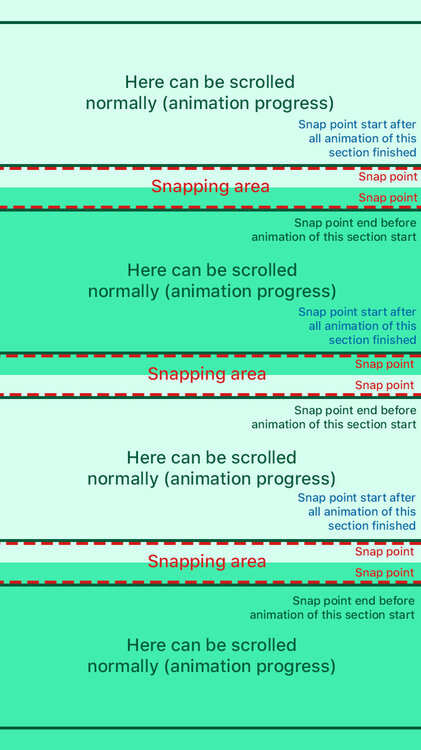
Hi everyone, I have a question here, is there any possible way to start the snap at the end of a section (not at the start of a section)? Because as you guys can see in the codepen, it scroll the whole section until end of section. So there's no chance for the user to read the text in each section. Not sure if my code isn't implemented correctly. What I am going to achieve is, the user still should be able to control the scroll in order for them to read the text. Here's a visual reference for you guys in the attachment, hope it helps. Thank you! *in this pen, I use Scrolltrigger with smooth scrollbar
-
I am using Gatsby JS and initializing smooth-scrollbar within a layout component and I've also configured the scroller proxy. Within a child component, I'm trying to setup an animation using scroll trigger but I'm not sure how to configure this. Also, the config does work after HMR fires but not after page refresh. I removed most of the markup from the page as I know the animation works - I think the issue is with syncing the scrollers. layout.js: import React, { useRef, useEffect } from "react" import Navbar from "./navbar" import { gsap } from "gsap"; import { ScrollTrigger } from "gsap/ScrollTrigger"; import Scrollbar from 'smooth-scrollbar' // import "../styles/locomotive-scroll.css" const Layout = ({ children, location }) => { const scrollerRef = useRef() useEffect(() => { gsap.registerPlugin(ScrollTrigger) const scroller = scrollerRef.current const bodyScrollBar = Scrollbar.init(scrollerRef.current, { damping: 0.1, delegateTo: document, alwaysShowTracks: true }) window.bodyScrollBar = bodyScrollBar ScrollTrigger.scrollerProxy(scrollerRef.current, { scrollTop(value) { if (arguments.length) { bodyScrollBar.scrollTop = value } return bodyScrollBar.scrollTop } }) window.scroller = scrollerRef.current bodyScrollBar.addListener(ScrollTrigger.update) ScrollTrigger.defaults({ scroller: scroller }) // ScrollTrigger.refresh() return () => { if (bodyScrollBar) bodyScrollBar.destroy() bodyScrollBar.removeListener(ScrollTrigger.update) } }, [location]) return ( <div className="global-wrapper scroller h-screen overflow-hidden" ref={scrollerRef}> <header className="global-header animate__animated animate__fadeIn"> <Navbar /> </header> <main>{children}</main> <footer> {/* © {new Date().getFullYear()}, Built with */} {` `} {/* <a href="https://www.gatsbyjs.com">Gatsby</a> */} </footer> </div> ) } export default Layout index.js: import React, { useEffect, useRef } from "react" import { gsap } from "gsap"; import { ScrollTrigger } from "gsap/ScrollTrigger"; function Index() { const outroRef = useRef() const outroContentRef = useRef() useEffect(() => { gsap.registerPlugin(ScrollTrigger) gsap.fromTo(outroContentRef.current, { yPercent: "-50" }, { yPercent: "0", scrollTrigger: { scroller: window.scroller, trigger: outroRef.current, end: "bottom bottom", scrub: true, markers: true }, ease: "none" }) }, []); return ( <> {/* Page content */} </> ) } export default Index